
Testing Your Components in React
A walkthrough of test utilities, test renderer, and the React Testing Library
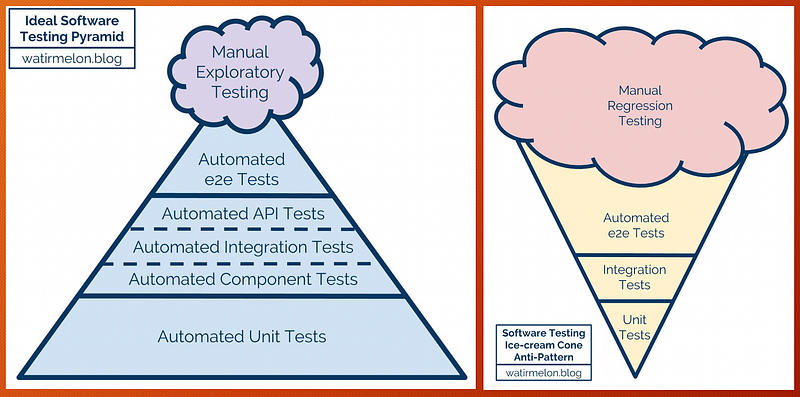
Software testing provides information about the quality of the software being tested.
There are many types of testing. Unit testing isolates each part of the program and verifies that the individual parts are correct — it has the narrowest scope and the largest number of test cases. Integration testing is the phase in which individual software modules are combined and tested as a group — it has the broadest scope and fewest number of test cases.
In the diagram above, the left side is the recommended testing pyramid, and the right side is the testing ice cream cone, which is to be avoided.
We’ve already written a guide on how to test and mock unit test cases for asynchronous calls. This article focuses on how to test React components with the React Testing Library, which covers both unit testing and integration testing.
The History
Jest is a JavaScript testing framework that ensures the correctness of any JavaScript codebase. Since both Jest and React are created and maintained by Facebook, it is a common practice to use the Jest testing framework to test React code.
The React team provide two ways to test React components: Test Utilities (react-dom/test-utils) and Test Renderer (react-test-renderer). These packages aren’t sufficient for production-level testing, but they’re a decent foundation for more advanced testing libraries and frameworks.
The React team recommends Enzyme and the React Testing Library.
- Enzyme is a JavaScript Testing utility to test React Components. It facilitates unit and integration testing. It has built-in ways to manipulate and traverse virtual DOM, as well as to simulate actions and events. It allows us to assert the rendered components work as expected. It provides three ways of testing: shallow, mount, and render.
- The React Testing Library tests React components by the way the software is used. It facilitates unit and integration testing. The test cases are robust against code changes. Since the React Testing Library does not provide APIs to isolated tests, mocking is often the way for shallow testing. Create React App is pre-configured with React Testing Library.
Test Utilities
The following is the App.test.js provide by Create React App:
Test utilities (react-dom/test-utils) provides 16 utility APIs to facilitate testing. In the below code, we use renderIntoDocument on line six to replace lines six to seven in the above App.test.js. Line seven verifies whether <App /> is an element, and line eight verifies whether <App /> is an element and its type is App.
If your code performs state updates, you must wrap the code inside act():
act(() => {
  renderIntoDocument(<App />, div);
});
Test Renderer
Test Renderer (react-test-renderer) is used to render React components to pure JavaScript objects, without depending on the DOM or a native mobile environment. It provides 19 APIs.
In order to use Test Renderer, react-test-renderer needs to be installed as devDependencies in package.json:
"devDependencies": {
  "react-test-renderer": "^16.13.1"
}
This is revised App.test.js, with Test Renderer:
Line seven prints out the rendered tree:
Line eight prints out the object that represents the rendered tree:
{ type: 'div',
  props: { className: 'App' },
  children: [{ type: 'header', props: [Object], children: [Array] }]
}
Test Renderer is a foundation for Snapshot testing. A typical snapshot test case renders a UI component, takes a snapshot, and stores it under __snapshots__ directory as a reference. A test case compares the new snapshot with the reference and verifies UI does not change unexpectedly.
React Testing Library
React Testing Library is built on top of react-test-renderer. Comparing the tests for snapshot, the following syntax is slightly simpler than Test Renderer:
In order to use React Testing Library, @testing-library/react and @testing-library/jest-dom are typically added to devDependencies in a package.json file.
"devDependencies": {
  "@testing-library/jest-dom": "^5.5.0",
  "@testing-library/react": "^10.0.2",
}@testing-library/reactprovides light utility functions on top ofreact-domandreact-dom/test-utils.@testing-library/jest-domprovides a set of custom Jest matchers, such astoBeDisabled,toHaveAttribute, andtoHaveFormValues. These matchers focus on an element’s attributes, its text content, its CSS classes, and so on. It makes the expect sentence more declarative, readable, and maintainable.
Example
We create an example to illustrate how to use React Testing Library.
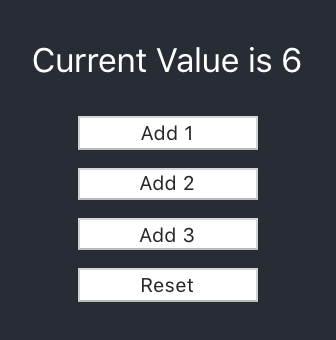
The following is the UX design for the example. Initially, the current value is 0. If the button, Add 1, is clicked, the current value is up 1. If the button, Add 2, is clicked, the current value is up 2. If the button, Add 3, is clicked, the current value is up 3. If the button, Reset, is clicked, the current value is reset to 0.
Source code
We revised App.js to implement this example.
In the above code, buttons and utils are defined in separate files to simulate the real world’s complication.
AddButton.js exports a default component:
ResetButton.js uses a named export:
Utils.js also uses a named export:
Snapshot tests
We write a snapshot test for the revised App.js.
The following is the generated snapshot content, with all the DOM elements:
Then, we add mocks for AddButton and ResetButton:
Form the following generated snapshot content, we can see the content has been shortened from 34 lines to 22 lines. This is how we do shallow rendering to isolate tests. You can imagine how much time we’d save if both AddButton and ResetButton were complicated components.
Interactive tests
React Testing Library tests the code in the same way a user would use it. It provides APIs to simulate the operations. The following test case clicks Add 1, Add 2, and Add 3 buttons, and verifies that the result is 6.
In the above test case, it uses getByTestId to retrieve the resultDiv. The buttons are defined in other JavaScript source, where test IDs may not be provided. getByText is used to retrieve the element.
Here, getByTestId and getByText are destructured from the render result.
In the below test case, we import getByTestId and getByText from the @testing-library/react module. Then the invocation needs to specify the exact container. This test case clicks Add 2 and Reset buttons, and verifies that the result is 0.
In the above examples, we mocked AddButton and RestButton. How about the Utils functions? They can also be mocked to simplify the logic:
Conclusion
Test Utilities and Test Renderer come with React. The React Testing Library is recommended by the React team. We modified the Create React App to provide examples for snapshot test cases and interactive tests. These test cases run in Create React App repository. You can execute them with npm run test, which invokes react-scripts test.
Have fun with the React Testing Library!
Thanks for reading. I hope this was helpful. You can see my other Medium publications here.


