avatarHasan Basri Akçay

Free AI web copilot to create summaries, insights and extended knowledge, download it at here

8157

Abstract

ax1.set_title(<span class="hljs-string">'Distribution of {name}'</span>.format(<span class="hljs-attribute">name</span>=feature))</pre></div><div id="882e"><pre> sns.boxplot<span class="hljs-params">(<span class="hljs-attr">x</span>='target',<span class="hljs-attr">y</span>=feature,<span class="hljs-attr">data</span>=Data_plot,<span class="hljs-attr">ax</span>=ax2)</span> ax2.<span class="hljs-keyword">set</span>_xlabel<span class="hljs-params">('Category')</span> ax2.<span class="hljs-keyword">set</span>_title<span class="hljs-params">('Boxplot of {name}'.format(<span class="hljs-attr">name</span>=feature)</span>)</pre></div><div id="256a"><pre> fig.<span class="hljs-keyword">show</span>()</pre></div><figure id="a5d0"><img src="https://cdn-images-1.readmedium.com/v2/resize:fit:800/0*wfDjgyhKaCbPfVhO.png"><figcaption>Numeric Cont0 Distribution Plot — image by author</figcaption></figure><div id="ceaa"><pre>data_plot = pd<span class="hljs-selector-class">.concat</span>(<span class="hljs-selector-attr">[data_categorical_pd[:]</span><span class="hljs-selector-attr">[:len(y_plot)]</span>, y_plot], axis=<span class="hljs-number">1</span>) feature_list = <span class="hljs-selector-attr">[]</span> <span class="hljs-keyword">for</span> col <span class="hljs-keyword">in</span> data_categorical_pd<span class="hljs-selector-class">.columns</span>: <span class="hljs-keyword">if</span> <span class="hljs-built_in">len</span>(data_categorical_pd<span class="hljs-selector-attr">[col]</span><span class="hljs-selector-class">.unique</span>()) <= <span class="hljs-number">20</span>: feature_list<span class="hljs-selector-class">.append</span>(col)

n_cols = <span class="hljs-number">3</span> nrows = <span class="hljs-built_in">round</span>(<span class="hljs-built_in">len</span>(feature_list) / n_cols) fig, axes = plt<span class="hljs-selector-class">.subplots</span>(nrows, n_cols, figsize=(<span class="hljs-number">24</span>, <span class="hljs-number">12</span>)) plt<span class="hljs-selector-class">.subplots_adjust</span>(hspace=<span class="hljs-number">0.5</span>)

index = <span class="hljs-number">0</span> <span class="hljs-keyword">for</span> row <span class="hljs-keyword">in</span> <span class="hljs-built_in">range</span>(nrows): <span class="hljs-keyword">for</span> col <span class="hljs-keyword">in</span> <span class="hljs-built_in">range</span>(n_cols): feature = feature_list<span class="hljs-selector-attr">[index]</span>

    sns<span class="hljs-selector-class">.barplot</span>(x=feature, y=<span class="hljs-string">'target'</span>, data=data_plot, ax=axes<span class="hljs-selector-attr">[row]</span><span class="hljs-selector-attr">[col]</span>)
    axes<span class="hljs-selector-attr">[row]</span><span class="hljs-selector-attr">[col]</span><span class="hljs-selector-class">.set_title</span>(feature + <span class="hljs-string">' Distribution'</span>, <span class="hljs-attribute">color</span> = <span class="hljs-string">'red'</span>)
    
    index += <span class="hljs-number">1</span>

plt<span class="hljs-selector-class">.show</span>()</pre></div><figure id="ea4e"><img src="https://cdn-images-1.readmedium.com/v2/resize:fit:800/0*V2IsUkj82f7yuixB.png"><figcaption>Categorical Distributions Plot — image by author</figcaption></figure><h2 id="f2fa">Data cleaning — Categorical values quality checking</h2><p id="1202">Cat10 feature has a lot of different object features and some objects are in the train set but are not in the test set. Therefore cat10 is a bad feature for ml models. You can drop this feature or replace low repeat values with ‘OTHERS’.</p><div id="a726"><pre><span class="hljs-keyword">from</span> sklearn.model_selection import train_test_split

object_cols = data_categorical_pd.columns X_train, X_valid, y_train, y_valid = train_test_split(data_categorical_pd[:][<span class="hljs-keyword">:len</span>(train_y)], train_y, <span class="hljs-attribute">train_size</span>=0.8, <span class="hljs-attribute">test_size</span>=0.2, <span class="hljs-attribute">random_state</span>=0)

<span class="hljs-comment"># Columns that can be safely label encoded</span> good_label_cols = [col <span class="hljs-keyword">for</span> col <span class="hljs-keyword">in</span> object_cols <span class="hljs-keyword">if</span> <span class="hljs-built_in">set</span>(X_train[col]) == <span class="hljs-built_in">set</span>(X_valid[col])]

<span class="hljs-comment"># Problematic columns that will be dropped from the dataset</span> bad_label_cols = list(<span class="hljs-built_in">set</span>(object_cols)-<span class="hljs-built_in">set</span>(good_label_cols))

<span class="hljs-built_in">print</span>(<span class="hljs-string">'good_label_cols: '</span>, len(good_label_cols)) <span class="hljs-built_in">print</span>(good_label_cols) <span class="hljs-built_in">print</span>(<span class="hljs-string">'bad_label_cols: '</span>, len(bad_label_cols)) <span class="hljs-built_in">print</span>(bad_label_cols)</pre></div><div id="5fea"><pre>good_label_cols: <span class="hljs-number">18</span> [<span class="hljs-string">'cat0'</span>, <span class="hljs-string">'cat1'</span>, <span class="hljs-string">'cat2'</span>, <span class="hljs-string">'cat3'</span>, <span class="hljs-string">'cat4'</span>, <span class="hljs-string">'cat5'</span>, <span class="hljs-string">'cat6'</span>, <span class="hljs-string">'cat7'</span>, <span class="hljs-string">'cat8'</span>, <span class="hljs-string">'cat9'</span>, <span class="hljs-string">'cat11'</span>, <span class="hljs-string">'cat12'</span>, <span class="hljs-string">'cat13'</span>, <span class="hljs-string">'cat14'</span>, <span class="hljs-string">'cat15'</span>, <span class="hljs-string">'cat16'</span>, <span class="hljs-string">'cat17'</span>, <span class="hljs-string">'cat18'</span>] bad_label_cols: <span class="hljs-number">1</span> [<span class="hljs-string">'cat10'</span>]</pre></div><h2 id="3b75">Data cleaning — Label encoding</h2><p id="82f5">Ml models can not understand object types of data (except some tree models) that are why we have to encode them to numeric data. You can use LabelEncoder or OneHotEncoder for the encoding process.</p><div id="4a56"><pre>from sklearn<span class="hljs-selector-class">.preprocessing</span> import LabelEncoder from sklearn<span class="hljs-selector-class">.preprocessing</span> import OneHotEncoder

data_categorical_encoded_pd = data_categorical_temp_pd<span class="hljs-selector-class">.copy</span>() <span class="hljs-keyword">for</span> feature <span class="hljs-keyword">in</span> data_categorical_encoded_pd<span class="hljs-selector-class">.columns</span>: le = <span class="hljs-built_in">LabelEncoder</span>() data_categorical_encoded_pd<span class="hljs-selector-attr">[feature]</span> = le<span class="hljs-selector-class">.fit_transform</span>(data_categorical_temp_pd<span class="hljs-selector-attr">[feature]</span><span class="hljs-selector-class">.astype</span>(str))</pre></div><h1 id="8bb6">Feature Engineering</h1><p id="3629">In this part, we add and multiply some features for creating new features.</p><div id="6462"><pre>data_categorical_FeaEng_pd = data_categorical_encoded_pd.copy() data_numerical_FeaEng_pd = data_numerical_pd.copy()

data_categorical_FeaEng_pd[<span class="hljs-string">'cat9cat2T'</span>] = (data_categorical_encoded_pd[<span class="hljs-string">'cat9'</span>] + data_categorical_encoded_pd[<span class="hljs-string">'cat2'</span>]) data_categorical_FeaEng_pd[<span class="hljs-string">'cat9cat2M'</span>] = (data_categorical_encoded_pd[<span class="hljs-string">'cat9'</span>] * data_categorical_encoded_pd[<span class="hljs-string">'cat2'</span>])</pre></div><div id="29e0"><pre><span class="hljs-meta prompt_">...</span></pre></div><h2 id="03a0">Feature Transformation</h2><p id="83a1">Machine learning models predict targets better when the distribution of data is normal. For this reason, we use box-cox transformation.</p><div id="ebfb"><pre><span class="hljs-title">from</span> scip

Options

y.stats <span class="hljs-keyword">import</span> skew, boxcox <span class="hljs-keyword">import</span> seaborn <span class="hljs-keyword">as</span> sns</pre></div><div id="b3e9"><pre><span class="hljs-meta prompt_">...</span></pre></div><figure id="3124"><img src="https://cdn-images-1.readmedium.com/v2/resize:fit:800/0*sEDnhz7r3ZCfnJ6H.png"><figcaption>Numerical Value Distributions Plots— image by author</figcaption></figure><h1 id="de3a">Preparation Data For Training</h1><p id="13c2">After all processes, we split data to train and test again. Now the shape of the train data is (300000, 68) and the shape of the test data is (200000, 68).</p><div id="1e0d"><pre>X_train = pd<span class="hljs-selector-class">.concat</span>(<span class="hljs-selector-attr">[data_numerical_TR_pd[:]</span><span class="hljs-selector-attr">[:train_rows_len]</span>, data_categorical_TR_pd<span class="hljs-selector-attr">[:]</span><span class="hljs-selector-attr">[:train_rows_len]</span>], axis=<span class="hljs-number">1</span>) X_test = pd<span class="hljs-selector-class">.concat</span>(<span class="hljs-selector-attr">[data_numerical_TR_pd[:]</span><span class="hljs-selector-attr">[train_rows_len:]</span>, data_categorical_TR_pd<span class="hljs-selector-attr">[:]</span><span class="hljs-selector-attr">[train_rows_len:]</span>], axis=<span class="hljs-number">1</span>) y_train = train_y<span class="hljs-selector-class">.copy</span>()

X_train<span class="hljs-selector-class">.to_csv</span>(<span class="hljs-string">'x_train.csv'</span>,index=False) X_test<span class="hljs-selector-class">.to_csv</span>(<span class="hljs-string">'x_test.csv'</span>,index=False) y_train<span class="hljs-selector-class">.to_csv</span>(<span class="hljs-string">'y_train.csv'</span>,index=False)

<span class="hljs-function"><span class="hljs-title">print</span><span class="hljs-params">(<span class="hljs-string">'X_train shape: '</span>, X_train.shape)</span></span> <span class="hljs-function"><span class="hljs-title">print</span><span class="hljs-params">(<span class="hljs-string">'X_test shape: '</span>, X_test.shape)</span></span> <span class="hljs-function"><span class="hljs-title">print</span><span class="hljs-params">(<span class="hljs-string">'y_train shape: '</span>, y_train.shape)</span></span></pre></div><div id="a9c5"><pre><span class="hljs-attribute">X_train</span> shape: (<span class="hljs-number">300000</span>, <span class="hljs-number">68</span>) <span class="hljs-attribute">X_test</span> shape: (<span class="hljs-number">200000</span>, <span class="hljs-number">68</span>) <span class="hljs-attribute">y_train</span> shape: (<span class="hljs-number">300000</span>,)</pre></div><p id="3f98">This is part 1 of the TPS-Mar21 competition that I am in LB %14. In this article, we prepared data for better prediction and in the second part, we will work on modeling.</p><p id="2504">You can see full python code and all plots from here 👉 <a href="https://www.kaggle.com/hasanbasriakcay/eda-feature-engineering">Kaggle Notebook</a>.</p><p id="7396">👋 Thanks for reading. If you enjoy my work, don’t forget to like it 👏, follow me <a href="https://medium.com/@hasan.basri.akcay">on Medium</a> and <a href="https://www.linkedin.com/in/hasan-basri-akcay/">LinkedIn</a>. It will motivate me in offering more content to the Medium community! 😊</p><div id="6b73" class="link-block"> <a href="https://www.linkedin.com/in/hasan-basri-akcay/"> <div> <div> <h2>Hasan Basri Akçay - Data Engineer - İnelso Energy Systems | LinkedIn</h2> <div><h3>View Hasan Basri Akçay's profile on LinkedIn, the world's largest professional community. Hasan Basri has 6 jobs listed…</h3></div> <div><p>www.linkedin.com</p></div> </div> <div> <div style="background-image: url(https://miro.readmedium.com/v2/resize:fit:320/0*fgpg-KhPZn_GCAgp)"></div> </div> </div> </a> </div><h1 id="704e">More…</h1><div id="42ff" class="link-block"> <a href="https://readmedium.com/welcome-2022-what-has-changed-in-data-science-in-2021-dac24bd37929"> <div> <div> <h2>Welcome, 2022🎉. What Has Changed in Data Science in 2021?</h2> <div><h3>Best Data Science Tools, Methods, and Techniques such as Cloud Computing Product, Automated ML Tools, Courses, IDEs…</h3></div> <div><p>medium.com</p></div> </div> <div> <div style="background-image: url(https://miro.readmedium.com/v2/resize:fit:320/1*dsTfAexTofYMUwPVET802Q.png)"></div> </div> </div> </a> </div><div id="4ab4" class="link-block"> <a href="https://readmedium.com/5-important-python-libraries-and-methods-for-data-scientists-491186e9f999"> <div> <div> <h2>5 Important Python Libraries and Methods For Data Scientists!</h2> <div><h3>Most of the python libraries are already written for data science but newbies working in data science and machine…</h3></div> <div><p>medium.com</p></div> </div> <div> <div style="background-image: url(https://miro.readmedium.com/v2/resize:fit:320/0*uroU5ydP4c8QoFiL)"></div> </div> </div> </a> </div><div id="7723" class="link-block"> <a href="https://readmedium.com/application-security-automation-part-4-7c33d4c27540"> <div> <div> <h2>Application Security Automation Part 4</h2> <div><h3>Automated Static Code Analysis</h3></div> <div><p>medium.com</p></div> </div> <div> <div style="background-image: url(https://miro.readmedium.com/v2/resize:fit:320/0*uxD7WRvE9K-Fe9Oy)"></div> </div> </div> </a> </div><div id="305b" class="link-block"> <a href="https://readmedium.com/what-are-the-differences-between-data-scientists-that-earn-500-and-225-000-yearly-ea60ccdf03d7"> <div> <div> <h2>What Are The Differences Between Data Scientists That Earn 500💲 And 225.000💲 Yearly?</h2> <div><h3>This article is about important talents, tools, features of the country, and features of the company for high income in…</h3></div> <div><p>medium.com</p></div> </div> <div> <div style="background-image: url(https://miro.readmedium.com/v2/resize:fit:320/1*kigSkk0txLLC_CtuebcVuA.gif)"></div> </div> </div> </a> </div><div id="0b94" class="link-block"> <a href="https://readmedium.com/e-commerce-forecasting-fbprophet-optuna-6e9a83d89079"> <div> <div> <h2>E-Commerce Forecasting Fbprophet + Optuna</h2> <div><h3>A quick article about how to use Optuna with Fbprophet.</h3></div> <div><p>medium.com</p></div> </div> <div> <div style="background-image: url(https://miro.readmedium.com/v2/resize:fit:320/1*EHE8aX_CNR4rpeg5vfckuw.png)"></div> </div> </div> </a> </div><div id="950c" class="link-block"> <a href="https://readmedium.com/olympic-medal-numbers-predictions-with-timeseries-part-2-data-analysis-5d5d7e38fc37"> <div> <div> <h2>Olympic Medal Numbers Predictions with Time Series, Part 2: Data Analysis</h2> <div><h3>Fbprophet, Darts, AutoTS, Arima, Sarimax, and Monte Carlo Simulation</h3></div> <div><p>medium.com</p></div> </div> <div> <div style="background-image: url(https://miro.readmedium.com/v2/resize:fit:320/1*c48pN1nf2BYyPIXPM5UydA.jpeg)"></div> </div> </div> </a> </div></article></body>

Tabular Playground Series-Mar 2021, Leaderboard %14, EDA + Feature Engineering 🔥

This is part 1 of the TPS-Mar21 competition that I am in LB %14.

Photo by Luke Chesser on Unsplash

Hi dear readers 👋, I am telling my work about the TPS-Mar21 competition in this article.

Tabular Playground Series is a Kaggle competition series that only include tabular data. You can see the dataset here and you can see full python code at the end of the article.

Introduction

In this part, we looked closer at the data. The shape of train data is (300000, 30) and the shape of the test data is (200000, 30).

import pandas as pd
import numpy as np

train = pd.read_csv('/kaggle/input/tabular-playground-series-mar-2021/train.csv')
test = pd.read_csv('/kaggle/input/tabular-playground-series-mar-2021/test.csv')

train_y = train['target']
train_data = train.drop(columns=['id', 'target'])
test_data = test.drop(columns=['id'])

train_rows_len = train_data.shape[0]

train_test_data = pd.concat([train_data, test_data])

print(train_data.shape)
print(test_data.shape)
print(train_test_data.shape)
(300000, 30)
(200000, 30)
(500000, 30)

Target Data Distribution

You can see a distribution of the target column below. According to this plot, the target distribution is low unbalanced. If the target distribution is between 20%-40%, low unbalanced; 1%-20% is medium unbalanced and <1% is extremely unbalanced.

import matplotlib.pyplot as plt

plt.hist(train_y)
plt.title("Target Histogram")
plt.show()
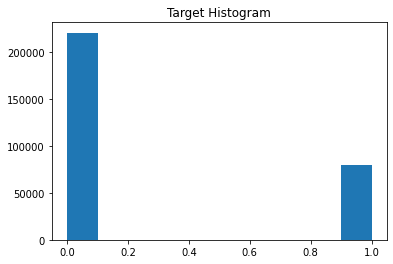
Target Distribution Plot — image by author

Split Numerical and Categorical

Data has 19 categorical features and 11 numeric features.

data_categorical_pd  = train_test_data.loc[:,train_test_data.dtypes==np.object]
data_numerical_pd  = train_test_data.loc[:,train_test_data.dtypes!=np.object]
print('data_categorical_pd.shape: ', data_categorical_pd.shape)
print('data_numerical_pd.shape: ', data_numerical_pd.shape)
data_categorical_pd.shape:  (500000, 19)
data_numerical_pd.shape:  (500000, 11)

Data cleaning

The data cleaning part has four different parts Dealing with null values, Dealing with outliers, Label encoding, Categorical values quality checking.

Data cleaning — Dealing with null values

The data hasn’t null values.

categorical_missing_val_count = (data_categorical_pd.isnull().sum())
numerical_missing_val_count = (data_numerical_pd.isnull().sum())
print('categorical_missing_val_count')
print(categorical_missing_val_count[categorical_missing_val_count > 0])
print('numerical_missing_val_count')
print(numerical_missing_val_count[numerical_missing_val_count > 0])
categorical_missing_val_count
Series([], dtype: int64)
numerical_missing_val_count
Series([], dtype: int64)

Data cleaning — Dealing with outliers

import seaborn as sns
import warnings
warnings.simplefilter("ignore")
# Numerical
y_plot = train_y.copy()
y_plot.columns = ['target']
Data_plot = pd.concat([data_numerical_pd[:][:len(y_plot)], y_plot], axis=1)
for feature in data_numerical_pd.columns:
    fig, (ax1, ax2) = plt.subplots(nrows=1, ncols=2, figsize=(10, 5))
    
    plot10 = sns.distplot(Data_plot[Data_plot['target']==0][feature],ax=ax1, label='0')
    sns.distplot(Data_plot[Data_plot['target']==1][feature],ax=ax1,color='red', label='1')
    plot10.axes.legend()
    ax1.set_title('Distribution of {name}'.format(name=feature))
    sns.boxplot(x='target',y=feature,data=Data_plot,ax=ax2)
    ax2.set_xlabel('Category') 
    ax2.set_title('Boxplot of {name}'.format(name=feature))
    fig.show()
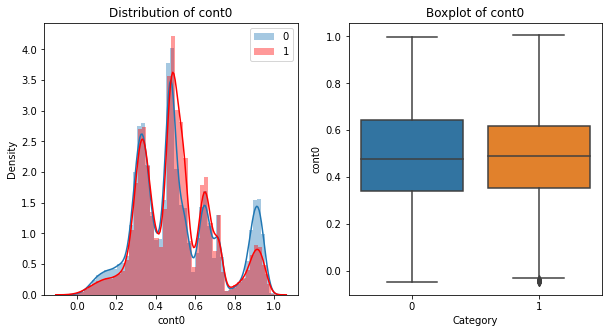
Numeric Cont0 Distribution Plot — image by author
data_plot = pd.concat([data_categorical_pd[:][:len(y_plot)], y_plot], axis=1)
feature_list = []
for col in data_categorical_pd.columns:
    if len(data_categorical_pd[col].unique()) <= 20:
        feature_list.append(col)

n_cols = 3
nrows = round(len(feature_list) / n_cols)
fig, axes = plt.subplots(nrows, n_cols, figsize=(24, 12))
plt.subplots_adjust(hspace=0.5)

index = 0
for row in range(nrows):
    for col in range(n_cols):
        feature = feature_list[index]
        
        sns.barplot(x=feature, y='target', data=data_plot, ax=axes[row][col])
        axes[row][col].set_title(feature + ' Distribution', color = 'red')
        
        index += 1
plt.show()
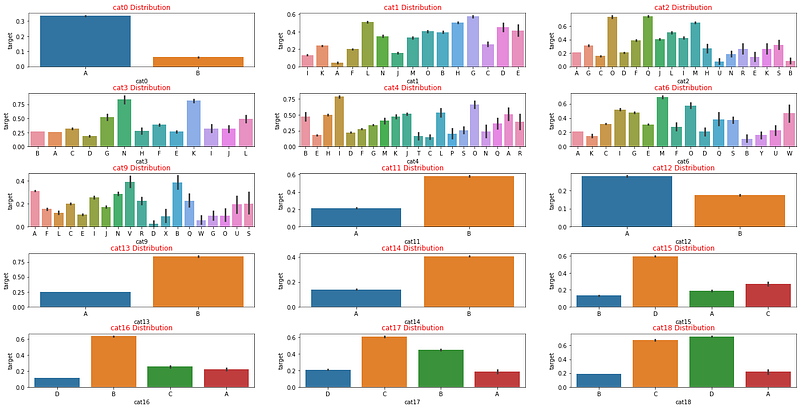
Categorical Distributions Plot — image by author

Data cleaning — Categorical values quality checking

Cat10 feature has a lot of different object features and some objects are in the train set but are not in the test set. Therefore cat10 is a bad feature for ml models. You can drop this feature or replace low repeat values with ‘OTHERS’.

from sklearn.model_selection import train_test_split

object_cols = data_categorical_pd.columns
X_train, X_valid, y_train, y_valid = train_test_split(data_categorical_pd[:][:len(train_y)], train_y, train_size=0.8, test_size=0.2,
                                                      random_state=0)

# Columns that can be safely label encoded
good_label_cols = [col for col in object_cols if 
                   set(X_train[col]) == set(X_valid[col])]
        
# Problematic columns that will be dropped from the dataset
bad_label_cols = list(set(object_cols)-set(good_label_cols))

print('good_label_cols: ', len(good_label_cols))
print(good_label_cols)
print('bad_label_cols: ', len(bad_label_cols))
print(bad_label_cols)
good_label_cols:  18
['cat0', 'cat1', 'cat2', 'cat3', 'cat4', 'cat5', 'cat6', 'cat7', 'cat8', 'cat9', 'cat11', 'cat12', 'cat13', 'cat14', 'cat15', 'cat16', 'cat17', 'cat18']
bad_label_cols:  1
['cat10']

Data cleaning — Label encoding

Ml models can not understand object types of data (except some tree models) that are why we have to encode them to numeric data. You can use LabelEncoder or OneHotEncoder for the encoding process.

from sklearn.preprocessing import LabelEncoder
from sklearn.preprocessing import OneHotEncoder

data_categorical_encoded_pd = data_categorical_temp_pd.copy()
for feature in data_categorical_encoded_pd.columns:
        le = LabelEncoder()
        data_categorical_encoded_pd[feature] = le.fit_transform(data_categorical_temp_pd[feature].astype(str))

Feature Engineering

In this part, we add and multiply some features for creating new features.

data_categorical_FeaEng_pd = data_categorical_encoded_pd.copy()
data_numerical_FeaEng_pd = data_numerical_pd.copy()

data_categorical_FeaEng_pd['cat9cat2T'] = (data_categorical_encoded_pd['cat9'] + data_categorical_encoded_pd['cat2'])
data_categorical_FeaEng_pd['cat9cat2M'] = (data_categorical_encoded_pd['cat9'] * data_categorical_encoded_pd['cat2'])
...

Feature Transformation

Machine learning models predict targets better when the distribution of data is normal. For this reason, we use box-cox transformation.

from scipy.stats import skew, boxcox
import seaborn as sns
...
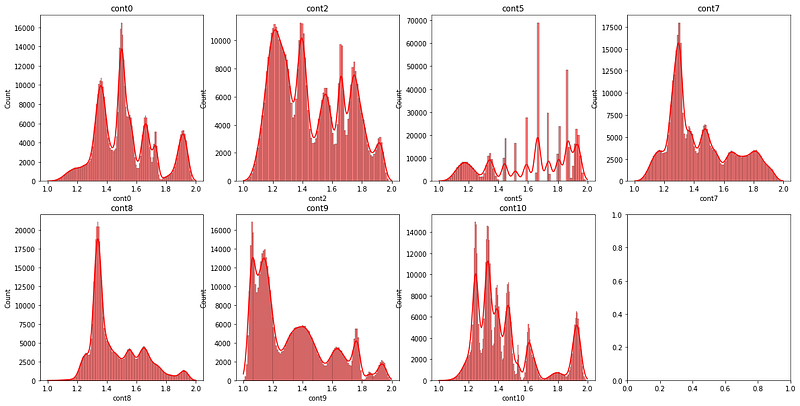
Numerical Value Distributions Plots— image by author

Preparation Data For Training

After all processes, we split data to train and test again. Now the shape of the train data is (300000, 68) and the shape of the test data is (200000, 68).

X_train = pd.concat([data_numerical_TR_pd[:][:train_rows_len], data_categorical_TR_pd[:][:train_rows_len]], axis=1)
X_test = pd.concat([data_numerical_TR_pd[:][train_rows_len:], data_categorical_TR_pd[:][train_rows_len:]], axis=1)
y_train = train_y.copy()

X_train.to_csv('x_train.csv',index=False)
X_test.to_csv('x_test.csv',index=False)
y_train.to_csv('y_train.csv',index=False)

print('X_train shape: ', X_train.shape)
print('X_test shape: ', X_test.shape)
print('y_train shape: ', y_train.shape)
X_train shape:  (300000, 68)
X_test shape:  (200000, 68)
y_train shape:  (300000,)

This is part 1 of the TPS-Mar21 competition that I am in LB %14. In this article, we prepared data for better prediction and in the second part, we will work on modeling.

You can see full python code and all plots from here 👉 Kaggle Notebook.

👋 Thanks for reading. If you enjoy my work, don’t forget to like it 👏, follow me on Medium and LinkedIn. It will motivate me in offering more content to the Medium community! 😊

More…

Python
Exploratory Data Analysis
Data Analysis
Feature Engineering
Databulls
Recommended from ReadMedium