avatarGeeky Animals

Free AI web copilot to create summaries, insights and extended knowledge, download it at here

5403

Abstract

fore considering a price increase, the developers will reduce the margin to release the version first and optimize it.</li></ul><p id="7871"><b>(5) Other updates unrelated to Office Hours</b></p><p id="3ca7"><b>(5.1) Vary (Region) to add an anime character</b></p><p id="22c3">Shambibble (Midjourney user) shared a photo with an anime character standing next to the subject. Using Vary (Region) to add Niji style to a photograph is interesting.</p><p id="acf8">It is similar to mixing different styles and still achieving some harmony.</p><p id="ab3e">Here are some examples of my experiments. It is a lot of fun.</p><p id="bcfb">Remember that the Vary (Region) only sometimes works as expected, and some prompts may perform better than others for unknown reasons.</p><p id="a32f">Read this <a href="https://readmedium.com/the-complete-guide-to-midjourney-inpainting-from-basics-to-advanced-b34519f6e2a2">story</a> to learn more about Vary (Region).</p><p id="5d9a">Read this <a href="https://readmedium.com/midjourney-a-simple-method-to-fine-tune-your-inpainting-555430df9e96">story</a> to learn how to quickly edit an image with Vary (Region).</p><p id="f951">This is the original photo.</p><figure id="9605"><img src="https://cdn-images-1.readmedium.com/v2/resize:fit:800/0*6drXKk0bxM-zwK1L.png"><figcaption>/imagine prompt: a photograph of a robot preparing breakfast for a lady in the kitchen, magic, happy, dynamic action, futuristic — ar 16:9</figcaption></figure><p id="df89">I selected the lady and changed it to an anime character with this prompt:</p><p id="72eb">Vary (Region) <code>anime hatsune miku drawing --niji --s 250 --ar 16:9</code></p><p id="e5d5">See, an anime character in the photo!</p><figure id="226a"><img src="https://cdn-images-1.readmedium.com/v2/resize:fit:800/0*69oab2EvNKoWdsVb.png"><figcaption>Vary (Region) anime hatsune miku drawing — niji — s 250 — ar 16:9</figcaption></figure><p id="a4b1">This is another original photo.</p><figure id="cb95"><img src="https://cdn-images-1.readmedium.com/v2/resize:fit:800/0*wSVpucLP_6S4ivkK.png"><figcaption>/imagine prompt: a photograph of a robot preparing breakfast for a lady in the kitchen, magic, happy, dynamic action, futuristic — ar 16:9</figcaption></figure><p id="b122">Using the same prompt, I use Vary (Region) to change the senior lady into an anime character.</p><figure id="3833"><img src="https://cdn-images-1.readmedium.com/v2/resize:fit:800/0*_ut9Qz1vzSXIGR9R.png"><figcaption>Vary (Region) hand holding a cup::5 anime hatsune miku drawing — niji — s 250 — ar 16:9</figcaption></figure><p id="82b2">Another original photo.</p><figure id="1b02"><img src="https://cdn-images-1.readmedium.com/v2/resize:fit:800/0*L2bAMlWmUjo9nU9i.png"><figcaption>/imagine prompt: a photograph of a robot introduces the latest botanical exhibits, dynamic pose — ar 16:9</figcaption></figure><p id="fdd6">And the result of the Vary (Region).</p><figure id="0a3e"><img src="https://cdn-images-1.readmedium.com/v2/resize:fit:800/0*JNBGcDVexxjdHPit.png"><figcaption>Vary (Region) anime hatsune miku drawing — niji — s 250 — ar 16:9</figcaption></figure><p id="1997">Continue to /imagine and have fun!</p><p id="8937"><b>Geeky Animals’ most recent stories:</b></p><p id="341f">You can now download, publish, and unpublish your images in bulk on the <a href="https://readmedium.com/midjourney-website-batch-selection-feature-ebc7f3188555">Midjourney website</a>.</p><div id="4a8f" class="link-block"> <a href="https://bootcamp.uxdesign.cc/midjourney-website-batch-selection-feature-ebc7f3188555"> <div> <div> <h2>Midjourney: Website batch selection feature</h2> <div><h3>Download all of your images from the image grids without upscaling them.</h3></div> <div><p>bootcamp.uxdesign.cc</p></div> </div> <div> <div style="background-image: url(https://miro.readmedium.com/v2/resize:fit:320/0*2UQUQP5QQbtAi5Fz.png)"></div> </div> </div> </a> </div><p id="b97d"><a href="https://readmedium.com/quick-midjourney-update-5-key-highlights-to-know-6th-december-2023-a9c70c334014">Previous Quick Midjourney Update</a> and a published Nature article about people’s bias against AI art.</p><div id="3b64" class="link-block"> <a href="https://bootcamp.uxdesign.cc/quick-midjourney-update-5-key-highlights-to-know-6th-december-2023-a9c70c334014"> <div> <div> <h2>Quick Midjourney Update: 5 key highlights to know (6th December 2023)</h2> <div><h3>Keeping up with the rapid changes and developments</h3></div> <div><p>bootcamp.uxdesign.cc</p></div> </div> <div> <div style="background-image: url(https://miro.readmedium.com/v2/resize:fit:320/0*tBRTE-8EoHe37Tfx.png)"></div> </div> </div> </a> </div><p id="6955">Search for scientific information with confidence using <a href="https://readmedium.com/perplexity-search-scientific-information-with-confidence-806795a6caa2">Perplexity</a>. You can quickly check and verify the sources of information.</p><div id="f1ba" class="link-block"> <a href="https://readmedium.com/perplexity-search-scientific-information-with-confidence-806795a6caa2">

Options

<div>
          <div>
            <h2>Perplexity: Search scientific information with confidence</h2>
            <div><h3>You can quickly check and verify the sources of information.</h3></div>
            <div><p>medium.com</p></div>
          </div>
          <div>
            <div style="background-image: url(https://miro.readmedium.com/v2/resize:fit:320/0*9SgV6U4-k5e7a3Ki.png)"></div>
          </div>
        </div>
      </a>
    </div><p id="a109"><b>Other stories</b></p><p id="9deb"><a href="https://medium.com/@geekyanimals/list/quick-midjourney-update-de86b636b784">Latest news &amp; updates on Midjourney</a>:</p><div id="29a6" class="link-block">
      <a href="https://medium.com/@geekyanimals/list/de86b636b784">
        <div>
          <div>
            <h2>Quick Midjourney Update</h2>
            <div><h3>Latest updates on Midjourney</h3></div>
            <div><p>medium.com</p></div>
          </div>
          <div>
            <div style="background-image: url(https://miro.readmedium.com/v2/resize:fit:320/0*a21746e582c1fc306b81adf66761443601bc9b91.jpeg)"></div>
          </div>
        </div>
      </a>
    </div><p id="baab"><a href="https://medium.com/@geekyanimals/list/midjourney-e5b8cabc263d">Stories for Midjourney fans</a>:</p><div id="ac13" class="link-block">
      <a href="https://medium.com/@geekyanimals/list/e5b8cabc263d">
        <div>
          <div>
            <h2>Midjourney</h2>
            <div><h3>Stories for Midjourney fans</h3></div>
            <div><p>medium.com</p></div>
          </div>
          <div>
            <div style="background-image: url(https://miro.readmedium.com/v2/resize:fit:320/0*15ad7d2e4afb903d6ed6f9fcfa0a805ef34e346b.jpeg)"></div>
          </div>
        </div>
      </a>
    </div><p id="c041"><a href="https://medium.com/@geekyanimals/list/midjourney-minitutorials-516b50973fbd">Simple and easy-to-follow guides for Midjourney Beginners</a></p><div id="eac5" class="link-block">
      <a href="https://medium.com/@geekyanimals/list/516b50973fbd">
        <div>
          <div>
            <h2>Midjourney Mini-Tutorials</h2>
            <div><h3>Simple and easy-to-follow guides for Midjourney Beginners</h3></div>
            <div><p>medium.com</p></div>
          </div>
          <div>
            <div style="background-image: url(https://miro.readmedium.com/v2/resize:fit:320/0*d006ab231d9fa4d426e3a95db83e9bd9317e71a9.jpeg)"></div>
          </div>
        </div>
      </a>
    </div><p id="0bb9"><a href="https://medium.com/@geekyanimals/list/midjourney-muse-9e8c7506dfda">Midjourney Muse</a></p><div id="83fb" class="link-block">
      <a href="https://medium.com/@geekyanimals/list/9e8c7506dfda">
        <div>
          <div>
            <h2>Midjourney Muse</h2>
            <div><h3>You wake up one morning and realize that you are, in fact, a Midjourney fanatic.</h3></div>
            <div><p>medium.com</p></div>
          </div>
          <div>
            <div style="background-image: url(https://miro.readmedium.com/v2/resize:fit:320/0*fd7388af9aefe2828a16517ba38337406ef069d8.jpeg)"></div>
          </div>
        </div>
      </a>
    </div><p id="adcb"><a href="https://medium.com/@geekyanimals/list/fido-and-meow-2de73eecfaf4">Stories about pets</a>:</p><div id="37f2" class="link-block">
      <a href="https://medium.com/@geekyanimals/list/2de73eecfaf4">
        <div>
          <div>
            <h2>Fido and Meow</h2>
            <div><h3>Stories about pets from Geeky Animals</h3></div>
            <div><p>medium.com</p></div>
          </div>
          <div>
            <div style="background-image: url(https://miro.readmedium.com/v2/resize:fit:320/0*13f95fb54dc071914ad5d1c3eb882c3004de0f10.jpeg)"></div>
          </div>
        </div>
      </a>
    </div><p id="60dc">I hope you like this story!</p><p id="c5b5"><b>Please give me a clap or leave a positive comment </b>to let Medium’s algorithm know that this story is helpful and has contributed to its platform’s success.</p><p id="0714"><b>Please share the Friend Link</b> with your friends, family, and fans to give them free access to this story.</p><p id="0e8e">Your support inspires me to create higher-quality content in the future!</p><p id="687f">Never miss a story. <b>Follow me on Medium</b> for updates, stories, and tips about Midjourney.</p><div id="ee30" class="link-block">
      <a href="https://medium.com/@geekyanimals">
        <div>
          <div>
            <h2>Geeky Animals — Medium</h2>
            <div><h3>Read writing from Geeky Animals on Medium. I’m a veterinarian passionate about the intersection of Midjourney, AI, art…</h3></div>
            <div><p>medium.com</p></div>
          </div>
          <div>
            <div style="background-image: url(https://miro.readmedium.com/v2/resize:fit:320/0*expQMusdp5XOkDiw)"></div>
          </div>
        </div>
      </a>
    </div><p id="0ccb">Sign up <a href="https://medium.com/@geekyanimals/subscribe"><b>here</b> </a>for a free email alert when I post a new story.</p></article></body>

Quick Midjourney Update: 5 key highlights to know (13th December 2023)

Keeping up with the rapid changes and developments
Get a free email alert when a new story is published.

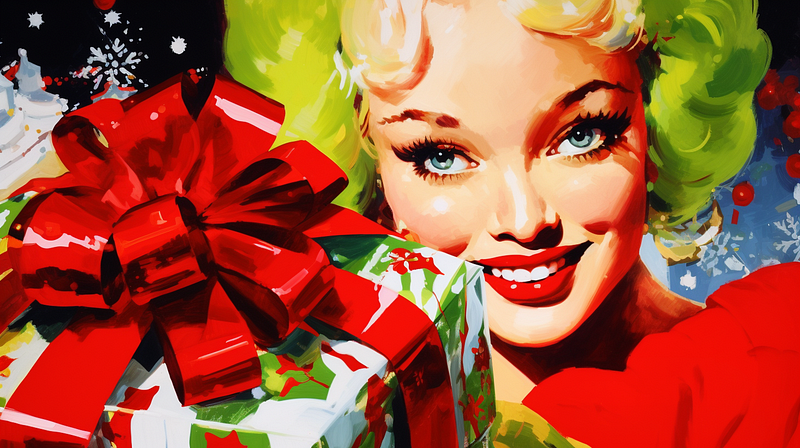
Midjourney V6 as the Christmas present? Will it happen? This featured image was created using a Tuner code from the Christmassy story. /imagine prompt: an illustration of a Christmas tree and lady Santa celebrating Christmas, joyful and festive, cute, Pop Art — style 1nAw5xvPynK13qaslKOG74rngOuMgx3 — ar 16:9

Here’s a quick rundown of the most recent Midjourney Weekly Office Hours:

(1) Upcoming releases

  • Midjourney V6 could be released the week before Christmas.
  • An Alpha test website with an image creation feature is now available to users in the 10K club (who created at least 10K images) and higher.

(2) Midjourney Alpha Website
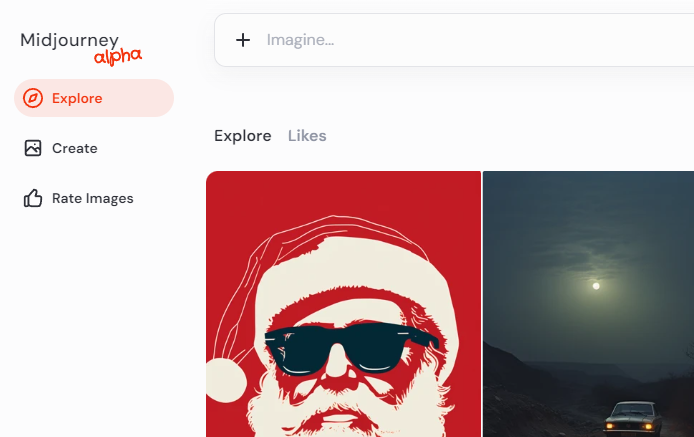
The Midjourney Alpha test website is now available for testing for users who have created more than 10,000 images. Website: https://alpha.midjourney.com/explore
  • The new Alpha test website is an active construction zone.
  • It will be rolled out gradually to more users, beginning with users who have created 10,000 or more images, then 5,000, then 2,500, and finally 1,000.
  • By typing /info, you can find out how many images you have created.
  • The gradual rollout is vital to assist new users in becoming acquainted with the Discord server and getting community support before creating images on the website.
  • Every week, massive changes will occur without warning until the website is ready to become a more stable beta or public release.
  • The current Alpha website is functionally limited. There is no social feature, Vary (Region), Style Tuners, Remix, Zoom, /describe, and many others.
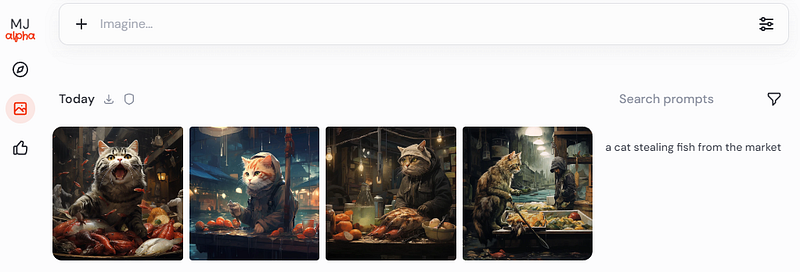
An example of output after typing the prompt: “a cat stealing fish from the market.”

(3) Other website updates

  • There will be folders, collections, filters, and a new Explore page.
  • Aim to increase the diversity of the images in the gallery.
  • Separation of the create and archive pages.
  • The development of mobile applications is not a priority.
  • Priority is on the desktop app.
  • iOS users may receive the native app version before Android users.

(4) Midjourney V6

  • David was cooking while discussing V6. This is the photo of his creation.
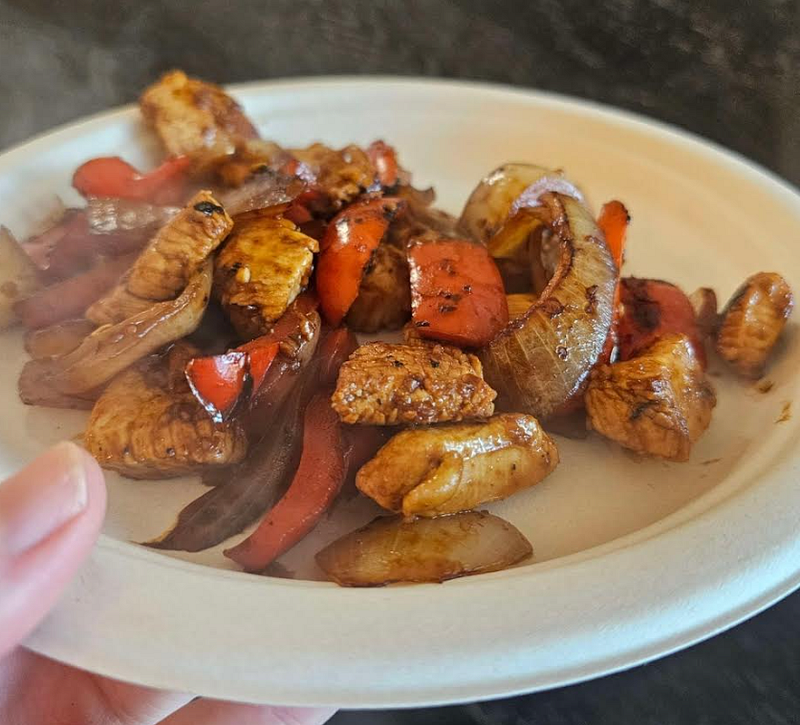
David’s cooking. Chicken with vegetables and onions.
  • V6 includes a new prompting style that accepts natural language input.
  • It is more sensitive to words and can pick up more things (at least three at a time) in the prompt. It’s unclear exactly how many things it can pick up. However, the bot may pick up some but not all of the details as the descriptions become more lengthy and detailed.
  • When asked about V6’s ability to create images that closely adhere to the prompt, such as DALL-E 3, David responded, “V6 will be very good at this.”
  • In V6 prompting, avoid using words like 4K, 8K, Trending on Artstation, and 3D rendering software names. A prompt like “a dog trending at Art Station” will not work. Read this story for more words to avoid in the prompt.
  • The prompt crafting method of using a lot of commas to throw in random items will no longer work. It is not recommended to write a prompt like Stable Diffusion.
  • A new /describe command with more details and longer sentences will be released at launch.
  • A new image prompting feature will be included in V6.
  • Whether a new multi-prompting feature will be added in V6 is unknown.
  • By default, V6 will not have double or higher resolution. It will focus on 2,048 x 2,048 images. However, a higher resolution is planned for V7.
  • The first internal rating party was completed, and the developers are fine-tuning it for a second rating party. The images are rendered and tested using prompts from the community.
  • There is currently no new upscale for V6, but a better upscale may be added later.
  • The developers are currently testing several versions of V6. Because the versions have not been optimized, they are more expensive than V5.
  • V6 is estimated to be four times more expensive to operate than V5. Before considering a price increase, the developers will reduce the margin to release the version first and optimize it.

(5) Other updates unrelated to Office Hours

(5.1) Vary (Region) to add an anime character

Shambibble (Midjourney user) shared a photo with an anime character standing next to the subject. Using Vary (Region) to add Niji style to a photograph is interesting.

It is similar to mixing different styles and still achieving some harmony.

Here are some examples of my experiments. It is a lot of fun.

Remember that the Vary (Region) only sometimes works as expected, and some prompts may perform better than others for unknown reasons.

Read this story to learn more about Vary (Region).

Read this story to learn how to quickly edit an image with Vary (Region).

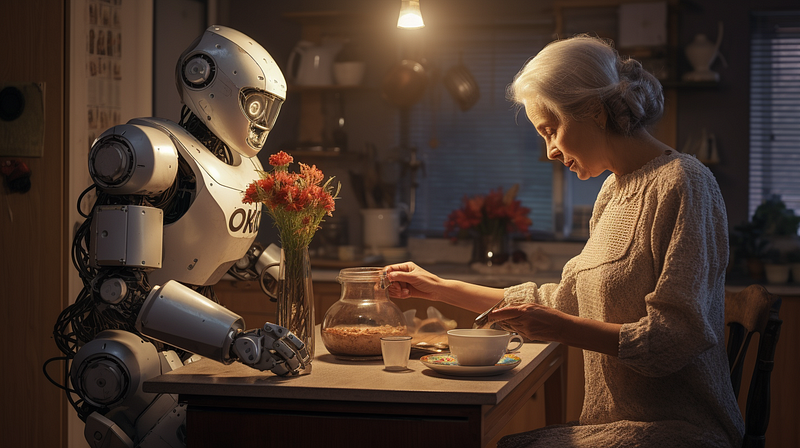
This is the original photo.
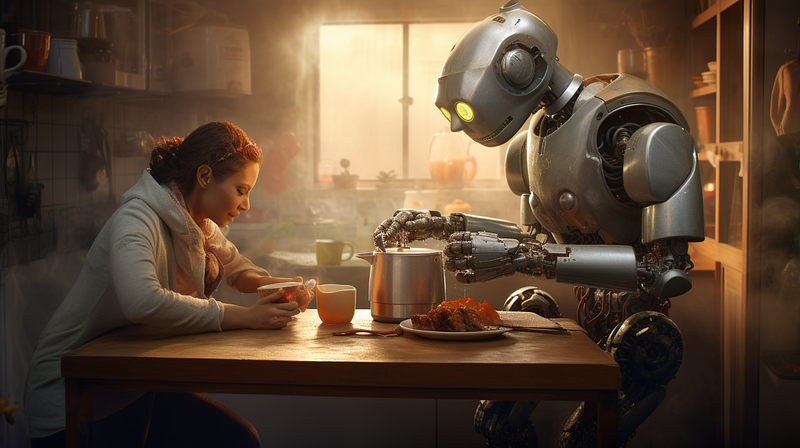
/imagine prompt: a photograph of a robot preparing breakfast for a lady in the kitchen, magic, happy, dynamic action, futuristic — ar 16:9

I selected the lady and changed it to an anime character with this prompt:

Vary (Region) anime hatsune miku drawing --niji --s 250 --ar 16:9

See, an anime character in the photo!
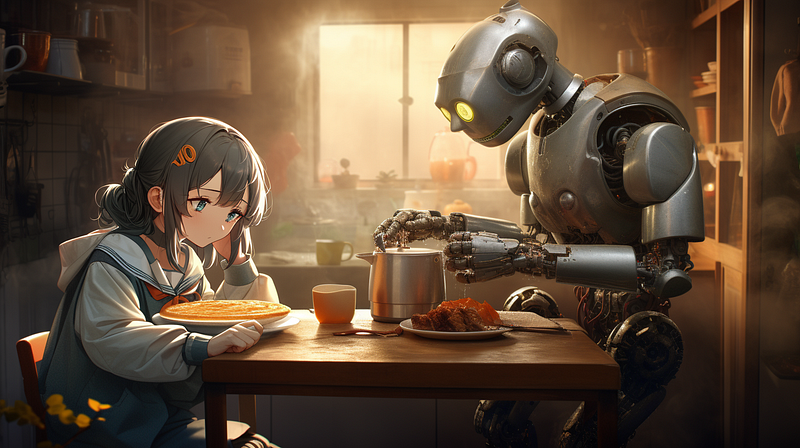
Vary (Region) anime hatsune miku drawing — niji — s 250 — ar 16:9

This is another original photo.

/imagine prompt: a photograph of a robot preparing breakfast for a lady in the kitchen, magic, happy, dynamic action, futuristic — ar 16:9

Using the same prompt, I use Vary (Region) to change the senior lady into an anime character.
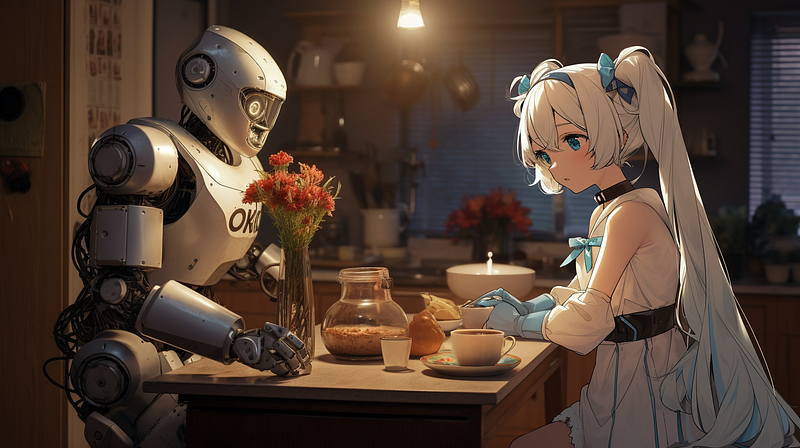
Vary (Region) hand holding a cup::5 anime hatsune miku drawing — niji — s 250 — ar 16:9

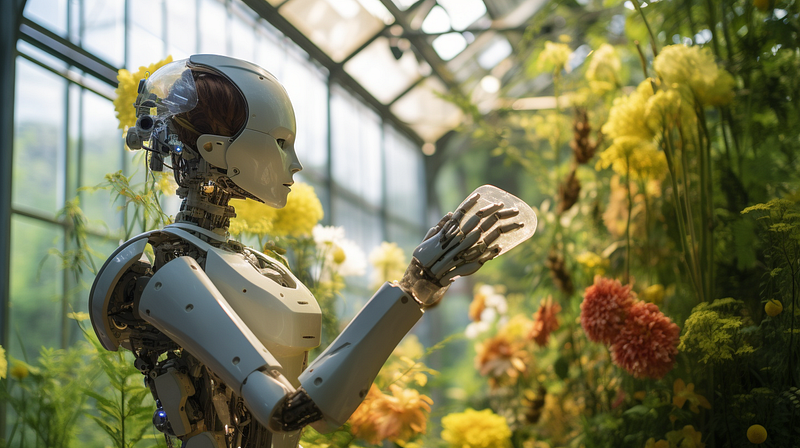
Another original photo.

/imagine prompt: a photograph of a robot introduces the latest botanical exhibits, dynamic pose — ar 16:9

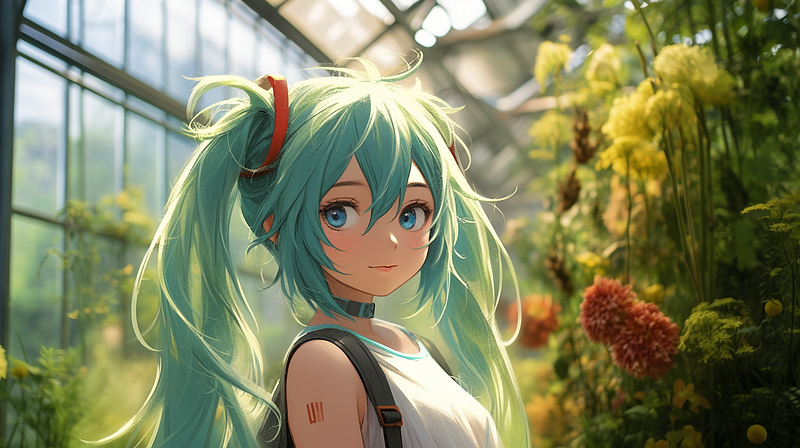
And the result of the Vary (Region).

Vary (Region) anime hatsune miku drawing — niji — s 250 — ar 16:9

Continue to /imagine and have fun!

Geeky Animals’ most recent stories:

You can now download, publish, and unpublish your images in bulk on the Midjourney website.

Previous Quick Midjourney Update and a published Nature article about people’s bias against AI art.

Search for scientific information with confidence using Perplexity. You can quickly check and verify the sources of information.

Other stories

Latest news & updates on Midjourney:

Stories for Midjourney fans:

Simple and easy-to-follow guides for Midjourney Beginners

Midjourney Muse

Stories about pets:

I hope you like this story!

Please give me a clap or leave a positive comment to let Medium’s algorithm know that this story is helpful and has contributed to its platform’s success.

Please share the Friend Link with your friends, family, and fans to give them free access to this story.

Your support inspires me to create higher-quality content in the future!

Never miss a story. Follow me on Medium for updates, stories, and tips about Midjourney.

Sign up here for a free email alert when I post a new story.

Midjourney
Technology
Artificial Intelligence
Creativity
Digital
Recommended from ReadMedium