
Midjourney: Website batch selection feature
Download all of your images from the image grids without upscaling them.
This is one of the stories in the “Midjourney Mini Tutorials” series. The mini-tutorials are designed to help new Midjourney users perform specific tasks by providing simple, easy-to-follow instructions.
You can now batch-select to download, publish/unpublish your images on the Midjourney website.
Midjourney’s website now has a new batch selection feature that allows users to select multiple images to download, publish, or unpublish.
Since migrating to the new Midjourney gallery website, the batch selection feature, particularly the batch download, has been one of the most requested features.
Here is how to select images in bulk
- Visit the Gallery’s website at https://www.midjourney.com/imagine — do not use the beta website; the new feature will not work there.
- Click “My Images” on the left menu. You can only batch-select the images that you have created.
- Select images by clicking and dragging or Shift-clicking them.
- At the bottom of the page, click “Download, Publish, or Unpublish.” The Publish and Unpublish options are only available to Pro and Mega plan subscribers who can activate Stealth Mode.
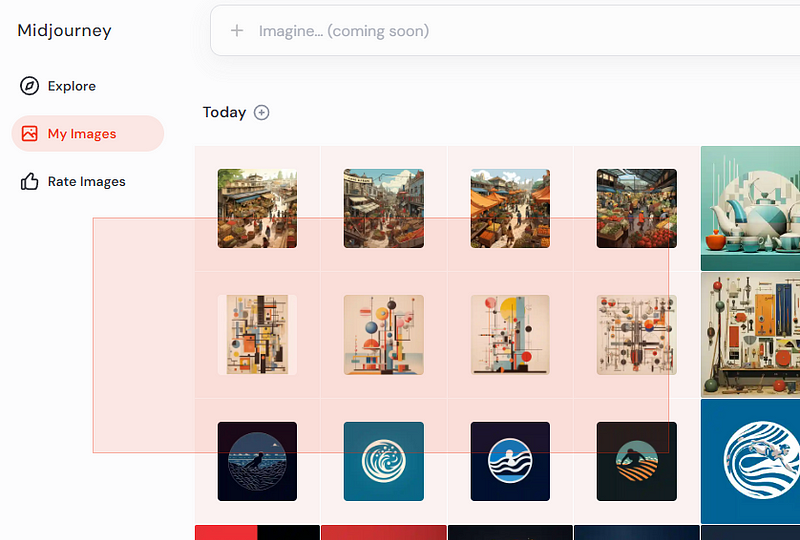
A menu will appear at the bottom of the page after the selection.

Download individual images from the image grids
Individual images can now be batch-selected and downloaded from the website even if not upscaled (U1, U2, U3, U4) in Discord.
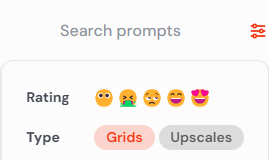
To view all images, go to the website and click Grids (or both Grids and Upscales).
Then, either Shift-click one image after another or Click+drag across multiple images to select the images you want to download.
For download, the images will be packaged in a Zip file.
That’s it for this brief update.
I wish you a wonderful day!
Related stories
Conclusion
- To use the new batch-select feature, go to the Gallery’s website at: https://www.midjourney.com/imagine
- You can now download, publish, and unpublish your images in bulk on the Midjourney website.
- Click+drag or Shift-click the images to batch-select them.
- Individual images from an image grid can be downloaded even if they were not upscaled in Discord.
I hope you like this story!
Please give me a clap or leave a positive comment to let Medium’s algorithm know that this story is helpful and has contributed to its platform’s success.
Please share the Friend Link with your friends, family, and fans to give them free access to this story.
Your support inspires me to create higher-quality content in the future!
Never miss a story. Follow me on Medium for updates, stories, and tips about Midjourney.
Sign up here for a free email alert when I post a new story.


