avatarRenu Khandelwal

Free AI web copilot to create summaries, insights and extended knowledge, download it at here

4827

Abstract

etails on <b>reading from a different formats of file and writing to different formats of file</b> follow my post — <a href="https://readmedium.com/python-reading-and-writing-data-from-files-d3b70441416e">https://readmedium.com/python-reading-and-writing-data-from-files-d3b70441416e</a></p><p id="3177">To get a good understanding of the data refer to my post-<a href="https://readmedium.com/machine-learning-understanding-data-dfef261d833b">https://readmedium.com/machine-learning-understanding-data-dfef261d833b</a></p><p id="0cdb">I have downloaded my dataset in my default jupyter folder</p><div id="cbd1"><pre><span class="hljs-attr">data_set</span> = pd.read_csv(<span class="hljs-string">"train.csv"</span>)</pre></div><p id="63b6">Let’s view all the features of the dataset by printing just 3 rows from the dataset</p><div id="4b33"><pre><span class="hljs-attribute">data_set</span>.head(<span class="hljs-number">3</span>)</pre></div><figure id="b6a4"><img src="https://cdn-images-1.readmedium.com/v2/resize:fit:800/1*HYs13P_uefrQJULkETL-kA.png"><figcaption>head(3) display first three rows from the dataset</figcaption></figure><p id="0554">In the data_set dataframe Name and Ticket seems to be irrelevant and doesn’t seem to help with our analysis for predicting passenger’s survival chance so we go and drop the column</p><div id="576f"><pre>data_set.drop([<span class="hljs-string">'Name'</span>, <span class="hljs-string">'Ticket'</span>], <span class="hljs-attribute">inplace</span>=<span class="hljs-literal">True</span>, <span class="hljs-attribute">axis</span>=1) data_set.head(3)</pre></div><figure id="7a84"><img src="https://cdn-images-1.readmedium.com/v2/resize:fit:800/1*5YAf75FaVIRx8f9E57a5mQ.png"><figcaption>dropped columns Name and Ticket</figcaption></figure><h1 id="43fc">Handling missing data</h1><p id="0fa1"><b>Dropping rows that contain missing value</b></p><p id="ef00">We can drop the rows that contain null or missing data by using <b>dropna().</b> If we set inplace to True then the original dataset gets modified</p><div id="d2cd"><pre>dat<span class="hljs-built_in">a_set</span>.dropna(inplace = <span class="hljs-literal">True</span>) dat<span class="hljs-built_in">a_set</span>.head(<span class="hljs-number">3</span>)</pre></div><figure id="ba13"><img src="https://cdn-images-1.readmedium.com/v2/resize:fit:800/1*sHWbHjH9Yx1Sm5s06bz7Ug.png"><figcaption>Row 0 and Row 2 are dropped as they has Nan Values</figcaption></figure><p id="ce83">Always dropping rows that contain any null values may not be a good strategy as we may miss the randomness is the dataset</p><p id="f410"><i>So, what is the next best option to handle missing value?</i></p><p id="814e"><b>Setting threshold for null values in a row</b></p><p id="a8cc">we can set a threshold count and if a rows exceeds the threshold count for null values then we can drop the row.</p><p id="6719">We will drop a row from data_1 only if a row contains 2 or more null values, so we should be dropping only row 0 and row 2 and row 3 should remain.</p><p id="cc2b">If we print data_1 at this time, since inplace is False by default, data_1 dataframe remains unchanged.</p><div id="699f"><pre>dat<span class="hljs-built_in">a_1</span></pre></div><figure id="51f6"><img src="https://cdn-images-1.readmedium.com/v2/resize:fit:800/1*YDNzG5YmQw4HSLczGiEkZw.png"><figcaption>data_1</figcaption></figure><div id="f5a5"><pre>data_1.dropna(<span class="hljs-attribute">thresh</span>=2)</pre></div><figure id="048c"><img src="https://cdn-images-1.readmedium.com/v2/resize:fit:800/1*K2WcxGrQ4vzZutvsKeslKw.png"><figcaption>dropping data based on threshold count</figcaption></figure><p id="bd41"><i>What if I do not want to drop any rows with missing data instead fill it with more meaning value?</i></p><p id="5c09"><b>Filling Missing data with Value</b></p><p id="c7fe">There are different ways we can fill the missing data with some meaningful values like mean or median or most frequently value available in the column.</p><p id="ab14"><b>One of the method is to use fillna()</b> by specifying how we want to fill the null or missing values.</p><p id="23f9">In the example below, we are filling the missing values in ‘Ratings’ column by taking a mean</p><div id="0397"><pre>data_1<span class="hljs-selector-attr">[<span class="hljs-string">'Ratings'</span>]</span><span class="hljs-selector-class">.fillna</span>(data_1<span class="hljs-selector-attr">[<span class="hljs-string">'Ratings'</span>]</span><span class="hljs-selector-class">.mean</span>(), inplace = True) data_1</pre></div><figure id="2d0c"><img src="https://cdn-images-1.readmedium.com/v2/resize:fit:800/1*PbNYsgPjslqIMdFmIWRFOg.png"><figcaption>Ratings missing values are filled by mean of the Ratings column</figcaption></figure><p id="d72b">In the example below, we are fi

Options

lling the “Average Age” column by median of the “Average Age” column which is 77.5</p><div id="39e4"><pre>data_1<span class="hljs-selector-attr">[<span class="hljs-string">'Average Age'</span>]</span><span class="hljs-selector-class">.fillna</span>(data_1<span class="hljs-selector-attr">[<span class="hljs-string">'Average Age'</span>]</span><span class="hljs-selector-class">.median</span>(), inplace = True) data_1</pre></div><figure id="669c"><img src="https://cdn-images-1.readmedium.com/v2/resize:fit:800/1*rO_9lZ37AgAdZWvsM7oDEA.png"><figcaption>filling missing values in Average Age column with median of the column</figcaption></figure><p id="917d"><b>Imputing missing data with mean,median or most frequently used value for the column</b></p><p id="cb0d">For imputing we need to import Imputer from sklearn.preprocessing library</p><div id="f0a0"><pre><span class="hljs-keyword">from</span> sklearn.preprocessing <span class="hljs-keyword">import</span> Imputer</pre></div><p id="2288">we will create a new dataframe data_1 to show the usage of the Imputer class</p><div id="bccc"><pre><span class="hljs-attribute">countryData</span> = pd.DataFrame({<span class="hljs-string">"Country"</span>:[<span class="hljs-string">"France"</span>,<span class="hljs-string">"Spain"</span>, <span class="hljs-string">"Germany"</span>, <span class="hljs-string">"USA"</span>], <span class="hljs-string">"Age"</span>:[np.nan,<span class="hljs-number">45</span>,np.nan,<span class="hljs-number">32</span>], <span class="hljs-string">"Salary"</span>:[np.nan,<span class="hljs-number">90000</span>,np.nan,<span class="hljs-number">75000</span>]})</pre></div><div id="5f89"><pre><span class="hljs-attribute">countryData</span></pre></div><figure id="6e97"><img src="https://cdn-images-1.readmedium.com/v2/resize:fit:800/1*D_LJf7GYqpDEQO_b2oKZVA.png"><figcaption>countryData</figcaption></figure><p id="a3f4">we will create the Imputer object and set a strategy for handling the missing values.</p><p id="103e">Different strategy available are <b>mean, median and most_frequent</b></p><p id="495e">we then fit the imputter objects on the column where we want to handle the missing values</p><p id="5553">After fitting the data we transform the data from the dataframe</p><div id="3748"><pre>imp = Imputer(<span class="hljs-attribute">missing_values</span>=<span class="hljs-string">'NaN'</span>, <span class="hljs-attribute">strategy</span>=<span class="hljs-string">'mean'</span>, <span class="hljs-attribute">axis</span>=0)</pre></div><div id="b3e3"><pre>imp<span class="hljs-selector-class">.fit</span>(countryData<span class="hljs-selector-class">.iloc</span><span class="hljs-selector-attr">[:,[0,2]</span>])</pre></div><div id="c02a"><pre>countryData<span class="hljs-selector-class">.iloc</span><span class="hljs-selector-attr">[:,[0,2]</span>]=imp<span class="hljs-selector-class">.transform</span>(countryData<span class="hljs-selector-class">.iloc</span><span class="hljs-selector-attr">[:,[0,2]</span>])</pre></div><div id="1ef3"><pre><span class="hljs-attribute">countryData</span></pre></div><figure id="387c"><img src="https://cdn-images-1.readmedium.com/v2/resize:fit:800/1*LEP4PMOo8Jzu-zuzAazdUg.png"><figcaption>Imputing the missing data with mean values for the columns Age and Salary</figcaption></figure><p id="e4f9"><b>Using replace method</b></p><p id="f5ef">If we want to replace a value in the dataframe with one another value then we can use replace method.</p><p id="fa1f">we will use the same dataframe countryData</p><div id="cf02"><pre><span class="hljs-attribute">countryData</span> = pd.DataFrame({<span class="hljs-string">"Country"</span>:[<span class="hljs-string">"France"</span>,<span class="hljs-string">"Spain"</span>, <span class="hljs-string">"Germany"</span>, <span class="hljs-string">"USA"</span>], <span class="hljs-string">"Age"</span>:[np.nan,<span class="hljs-number">45</span>,np.nan,<span class="hljs-number">32</span>], <span class="hljs-string">"Salary"</span>:[np.nan,<span class="hljs-number">90000</span>,np.nan,<span class="hljs-number">75000</span>]})</pre></div><div id="83df"><pre><span class="hljs-attribute">countryData</span></pre></div><figure id="5f65"><img src="https://cdn-images-1.readmedium.com/v2/resize:fit:800/1*D_LJf7GYqpDEQO_b2oKZVA.png"><figcaption>countryData</figcaption></figure><p id="3bfe">We will replace NaN values for Age couln with a 40</p><div id="9826"><pre>countryData.<span class="hljs-built_in">replace</span>({<span class="hljs-string">'Age'</span>:np.<span class="hljs-literal">NAN</span>},<span class="hljs-number">40</span> )</pre></div><figure id="42cd"><img src="https://cdn-images-1.readmedium.com/v2/resize:fit:800/1*0d4dWpjW11PnVxoVnTdjuQ.png"><figcaption>replacing NaN in Age column with a value of 40</figcaption></figure></article></body>

Python — Machine learning Data Clean up

Learn different ways to clean the data

Now that we have understood the data, visualized the data let’s clean the data so that we are ready for using different machine learning algorithms.

For understanding data refer to my post — https://readmedium.com/machine-learning-understanding-data-dfef261d833b

For data visualization refer to my post — https://readmedium.com/data-visualization-5b1dc260c91a

For python code for data clean up- https://github.com/arshren/MachineLearning/blob/master/Python%20-%20Cleaning%20the%20data.ipynb

Understanding, visualizing and cleaning the data are the most fundamental steps that we need to master along with understanding different machine learning algorithms.

In this post we will learn about

  • Removing duplicate entries from the dataset
  • Removing irrelevant observations
  • Handling missing data

We will take different datasets to learn different ways to clean the data

Removing duplicate entries from the dataset

We will first import the required libraries -pandas and numpy

import numpy as np
import pandas as pd

we will create a dataframe with duplicate values and then see how we can remove duplicate entries

df = pd.DataFrame({"Name":["Jack", "Jill", "John", "Jack"], "Rank":[1,21,3,1], "Marks":[99,56,97,99]})
df
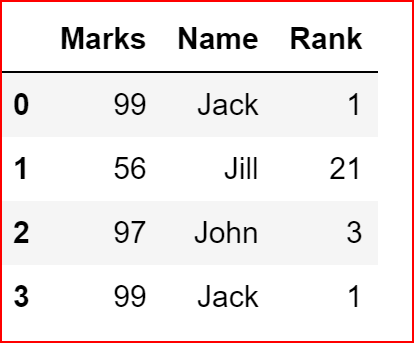
df dataframe with duplicate entries

now let’s remove the duplicate entries and keep the first instance of occurence and will delete any other duplicate entries

df.drop_duplicates(keep='first')
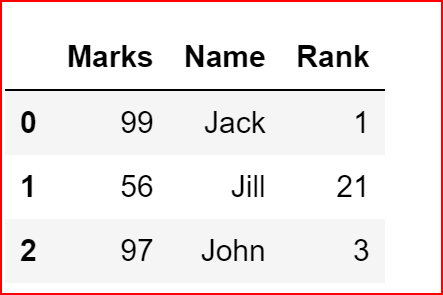
removing duplicate rows and just keeping the first occurence

Dropping any instance of the duplicate rows

df.drop_duplicates(keep=False)
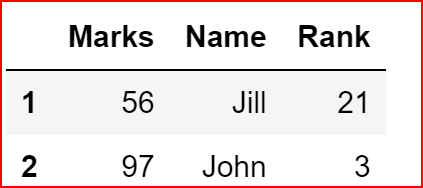
removing any duplicate rows and keeping only unique rows

Inplace is false by default and that means the original dataset remain unchanged, so if we print df again we see all rows

df
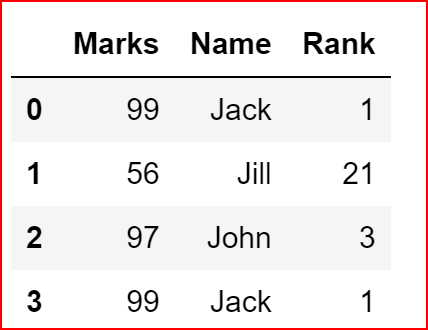
df is same again as inplace is False by default
df.drop_duplicates(keep='first', inplace=True)
df
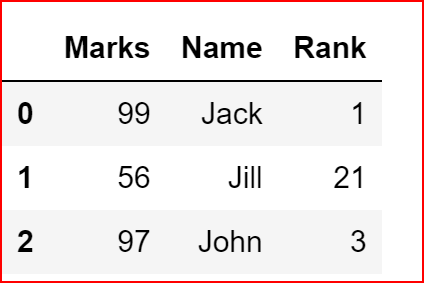
df is now changed as inplace was set to true and only first instance of duplicate row was kept

Removing irrelevant observations

Titanic dataset is available here -https://www.kaggle.com/c/titanic

we will now read the data from the downloaded dataset. and we will use the training dataset — train.csv.

For more details on reading from a different formats of file and writing to different formats of file follow my post — https://readmedium.com/python-reading-and-writing-data-from-files-d3b70441416e

To get a good understanding of the data refer to my post-https://readmedium.com/machine-learning-understanding-data-dfef261d833b

I have downloaded my dataset in my default jupyter folder

data_set = pd.read_csv("train.csv")

Let’s view all the features of the dataset by printing just 3 rows from the dataset

data_set.head(3)

head(3) display first three rows from the dataset

In the data_set dataframe Name and Ticket seems to be irrelevant and doesn’t seem to help with our analysis for predicting passenger’s survival chance so we go and drop the column

data_set.drop(['Name', 'Ticket'], inplace=True, axis=1)
data_set.head(3)

dropped columns Name and Ticket

Handling missing data

Dropping rows that contain missing value

We can drop the rows that contain null or missing data by using dropna(). If we set inplace to True then the original dataset gets modified

data_set.dropna(inplace = True)
data_set.head(3)

Row 0 and Row 2 are dropped as they has Nan Values

Always dropping rows that contain any null values may not be a good strategy as we may miss the randomness is the dataset

So, what is the next best option to handle missing value?

Setting threshold for null values in a row

we can set a threshold count and if a rows exceeds the threshold count for null values then we can drop the row.

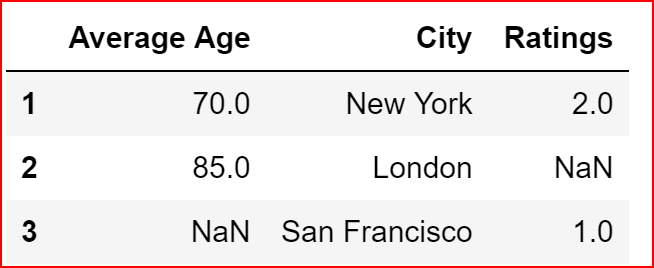
We will drop a row from data_1 only if a row contains 2 or more null values, so we should be dropping only row 0 and row 2 and row 3 should remain.

If we print data_1 at this time, since inplace is False by default, data_1 dataframe remains unchanged.

data_1
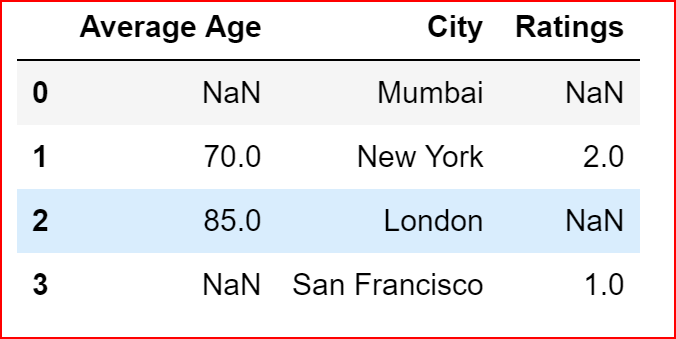
data_1
data_1.dropna(thresh=2)
dropping data based on threshold count

What if I do not want to drop any rows with missing data instead fill it with more meaning value?

Filling Missing data with Value

There are different ways we can fill the missing data with some meaningful values like mean or median or most frequently value available in the column.

One of the method is to use fillna() by specifying how we want to fill the null or missing values.

In the example below, we are filling the missing values in ‘Ratings’ column by taking a mean

data_1['Ratings'].fillna(data_1['Ratings'].mean(), inplace = True)
data_1
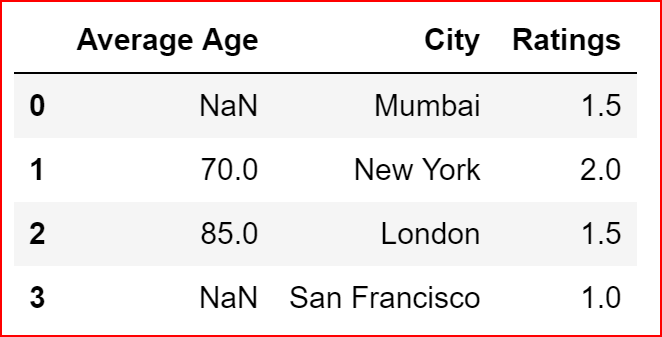
Ratings missing values are filled by mean of the Ratings column

In the example below, we are filling the “Average Age” column by median of the “Average Age” column which is 77.5

data_1['Average Age'].fillna(data_1['Average Age'].median(), inplace = True)
data_1
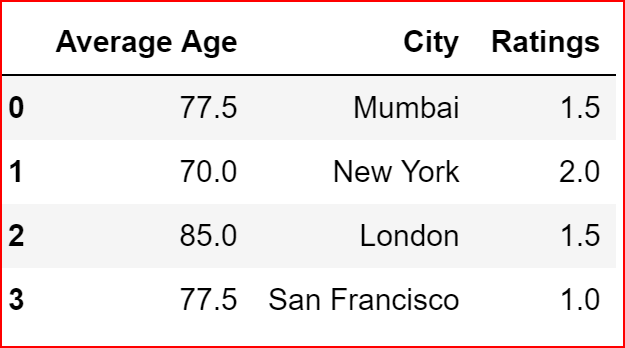
filling missing values in Average Age column with median of the column

Imputing missing data with mean,median or most frequently used value for the column

For imputing we need to import Imputer from sklearn.preprocessing library

from sklearn.preprocessing import Imputer

we will create a new dataframe data_1 to show the usage of the Imputer class

countryData = pd.DataFrame({"Country":["France","Spain", "Germany", "USA"], "Age":[np.nan,45,np.nan,32], "Salary":[np.nan,90000,np.nan,75000]})
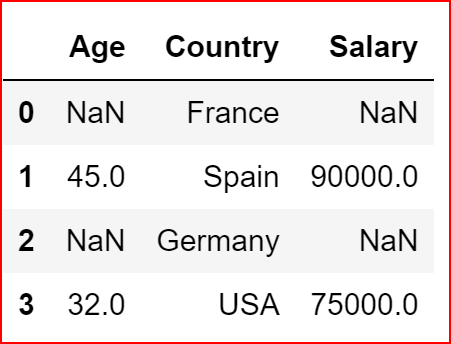
countryData
countryData

we will create the Imputer object and set a strategy for handling the missing values.

Different strategy available are mean, median and most_frequent

we then fit the imputter objects on the column where we want to handle the missing values

After fitting the data we transform the data from the dataframe

imp = Imputer(missing_values='NaN', strategy='mean', axis=0)
imp.fit(countryData.iloc[:,[0,2]])
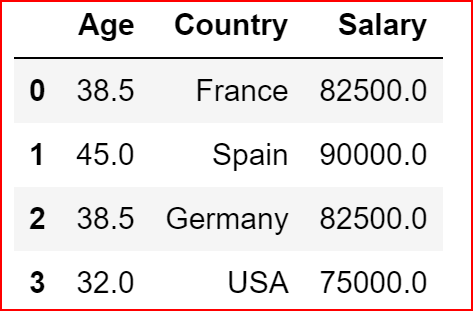
countryData.iloc[:,[0,2]]=imp.transform(countryData.iloc[:,[0,2]])
countryData
Imputing the missing data with mean values for the columns Age and Salary

Using replace method

If we want to replace a value in the dataframe with one another value then we can use replace method.

we will use the same dataframe countryData

countryData = pd.DataFrame({"Country":["France","Spain", "Germany", "USA"], "Age":[np.nan,45,np.nan,32], "Salary":[np.nan,90000,np.nan,75000]})
countryData
countryData

We will replace NaN values for Age couln with a 40

countryData.replace({'Age':np.NAN},40 )
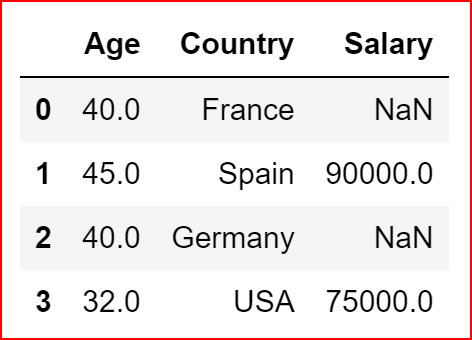
replacing NaN in Age column with a value of 40
Data Science
Python
Imputter
Handling Missing Values
Recommended from ReadMedium