
Node.js app in the real world : comments, documentation, testing
This is Part 4 of a 5-part series.
Part 0 was the introduction, Part 1 was about structuring your application and coding style, Part 2 was about persisting our domain, setting up the HTTP interface. Part 3 was about authentication, access control and error handling. Now let’s talk about commenting, documenting and testing our REST API written in JavaScript under Node.js with a Koa server, a Mongodb database and the Mongoose ODM. We’ll also see how to write CLI commands to use our API services.

How to comment code and create useful documentation ?
I favor minimal code comments as I prefer expressive code in itself (through variable and function names). But I have no hesitation using JSDoc tags extensively. Here’s our CreateUser app service with JSDoc :
src/app/user/create.js
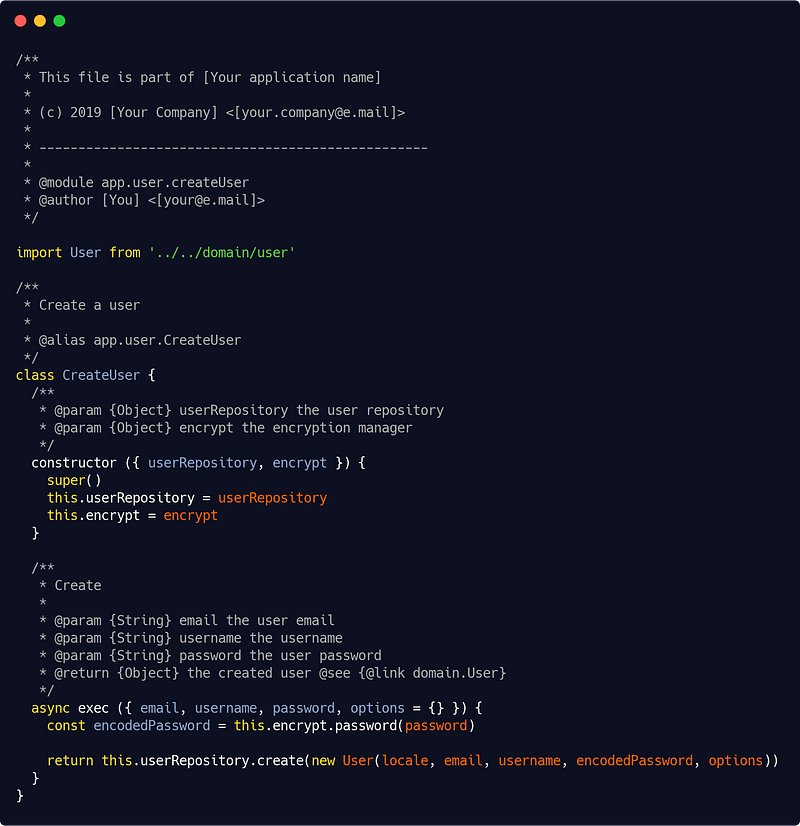
Yes, it is verbose and some will hate this, but if you discipline yourself doing that then you can generate thorough and consistent documentation with one line :
jsdoc --configure .jsdoc.jsonAnd here’s my .jsdoc.json configuration file :
{
  "source": {
    "include": ["src", "README.md"],
    "includePattern": "\\.js$"
  },
  "plugins": [
    "plugins/markdown"
  ],
  "templates": {
    "referenceTitle": "Your application name vX.X.X",
    "collapse": false,
    "disableSort": false
  },
  "opts": {
    "destination": "./docs/",
    "encoding": "utf8",
    "private": true,
    "recurse": true,
    "template": "./node_modules/[your-favorite-template]"
  }
}
As for documenting the routes, I use apiDoc, so a route will be annotated like this :
src/interfaces/http/routes/manageUser.js
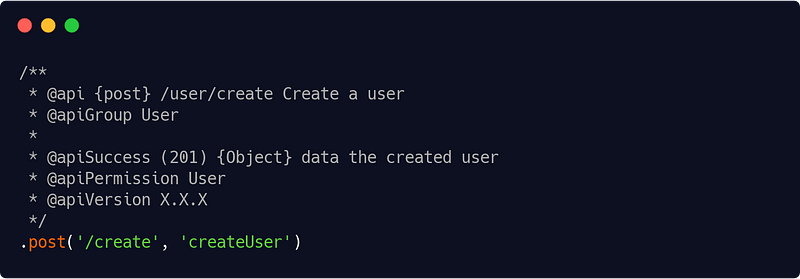
Then the one-liner :
apidoc -i src/interfaces/http/routes/ -o ./docs/routeswill generate nice and tidy documentation for your API.
That’s really all. Feel free to look at JSDoc and apiDoc own documentations for further informations, otherwise you can safely follow the patterns given above in the examples.
How to aim at 100% unit test coverage ?
Testing is tedious. But testing is beyond mandatory. Both unit and integration tests.
Test Driven Design (TDD) is an interesting approach, but even without going down that route, you should write lots of tests and aim at 100% code coverage (which, incidentally, would not mean that your code is failproof, but you’ll get close).
So pick up the test suite and tools of your liking — in what follows I’ll use the test framework Mocha, the Chai assertion library, Sinon.JS for stubs (and spies if you need them, and you will for testing events for instance), Supertest for integration tests and finally Istanbul for code coverage.
Once everything is setup, you’ll add those scripts in your package.json :
"test": "npm run test:unit && npm run test:int",
"test:unit": "NODE_PATH=. NODE_ENV=test mocha --require @babel/register --opts test/mocha.opts.unit",
"test:int": "NODE_PATH=. NODE_ENV=test mocha --require @babel/register --opts test/mocha.opts.int",
"coverage": "NODE_PATH=. NODE_ENV=test nyc mocha --require @babel/register --opts test/mocha.opts.unit"
Unit tests
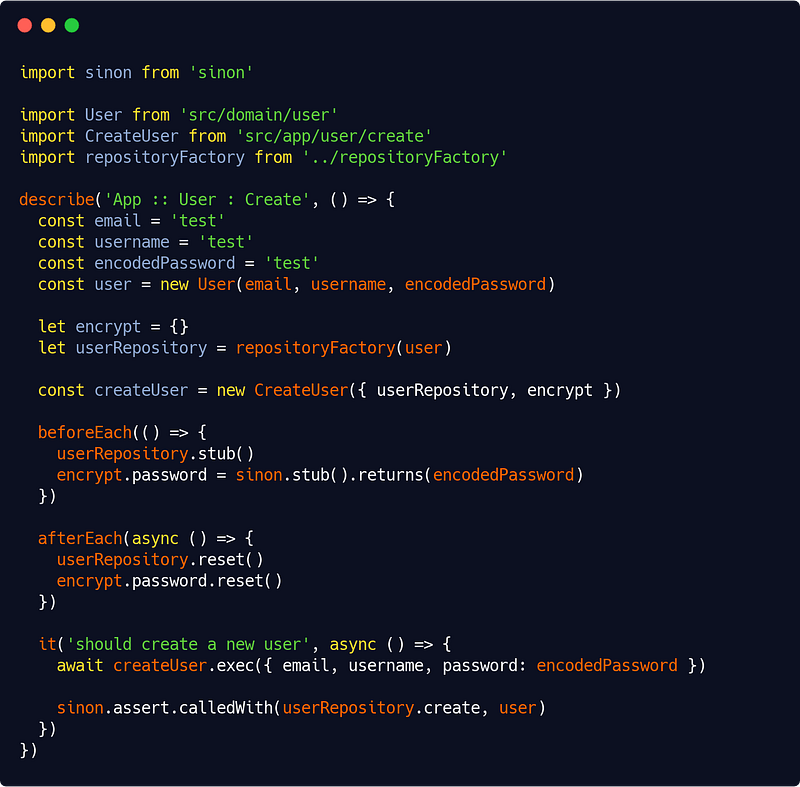
And then you have to write your tests. Here’s the unit test for the CreateUser service for instance :
test/unit/app/user/createUser.spec.js
(By the way, they are stripped above, but you should lightly — the header is enough — comment your tests too.)
The test is pretty straightforward again : We are using Sinon.JS to assert our stubbed userRepository.create() function is called. This is a unit test, so we are not testing the encryption here.
But we did use a helper function, repositoryFactory() :
test/unit/app/repositoryFactory.js
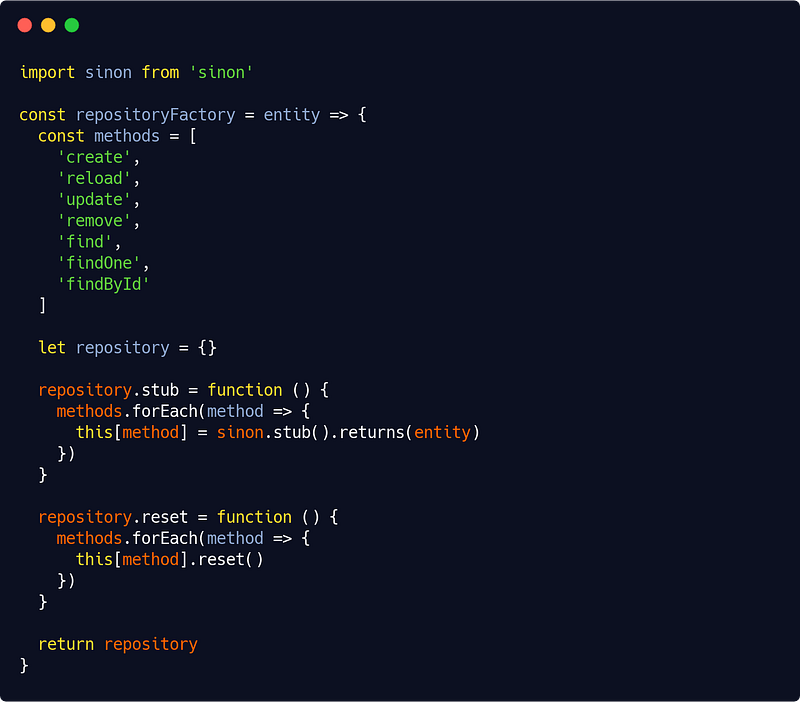
which is creating the stubs for our repository (add in what functions you have put there).
Most of your tests will look like the one above. I repeat : having used dependency injection throughout your projet will vastly facilitate and speed up your test-writing process. You just need to stub the dependencies.
For regular functions (like the ones you wrote in the domain layer) it will be even simpler. Here’s an example :
test/unit/domain/user.js
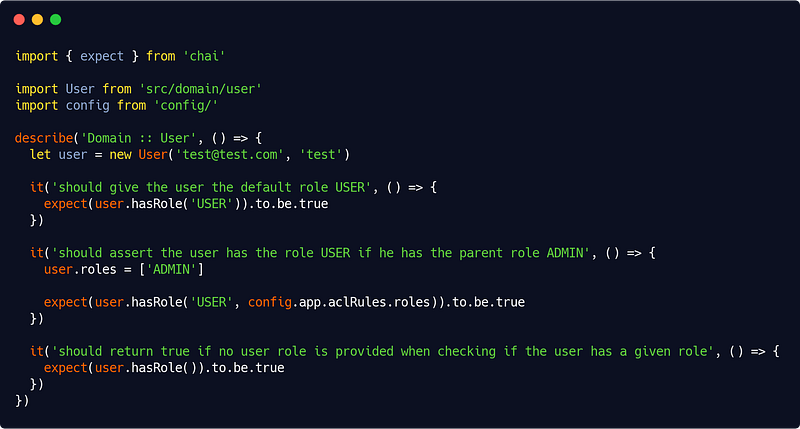
(provided, of course, that here your role hierachy is defined in the config.app.aclRules object.)
It’s up to you now.
How many unit tests should you write ? The answer is : as many as needed to reach 100% code coverage, and more for edge cases ! Don’t be afraid if your typical (non trivial) application total number of unit tests is in the order of several hundreds. It is perfectly normal, and healthy (but, yes, requires some work) !
Integration tests
They are those that will actually test your application processes, tying up layers together.
So a typical integration test file will look like this :
test/int/manageUser.js
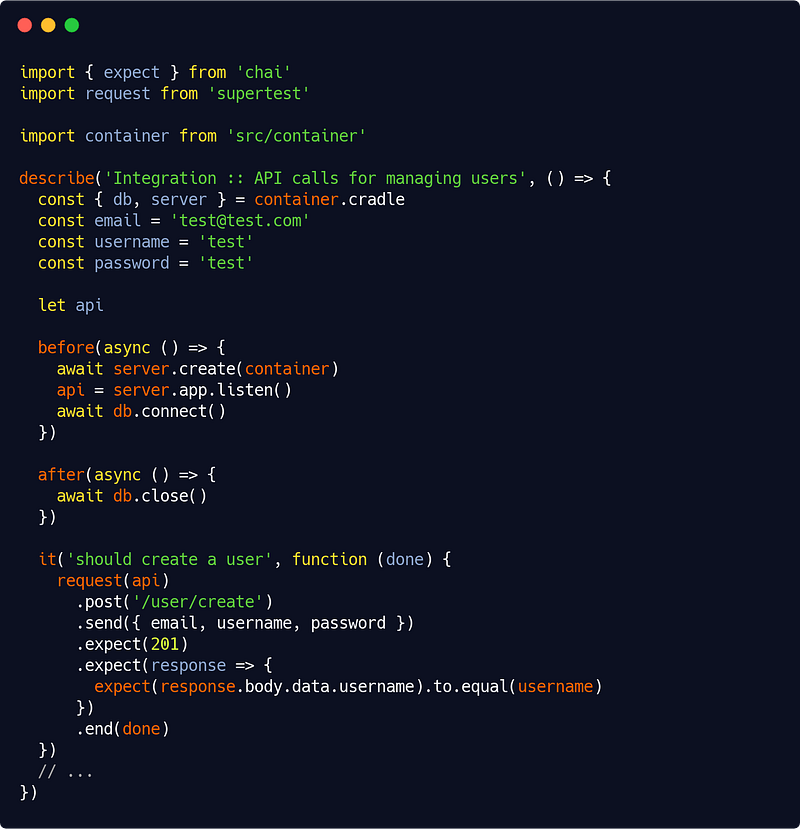
Nothing fancy, we are using our db and server services (see Part 2) and the Supertest library (the request() function) to call our routes. Then we assert what needs to be (by the way, don’t confuse expect() from Supertest and expect() from Chai).
And so on for other integration tests.
Here too, don’t be afraid to write a lot of integration tests : more than 150 doesn’t seem on overkill for a typical (non trivial) application.
How to use some CLI commands using your app services ?
There are other ways to consume our application layer services than through the HTTP interface. One obvious extra usage is to write CLI commands. For this I’m using the Commander command-line framework as well as the Enquirer library for user-friendly prompts. As usual, there are other tools for you to choose if you want.
Now a typical command is basically just a dependency-free object :
src/interfaces/console/commands/user/createUser.js
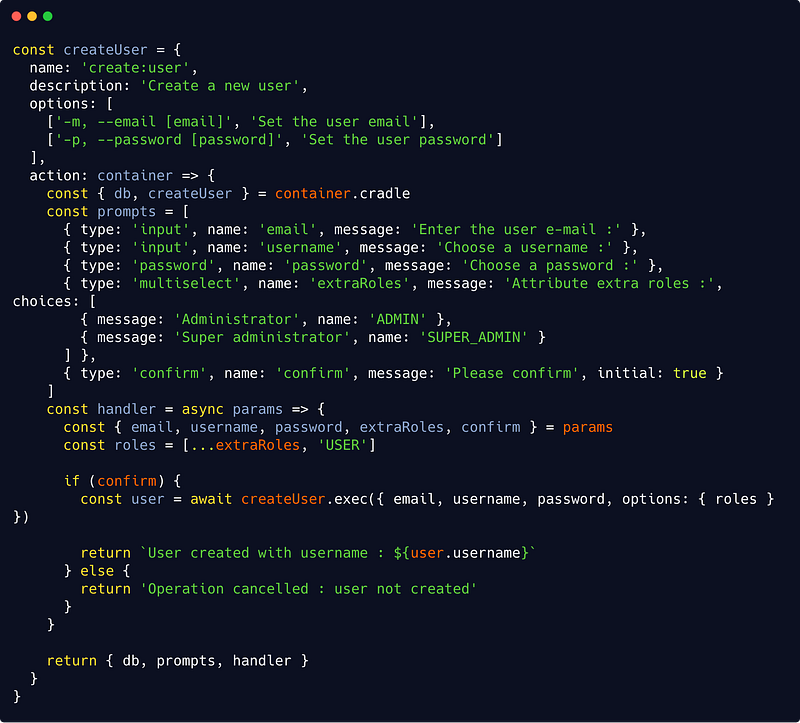
Note that the above is a very simplified version : we should add validators (to check email unicity or password strength) and maybe some hints (notably on how to choose extra roles).
Also notice that we are fetching our db service from our container passed as parameter in the action() function : this is because when our command gets executed, we will need a database. More on this right below.
This setup requires two generic files, one for adding commands, another to execute them (requiring Enquirer), as well as an index file requiring Commander to start our CLI program. Let’s see them :
src/interfaces/console/commands/add.js
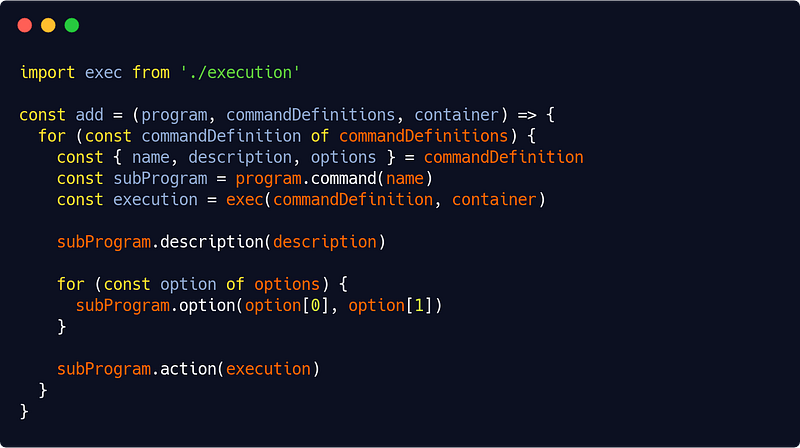
The code is, again, straightforward : we fetch our command definition (see above) and add a sub-program to our main Commander program.
src/interfaces/console/commands/execution.js
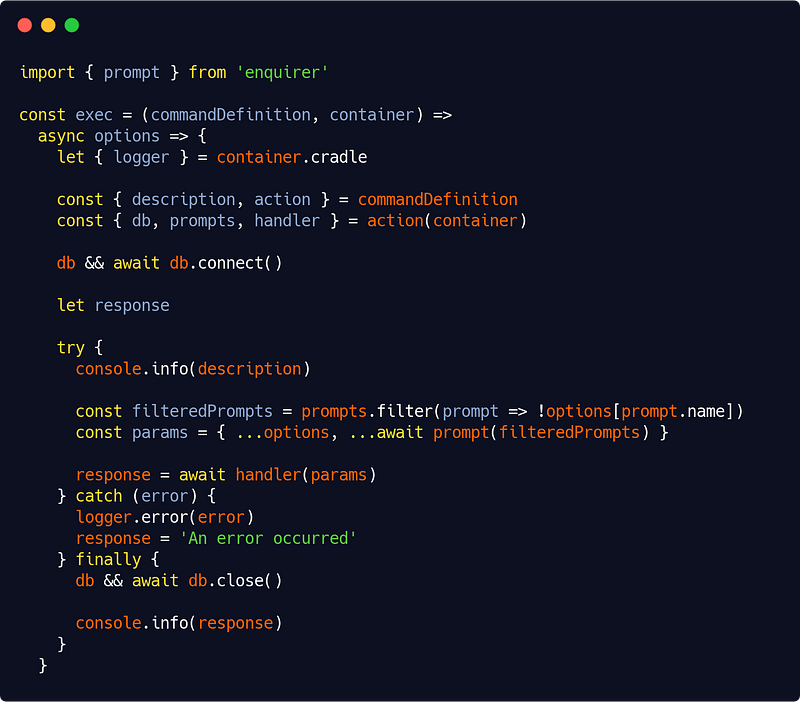
The execution function logs some stuff and uses the prompts and handler from our command definition, connecting to the database only if needed. The user can define some parameters either as command options or when prompted, so we have to merge the two before execution. Given those remarks, the above code should here too be self-explanatory.
Finally our index file ties everything up :
src/interfaces/console/commands/index.js
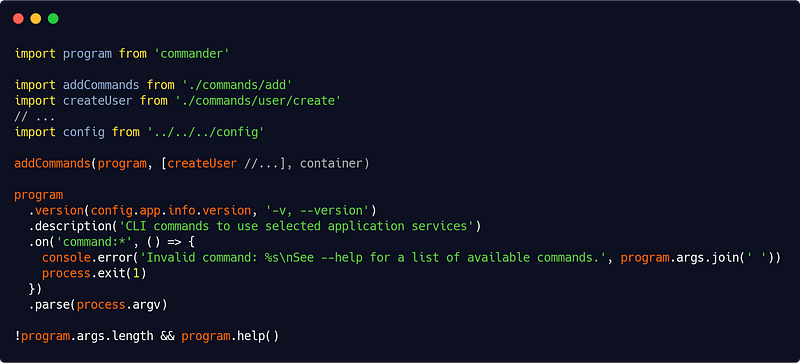
You can add more commands easily. Commander allows us to display help if no command is provided and an error in case of a wrong command.
The last step is to run the program by placing in a bin/ folder at your project root a file of your chosen name (like myApp-cli) with a single line :
require('../dist/interfaces/console/')and make that file executable so that you’ll run your app by simply typing in your console :
./bin/myApp-cli ...Of course don’t forget to build your app first by running :
babel src -d distThis way we have a highly decoupled CLI program too. Nice.
Part 5 will wrap up the series with how to deploy in production, implement useful decorators and… go beyond infinity !


