avatarEllane W

Free AI web copilot to create summaries, insights and extended knowledge, download it at here

3923

Abstract

top-down approach. You can access my Obsidian calendar templates <a href="https://erpub.notion.site/Productivity-c3354178231a40de967fc87058b034dc">here</a>.</p><figure id="05b1"><img src="https://cdn-images-1.readmedium.com/v2/resize:fit:800/1*qtRemQt608CfvigZyGgBNQ.png"><figcaption>Quarter, Month, Week and Daily pages, all hyperlinked in Obsidian. Screenshot by Author.</figcaption></figure><p id="c072">As wonderful as Obsidian is, and as clever as my interlinked MOCs and calendar pages are, they can’t do all the heavy lifting on their own.</p><p id="f5b9">This is where Apple’s own Reminders and Calendar apps slip in and tie everything together into a very neat, flexible bundle.</p><p id="412c"><a href="https://jonmitchell.net/blog/reminders">Jon Mitchell</a> nearly blew my mind when he described his journey from Omnifocus to Reminders. If you’re going to listen to anyone tell you how Reminders can help you keep track of your work and personal life, let it be a well-written former Omnifocus guru.</p><p id="7539">I use Reminders for time, location, and person-based tasks. One of my favorite uses is to keep a list of things I need to discuss with a particular person, and having that list automatically pop-up when I’m next messaging or talking to them on my phone.</p><p id="12be">Obsidian is my life planner, <a href="https://www.animalz.co/blog/idea-farm/">idea garden</a> and Zettelkasten. Reminders and Calendar make sure that the things I need to chase, chase me first. They’re organised to pop up and say “here I am,” <i>before</i> they’re needed, or <a href="https://readmedium.com/bending-the-curves-of-productivity-25edb268672f">just in time</a> — whichever works best.</p><p id="94aa">Apple’s Calendar app shows Reminders on the day they’re due, but what about undated Reminders? BusyCal is a good option for people who want to see both dates and dated/undated tasks in one app. That’s nothing you can’t do by flicking back and forth between Calendar and Reminders, but it’s good to know it’s possible to merge the two.</p><h2 id="becd">It’s your car; drive it where you want to go</h2><p id="7bbe">Task management is just one aspect of my app-agnostic productivity system. There’s a lot more besides. It’s adaptable and constantly developing, and I think that’s what I love the most about it.</p><p id="d3d8">This is what I’m using the alchemy of Obsidian, Reminders and Calendar for at the moment:</p><ul><li>Planning goals and activities from year, quarter, month, week, and daily perspectives (Obsidian, Calendar)</li><li>Tracking projects and tasks as a solopreneur (Obsidian, Reminders)</li><li>Turning emails into tasks (Obsidian, Reminders)</li><li>Tracking subscriptions and things like passport renewal dates (Reminders)</li><li>Viewing (and feeling in control of — yay!) master dashboards of everything I’m responsible for, with direct clickable links to associated files both on my computer and relevant websites (Obsidian)</li><li>Maintaining an organised collection point for information relating to topics that interest me (Obsidian)</li><li>Checklists for things like to-read, to-watch, gift ideas, things I’m waiting for (Obsidian)</li><li>A place where literature notes, incubating ideas and permanent notes (Zettelkasten) are easily added to and retrievable on a paragraph by paragraph basis (Obsidian)</li><li>Writing Medium stories while keeping track of versions and drafts (Obsidian)</li></ul><p id="4ecd">Before finding Obsidian I was tracking projects and tasks in Things, and while it was lovely to look at and worked well, I couldn’t seem to stick with it.</p><p id="f508">Anyway, as a plain text enthusiast I wanted to know if I could create a system that put me <i>completely</i> in charge of my data. A few YouTube videos and plugins later, that’s exactly what I’ve been doing for the past three months.</p><p id="ea56">The heart of my data lives on my hard drive, is

Options

backed up and synced to three different Cloud services, and can be manipulated by any number of plain text reading apps.</p><p id="13b0">I’m loving the freedom of breaking down the walls proprietary apps insist on building, and taking up the role of head cultivator in my productivity garden.</p><p id="a46f">Somehow, being the boss is quieting down my obsession with finding the next shiny task management object. I’m on a strict look-but-don’t-touch diet, and it’s working for me so far!</p><div id="b8e1" class="link-block"> <a href="https://readmedium.com/i-was-a-task-management-app-addict-92396f23ece5"> <div> <div> <h2>I Was a Task Management App Addict</h2> <div><h3>Four Truths That Helped Me to Break Free</h3></div> <div><p>medium.com</p></div> </div> <div> <div style="background-image: url(https://miro.readmedium.com/v2/resize:fit:320/0*xoRbIexmeFFl_cWx)"></div> </div> </div> </a> </div><h2 id="b25d">There is more than one path to productivity freedom</h2><p id="8331">The majority of people seem to use dedicated task management apps happily and productively with no sign of app-addiction or shiny object syndrome rising up to take over their every waking moment. I spent a long time wishing I could be like those people, and falling down every time I tried to copy their methods.</p><p id="7d2c">With age has come a small dose of wisdom, I’m happy to say! No more taking on other people’s systems without first tailor making them to fit my unique frame.</p><p id="0da1">The combination of Obsidian, Reminders and Calendar is the bespoke path to simplicity and autonomy my somewhat obsessive personality needed. Your path may look very different, and that’s the beauty of being free to choose what resonates over what doesn’t.</p><p id="22a4">Interestingly, while this system seems more hands-on, the few minutes it takes to gather and process information compares very well to the maintenance required to run other task management apps and systems.</p><p id="4a03">If you’re struggling with app-addiction or shiny object syndrome and you have a strong desire to be free, I hope you’ve discovered an idea or two that sparks something in you. If not, don’t worry — it just means that either the timing isn’t right or there’s a different road waiting up ahead.</p><p id="9d67">The grandma in me can’t resist leaving you with one last piece of productivity advice, from a series of <a href="https://readmedium.com/10-deceptively-simple-productivity-tips-1648768229e8">ten tips</a> I put together earlier this year.</p><blockquote id="3bad"><p>Being productive is a worthy means, but not a fruitful end. Wanting to do a thing more efficiently is good, but when you strip everything external away, what drives you to keep on the path?</p></blockquote><p id="fa58">For advice and systems like this one to be truly meaningful rather than superficially helpful, you’ll first need to discover your deepest “why”. Take the time to reflect and see if the prize at the end of the path you’re following is one you’ll be happy to live with.</p><p id="607c"><i>More Mac plain text productivity:</i></p><div id="1e46" class="link-block"> <a href="https://readmedium.com/3-vital-mac-apps-in-my-plain-text-productivity-system-d92ebb095728"> <div> <div> <h2>3 Vital Mac Apps in My Plain Text Productivity System</h2> <div><h3>How Drafts, Obsidian and Hook bring it all together</h3></div> <div><p>medium.com</p></div> </div> <div> <div style="background-image: url(https://miro.readmedium.com/v2/resize:fit:320/0*XIVmEzEDwNvQAGtX)"></div> </div> </div> </a> </div></article></body>

My Favourite Mac Task Management Solution Isn’t One App, It’s Three

How I run my life in Obsidian and two stock Apple apps
Part of my dynamic workstation. Photo by Author.

If you’re in the habit of trying out every task management app available for the Mac just to see what you’re missing out on, you’re not doing yourself any favors.

After years of trading a balanced and productive life for the fleeting thrill of a new perspective, I’d finally had enough. It was time to walk away from toxic productivity and opt for a simpler approach.

Where do you keep your brain?

If you don’t have a photographic memory, you’re going to need a system to record information, thoughts and insights.

My first, God-given brain, lives in my head. My second brain exists as a large number of plain text files in a folder that syncs between all my Apple devices. As of this moment, all 1,364 items only take up 58.6 MB, including over 30 MB of jpeg attachments.

Obsidian is the interface I’m currently using to interact with those files. Plain text (or, in this case, Markdown) is a joy I didn’t know I was missing! I love how it centres me in the peaceful, minimalistic vibe of the analog productivity system I used as a design student.

I should point out that even as a plain text convert I still enjoy using proprietary apps for lots of things. I create databases in Notion, graphics in Concepts and Affinity Designer, and I use Drafts, 1Writer, Noteshelf and GoodNotes extensively on my iPad Pro and iPhone.

What I don’t do is to keep vital information solely in those apps. It makes me shudder to hear people refer to one app or another as the one they couldn’t run their business without. That’s a lot of trust to place in something outside your control!

You might be better off using the right tool for the job while remaining autonomous over your most important data.

What to do, and when

That’s the heart of task management, right? Knowing what to do, and when to do it.

I keep pages called Maps of Content (MOCs) in Obsidian, which show me very clearly what projects and areas of responsibility are on the go and need regular attention. These pages naturally breed the tasks needed to fulfill their (sometimes) lofty goals.
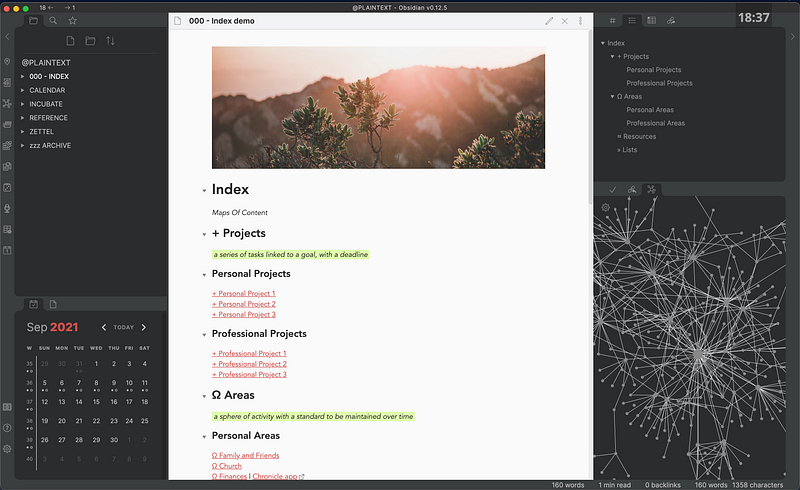
Index page, showing sample Maps of Content. Screenshot by Author.

Each MOC is listed on a master page I’ve named Index and their organisational structure is inspired by Tiago Forte’s PARA system.
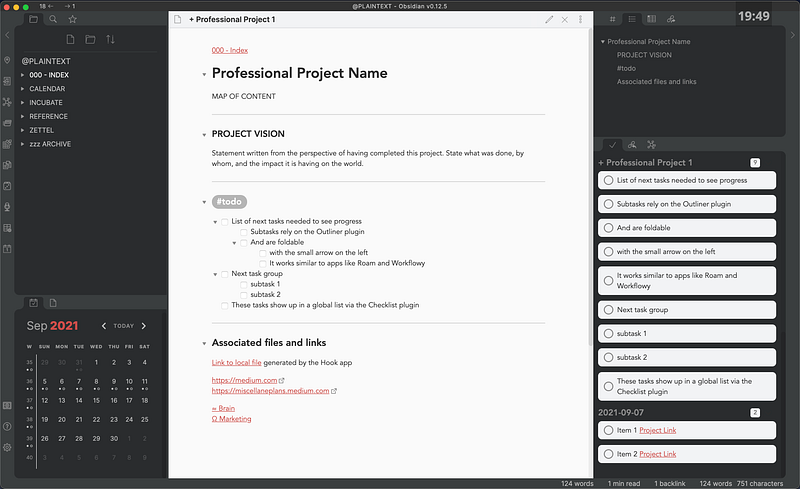
Sample Map of Content for a project that is listed on the Index page. All tasks appear in the Checklist plugin—see right hand panel. Screenshot by Author.

I use the Periodic Notes plugin in Obsidian, and have expanded it to include fully linked year, quarter, month, week and daily planning pages. The simple but stunning Momentum planner was a great source of inspiration for the way I navigate this top-down approach. You can access my Obsidian calendar templates here.
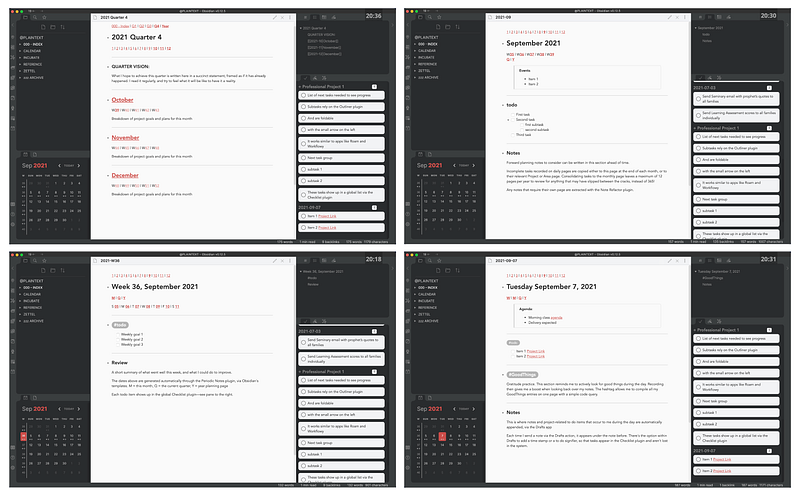
Quarter, Month, Week and Daily pages, all hyperlinked in Obsidian. Screenshot by Author.

As wonderful as Obsidian is, and as clever as my interlinked MOCs and calendar pages are, they can’t do all the heavy lifting on their own.

This is where Apple’s own Reminders and Calendar apps slip in and tie everything together into a very neat, flexible bundle.

Jon Mitchell nearly blew my mind when he described his journey from Omnifocus to Reminders. If you’re going to listen to anyone tell you how Reminders can help you keep track of your work and personal life, let it be a well-written former Omnifocus guru.

I use Reminders for time, location, and person-based tasks. One of my favorite uses is to keep a list of things I need to discuss with a particular person, and having that list automatically pop-up when I’m next messaging or talking to them on my phone.

Obsidian is my life planner, idea garden and Zettelkasten. Reminders and Calendar make sure that the things I need to chase, chase me first. They’re organised to pop up and say “here I am,” before they’re needed, or just in time — whichever works best.

Apple’s Calendar app shows Reminders on the day they’re due, but what about undated Reminders? BusyCal is a good option for people who want to see both dates and dated/undated tasks in one app. That’s nothing you can’t do by flicking back and forth between Calendar and Reminders, but it’s good to know it’s possible to merge the two.

It’s your car; drive it where you want to go

Task management is just one aspect of my app-agnostic productivity system. There’s a lot more besides. It’s adaptable and constantly developing, and I think that’s what I love the most about it.

This is what I’m using the alchemy of Obsidian, Reminders and Calendar for at the moment:

  • Planning goals and activities from year, quarter, month, week, and daily perspectives (Obsidian, Calendar)
  • Tracking projects and tasks as a solopreneur (Obsidian, Reminders)
  • Turning emails into tasks (Obsidian, Reminders)
  • Tracking subscriptions and things like passport renewal dates (Reminders)
  • Viewing (and feeling in control of — yay!) master dashboards of everything I’m responsible for, with direct clickable links to associated files both on my computer and relevant websites (Obsidian)
  • Maintaining an organised collection point for information relating to topics that interest me (Obsidian)
  • Checklists for things like to-read, to-watch, gift ideas, things I’m waiting for (Obsidian)
  • A place where literature notes, incubating ideas and permanent notes (Zettelkasten) are easily added to and retrievable on a paragraph by paragraph basis (Obsidian)
  • Writing Medium stories while keeping track of versions and drafts (Obsidian)

Before finding Obsidian I was tracking projects and tasks in Things, and while it was lovely to look at and worked well, I couldn’t seem to stick with it.

Anyway, as a plain text enthusiast I wanted to know if I could create a system that put me completely in charge of my data. A few YouTube videos and plugins later, that’s exactly what I’ve been doing for the past three months.

The heart of my data lives on my hard drive, is backed up and synced to three different Cloud services, and can be manipulated by any number of plain text reading apps.

I’m loving the freedom of breaking down the walls proprietary apps insist on building, and taking up the role of head cultivator in my productivity garden.

Somehow, being the boss is quieting down my obsession with finding the next shiny task management object. I’m on a strict look-but-don’t-touch diet, and it’s working for me so far!

There is more than one path to productivity freedom

The majority of people seem to use dedicated task management apps happily and productively with no sign of app-addiction or shiny object syndrome rising up to take over their every waking moment. I spent a long time wishing I could be like those people, and falling down every time I tried to copy their methods.

With age has come a small dose of wisdom, I’m happy to say! No more taking on other people’s systems without first tailor making them to fit my unique frame.

The combination of Obsidian, Reminders and Calendar is the bespoke path to simplicity and autonomy my somewhat obsessive personality needed. Your path may look very different, and that’s the beauty of being free to choose what resonates over what doesn’t.

Interestingly, while this system seems more hands-on, the few minutes it takes to gather and process information compares very well to the maintenance required to run other task management apps and systems.

If you’re struggling with app-addiction or shiny object syndrome and you have a strong desire to be free, I hope you’ve discovered an idea or two that sparks something in you. If not, don’t worry — it just means that either the timing isn’t right or there’s a different road waiting up ahead.

The grandma in me can’t resist leaving you with one last piece of productivity advice, from a series of ten tips I put together earlier this year.

Being productive is a worthy means, but not a fruitful end. Wanting to do a thing more efficiently is good, but when you strip everything external away, what drives you to keep on the path?

For advice and systems like this one to be truly meaningful rather than superficially helpful, you’ll first need to discover your deepest “why”. Take the time to reflect and see if the prize at the end of the path you’re following is one you’ll be happy to live with.

More Mac plain text productivity:

Productivity
Technology
Apple
Self Improvement
Minimalism
Recommended from ReadMedium