JavaScript Day 30— Mastering JavaScript Basics: A Comprehensive Guide for Interview Preparation
100 Days of JavaScript Interview Prep: A Beginner’s Journey
How to Make a GET Request with Fetch API in JavaScript?
Welcome to Day 30–100 Days of JavaScript Interview Prep: A Beginner’s Journey with Web API
Embarking on a 100-day adventure focused on learning, practice, and growth sounds like an incredibly rewarding journey.
DAY 30 (April 21st, 2024) — Fetch API (GET) Request.
How to Make a GET Request with Fetch API in JavaScript?
Answer
Let’s assume that we are making a request to an external API to get some posts data from a server.
We will use JsonPlaceholder website (Free fake and reliable API for testing and prototyping).
Below is the url for our JsonPlaceholder website
Getting Started
Let’s start with simple API “https://jsonplaceholder.typicode.com/posts”
Tip : By default, In Fetch API — METHOD is always GET
Before we start, let’s first understand the key parameters of FETCH API
Key Fetch Parameters are as below
1. Method —
The request method, e.g., "GET", "POST". The default is "GET".
Note that the Origin header is not set on Fetch requests with a method of HEAD or GET.
2. Resource —
It defines the resource that you wish to fetch.
It can either be:
- A string or any other object with a stringifier — including a
URLobject — that provides the URL of the resource you want to fetch. - A
Requestobject.
3. Options (optional)
An object containing any custom settings you want to apply to the request.
Example of options
body , cache , credentials, headers, integrity, keepalive , method, mode, priority, redirect, referrer, referrerPolicy or signal
4. Return value
A Promise that resolves to a Response object.
5. Exceptions —
Network errors, rejection and syntax errors etc
Now let’s see the Simple Syntax of Fetch
fetch(resource) // resources we discussed above
fetch(resource, options) // options we mentioned above
To know more about in detail for fetch interface or parameters, please follow below URL's for complete detail of information.
- GET — https://developer.mozilla.org/en-US/docs/Web/HTTP/Methods/GET
- HTTP (Hypertext Transfer Protocol (HTTP) — https://developer.mozilla.org/en-US/docs/Web/HTTP
- Request object — https://developer.mozilla.org/en-US/docs/Web/API/Request
- Response — https://developer.mozilla.org/en-US/docs/Web/API/Response
- Headers — https://developer.mozilla.org/en-US/docs/Web/API/Headers
Getting Started with Fetch API
STEP 1
fetch() with the endpoint URL (resource) as the argument.
fetch('https://jsonplaceholder.typicode.com/posts');STEP 2 The response body for this endpoint will be information about a blog post:
fetch('https://jsonplaceholder.typicode.com/posts')
  .then(response => {
    if (!response.ok) {
      throw new Error('Network response was not ok');
    }
    return response.json(); // Parse the JSON data
  })
  .then(data => {
    console.log(data);
  })
  .catch(error => {
    console.error('Fetch error:', error);
  });
We are Using Live Playground for above code, and please find URL as below to use the same playground
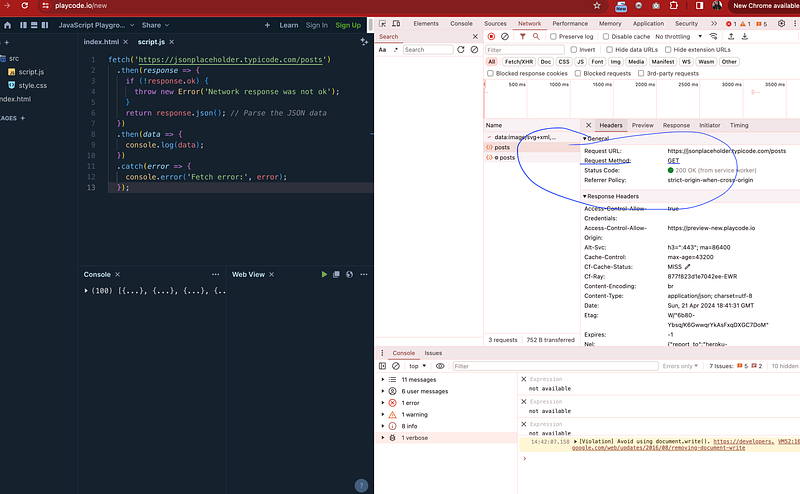
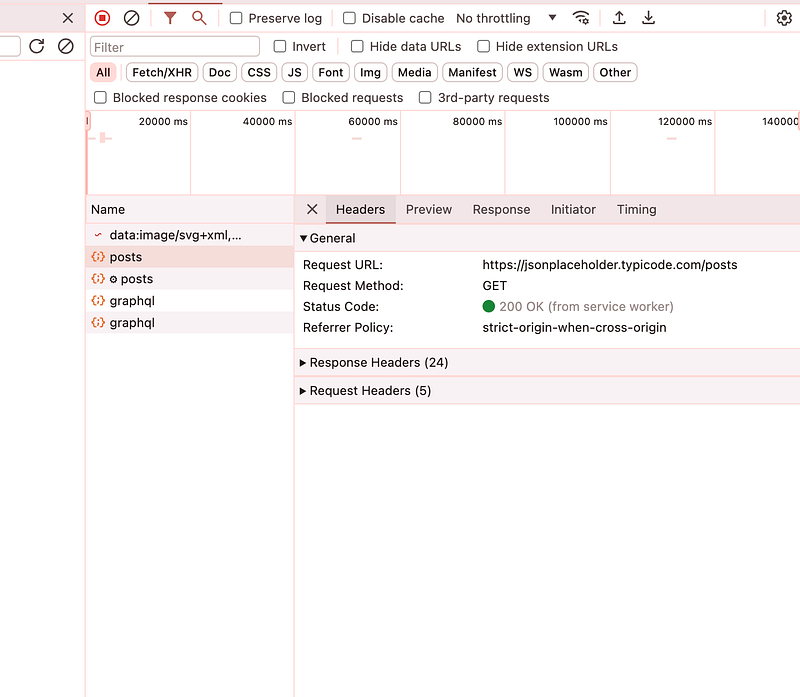
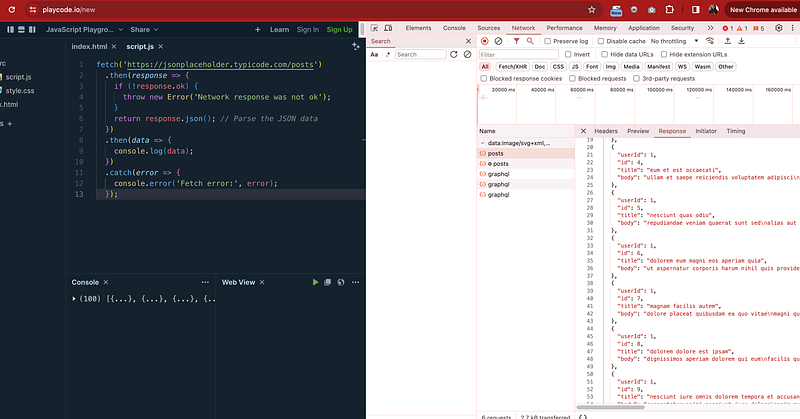
STEP 3 — Open the DevTools and click on Network tab
You can see the call in network with all parameters and options
STEP 4 — Handling the SUCCESS Response
Conclusion —
- Fetch API returns a promise.
2. To handle the promise, we need to nest a then() method to handle the resolution.
3. The data returned from the API is not usually in a readable or usable form.
4. We will need then to convert the data to a form which our JavaScript can operate with.
5. We used the json() method to return the JSON readable response so that we can use for further processing.
Please find the complete example again with all commenting for better understanding.
fetch('https://jsonplaceholder.typicode.com/posts')
  .then(response => { // response handling
    if (!response.ok) {
      throw new Error('Network response was not ok');
    }
    return response.json();
// Parse the JSON data // converted into json and return
  })
  .then(data => {
    console.log(data); // json response for further processing
  })
  .catch(error => {
    console.error('Fetch error:', error); // exception handling
  });
How FETCH API handle fail request ?
When it comes to handling failures in the Fetch API, developers typically implement error handling mechanisms to deal with various scenarios. Here’s how failures can be handled with some example.
A fetch() promise only rejects when the request fails.
a) Network Errors
Network errors can occur due to reasons such as loss of internet connection or server unavailability.
Fetch API will reject the Promise returned by the fetch() function.
With help of
b) HTTP Errors-
If the network request is successful, the server may respond with an error status code (e.g., 404 Not Found, 500 Internal Server Error).
Example Usage with Catch for handing all our expectations
fetch('https://jsonplaceholder.typicode.com/posts')
  .then(response => { // response handling
    if (!response.ok) {
//  NETWORK ERROR Example
      throw new Error('Network response was not ok');
    }
    return response.json();
// Parse the JSON data // converted into json and return
  })
  .then(data => {
    console.log(data); // json response for further processing
  })
  .catch(error => {
    //  HTTP ERROR Example
    console.error('Fetch error:', error); // exception handling
  });
Tomorrow we will learn more about fetch API with POST method examples.
Happy Coding and Stay Tuned :)
Kind is cool !!!
Share knowledge to gain knowledge !!!!
Be kind and treat people with respect !!
If you find my blog helpful, then please subscribe, claps and follow to support :)