JavaScript Day 29 — Mastering JavaScript Basics: A Comprehensive Guide for Interview Preparation
100 Days of JavaScript Interview Prep: A Beginner’s Journey
Welcome to Day 29–100 Days of JavaScript Interview Prep: A Beginner’s Journey with Web API
Embarking on a 100-day adventure focused on learning, practice, and growth sounds like an incredibly rewarding journey.
DAY 29 (April 20th, 2024) — What is Fetch API in JavaScript with example?
Answer
The Fetch API provides an interface for fetching resources (including across the network).
- It is a more powerful and flexible replacement for
XMLHttpRequest. - It is a modern way for fetching the data across the network.
- This feature is part of web-workers API.
- It is an ECMAScript6 (ES6) feature.
NOTE — fetch()is not supported in Internet Explorer.
Let’s understand a little bit first about web workers before we start fetch API with some example.
Web Workers makes it possible to run a script operation in a background thread separate from the main execution thread of a web application.
It provide a way to run scripts in the background, separate from the main execution thread of a web application.
Some of the Web Worker Functions (a subset) that are common to all workers and to the main thread (from WindowOrWorkerGlobalScope)
Here is the complete list for those functions, and fetch is one of the common to all and to the main thread.
How FETCH works
fetch() —Thefetch()method used to fetch a resource.
Fetch(URL) — the URL of the resource you want to fetch.
Optionally, we can include an object as the second argument, where we can specify various settings such as the HTTP method, headers, and more.
2. Return value (Response)
a) It represents the response to a request.
b) And it returns a promise that resolves to a response object.
Basic Fetch API
fetch('https://jsonplaceholder.typicode.com/todos/2')
  .then(response => {
    if (!response.ok) {
      throw new Error('Network response was not ok');
    }
    return response.json(); // Parse the JSON data
  })
  .then(data => {
    console.log(data);
  })
  .catch(error => {
    console.error('Fetch error:', error);
  });
We will use below live playground today to run our sample code.
You can run on existing any JavaScript project running on your local port or any cloud real world where your application is deployed.
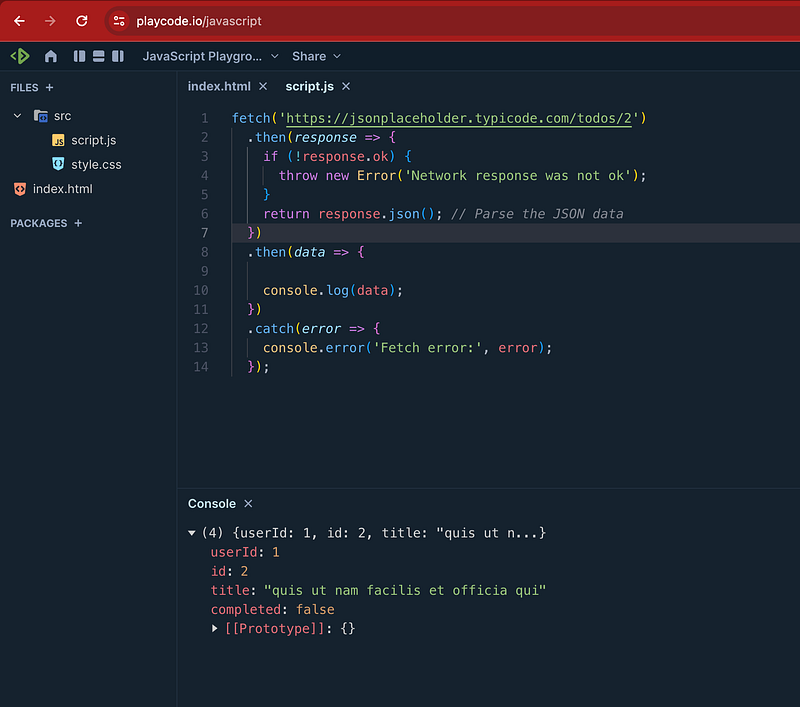
Tomorrow we will learn more about fetch API with GET and POST method examples.
Happy Coding and Stay Tuned :)
Kind is cool !!!
Share knowledge to gain knowledge !!!!
Be kind and treat people with respect !!
If you find my blog helpful, then please subscribe, claps and follow to support :)