avatarTeri Radichel

Free AI web copilot to create summaries, insights and extended knowledge, download it at here

6486

Abstract

</div> </div> </a> </div><div id="3be3" class="link-block"> <a href="https://readmedium.com/disable-ipv6-on-pfsense-e9e80fa656fb"> <div> <div> <h2>Disable IPv6 on PFSense</h2> <div><h3>If you don’t need IPv6 you can disable it to simplify network management</h3></div> <div><p>medium.com</p></div> </div> <div> <div style="background-image: url(https://miro.readmedium.com/v2/resize:fit:320/1*y2H8FV1vOGrAl2_fSAs_xg.png)"></div> </div> </div> </a> </div><p id="f504">What is interesting when I query security.ubuntu.com from my local network I get:</p><figure id="6a03"><img src="https://cdn-images-1.readmedium.com/v2/resize:fit:800/1*BXTEpL8CobYqchPk01kASw.png"><figcaption></figcaption></figure><p id="1707">Anyway I tried running the command again after opening the network excluding IPv6 and it seemed to work.</p><p id="6ad6">Then I run the command to install unzip again.</p><p id="2b30">Then the unzip command worked.</p><p id="6b27">Then I ran the next command from the documentation and I got this:</p><figure id="489f"><img src="https://cdn-images-1.readmedium.com/v2/resize:fit:800/1*qEzRfCSTV7N_AYkTVEX8qg.png"><figcaption></figcaption></figure><p id="03e1">Next I navigated into the aws/install directory and executed “install” and got this:</p><figure id="370a"><img src="https://cdn-images-1.readmedium.com/v2/resize:fit:800/1*A6LhwWfV0Uzn4Y9dshPUSg.png"><figcaption></figcaption></figure><p id="76ab">OK so I run that command and I get this:</p><figure id="bd52"><img src="https://cdn-images-1.readmedium.com/v2/resize:fit:800/1*ET_xrvK-h-fKhZR8kHB7GA.png"><figcaption></figcaption></figure><p id="bd2c">OK so then I try to run the apt-update command and hitting errors on security.ubuntu.com resolving to IPv6 so I update my hosts file:</p><div id="3103"><pre>sudo <span class="hljs-built_in">cd</span> /etc sudo vi hosts</pre></div><figure id="65db"><img src="https://cdn-images-1.readmedium.com/v2/resize:fit:800/1*Sdei8axqKGTTaVJpT3cOsA.png"><figcaption></figcaption></figure><p id="8cf8">Save the file</p><div id="f03b"><pre>:wq!</pre></div><p id="8467">test that the domain resolves to the IP I set:</p><figure id="0a1d"><img src="https://cdn-images-1.readmedium.com/v2/resize:fit:800/1*9eOwVhIfsyfT54ku2BNr_w.png"><figcaption></figcaption></figure><p id="ee1c">This should work:</p><figure id="6350"><img src="https://cdn-images-1.readmedium.com/v2/resize:fit:800/1*vGvWokgwM0B0wDS6j9Jtyg.png"><figcaption></figcaption></figure><figure id="b245"><img src="https://cdn-images-1.readmedium.com/v2/resize:fit:800/1*NxbLTUBZgwW2xI3tvnN4KQ.png"><figcaption></figcaption></figure><p id="9398">Except that I forgot to allow that IP on port 80 through my security group rules.</p><p id="968e">Then I got this:</p><figure id="1fb3"><img src="https://cdn-images-1.readmedium.com/v2/resize:fit:800/1*e46CN4jPHgwwNDUT8kRUiw.png"><figcaption></figcaption></figure><p id="9be0">Hmm. OK let’s perform the upgrade.</p><p id="b990">Interesting result:</p><figure id="0233"><img src="https://cdn-images-1.readmedium.com/v2/resize:fit:800/1*5GsYyJ3ns5MD-g8lApIeVg.png"><figcaption></figcaption></figure><p id="4480">Hit enter for OK and my session got disconnected…</p><p id="5128">And now I cannot log back in. Wait for a while…</p><p id="5eab">Nope. Tries to connect and immediately disconnects.</p><p id="0a36">Reboot.</p><p id="e203">Nope.</p><figure id="7aaf"><img src="https://cdn-images-1.readmedium.com/v2/resize:fit:800/1*vYLJc_u0Lup5_pRSzhDHGg.png"><figcaption></figcaption></figure><p id="dba8">Stop and restart. Well, I have to force stop.</p><p id="66a6">And at this point I see that my instance is trying to connect to what tend to be sketchy networks (Digital Ocean, Hurricane, Linode, and also Cloudflare which is not usually too sketchy but can be abused).</p><p id="c24c">Looks like this may be NTP traffic (port 123) but can’t know for sure without seeing the packet data. Looks like Ubuntu might not be configured to use the AWS NTP servers.</p><figure id="d604"><img src="https://cdn-images-1.readmedium.com/v2/resize:fit:800/1*5205-UzG-yXQDueZSgRD5w.png"><figcaption></figcaption></figure><p id="90ae">Yep, the ntp configuration points to ubuntu.pool.ntp.org instead of the AWS NTP Servers:</p><figure id="10f8"><img src="https://cdn-images-1.readmedium.com/v2/resize:fit:800/1*bxLthjEvbNN0X-eEEOxJig.png"><figcaption></figcaption></figure><p id="c467">Fix as described here with the chrony option.</p><div id="067f" class="link-block"> <a href="https://docs.aws.amazon.com/AWSEC2/latest/UserGuide/set-time.html"> <div> <div> <h2>Set the time for your Linux instance</h2> <div><h3>A consistent and accurate time reference is crucial for many server tasks and processes. Most system logs include a…</h3></div> <div><p>docs.aws.amazon.com</p></div> </div> <div> <div style="background-image: url(https://miro.readmedium.com/v2/resize:fit:320/0*j0wHx55uER4IN4FN)"></div> </div> </div> </a> </div><p id="ba3a">Now the traffic on port 23 goes to AWS.</p><figure id="eb7e"><img src="https://cdn-images-1.readmedium.com/v2/resize:fit:800/1*cjQl9Fzb8S8cXNwyqHRmug.png"><figcaption></figcaption></figure><p id="0bf8">After restarting my VM, I can connect to it again, but I still cannot run the AWS CLI.</p><p id="0886">…</p><p id="37b3">OK …back at it later and run sudo apt update again.</p><p id="f460">I ended up with an error that four packages were being held back. Had an issue with disk space so I deleted some files and cleared the trash. Got to the last package and getting this error:</p><div id="f28d"><pre>update-notifier-download.service is a disabled<span class="hljs-built_in"> or </span>a<span class="hljs-keyword"> static</span> unit<span class="hljs-built_in"> not </span>running, <span class="hljs-built_in"> not </span>starting it.</pre></div><p id="cdb5">Now for some reason, that error went away. The only thing I did was run these commands (with sudo):</p><div id="2911"><pre>uname -a lsb_release -crid sudo dpkg <span class="hljs-params">--audit</span> apt-cache policy update-notifier-common usrmerge update-notifier update-manager dpkg -S <span class="hljs-string">/bi # Options n/bin2c</span> dpkg -S <span class="hljs-string">/usr/bin/bin2c</span> <span class="hljs-keyword">ls</span> -l <span class="hljs-string">/bin/bin2c</span> <span class="hljs-keyword">ls</span> -l <span class="hljs-string">/usr/bin/bin2c</span> sudo dpkg <span class="hljs-params">--configure</span> -a</pre></div><div id="0dfc" class="link-block"> <a href="https://answers.launchpad.net/ubuntu/+question/701477"> <div> <div> <h2>Question #701477 "sudo apt-get install libgsl-dev // Libraries i..." : Questions : Ubuntu</h2> <div><h3>Hello guys, today I tried to install some packages within the following command: sudo apt-get install libgsl-dev And…</h3></div> <div><p>answers.launchpad.net</p></div> </div> <div> <div style="background-image: url(https://miro.readmedium.com/v2/resize:fit:320/0*poCEjIYGck6VgV3x)"></div> </div> </div> </a> </div><p id="94ab">and I run one more update. For some reason the error with the last package went away.</p><p id="8b7f">Tried to run AWS again and failed. Tried to update AWS again and failed:</p><figure id="3008"><img src="https://cdn-images-1.readmedium.com/v2/resize:fit:800/1*FIH5PY91FosmnaASc80bjQ.png"><figcaption></figcaption></figure><p id="be21">Tried some other commands just to see if they work and got this:</p><figure id="5e70"><img src="https://cdn-images-1.readmedium.com/v2/resize:fit:800/1*IuihczGXTuOFOXV9n2zQmA.png"><figcaption></figcaption></figure><p id="2d87">Interesting. What’s a snap?</p><div id="ac7b" class="link-block"> <a href="https://ubuntu.com/core/services/guide/snaps-intro"> <div> <div> <h2>Introduction to snaps | Ubuntu</h2> <div><h3>undefined</h3></div> <div><p>undefined</p></div> </div> <div> <div style="background-image: url(https://miro.readmedium.com/v2/resize:fit:320/)"></div> </div> </div> </a> </div><p id="71b3">When I try to run the snap command I get this:</p><figure id="151c"><img src="https://cdn-images-1.readmedium.com/v2/resize:fit:800/1*TuYF0JkvHy9dle0Fz4-lIA.png"><figcaption></figcaption></figure><p id="ef20">OK I’ll try it. I don’t recommend this in high-security environments.</p><figure id="c2e3"><img src="https://cdn-images-1.readmedium.com/v2/resize:fit:800/1*QOwXHOSeZDo5WyLyXNUtLg.png"><figcaption></figcaption></figure><p id="6379">Yeah, no.</p><p id="f1b0">So I am stuck at this which I presume has something to do with the way the AWS CLI is compiled for arm but who knows.</p><figure id="e871"><img src="https://cdn-images-1.readmedium.com/v2/resize:fit:800/1*tVjxidehiLMtJmKId7M-Iw.png"><figcaption></figcaption></figure><p id="2595">Finally I searched around and found this page which has the option for python.</p><p id="b8f9"><a href="https://www.cyberciti.biz/faq/how-to-install-aws-cli-on-linux/">https://www.cyberciti.biz/faq/how-to-install-aws-cli-on-linux/</a></p><p id="d24c">First I had to install pip using the same methods as above (…install pip)</p><p id="fcfa">Then I tried this method which seems to work:</p><figure id="3f63"><img src="https://cdn-images-1.readmedium.com/v2/resize:fit:800/1*gCRxF8jiksmOa_RKIBzs-A.png"><figcaption></figcaption></figure><p id="7088">That appeared to work. Next command:</p><figure id="4c7d"><img src="https://cdn-images-1.readmedium.com/v2/resize:fit:800/1*cwHCaDSWbZY2xwMbqoVWSg.png"><figcaption></figcaption></figure><p id="af4d">Seems to work.</p><p id="0116">Well running the traditional command to test aws did not work. However, I an see that the command works above. awsv2 from my home directory did not work either. By looking closely at the information above I figured out where the executable ended up and navigated to that directory. From there I could see that somehow in all of the above I got two versions of the awscliv2 in the ~/.local/bin directory.</p><p id="141a">I exectuted the awsv2 version command and it worked as you can see below. So did the other CLI I somehow installed along the way.</p><figure id="ffb4"><img src="https://cdn-images-1.readmedium.com/v2/resize:fit:800/1*ISrxVju1WuLwHE0KXcJ1Xg.png"><figcaption></figcaption></figure><p id="994f">Well, I’m not an ubuntu guru just yet. So how do I map that executable so I can call it from anywhere — get it in my path or whatever, and permanently. That’s what I have left to figure out. And I can see that at the bottom of the above article:</p><figure id="50e6"><img src="https://cdn-images-1.readmedium.com/v2/resize:fit:800/1*4OuMTd4J17wZaFbrbi3Yqg.png"><figcaption></figcaption></figure><p id="aea0">AWS really needs to update the documentation for this to make it easier.</p><p id="3327">Follow for updates.</p><p id="4a3a">Teri Radichel | <i>© <a href="https://2ndsightlab.com/?source=post_page---------------------------">2nd Sight Lab</a> 2023</i></p><div id="8b5f"><pre><span class="hljs-section">About Teri Radichel: ~~~~~~~~~~~~~~~~~~~~</span> ⭐️ Author: Cybersecurity Books ⭐️ Presentations: Presentations by Teri Radichel ⭐️ Recognition: SANS Award, AWS Security Hero, IANS Faculty ⭐️ Certifications: SANS ~ GSE 240 ⭐️ Education: BA Business, Master of Software Engineering, Master of Infosec ⭐️ Company: Penetration Tests, Assessments, Phone Consulting ~ 2nd Sight Lab</pre></div><div id="caae"><pre><span class="hljs-section">Need Help With Cybersecurity, Cloud, or Application Security? ~~~~~~~~~~~~~~~~~~~~~~~~~~~~~~~~~~~~~~~~~~~~~~~~~~~~~~~~~~~~~</span> 🔒 Request a penetration test or security assessment 🔒 Schedule a consulting call 🔒 Cybersecurity Speaker for Presentation</pre></div><div id="5a42"><pre>Follow <span class="hljs-keyword">for</span> more stories like <span class="hljs-keyword">this</span>: ~~~~~~~~~~~~~~~~~~~~~~~~~~~~~~~~~~~~~~~~~~~~~~~~~~~~~~~~~~~~~ ❤️ Sign Up my Medium Email List ❤️ Twitter: <span class="hljs-meta">@teriradichel</span> ❤️ LinkedIn: https:<span class="hljs-comment">//www.linkedin.com/in/teriradichel</span> ❤️ Mastodon: <span class="hljs-meta">@teriradichel</span><span class="hljs-meta">@infosec</span>.exchange ❤️ Facebook: 2nd Sight Lab ❤️ YouTube: @2ndsightlab</pre></div><figure id="faf5"><img src="https://cdn-images-1.readmedium.com/v2/resize:fit:800/0*H9Ew1KCl-29nZiPR.jpeg"><figcaption></figcaption></figure></article></body>

Installing AWS CLI on EC2 ARM Ubuntu

Troubleshooting command line install

One of my stories on Ubuntu on AWS

Free Content on Jobs in Cybersecurity | Sign up for the Email List

I wrote about how I started using RDP on AWS EC2 Ubuntu here:

Today I tried to install the AWS CLI.

TLDR;

The AWS documentation doesn’t work.

Try this:

sudo apt install pip
python3 -m pip install awscliv2
~/.local/bin/awscliv2 --install
echo 'export PATH=$PATH:~/.local/bin' >>~/.bashrc
echo 'alias aws="awsv2"' >>~/.bashrc
source ~/.bashrc

You need port 80 open to the aws ubuntu server repos.

Switch the NTP servers to AWS servers.

You may need some other ports open to ubuntu security and Canonical but I’d have to do this from a fresh install using the commands above and look at the traffic to see if any other sources are actually needed.

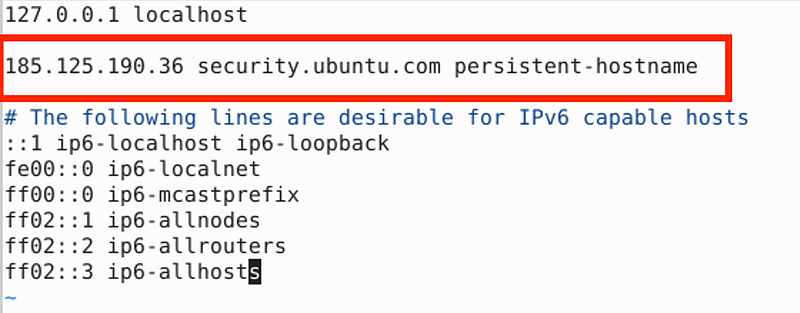
I had to manually set a host below to a non-IPv6 address in my hosts file due to DNS only resolving to IPv6. You may or may not need that in the end.

The whole long story that took me way too long…

Initially I used these commands:

curl "https://awscli.amazonaws.com/awscli-exe-linux-aarch64.zip" -o "awscliv2.zip"
unzip awscliv2.zip
sudo ./aws/install
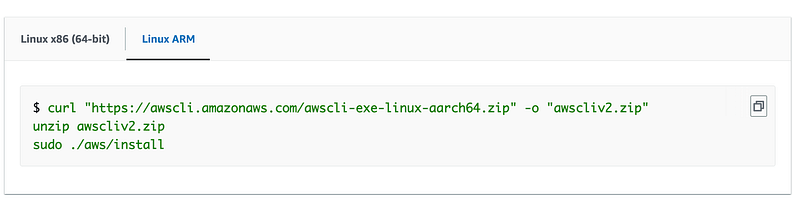
I got those from the documentation here for Linux Arm:

Curl worked fine.

unzip fails:

So I ran the update command first by trying to copy and paste it. I thought the keyboard shortcut from my mac worked yesterday but it doesn’t now. I have to use Copy and Paste by right clicking:
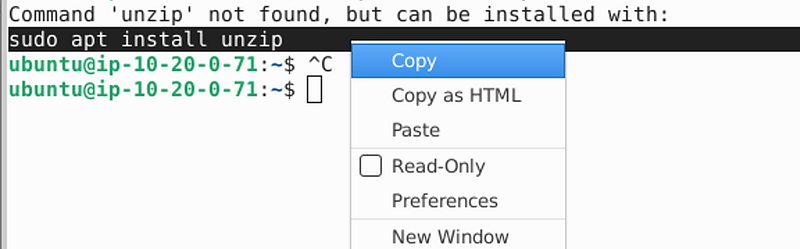
Then I had to clean up the pasted command as it had some extra characters.

Then I got this error:
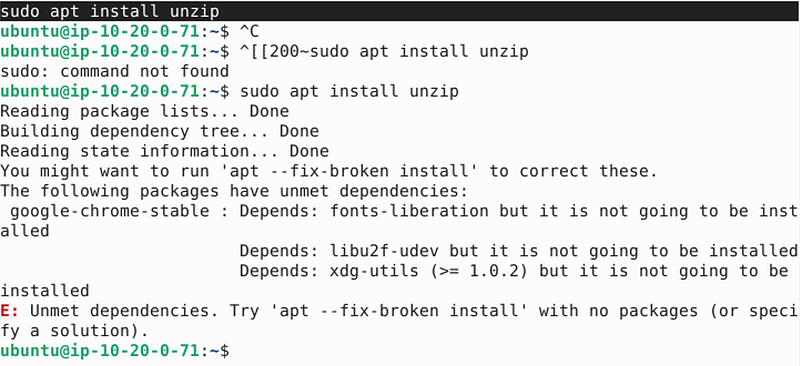
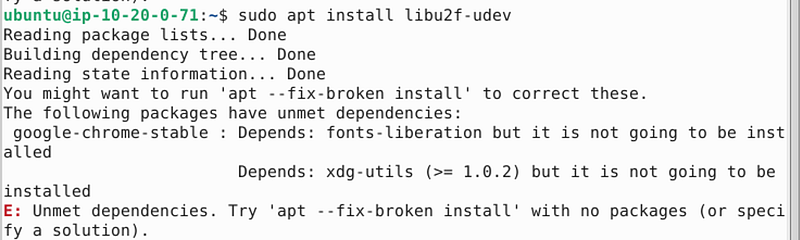
So I try to install lubu2f-udev and I get:
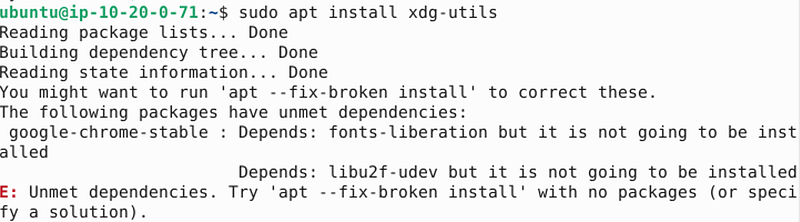
So I try to install xdg-utils but I run into a circular dependency problem:
Then I get this error:

Ok let’s try that using root.

sudo apt --fix-broken install

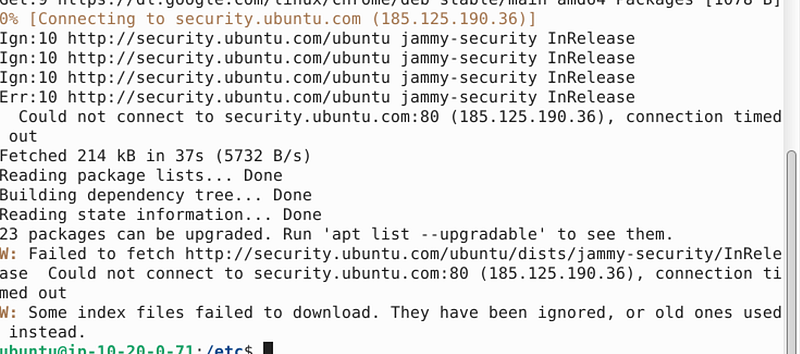
At some point I realized I had to add more firewall rules to allow updates on port 80 to specific AWS IP addresses. One of those addresses was problematic because it was an IPv6 address which I do not allow on my networks just because it’s easier for me to decipher and manage. I hope IPv6 is not a requirement for updates.

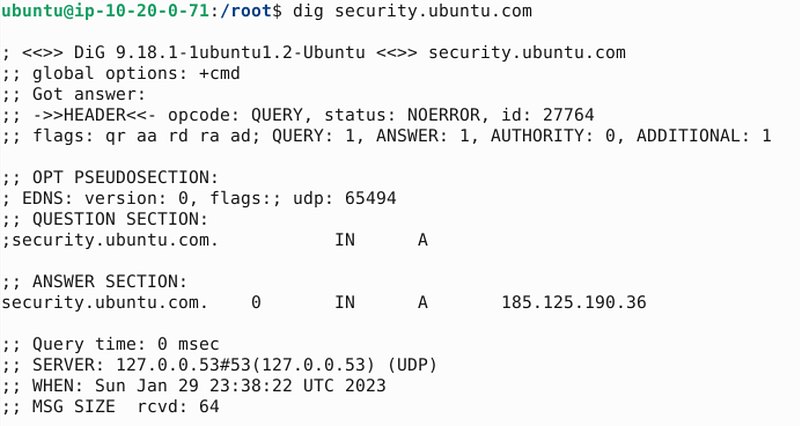
What is interesting when I query security.ubuntu.com from my local network I get:

Anyway I tried running the command again after opening the network excluding IPv6 and it seemed to work.

Then I run the command to install unzip again.

Then the unzip command worked.

Then I ran the next command from the documentation and I got this:

Next I navigated into the aws/install directory and executed “install” and got this:

OK so I run that command and I get this:

OK so then I try to run the apt-update command and hitting errors on security.ubuntu.com resolving to IPv6 so I update my hosts file:

sudo cd /etc
sudo vi hosts
Save the file

:wq!

test that the domain resolves to the IP I set:
This should work:

Except that I forgot to allow that IP on port 80 through my security group rules.

Then I got this:
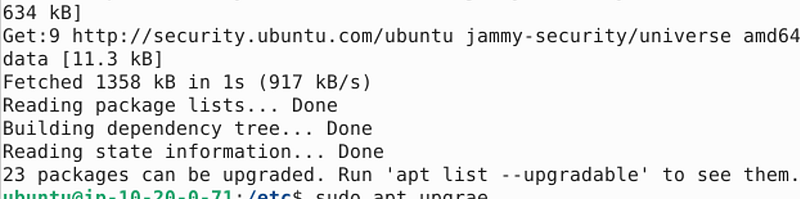
Hmm. OK let’s perform the upgrade.

Interesting result:
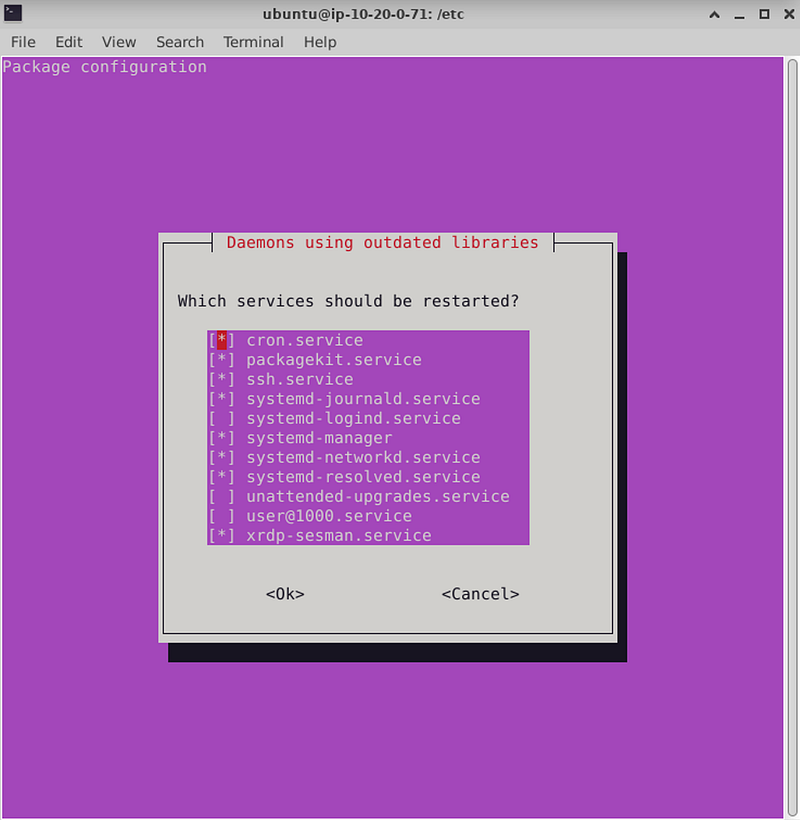
Hit enter for OK and my session got disconnected…

And now I cannot log back in. Wait for a while…

Nope. Tries to connect and immediately disconnects.

Reboot.

Nope.
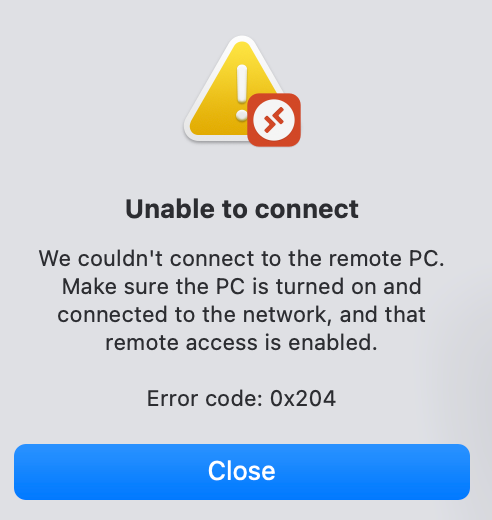
Stop and restart. Well, I have to force stop.

And at this point I see that my instance is trying to connect to what tend to be sketchy networks (Digital Ocean, Hurricane, Linode, and also Cloudflare which is not usually too sketchy but can be abused).

Looks like this may be NTP traffic (port 123) but can’t know for sure without seeing the packet data. Looks like Ubuntu might not be configured to use the AWS NTP servers.
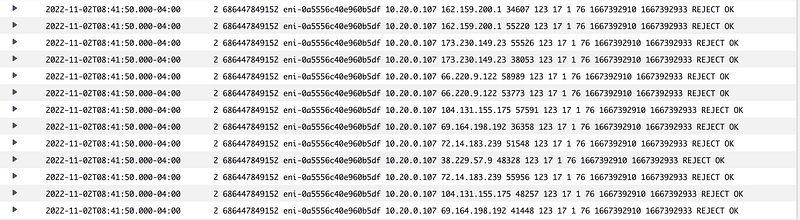
Yep, the ntp configuration points to ubuntu.pool.ntp.org instead of the AWS NTP Servers:
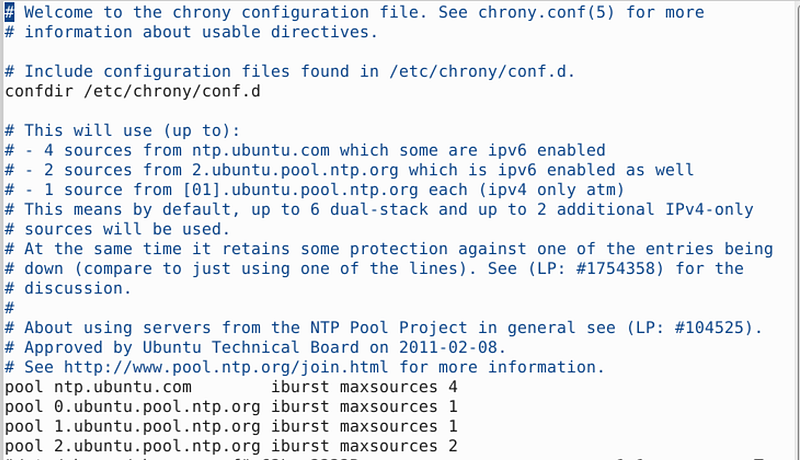
Fix as described here with the chrony option.

Now the traffic on port 23 goes to AWS.

After restarting my VM, I can connect to it again, but I still cannot run the AWS CLI.

OK …back at it later and run sudo apt update again.

I ended up with an error that four packages were being held back. Had an issue with disk space so I deleted some files and cleared the trash. Got to the last package and getting this error:

update-notifier-download.service is a disabled or a static unit not running, 
not starting it.

Now for some reason, that error went away. The only thing I did was run these commands (with sudo):

uname -a
lsb_release -crid
sudo dpkg --audit
apt-cache policy update-notifier-common usrmerge update-notifier update-manager
dpkg -S /bin/bin2c
dpkg -S /usr/bin/bin2c
ls -l /bin/bin2c
ls -l /usr/bin/bin2c
sudo dpkg --configure -a

and I run one more update. For some reason the error with the last package went away.

Tried to run AWS again and failed. Tried to update AWS again and failed:

Tried some other commands just to see if they work and got this:
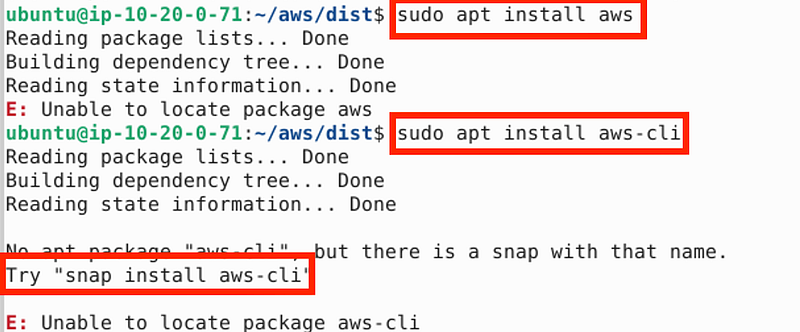
Interesting. What’s a snap?

When I try to run the snap command I get this:
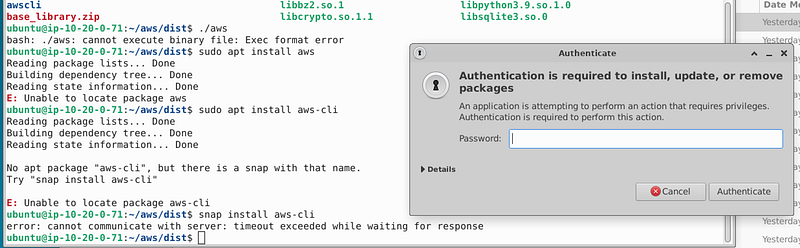
OK I’ll try it. I don’t recommend this in high-security environments.

Yeah, no.

So I am stuck at this which I presume has something to do with the way the AWS CLI is compiled for arm but who knows.

Finally I searched around and found this page which has the option for python.

https://www.cyberciti.biz/faq/how-to-install-aws-cli-on-linux/

First I had to install pip using the same methods as above (…install pip)

Then I tried this method which seems to work:
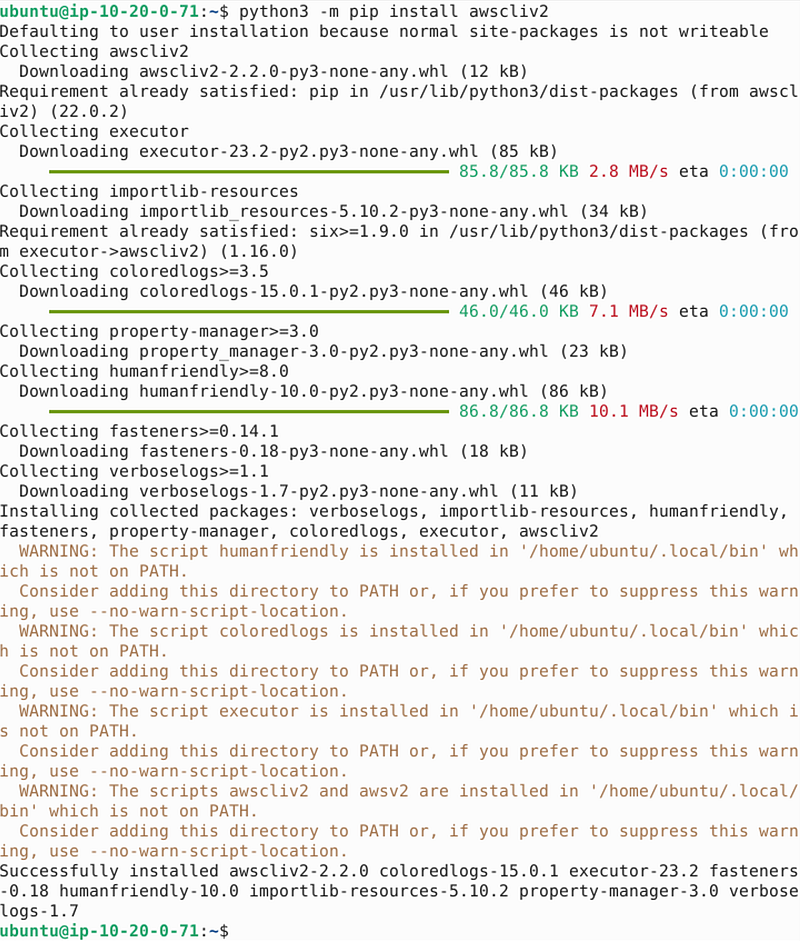
That appeared to work. Next command:
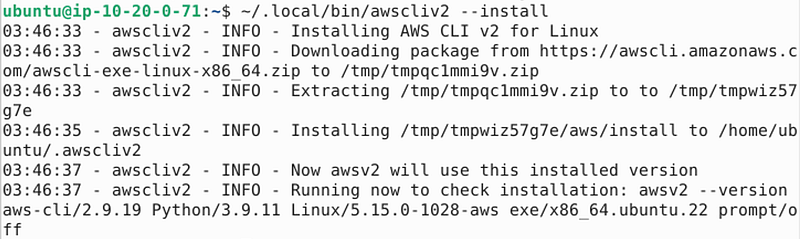
Seems to work.

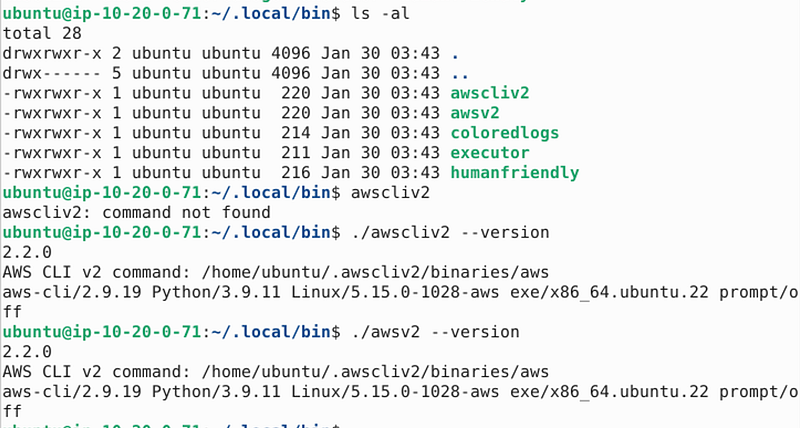
Well running the traditional command to test aws did not work. However, I an see that the command works above. awsv2 from my home directory did not work either. By looking closely at the information above I figured out where the executable ended up and navigated to that directory. From there I could see that somehow in all of the above I got two versions of the awscliv2 in the ~/.local/bin directory.

I exectuted the awsv2 version command and it worked as you can see below. So did the other CLI I somehow installed along the way.
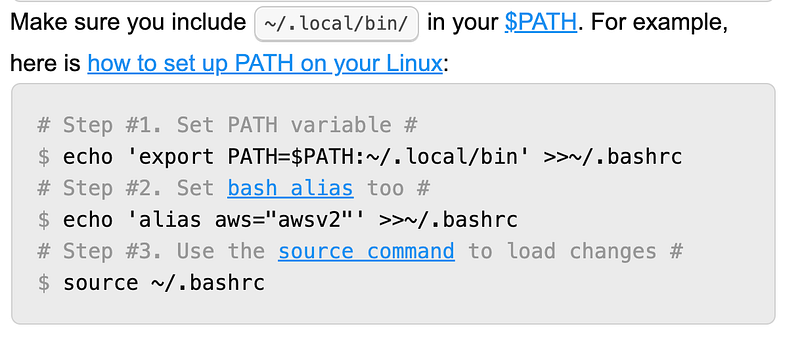
Well, I’m not an ubuntu guru just yet. So how do I map that executable so I can call it from anywhere — get it in my path or whatever, and permanently. That’s what I have left to figure out. And I can see that at the bottom of the above article:
AWS really needs to update the documentation for this to make it easier.

Follow for updates.

Teri Radichel | © 2nd Sight Lab 2023

About Teri Radichel:
~~~~~~~~~~~~~~~~~~~~
⭐️ Author: Cybersecurity Books
⭐️ Presentations: Presentations by Teri Radichel
⭐️ Recognition: SANS Award, AWS Security Hero, IANS Faculty
⭐️ Certifications: SANS ~ GSE 240
⭐️ Education: BA Business, Master of Software Engineering, Master of Infosec
⭐️ Company: Penetration Tests, Assessments, Phone Consulting ~ 2nd Sight Lab
Need Help With Cybersecurity, Cloud, or Application Security?
~~~~~~~~~~~~~~~~~~~~~~~~~~~~~~~~~~~~~~~~~~~~~~~~~~~~~~~~~~~~~
🔒 Request a penetration test or security assessment
🔒 Schedule a consulting call
🔒 Cybersecurity Speaker for Presentation
Follow for more stories like this:
~~~~~~~~~~~~~~~~~~~~~~~~~~~~~~~~~~~~~~~~~~~~~~~~~~~~~~~~~~~~~ 
❤️ Sign Up my Medium Email List
❤️ Twitter: @teriradichel
❤️ LinkedIn: https://www.linkedin.com/in/teriradichel
❤️ Mastodon: @teriradichel@infosec.exchange
❤️ Facebook: 2nd Sight Lab
❤️ YouTube: @2ndsightlab

AWS
Ubuntu
Network Security
Cli
Arm
Recommended from ReadMedium