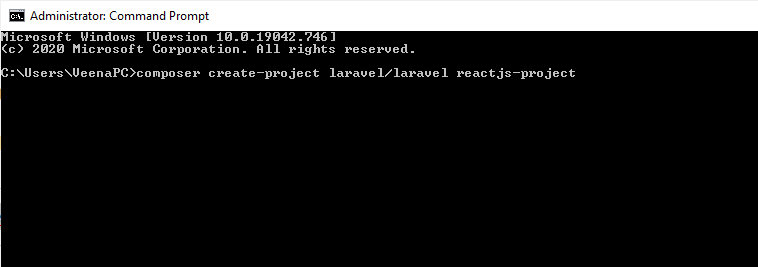
tJS</li><li><b>Step 4 : </b>Install React with Auth</li><li><b>Step 5 : </b>Install Required Packages</li><li><b>Step 6 :</b> Conclusion</li></ul><h1 id="2090">Install Fresh Laravel Application</h1><p id="6d7c">First, We are going to install a <b>fresh new Laravel project</b>.</p><p id="4884">To install a Laravel project open a Terminal and run the following command:</p><div id="6f3d"><pre><span class="hljs-string">composer</span> <span class="hljs-built_in">create-project</span> <span class="hljs-string">laravel</span>/<span class="hljs-string">laravel</span> <span class="hljs-string">reactjs-project</span></pre></div><p id="4cb4"><b>reactjs-project</b> is the Laravel project name.</p><figure id="08cc"><img src="https://cdn-images-1.readmedium.com/v2/resize:fit:800/0*57VM7vE1NW4yVvXS.png"><figcaption></figcaption></figure><h1 id="c6f3">Install Laravel UI</h1><p id="909b">We are installing a Laravel UI to start with Laravel 9.</p><p id="1593">Run the following command to <b>install Laravel UI</b>.</p><div id="cb3f"><pre><span class="hljs-symbol">composer</span> <span class="hljs-meta">require</span> laravel/ui</pre></div><p id="120f">The above command will install the Laravel UI package.</p><p id="933c"><b>Also Read : <a href="https://laraveltuts.com/how-to-create-a-login-form-in-php-example/"></a></b><a href="https://laraveltuts.com/how-to-create-a-login-form-in-php-example/">How to Create a Login Form in PHP Example</a></p><figure id="4d84"><img src="https://cdn-images-1.readmedium.com/v2/resize:fit:800/0*0HvH0ihaDWGHJrfp.png"><figcaption></figcaption></figure><h1 id="a91e">Install ReactJS</h1><p id="b2c1">Now, Its time to install <b>React to your Laravel project</b>.</p><p id="d2c7">To install the React into your application run the following command in the terminal:</p><div id="73b4"><pre><span class="hljs-attribute">php artisan ui react</span></pre></div><h1 id="d71c">Install React with Auth</h1><p id="27cf">or if you like to create <b>React with Authentication</b> run the following command in the terminal:</p><div id="172c"><pre>php artisan ui react <span class="hljs-comment">--auth</span></pre></div><p id="ced7">This will create a Laravel 9 React Application with authentication.</p><h1 id="5263">Install Required Packages</h1><p id="c746">We will installed other required packages to our Laravel 9 React Application.</p><p id="5a86">Please first install <a href="https://nodejs.or
Options
g/en/download/"><b>NODE</b></a> in your system. So, we will assume that you had installed a node in your development machine.</p><p id="2391"><b>Also Read : <a href="https://laraveltuts.com/how-to-login-with-google-in-php/"></a></b><a href="https://laraveltuts.com/how-to-login-with-google-in-php/">How to Login with Google in PHP</a></p><p id="1dbc">Check the <b>Node </b>and <b>NPM </b>Version running following command:</p><div id="49b0"><pre><span class="hljs-comment"># Node Version</span>
<span class="hljs-keyword">node</span> <span class="hljs-title">-v</span></pre></div><div id="73fb"><pre><span class="hljs-comment"># NPM Version</span>
<span class="hljs-built_in">npm</span> -v</pre></div><p id="5334"><b>Also Read : <a href="https://laraveltuts.com/php-chunk-file-upload-using-javascript/"></a></b><a href="https://laraveltuts.com/php-chunk-file-upload-using-javascript/">PHP Chunk File Upload using JavaScript</a></p><p id="19dc"><b>Install NPM:</b></p><div id="f9c1"><pre>npm <span class="hljs-keyword">install</span></pre></div><p id="ef0b"><b>Run NPM:</b></p><div id="efc6"><pre>npm <span class="hljs-built_in">run</span> dev</pre></div><p id="aa40"><b>Run Laravel Application:</b></p><div id="58cf"><pre><span class="hljs-attribute">php artisan serve</span></pre></div><figure id="64b3"><img src="https://cdn-images-1.readmedium.com/v2/resize:fit:800/0*0HvH0ihaDWGHJrfp.png"><figcaption></figcaption></figure><h1 id="6acf">Conclusion</h1><p id="6137"><b>Congratulations!</b> You have successfully installed ReactJS in Laravel 9 Application.</p><p id="2a71">Hope this tutorial helped you in installing ReactJs into Laravel 9 Application and Thanks for reading! If you have any question so, please ask us by commenting below. Thank you!</p><h1 id="e4b5">Medium Articles:</h1><ul><li><a href="https://readmedium.com/how-to-send-mail-using-gmail-in-laravel-9-76d110779a4a">How to send mail using Gmail in Laravel 9?</a></li><li><a href="https://readmedium.com/install-reactjs-in-laravel-9-tutorial-d2fe57d41c15">Install ReactJS in Laravel 9 Tutorial</a></li><li><a href="https://readmedium.com/codeigniter-3-and-angularjs-crud-with-search-and-pagination-tutorial-51265ef4747f">Codeigniter 3 and AngularJS CRUD with Search and Pagination Tutorial</a></li><li><a href="https://readmedium.com/php-chunk-file-upload-using-javascript-56fc05d4ec29">PHP Chunk File Upload using JavaScript</a></li></ul></article></body>
Install ReactJS in Laravel 9 Tutorial
Today, We are going to learn how to Install ReactJS in latest Laravel 9. This tutorial will cover the step on installing the ReactJS into laravel 9. So, Before installing ReactJs we will see what is ReactJS?
What is ReactJS?
React is a free and open-source front-end JavaScript library for building user interfaces based on UI components. It is maintained by Meta and a community of individual developers and companies.
Congratulations! You have successfully installed ReactJS in Laravel 9 Application.
Hope this tutorial helped you in installing ReactJs into Laravel 9 Application and Thanks for reading! If you have any question so, please ask us by commenting below. Thank you!