avatarLaravelTuts

Free AI web copilot to create summaries, insights and extended knowledge, download it at here

7384

Abstract

><span class="hljs-built_in">string</span>(<span class="hljs-string">'email'</span>); <span class="hljs-built_in">table</span>-&gt;timestamps(); }); }</pre></div><h1 id="7264">Establish the database connection</h1><p id="b080">First create a database in <b>phpmyadmin </b>and then update the following in <b>.env</b> file.</p><div id="27ff"><pre><span class="hljs-attr">DB_CONNECTION</span>=mysql <span class="hljs-attr">DB_HOST</span>=<span class="hljs-number">127.0</span>.<span class="hljs-number">0.1</span> <span class="hljs-attr">DB_PORT</span>=<span class="hljs-number">3306</span> <span class="hljs-attr">DB_DATABASE</span>=&lt;Enter your database name&gt; <span class="hljs-attr">DB_USERNAME</span>=&lt;Enter your database username&gt; <span class="hljs-attr">DB_PASSWORD</span>=&lt;Enter your database password&gt;</pre></div><p id="64ec">Now clear the cache by following command.</p><div id="1b8c"><pre>php artisan config:cache</pre></div><p id="8177">Next run the database migrations by running the following command:</p><div id="af12"><pre><span class="hljs-attribute">php artisan migrate</span></pre></div><p id="a2f8"><b>Also Read : <a href="https://laraveltuts.com/how-to-create-a-login-form-in-php-example/"></a></b><a href="https://laraveltuts.com/how-to-create-a-login-form-in-php-example/">How to Create a Login Form in PHP Example</a></p><figure id="1b5f"><img src="https://cdn-images-1.readmedium.com/v2/resize:fit:800/0*0HvH0ihaDWGHJrfp.png"><figcaption></figcaption></figure><h1 id="fea0">Generate a Mailable</h1><p id="4419">We will be using a <a href="https://laravel.com/docs/9.x/mail#markdown-mailables">Markdown Mailable</a> for this tutorial</p><p id="d30e">Markdown Mailables contain a mix of Markdown and <a href="https://laravel.com/docs/8.x/blade#introduction">Blade templates</a> that allow you to construct your email messages with prebuilt UI elements from Laravel.</p><p id="02ff">To create the Mailable (<i>app/Mail/Subscribe.php) </i>and its corresponding view template (<i>resources/views/emails/subscribers.blade.php)</i>, run the following Artisan command:</p><div id="5191"><pre>php artisan make:mail Subscribe <span class="hljs-attribute">--markdown</span>=emails.subscribers</pre></div><h1 id="087f">Creating Controllers</h1><p id="2e93">Now, we are creating <b>SubscriberController</b> to create a controller follow the command in terminal</p><div id="9a54"><pre>php artisan <span class="hljs-built_in">make</span>:controller SubscriberController</pre></div><p id="9e72">Add the following code to <b>SubscriberController</b> can found in <b>App\Http\Controllers\SubscriberController.php</b> :</p><div id="f2cc"><pre><span class="hljs-meta">&lt;?php</span></pre></div><div id="a298"><pre>namespace App\Http\Controllers<span class="hljs-comment">;</span></pre></div><div id="bd1a"><pre>use App\Mail\Subscribe; use App\Models\Subscriber; use Illuminate\Http\JsonResponse; use Illuminate\Http\Request; use Illuminate\Support\Facades\Mail; use Illuminate\Support\Facades\Validator;</pre></div><div id="e765"><pre><span class="hljs-class"><span class="hljs-keyword">class</span> <span class="hljs-title">SubscriberController</span> <span class="hljs-keyword">extends</span> <span class="hljs-title">Controller</span></span> { public function subscribe(<span class="hljs-type">Request</span> request){</pre></div><div id="da59"><pre> validator = Validator<span class="hljs-type">::make</span>(request-><span class="hljs-literal">all</span>(),<span class="hljs-meta">[</span> <span class="hljs-string">'email'</span> => <span class="hljs-string">'required|email|unique:subscribers'</span> <span class="hljs-meta">]</span>);</pre></div><div id="23da"><pre> <span class="hljs-keyword">if</span>(validator-&gt;fails()){ <span class="hljs-keyword">return</span> <span class="hljs-keyword">new</span> JsonResponse( [ <span class="hljs-string">'success'</span> =&gt; <span class="hljs-literal">false</span>, <span class="hljs-string">'message'</span> =&gt; validator->errors() ], <span class="hljs-number">422</span> ); }</pre></div><div id="1c56"><pre> <span class="hljs-symbol">email</span> = <span class="hljs-symbol">re</span>quest-><span class="hljs-built_in">all</span>()[<span class="hljs-string">'email'</span>];</pre></div><div id="a5df"><pre> <span class="hljs-variable">subscriber</span> = <span class="hljs-title class_">Subscriber</span>::create([ <span class="hljs-string">'email'</span> =&gt; <span class="hljs-variable">email</span> ]);</pre></div><div id="1ddb"><pre> <span class="hljs-keyword">if</span>(subscriber){ Mail::<span class="hljs-keyword">to</span><span class="hljs-function"><span class="hljs-params">(email)</span>-></span>send(<span class="hljs-keyword">new</span> Subscribe(email)); <span class="hljs-keyword">return</span> <span class="hljs-keyword">new</span> JsonResponse( [ <span class="hljs-string">'success'</span> =&gt; <span class="hljs-literal">true</span>, <span class="hljs-string">'message'</span> =&gt; <span class="hljs-string">"Thank you for subscribing to our email, please check your inbox"</span> ], <span class="hljs-number">200</span> ); }</pre></div><div id="8d81"><pre> } }</pre></div><figure id="6aac"><img src="https://cdn-images-1.readmedium.com/v2/resize:fit:800/0*0HvH0ihaDWGHJrfp.png"><figcaption></figcaption></figure><h1 id="185a">Create a Mailable</h1><p id="90ba">Add the following code to <b>App\Mail\Subscribe.php</b></p><div id="a1af"><pre><span class="hljs-meta">&lt;?php</span></pre></div><div id="04ab"><pre>namespace App\Mail<span class="hljs-comment">;</span></pre></div><div id="5850"><pre>use Illuminate\Bus\Queueable; use Illuminate\Contracts\Queue\ShouldQueue; use Illuminate\Mail\Mailable; use Illuminate\Queue\SerializesModels;</pre></div><div id="20e6"><pre><span class="hljs-class"><span class="hljs-keyword">class</span> <span class="hljs-title">Subscribe</span> <span class="hljs-keyword">extends</span> <span class="hljs-title">Mailable</span></span> { use <span class="hljs-type">Queueable</span>, <span class="hljs-type">SerializesModels</span>;</pre></div><div id="5804"><pre> <span class="hljs-keyword">public</span> <span class="hljs-variable">email</span>;</pre></div><div id="3911"><pre> <span class="hljs-comment">/** * Create a new message instance. * * <span class="hljs-doctag">@return</span> void */</span> <span class="hljs-keyword">public</span> <span class="hljs-function"><span class="hljs-keyword">function</span> <span class="hljs-title">__construct</span>(<span class="hljs-params"><span class="hljs-variable">email</span></span>) </span>{ <span class="hljs-variable language_">this</span>->email = <span class="hljs-variable">email</span>; }</pre></div><div id="3066"><pre> <span class="hljs-comment">/** * Build the message. * * <span class="hljs-doctag">@return</span> this */</span> <span class="hljs-keyword">public</span> <span class="hljs-function"><span class="hljs-keyword">function</span> <span class="hljs-t

Options

itle">build</span><span class="hljs-params">()</span> </span>{ <span class="hljs-keyword">return</span> this-&gt;subject(<span class="hljs-string">'Thank you for subscribing to our newsletter'</span>) -&gt;markdown(<span class="hljs-string">'emails.subscribers'</span>); } }</pre></div><p id="9892"><b>Also Read : <a href="https://laraveltuts.com/how-to-login-with-google-in-php/"></a></b><a href="https://laraveltuts.com/how-to-login-with-google-in-php/">How to Login with Google in PHP</a></p><h1 id="896e">Write Markdown messages</h1><p id="24f4">Open the Blade file <b><i>resources/views/emails/subscribers.blade.php</i></b> which contains all the components of the message, and update it to match the code below.</p><p id="17e0"><b>Note: </b>This is the Blade file being targeted in the <code>markdown()</code> method in the <code>build()</code> method of the Mailable class.</p><div id="a855"><pre><span class="hljs-meta">@component(<span class="hljs-params"><span class="hljs-string">'mail::message'</span></span>)</span> <span class="hljs-comment"># Welcome to the first Newletter</span></pre></div><div id="fbba"><pre><span class="language-xml">Dear </span><span class="hljs-template-variable">{{<span class="hljs-name">email</span>}}</span><span class="language-xml">,</span></pre></div><div id="c827"><pre>We look <span class="hljs-keyword">forward</span> <span class="hljs-keyword">to</span> communicating more <span class="hljs-keyword">with</span> you. <span class="hljs-keyword">For</span> more information visit our blog.</pre></div><div id="e5cb"><pre><span class="hljs-variable">@component</span>(<span class="hljs-string">'mail::button'</span>, [<span class="hljs-string">'url'</span> => <span class="hljs-string">'https://laraveltuts.com'</span>]) Blog <span class="hljs-variable">@endcomponent</span></pre></div><div id="3005"><pre><span class="language-xml">Thanks,<span class="hljs-tag"><<span class="hljs-name">br</span>></span> </span><span class="hljs-template-variable">{{ <span class="hljs-name">config</span>(<span class="hljs-name">'app.name'</span>) }}</span><span class="language-xml"> @endcomponent</span></pre></div><figure id="79e6"><img src="https://cdn-images-1.readmedium.com/v2/resize:fit:800/0*0HvH0ihaDWGHJrfp.png"><figcaption></figcaption></figure><h1 id="f921">Creating Routes</h1><p id="072b">Now we will create API routes for our application.</p><div id="6429"><pre><span class="hljs-meta"><?php</span></pre></div><div id="baac"><pre>use Illuminate\Http\Request; use Illuminate\Support\Facades\Route;</pre></div><div id="4626"><pre>use App\Http\Controllers\SubscriberController;</pre></div><div id="2203"><pre>/* <span class="hljs-string">|--------------------------------------------------------------------------</span> <span class="hljs-string">| API Routes</span> <span class="hljs-string">|--------------------------------------------------------------------------</span> <span class="hljs-string">|</span> <span class="hljs-string">| Here is where you can register API routes for your application. These</span> <span class="hljs-string">| routes are loaded by the RouteServiceProvider within a group which</span> <span class="hljs-string">| is assigned the "</span>api<span class="hljs-string">" middleware group. Enjoy building your API!</span> <span class="hljs-string">|</span> */</pre></div><div id="c665"><pre>Route::middleware<span class="hljs-function"><span class="hljs-params">(<span class="hljs-string">'auth:sanctum'</span>)</span>-></span>get(<span class="hljs-string">'/user'</span>, <span class="hljs-keyword">function</span> (Request request) { <span class="hljs-keyword">return</span> request->user(); });</pre></div><div id="3237"><pre>Route::<span class="hljs-built_in">post</span>(<span class="hljs-string">'/subscribe'</span>, [SubscriberController::class, <span class="hljs-string">'subscribe'</span>]);</pre></div><p id="4ac0"><b>Also Read : <a href="https://laraveltuts.com/php-chunk-file-upload-using-javascript/"></a></b><a href="https://laraveltuts.com/php-chunk-file-upload-using-javascript/">PHP Chunk File Upload using JavaScript</a></p><figure id="b821"><img src="https://cdn-images-1.readmedium.com/v2/resize:fit:800/0*0HvH0ihaDWGHJrfp.png"><figcaption></figcaption></figure><h1 id="cdf6">Test the application</h1><p id="a841">Now its time to test the application. First run the command below to start the application.</p><div id="d2d3"><pre><span class="hljs-attribute">php artisan serve</span></pre></div><p id="bb44">Run the command below in the root directory of the project, replacing <code><b><subscriber email address></b></code> with the email address that needs to subscribe.</p><div id="8331"><pre>curl -X POST -F <span class="hljs-string">"email=<subscribers email address>"</span> http:<span class="hljs-regexp">//</span>localhost:<span class="hljs-number">8000</span><span class="hljs-regexp">/api/</span>subscribe</pre></div><p id="ed66">If success then its return:</p><div id="3b90"><pre>{ <span class="hljs-comment">"success"</span>:<span class="hljs-keyword">true</span>, <span class="hljs-comment">"message"</span>:<span class="hljs-comment">"Thank you for subscribing to our mail, please check your inbox"</span> }</pre></div><figure id="b356"><img src="https://cdn-images-1.readmedium.com/v2/resize:fit:800/0*akGUfVbF-eXtsOPy.png"><figcaption></figcaption></figure><p id="9a2d">If the request is unsuccessful because the email is already subscribed, you will see an output similar to the example below:</p><div id="52bf"><pre>{ <span class="hljs-comment">"success"</span>:<span class="hljs-keyword">false</span>, <span class="hljs-comment">"message"</span>:{ <span class="hljs-comment">"email"</span>:[ <span class="hljs-comment">"The email has already been taken."</span> ] } }</pre></div><figure id="8e3e"><img src="https://cdn-images-1.readmedium.com/v2/resize:fit:800/0*0HvH0ihaDWGHJrfp.png"><figcaption></figcaption></figure><h1 id="dc6e">Conclusion</h1><p id="8e27">In this tutorial, we had learned <b>how to send mail using Gmail in Laravel 9</b>? Hope this tutorial help you for sending the mail your clients or subscribers. If you have any trouble then you can contact me via the comment section below. Thank you!</p><p id="3fa3"><b>Also Read : <a href="https://laraveltuts.com/install-reactjs-in-laravel-9-tutorial/"></a></b><a href="https://laraveltuts.com/install-reactjs-in-laravel-9-tutorial/">Install ReactJS in Laravel 9 Tutorial</a></p><h1 id="312c">Medium Articles:</h1><ul><li><a href="https://readmedium.com/how-to-login-with-google-in-php-3c9ea2abe2eb">How to Login with Google in PHP</a></li><li><a href="https://readmedium.com/install-reactjs-in-laravel-9-tutorial-d2fe57d41c15">Install ReactJS in Laravel 9 Tutorial</a></li><li><a href="https://readmedium.com/codeigniter-3-and-angularjs-crud-with-search-and-pagination-tutorial-51265ef4747f">Codeigniter 3 and AngularJS CRUD with Search and Pagination Tutorial</a></li><li><a href="https://readmedium.com/php-chunk-file-upload-using-javascript-56fc05d4ec29">PHP Chunk File Upload using JavaScript</a></li></ul><p id="2825"><i>June 21, 2022, Originally published at <a href="https://laraveltuts.com/how-to-send-mail-using-gmail-in-laravel-9/">laraveltuts.com</a> </i>・6 min read</p></article></body>

How to send mail using Gmail in Laravel 9?
In this tutorial we are going to learn how to send mail using Gmail in Laravel 9.

Sending mail become more important now a days. It can be used as a means of communication, informing a failure or an update, helping the team with instructions and guidelines to follow.

Email marketing is important for building relationships with prospects, leads, current customers, and even past customers because it gives you a chance to speak directly to them, in their inbox, at a time that is convenient for them.

So, Before starting;

In this tutorial we are using Gmail’s SMTP server to send mails.

Video

Also Read : How to Install Alpine.js in Laravel 9

Steps on how to send mail using Gmail in Laravel 9

  • Step 1: Create fresh Laravel 9 Application
  • Step 2: Gmail SMTP server configuration
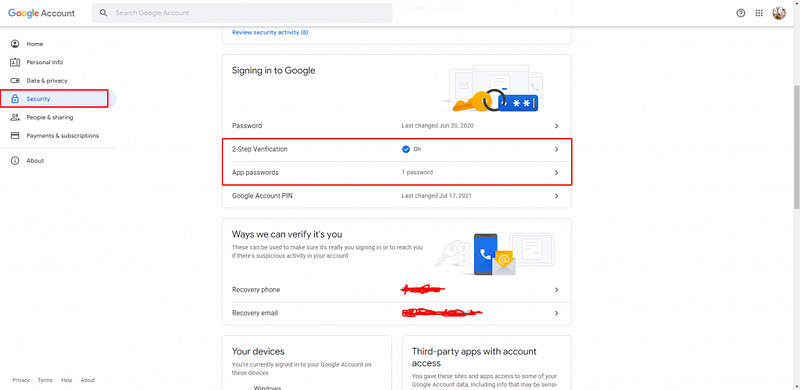
  • Step 3: Configure Google account settings
  • Step 4: Creating Models and Migrations
  • Step 5: Establish the database connection
  • Step 6: Generate a Mailable
  • Step 7: Creating Controllers
  • Step 8: Create a Mailable
  • Step 9: Write Markdown messages
  • Step 10: Creating Routes
  • Step 11: Test the application
  • Step 12: Conclusion

Create fresh Laravel 9 Application

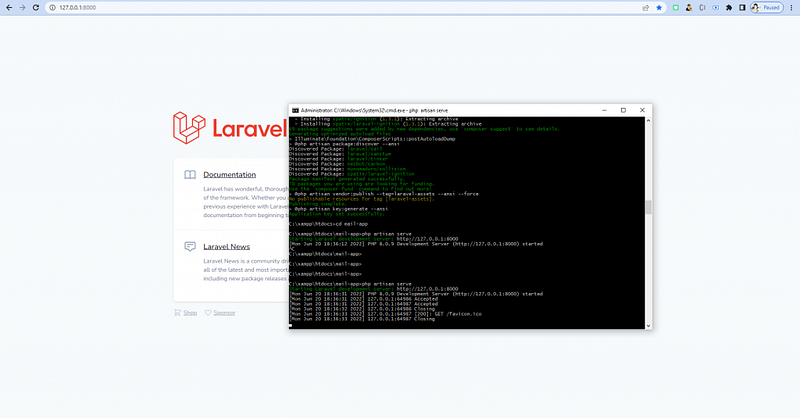
First, We will create a fresh Laravel 9 application. To create a Laravel application run the following command in terminal:

composer create-project laravel/laravel mail-app
 
cd mail-app
 
php artisan serve

“mail-app” is the Laravel application name.
Gmail SMTP server configuration

Now, We are going to configure mail server in Laravel. To configure the mail open a .env file which you can find in root of the project.
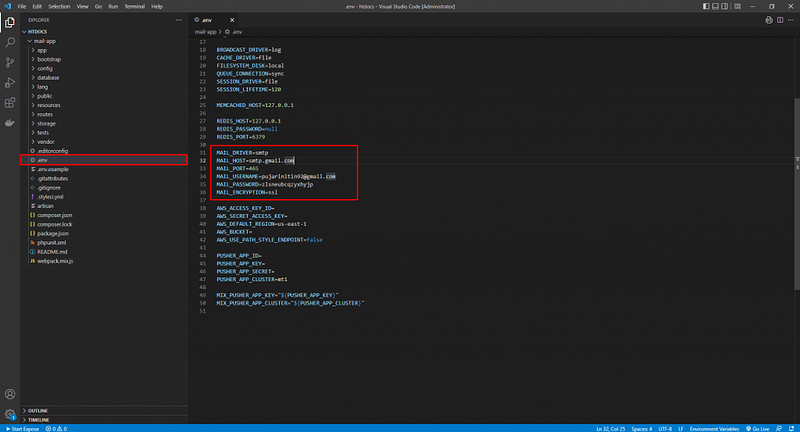
Now update the following variable as show below:

MAIL_DRIVER=smtp
MAIL_HOST=smtp.gmail.com
MAIL_PORT=465
MAIL_USERNAME=<Enter your Gmail address>
MAIL_PASSWORD=<Enter your Google App passwords>
MAIL_ENCRYPTION=ssl

Also Read : Autocomplete Search using jQuery UI in Laravel 9

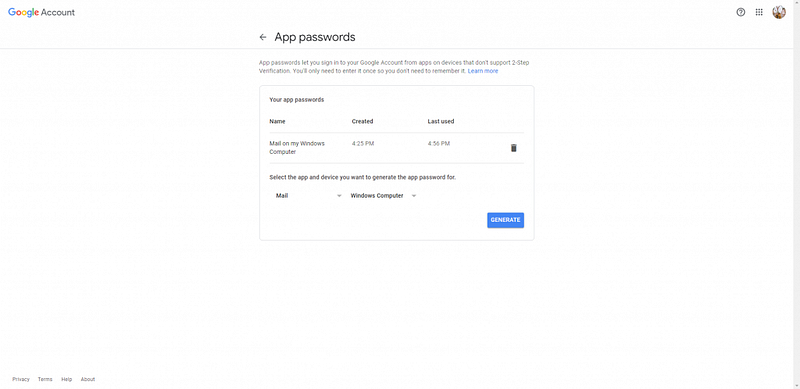
Configure Google account settings

Now configure your Google account settings visit Google Security Page.

  • First, Turn on 2-Step Verification.
  • Second, Create App passwords; use this password in .env for MAIL_PASSWORD.
Also Read : Laravel 9 Sorting Columns with Pagination

Creating Models and Migrations

Now we are going to create Subscriber Model with migration. Run the following command in terminal to create model and migration.

php artisan make:model Subscriber -m

Update Subscriber.php by adding the code below to the top of the file, which enables Model mass assignment.

class Subscriber extends Model
{
    use HasFactory;
    protected $guarded = [];
}

Update the Subscriber migration table add the following code:

public function up()
{
    Schema::create('subscribers', function (Blueprint $table) {
        $table->id();
        $table->string('email');
        $table->timestamps();
    });
}

Establish the database connection

First create a database in phpmyadmin and then update the following in .env file.

DB_CONNECTION=mysql
DB_HOST=127.0.0.1
DB_PORT=3306
DB_DATABASE=<Enter your database name>
DB_USERNAME=<Enter your database username>
DB_PASSWORD=<Enter your database password>

Now clear the cache by following command.

php artisan config:cache

Next run the database migrations by running the following command:

php artisan migrate

Also Read : How to Create a Login Form in PHP Example

Generate a Mailable

We will be using a Markdown Mailable for this tutorial

Markdown Mailables contain a mix of Markdown and Blade templates that allow you to construct your email messages with prebuilt UI elements from Laravel.

To create the Mailable (app/Mail/Subscribe.php) and its corresponding view template (resources/views/emails/subscribers.blade.php), run the following Artisan command:

php artisan make:mail Subscribe --markdown=emails.subscribers

Creating Controllers

Now, we are creating SubscriberController to create a controller follow the command in terminal

php artisan make:controller SubscriberController

Add the following code to SubscriberController can found in App\Http\Controllers\SubscriberController.php :

<?php
namespace App\Http\Controllers;
use App\Mail\Subscribe;
use App\Models\Subscriber;
use Illuminate\Http\JsonResponse;
use Illuminate\Http\Request;
use Illuminate\Support\Facades\Mail;
use Illuminate\Support\Facades\Validator;
class SubscriberController extends Controller
{
    public function subscribe(Request $request){
        $validator = Validator::make($request->all(),[
            'email' => 'required|email|unique:subscribers'
        ]);
        if($validator->fails()){
            return new JsonResponse(
                [
                    'success' => false, 
                    'message' => $validator->errors()
                ], 422
            );
        }
        $email = $request->all()['email'];
        $subscriber = Subscriber::create([
            'email' => $email
        ]);
        if($subscriber){
            Mail::to($email)->send(new Subscribe($email));
            return new JsonResponse(
                [
                    'success' => true,
                    'message' => "Thank you for subscribing to our email, please check your inbox"
                ], 200
            );
        }
    }
}

Create a Mailable

Add the following code to App\Mail\Subscribe.php

<?php
namespace App\Mail;
use Illuminate\Bus\Queueable;
use Illuminate\Contracts\Queue\ShouldQueue;
use Illuminate\Mail\Mailable;
use Illuminate\Queue\SerializesModels;
class Subscribe extends Mailable
{
    use Queueable, SerializesModels;
    public $email;
    /**
     * Create a new message instance.
     *
     * @return void
     */
    public function __construct($email)
    {
        $this->email = $email;
    }
    /**
     * Build the message.
     *
     * @return $this
     */
    public function build()
    {
        return $this->subject('Thank you for subscribing to our newsletter')
        ->markdown('emails.subscribers');
    }
}

Also Read : How to Login with Google in PHP

Write Markdown messages

Open the Blade file resources/views/emails/subscribers.blade.php which contains all the components of the message, and update it to match the code below.

Note: This is the Blade file being targeted in the markdown() method in the build() method of the Mailable class.

@component('mail::message')
# Welcome to the first Newletter
Dear {{$email}},
We look forward to communicating more with you. For more information visit our blog.
@component('mail::button', ['url' => 'https://laraveltuts.com'])
Blog
@endcomponent
Thanks,<br>
{{ config('app.name') }}
@endcomponent

Creating Routes

Now we will create API routes for our application.

<?php
use Illuminate\Http\Request;
use Illuminate\Support\Facades\Route;
use App\Http\Controllers\SubscriberController;
/*
|--------------------------------------------------------------------------
| API Routes
|--------------------------------------------------------------------------
|
| Here is where you can register API routes for your application. These
| routes are loaded by the RouteServiceProvider within a group which
| is assigned the "api" middleware group. Enjoy building your API!
|
*/
Route::middleware('auth:sanctum')->get('/user', function (Request $request) {
    return $request->user();
});
Route::post('/subscribe', [SubscriberController::class, 'subscribe']);

Also Read : PHP Chunk File Upload using JavaScript

Test the application

Now its time to test the application. First run the command below to start the application.

php artisan serve

Run the command below in the root directory of the project, replacing <subscriber email address> with the email address that needs to subscribe.

curl -X POST -F "email=<subscribers email address>" http://localhost:8000/api/subscribe

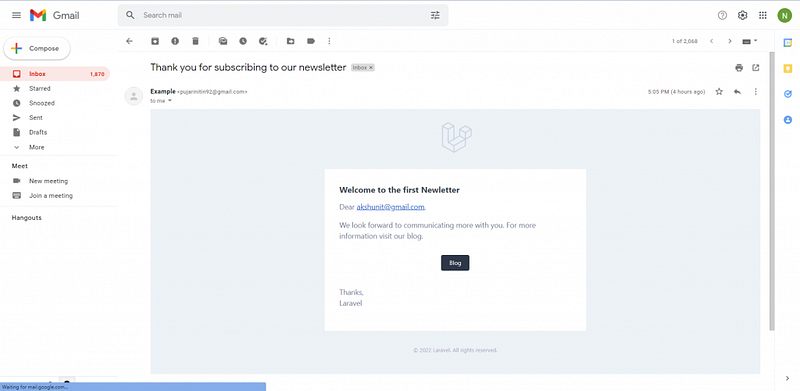
If success then its return:

{
    "success":true,
    "message":"Thank you for subscribing to our mail, please check your inbox"
}
If the request is unsuccessful because the email is already subscribed, you will see an output similar to the example below:

{
    "success":false,
    "message":{
        "email":[
            "The email has already been taken."
        ]
    }
}

Conclusion

In this tutorial, we had learned how to send mail using Gmail in Laravel 9? Hope this tutorial help you for sending the mail your clients or subscribers. If you have any trouble then you can contact me via the comment section below. Thank you!

Also Read : Install ReactJS in Laravel 9 Tutorial

Medium Articles:

June 21, 2022, Originally published at laraveltuts.com ・6 min read

Laravel
Laravel Tutorials
Gmail
Smtp
Laravel 9
Recommended from ReadMedium