
I Made $78,345 With These Easy-to-Create “Books”
An income stream almost anyone can replicate (but few will.)

Three years ago, I began experimenting with publishing.
Jasper AI (writing assistant) had just been released, and I wanted to see if I could use it to help build an additional income stream by writing short non-fiction ebooks quickly.
I knew I was on to something when I made $2,714 on Amazon in the second month of the experiment.
(NOTE: This result isn’t typical if you’re relying on “luck,” but it IS possible if you use data to guide your decisions.)
From there, I began fiendishly analyzing books that were generating at least $10k+ per month on Amazon and using that information to create competing and/or complementary products.
Here are a few “case studies” I shared here over the last year based on my research:
These are just a few examples, but I’ve done this (privately) for hundreds of books.
Next, I used Helium 10 to find the most profitable keywords on Amazon so I could incorporate them into my book titles, descriptions, and metadata (backend keywords.)
Profitable keywords are the words and phrases that customers use on Amazon to search for products that result in a high number of sales.
Here’s a tutorial I wrote on how I find the most profitable keywords in any niche:
Eventually, I developed my own “system” for reverse engineering profitable books.
I wrote about that in more detail here.
I publish my books on multiple sites, including:
- Amazon KDP
- B&N Press
- Google Play Books
- Draft2Digital
- Findaway (Audiobooks)
However, throughout this process, there was one niche that always stood out.
The $78,345 Niche
Most people who publish for profit start with ebooks because they’re easy to create.
Makes sense.
The problem is that they tend to ignore physical books.
Because who actually buys paperbacks anymore?
Turns out, a lot of people.
Especially when they can give them as gifts.
What types of books do people give as gifts?
- Activity books (word search, sudoku, crosswords, etc.)
- Workbooks (math, writing, spelling, self-improvement, etc.)
- Fill-in-the-blank “card style” books (for Valentine’s Day, Mother’s Day, Father’s Day, etc.)
- Trivia, Jokes, and Riddles
- Bathroom Activity Books
- Holiday Themed Books/Planners
- Books for Kids and Teens (parents & grandparents are buying)
And anything that can be used as “stocking stuffers,” “easter basket stuffers,” or “white elephant gifts” — these keywords are responsible for millions in revenue on Amazon.
In the last 12 months, I’ve made $78,345* selling physical books on Amazon KDP and B&N Press.
*Does NOT include my ebook or audiobook sales.
Currently, I have about 60 physical “activity/gift” style books in my catalog and most of my sales come from about 15-20 of those titles.
Notably, a HUGE number of sales are made in Q4 (October-December).
So, if this is an income stream you’ve been thinking about getting into, I’d start planning for Q4 now!
My Book Creation Process
The nice thing about these types of books is that they are incredibly easy to make.
Once you get the hang of it, you can create them very quickly — within a few hours or days.
But there are some things I had to learn through trial and error that I’ll share here.
It’s not as simple as slapping a book together, throwing it up on Amazon, and *hoping* it sells.
There’s a formula for making money with books.
Here’s my process.
Step 1: Choose a “high sales volume” keyword to build your book around
This is the MOST important step.
If no one is searching for your book, it isn’t going to sell any copies.
It’s just reality.
Customers use specific keywords when searching for books to buy.
If you know what those keywords are and can create a product to rank for them, you will be 1,000 steps ahead of the competition.
I strongly believe that this is why most people fail at publishing — they create what THEY want to make and then act all confused when it doesn’t sell.

It must be Amazon… It’s too saturated… It doesn’t work in 2024.
Or maybe…YOU didn’t do your homework??
You MUST do the research FIRST and find at least one high-volume keyword to build your book around.
I use Helium 10 for this.
However, there are other (less costly but also less advanced) tools you can use, like BookBolt or Publisher Rocket, that will give you general search volume data to point you in the right direction.
I look for keywords that get at least 100 SALES per month (or 1000+ searches.)
For example, the keyword “Mother’s Day book” is one I would consider building a book around because it generates 424 sales per month on Amazon with 3,491 customer searches. (Data from Helium 10.)
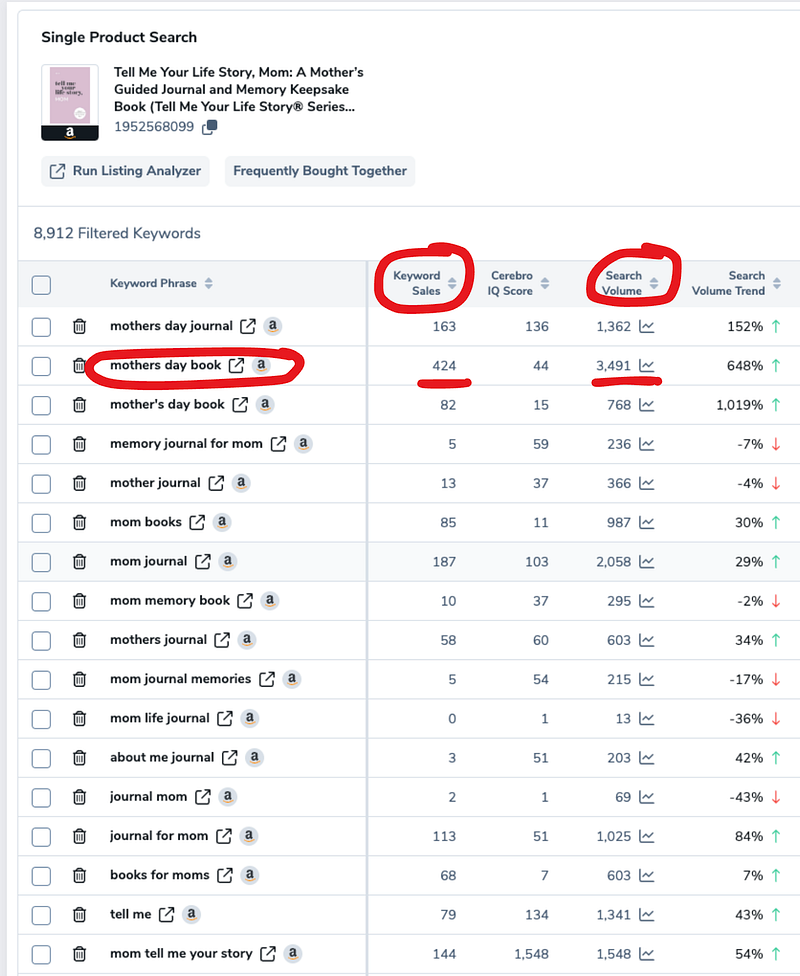
Note: Some keywords (like the one above) are seasonal, while others are evergreen. Seasonal books will make more at certain times of the year, while evergreen books produce consistent monthly sales.
Once I’ve picked out my keywords, I’m on to Step 2.
Step 2: Stalk the Competition
Next, I open an incognito window on my browser and head over to Amazon.
I go to the “Books” department and type my keyword into the search box.
Then I look at the first 10–25 book listings.
This is my competition.
These are the books that are actually selling and, more importantly, that Amazon thinks are best for its customers.
I don’t worry about the thousands of other books filling up the back pages of Amazon that no one will ever see or buy.
They‘re irrelevant.
The goal is to create a book that “fits in” with the top 10–25 ranked books for my keyword.
Ideally, I’ll create a book that’s better than the top competitors for the keyword.
For example, here are the top-ranked results for the keyword phrase “word search for adults.”
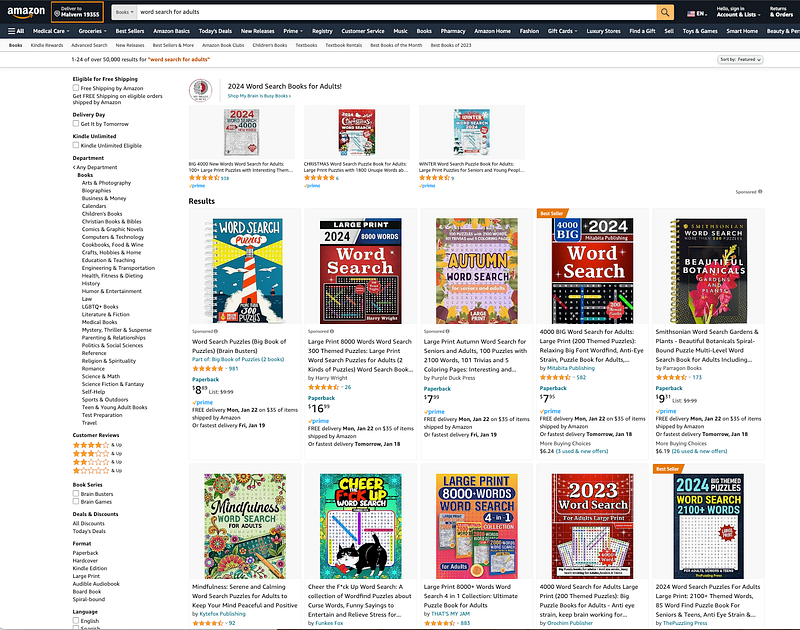
Notice any similarities among the top-ranked listings?
A few things stand out to me:
- They all have “WORD SEARCH” in big, bold letters on the cover,
- The main keyword (word search for adults) is in the title and/or subtitle.
- At least half of them incorporate the color “red” into the cover design (or bright colors), and
- There’s a graphic of a word search puzzle on the cover.
So….
If I want to create a book to rank at the top of the first page for this keyword, I would make sure that my book also has these common features.
The goal is not to COPY existing titles — it’s to create a superior competitor.
The book’s cover MUST match (or exceed) the quality of the top results for the keyword, or it will NOT be competitive.
I create my own covers using Canva. I often purchase custom fonts/graphic elements to make my designs more unique.
I taught myself to design covers by recreating the covers of my competitors (for practice/skill building, NOT to use on my products.)
However, if cover design is not your thing, you can outsource it via Fiverr, 99 Designs, Upwork, an AI tool, etc.
Just make sure the quality is on par with the top-ranked books for the keyword you’re targeting.
The cover is 99% of the sale.
Step 3: Create The Product
First up, I need a rankable title/subtitle.
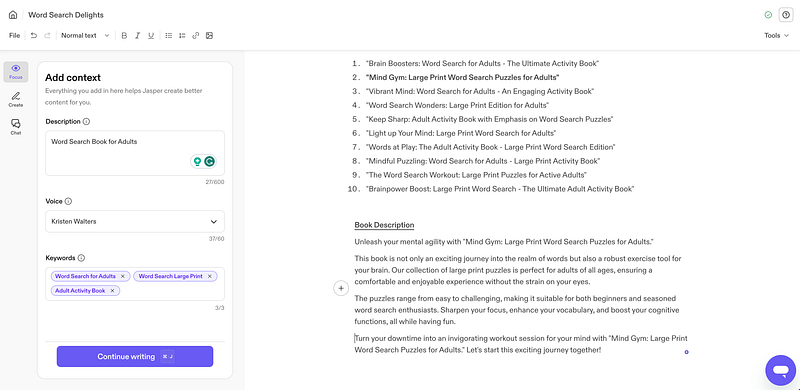
I use Jasper AI to come up with a list of potential titles/subtitles that incorporate the keywords I‘m targeting.
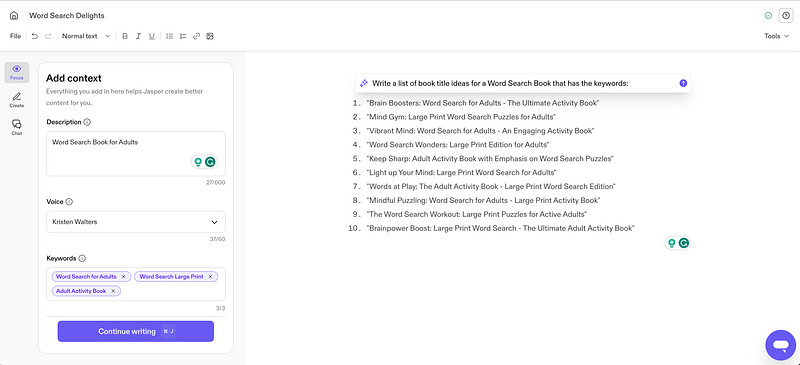
After choosing a title, I’ll have Jasper write a book description that I can use on Amazon, B&N, etc. when it's time to publish the book.
I make sure to incorporate the keywords I’m targeting in the description.
Book Interior
For the book’s interior, I use a tool called BookBolt.
BookBolt has an extensive collection of templates that you can mix and match to create unlimited books.
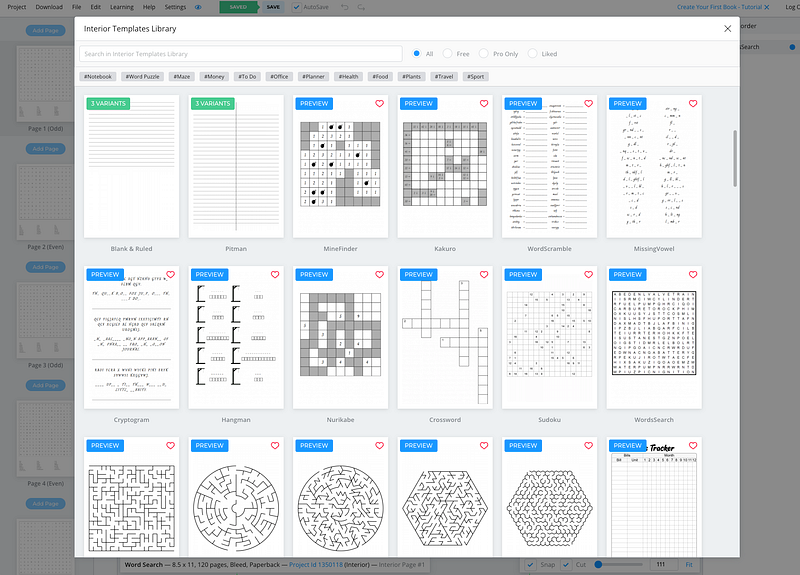
However, if I’m creating a “fill-in-the-blank” style book or something that requires more creativity and customization, I’ll use Canva to create my interior and export it as a PDF.
Generating Word Lists
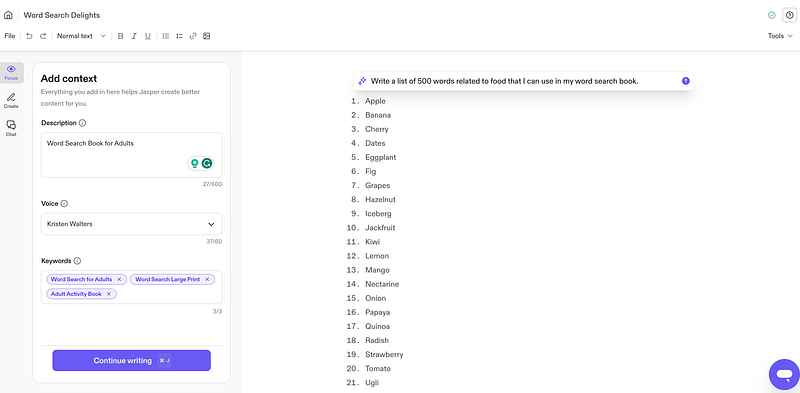
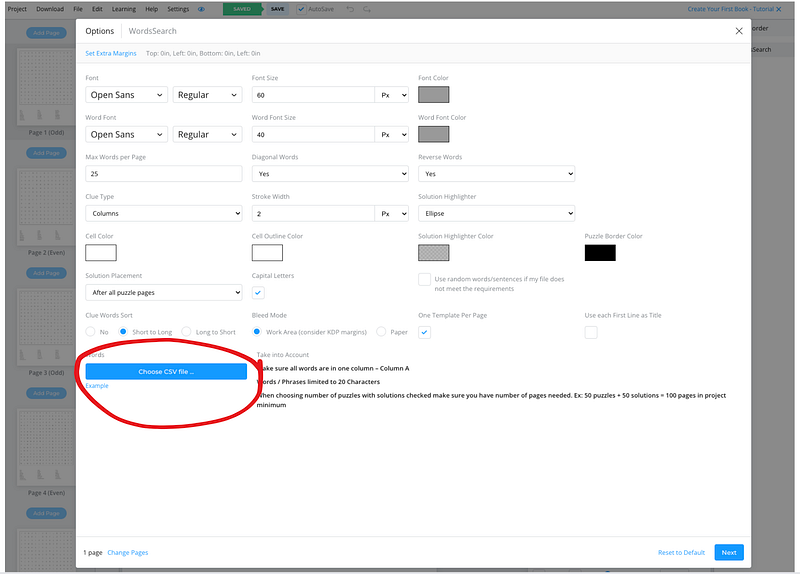
If you’re going to make a word search or crossword puzzle book, you’ll need to generate word lists to upload to BookBolt so that it can create your custom puzzle pages.
For this, I use Jasper AI to write a list of words related to the topic of my word search book.
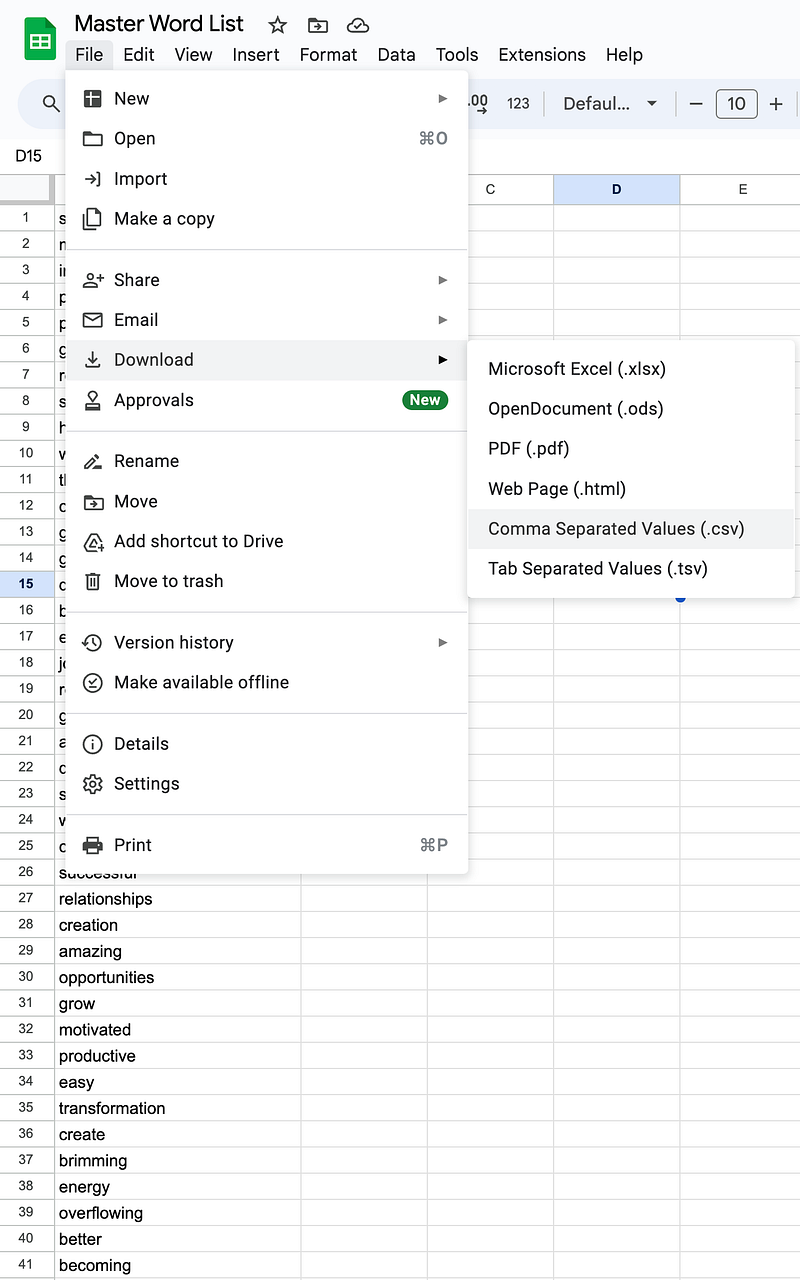
Then, I paste the words into a Google Sheet and export it as a CSV file that I can upload to BookBolt.
Back in BookBolt, I upload the word list…
Here’s what the puzzle pages look like —
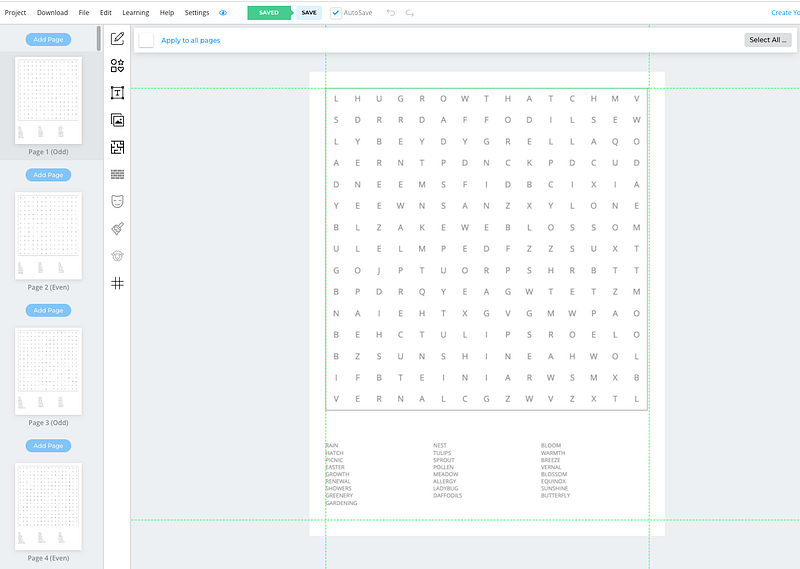
You can customize them further by adding headers, puzzle titles, images, changing font sizes, etc.
Once you’ve created your book’s interior pages, export it as a PDF.
Combining PDF’s
If you have more than one PDF for your book, you’ll need to combine them to create one final PDF interior for uploading.
For example, if you made puzzle pages in BookBolt but created a custom title page in Canva, you can combine both PDFs using Adobe Acrobat.
Step 4: Publish Your Book
There are no upfront costs for publishing paperback books through Amazon KDP or Barnes & Noble Press.
Just upload your cover/interior files, add the description, and set your price.
Your royalty is the difference between the price you set and the platform’s printing costs.
For example, one of my books is priced at $9.95 on Amazon, but my royalty after printing cost is $2.79 per book.
*Printing costs vary based on book size and number of pages.
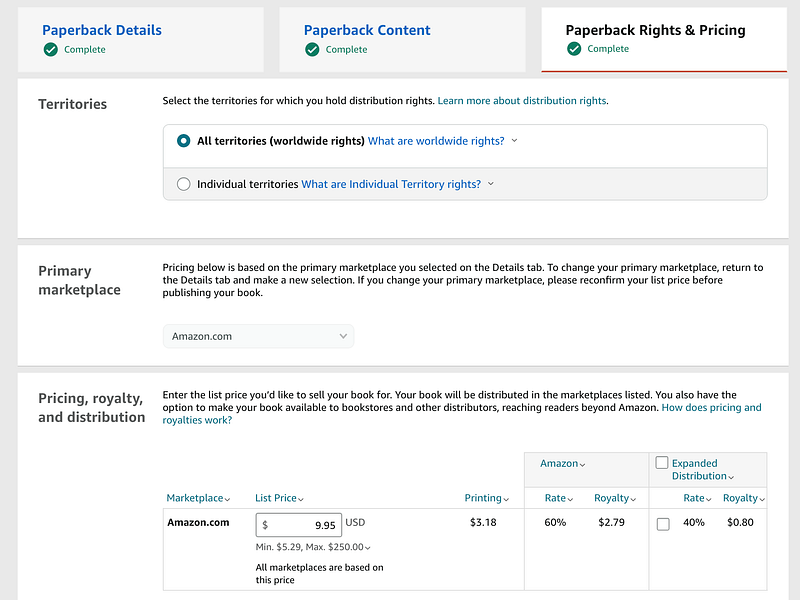
When pricing my books, I stay within the range used by the competitors for my keyword.
Publishing is pretty straightforward. However, if you want to see a step-by-step tutorial, I recommend this one for Amazon KDP and this one for Barnes & Noble Press.
Step 5: Rank Your Book
If you are publishing on Amazon, you need to take one extra step to help rank your book so that you can make ORGANIC sales in the future.
Here’s the thing most people miss —
The more sales you make, the higher your book gets ranked for your chosen keywords.
So, if you publish and run, your book will probably become one of the millions floating out there in Amazon oblivion — NOT MAKING YOU ANY MONEY.
Whenever I publish a new book, I run Amazon ads on my target keywords from day one.
This helps Amazon rank my book faster.
Each sale I make from those ads is a SIGNAL to Amazon that my book should be ranked higher for those keywords.
I don’t look at Amazon ads as a way to make PROFITS — I look at them as a tool for ranking my books higher in search for my chosen keywords.
Once your book is ranking on the first page for your keyword, you will start making organic sales and won’t need to rely on ads as much.
I also like to run low-bid “auto” ads for each of my books.
This is a topic for another day — but essentially, Amazon knows best when it comes to promoting your book, so running an auto ad will help you target profitable keywords and products you may not have considered.
Step 6: Kill Your (Underperforming) Darlings
Please, please, please, do not get emotionally attached to underperforming books.
I’ve been there — spending hundreds on ads trying to get a book to rank when the truth is — it just wasn’t good enough.
If I’ve built a book around a keyword, included the keyword in my title, description, and metadata, AND run Amazon ads to the book using my keyword, and it’s STILL not selling…
THAT MEANS THERE IS SOMETHING WRONG WITH THE BOOK.
- It could be the cover (it’s probably the cover.)
- It could be negative reviews.
- It *might* be the description (unlikely.)
- Or, it could just be that the angle or concept isn’t compelling to customers.
If I’ve improved the book to the best of my ability and it's not moving up in rank, I move on to the next one.
Wash. Rinse. Repeat.
It’s okay to publish duds.
They help you learn and grow your publishing skills.
It’s part of the process :)
Do it enough times and success will become inevitable.
This article contains affiliate links. If you purchase a subscription to one of the software tools linked in this story, I may receive a commission at no additional charge to you.


