
How to Use Set in JavaScript ES6 to Find Unique Items
Need unique values in JavaScript? That’s where the Set object comes in. Here’s how to use Set to filter a list of unique primitive values, objects by reference, or objects by their contents (values).

Unique JavaScript Values? Think Set
A Set is a unique collection of items, and it has the advantage over JavaScript objects that you can iterate through the items of a Set in insertion order.
“The Set object lets you store unique values of any type, whether primitive values or object references.” — MDN Docs
In other words, you can loop through a Set like an array, and the items stay in the order that they were found in. The properties of a JavaScript object do not retain their insertion order, so the order the properties were added to an object is lost in translation if use try to filter unique items using an object.
Set is an ES6 feature supported in all modern browsers, including IE11, according to the page for Set() on CanIUse.com.
In this article, you’ll learn how to use Set to handle the common task of finding a list of unique items in an array, whether you need to find unique primitive values (like numbers or strings) or objects.
I’ll cover both using Set with object references (the default behavior) as well as with the contents of those objects (finding unique objects by value).

How Set Checks Value Equality
Set uses the triple equality operator (===) also known as the strict equality operator in order to check equality of primitive values or objects.
“A value in the Set may only occur once; it is unique in the Set's collection.” — MDN Docs
However, there are a few key differences with the implementation of equality comparison for Set versus ===, at least since ECMAScript 2015 (ES6).
For Set, +0 (positive zero) and -0 (negative zero) are considered to be the same value, even though +0 !== -0 in JavaScript.
Similarly, Set treats NaN (not-a-number) differently than ===, in that Set makes all NaN values equal and will only store one in the Set.
NaN is typically the only value that does not equal itself in JavaScript, meaning that NaN === NaN is false and NaN !== NaN is true.
For details on how NaN works, see my article about How to Check for NaN:
Undefined values (undefined) can also be stored in a Set, and again only one undefined value will be kept. That’s normal behavior for ===, though.
Taken together, the behavior of Set is a little bit closer to that of another ES6 feature Object.is() compared to ===.

Using Set for Unique Primitive Values in an Array
Using Set is straightforward, as far as JavaScript objects go: you call the Set() constructor with the new keyword: new Set() // Set [].
The equivalent to the .push() method of arrays (Array.prototype.push()) for a Set is called .add() (Set.prototype.add()). It works the same way — except that only one of each unique value will be added to the Set.
That means you could loop through an array using .forEach() (Array.prototype.forEach()) or a for...of loop, then .add() each item to a new Set. The resulting Set object will have only the unique values.
More simply, you can just pass the array to the Set() constructor directly. That works because the Set() constructor accepts an iterable object, like an array, as its sole parameter.
“[JavaScript’s] iterable objects [include] built-in
String,Array, array-like objects (e.g.,arguments orNodeList),TypedArray,Map,Set, and user-defined iterables.” — MDN Docs
The constructor’s parameter is optional; new Set() makes an empty Set.
To convert a Set back to an array, one method to do so is Array.from(). I’ll talk about another method using the spread operator (...) later, but the Array.from() method works just as well and is easy-to-read.
Here is a code snippet demonstrating using Set with primitive values, like numbers and strings, to find the unique values in a JavaScript array.
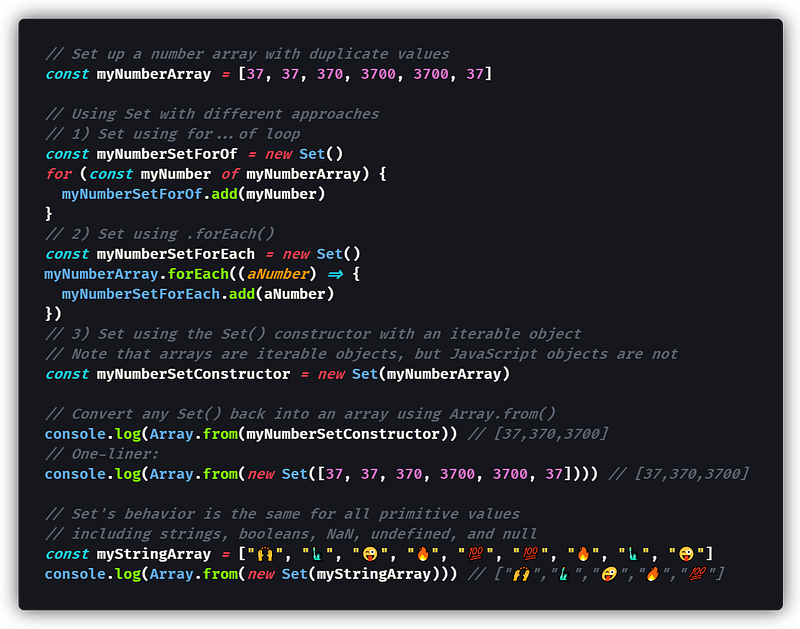
Did you like the one-liner to find the unique items in an array using Set?

Yeah, me too! 🤩 Thanks ES6.
Note that the order of the resulting Set or array is the “insertion order” — the order that the values were found in the original array or list.

Unique Object References in an Array Using Set
When working with primitive values like numbers or strings, a Set object works just as you would expect it does — only unique values are retained.
However, when working with objects, any objects that contain the same data are considered to be different objects by Set because they have different object references — the actual “pointers” in memory to those objects.
To put it another way, an array with just the number 1 in it will never equal another array, even if it also only contains 1: [1] !== [1] // true
However, we can still use Set to find unique object references in an array or other iterable object. That is super useful if the same object may have been added multiple times to an array, and we only want the unique objects.
For example, if you assign an object to a variable, and then add that variable to an array repeatedly, you could use Set to remove the duplicates:
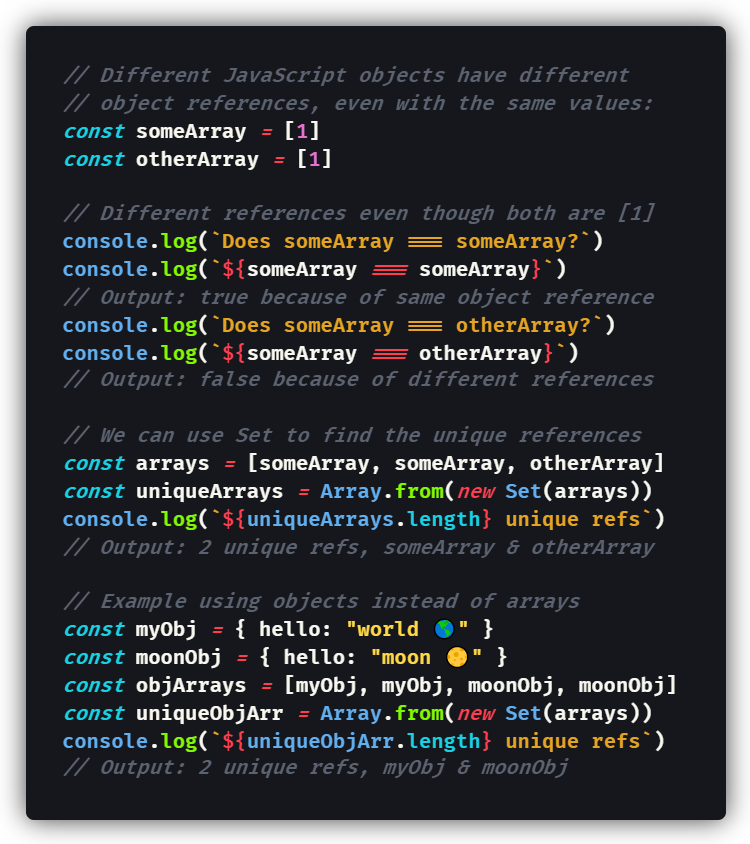
Understanding the concept of object references in JavaScript is something I’ve tackled before, in my article on deep copying objects in JavaScript:
Later in this article, I’ll talk about using Set to compare objects by the values they contain instead of the object references pointing to them.

How to Make an Array From a Set
My favorite method to turn a Set into an array is using the (...) spread operator with a pair of square brackets []: [...mySet].
You can even write it as a one-liner:
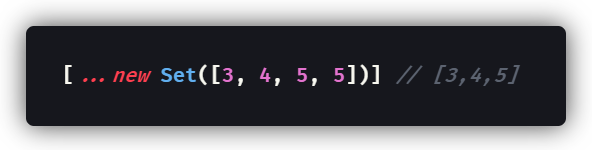
Wow! Of course, using the (...) spread operator is exactly equivalent to the Array.from() method I was using before. Feel free to use either one.
Once you have an array, you can iterate through it with your usual array methods, like a for...of loop, .forEach(), .map() and .reduce().
You can also iterate through the Set directly, as I discuss in the next section, because a Set is also a type of iterable object, just like arrays themselves.

Iterating Through a Set of Unique Values
There are a couple basic ways for iterating through a Set in JavaScript, but they’re not quite the same methods you would use for arrays:
1 — Use Set.prototype.keys() or Set.prototype.values()
These two methods are equivalent; both return a new Iterator object including the values for each element in the Set in insertion order.
Having an Iterator object allows us to call the .next() method directly, if that is something you would need to do in your JavaScript code.
Arfat Salman has a nice article explaining iterators over on CodeBurst.io.
2 — Use Set.prototype.forEach() with a Callback Function
The .forEach() method for a Set is similar to the method of the same name for arrays, so you can call it directly on a Set object.
“[
.forEach()calls]callbackFnonce for each value present in theSetobject, in insertion order. If athisArgparameter is provided, it will be used as thethisvalue for each invocation ofcallbackFn.” — MDN Docs
Of course, you can use an arrow function as the callback function, the same as you would do when working with an array.
3 — Use a for...of Loop Directly With the New Set
As Set is a type of iterable object, a for...of loop will work the same way with a Set as it would with a JavaScript array.
Technically, you don’t need to change the Set back into an array at all, depending on what task you’re trying to solve.
If you just need to iterate through the list of unique items, then any of these three methods will let you do that, without making a new array in memory.
Here’s a code snippet showing how to use each of the three methods:
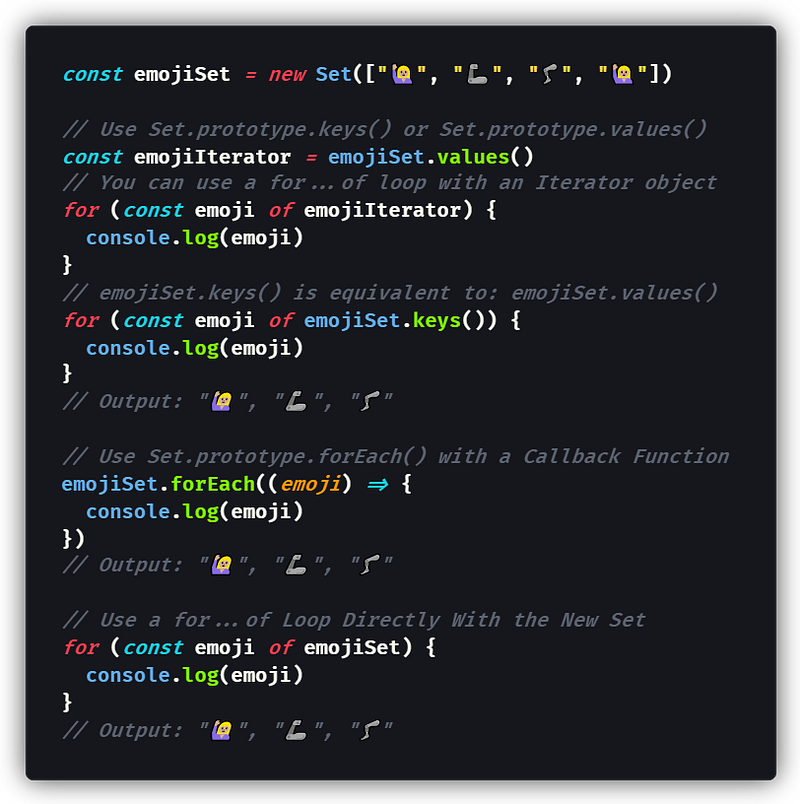
Typically, to iterate through a Set object directly, I’ll choose the for...of loop, but there’s nothing wrong with the other options.

Unique Object Keys (Properties) or Values with Set
To find a list of all the unique keys or unique values on an object, you can combine Object.keys() or Object.values(), respectively, with the Set() constructor, as those methods each return an Iterator object.
That being said, you would probably only ever use Object.values(), because JavaScript object keys are required to be unique in the first place.
“JavaScript objects cannot have duplicate keys. The keys must all be unique.” — Jason Anders from TreeHouse
If you need to save the key associated with each value based on some certain criteria, you should be aware of the Object.entries() method, which returns key-value pairs as an iterable that can be looped through with for...of.
That said, the only use for Set when working with object properties or values is for finding the unique values contained within an object.
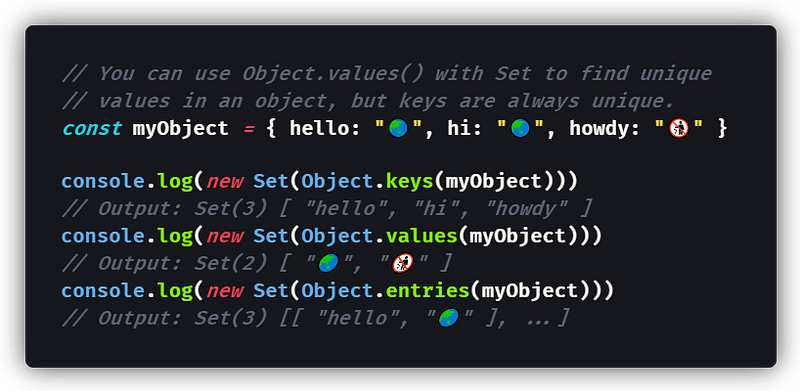
Set lets you find all the unique values in a JavaScript object, if that’s what you need to do — just combine it with Object.values(), as shown above.

Using Set with an Array of Objects: Unique Values
If you have an array of objects instead and need to find the unique values of one object property across all of those objects, you can do it with Set.
Here, you’ll need to use .map() (Array.prototype.map()) to create a new array of only the values you want, and then you make a Set of those.
To break it down, first you map the array of objects to a new array of just the values for your target property.
Then, you apply the Set() constructor as usual to find the unique values:
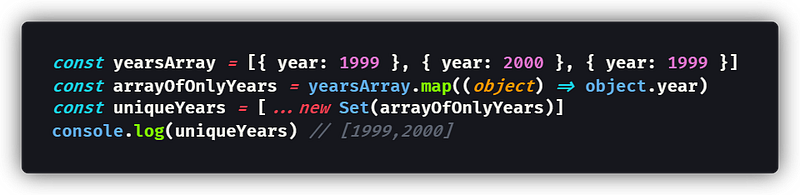
The code above outputs the unique values for the “year” property among all the objects contained in the initial array.

Using Set with an Array of Objects: Unique Objects
If you need to find all of the unique objects in an array based on whether they share the exact same keys and values (their contents), you can use Set.
However, Set checks for object references by default, so you will need to take a different approach in order to use Set.
You can find unique objects in an array by using Set() combined with the JSON helper methods JSON.stringify() and JSON.parse().
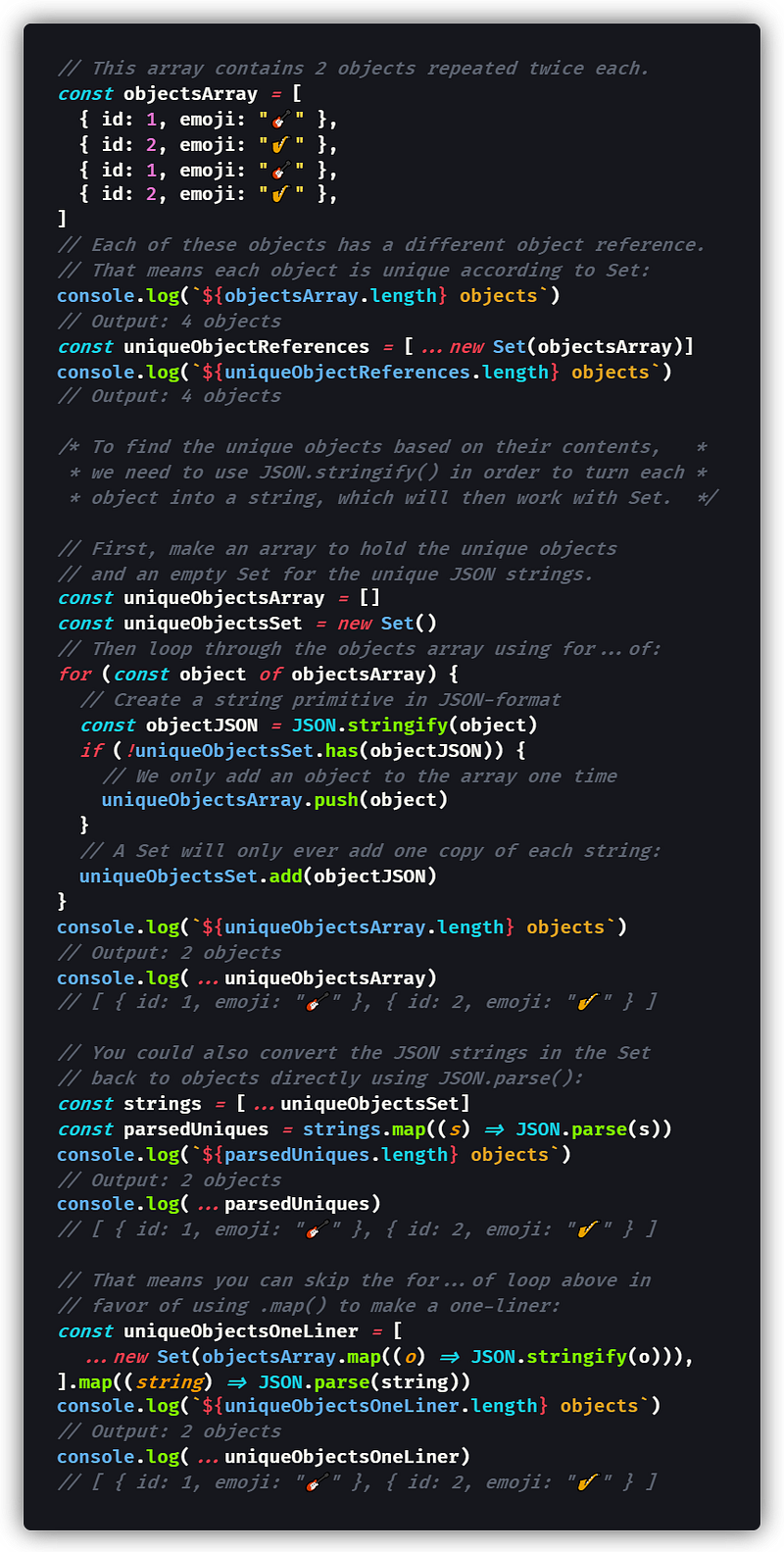
The above code loops through the entire array of objects, checking to see if the Set already contains the “JSON stringified” version of the object. If it doesn’t, then the object is added to the Set and the output array.
I then simplified my code by using JSON.parse() to transform the strings back to objects. That in turn lends itself to a functional programming approach: using .map()(Array.prototype.map()) instead of a for...of loop.
So, there’s a one-liner to find the unique objects in an array using Set:
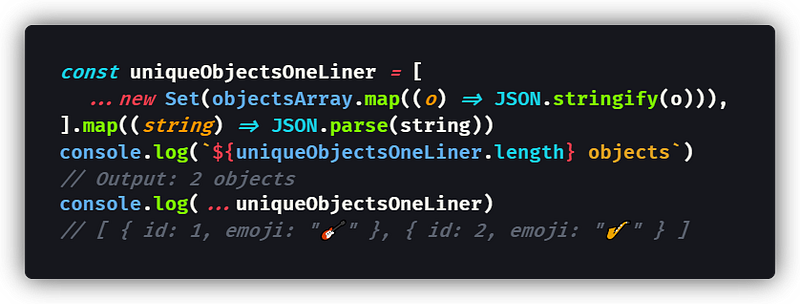
Just be warned that you may experience some problems using certain values like undefined and Infinity that are not JSON-safe, as I discussed in my previous article about JSON.stringify() and JSON.parse():
That said, for most types of data, JSON will work for comparing the objects using Set, even for nested objects — just watch out for when it doesn’t.

Finding the Unique Dates in an Array Using Set
Let’s expand on our discussion of using Set to find unique Javascript objects by looking at comparing dates using the built-in Date object.
By default, the Date will include an exact timestamp, because a Date is a wrapper for the number of milliseconds since 1 January 1970 UTC. That means any two dates that are off by a millisecond are different.
Additionally, we can’t even use JSON.stringify(), because Date objects are not JSON-safe. Date objects get transformed to strings by JSON.parse(), so you’d have to call the Date() constructor on each one, perhaps by using .map(dateString => new Date(dateString)). Putting that all together, we’d still be comparing milliseconds.
What if we just want to compare the year, month, and day? (The date?)
To find unique dates, you’d need to call .toDateString() (Date.prototype.toDateString()) instead of JSON.stringify().
The .toDateString() method returns the date in a human-readable string, like "Thu Jan 01 3001", making it perfect for the comparison we want.
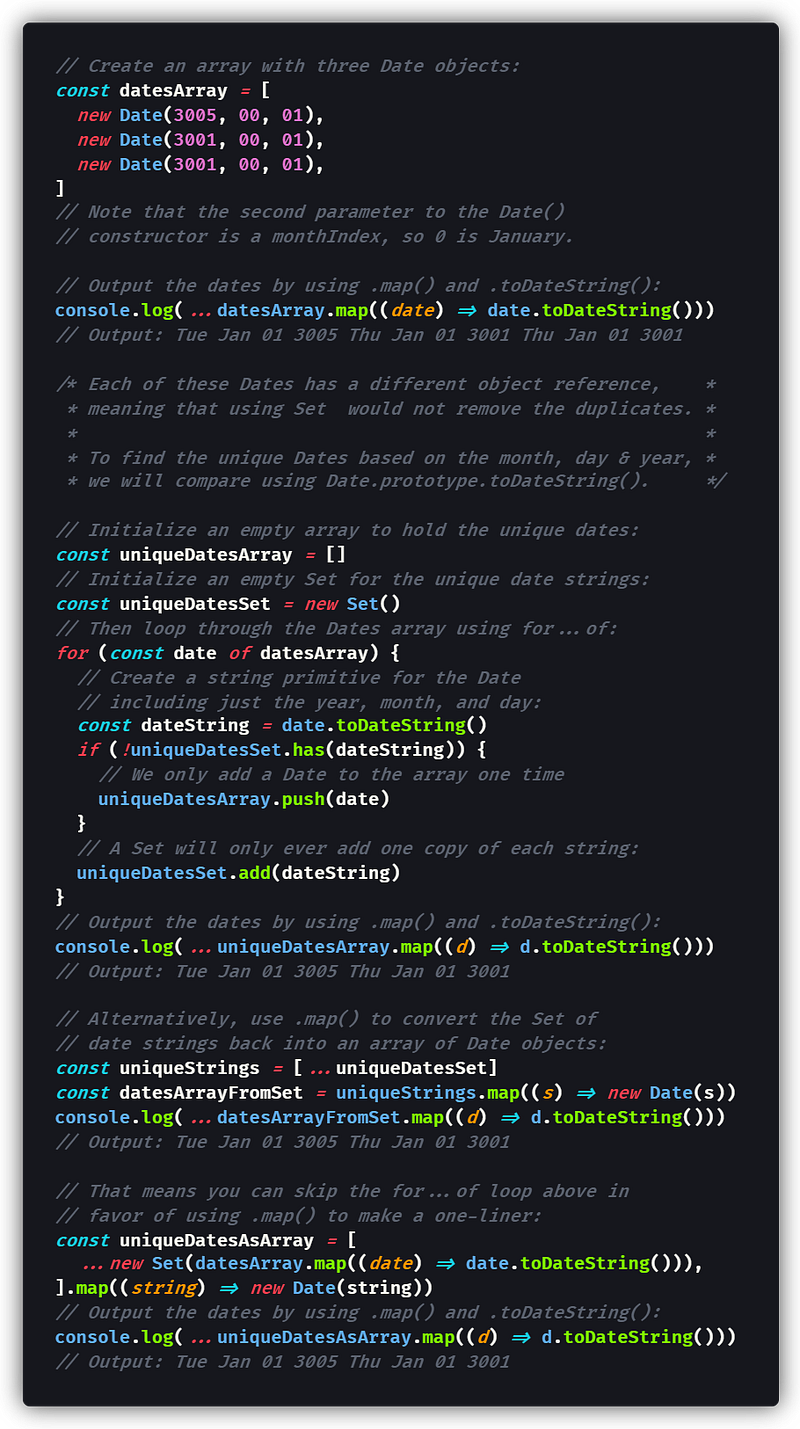
The one-liner for comparing dates is different than the one to compare objects; .map() needs to call .toDateString() and then the Date() constructor with new instead of JSON.stringify() and JSON.parse().

Conclusion
The ES6 feature Set is useful any time you need to filter out duplicate values from an array or other list of items that you’re working with in JavaScript.
Using Set has some built-in advantages over writing your own loop using the strict equality operator ===. Specifically, NaN (not-a-number) will only show up once, and -0 (negative zero) will be considered the same as +0.
Set can be used to find unique object references, to find unique object values, or to find unique object values for a given property in an array of objects.
With some help from JSON.stringify() and JSON.parse(), Set can be used to find unique objects by their contents — as long as the data is JSON safe.
I also included examples of using Set with Date objects, where you might want to compare them by their .toDateString() methods.
One more thing to mention here is Map, the ES6 type that is an iterable version of JavaScript objects, but that’s beyond the scope of this article.
Hopefully, this article has shown you some ways to use Set in JavaScript to filter out duplicate values and only keep the unique primitives or objects.
Happy coding! 👍😆💯
Join my email list to get free access to all of my Medium articles.

Dr. Derek Austin is the author of Career Programming: How You Can Become a Successful 6-Figure Programmer in 6 Months, now available on Amazon.


