How to Use the Spread Operator (…) in JavaScript
The spread operator is a useful and quick syntax for adding items to arrays, combining arrays or objects, and spreading an array out into a function’s arguments.

What is the spread operator?
In JavaScript, spread syntax refers to the use of an ellipsis of three dots (…) to expand an iterable object into the list of arguments.
“When ...arr is used in the function call, it ‘expands’ an iterable object arr into the list of arguments.” — JavaScript.info
The spread operator was added to JavaScript in ES6 (ES2015), just like the rest parameters, which have the same syntax: three magic dots ….

What is ... used for?
“Spread operator to the rescue! It looks similar to rest parameters, also using ..., but does quite the opposite.” — JavaScript.info
Take trying to find the largest number in an array with Math.max():
Trying to pass an array to a JavaScript function expecting separate arguments does not work. In this case it produces a NaN result. Enter …:
The spread syntax “spreads” the array into separate arguments.

What else can … do?
The … spread operator is useful for many different routine tasks in JavaScript, including the following:
- Copying an array
- Concatenating or combining arrays
- Using Math functions
- Using an array as arguments
- Adding an item to a list
- Adding to state in React
- Combining objects
- Converting NodeList to an array
In each case, the spread syntax expands an iterable object, usually an array, though it can be used on any interable, including a string.

Examples of using …
Here are a couple basic examples of using … in JavaScript, where I demonstrate copying an array, splitting a string into characters, and combining the properties of two JavaScript objects:
In the next section, I explore each of the above uses of the spread syntax.

Copying an array
Using the … spread operator is a convenient way to copy an array or combine arrays, and it can even add new items:

Concatenating arrays
As seen in the last example, the spread operator can quickly combine two arrays, an operation known as array concatenation:

Using Math functions
“The Math object's set of functions are a perfect example of the spread operator as the only argument to a function.” — @davidwalshblog on his blog
One of the best ways to understand the use of spread operator in JavaScript is to look at the the built-in functions Math.min() and Math.max(), which both expect a list of arguments, not an array.

Using an array as arguments
Since the spread operator “spreads” an array into different arguments, any functions that accepts multiple any number of arguments can benefit from use of the spread operator.

Adding an item to a list
As noted in the last example, the spread operator can add an item to an another array with a natural, easy-to-understand syntax:

Adding to state in React
Adding an item to an array in React state is easily accomplished using the spread operator. Take the following example adapted from my article on how to add to an array in React State:

Combining objects
The spread syntax is useful for combining the properties and methods on objects into a new object:

Converting NodeList to Array
The spread operator can convert NodeList and arguments objects to arrays, such as when selecting HTML elements on the page:

The spread operator and older browsers
When programming to support Internet Explorer and browsers on older mobile devices, the spread operator is not going to work.
Here is the current browser compatibility chart:
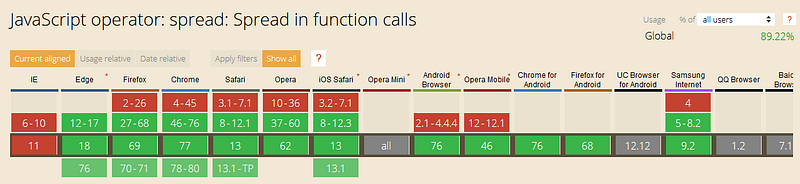
In that case, the function Function.prototype.apply() will have the same effect as the spread syntax:
Note that the first argument to .apply() is the target for this, which in this case does not matter, so I passed in null as the first argument.
Another option would be using the tool Babel to compile the JavaScript code along with the plugin babel-plugin-transform-spread.

A note about copying by reference
One of the benefits of using the spread operator is that it will create a new reference to its primitive values, copying them.
That means that changes to the original array will not affect the copied array, which is what would happen if the array had been linked to the original with the assignment operator =:
As you can see, the spread operator is useful for creating new instances of arrays that do not behave unexpectedly due to old references.

Watch out for the deeply-nested Gotcha!
On the other hand, when JavaScript objects including arrays are deeply nested, the spread operator only copies the first level with a new reference, but the deeper values are still linked together.
This type of problem is called creating a deep copy, as opposed to a shallow copy. Deep copies can be made using lodash or the R.clone() method from the Ramda functional programming library.
Thanks to Michał Bargiel for pointing out that the spread operator makes a shallow copy but not a deep copy.

Conclusion
“The spread operator can expand another item by split an iterable element like a string or an array into individual elements:” — CodinGame.com
The spread operator … is useful for working with arrays and objects in JavaScript. It is a convenient feature added in ES6 (ES2015).
One of my favorite uses of the spread syntax is when combining arrays such as when adding an item to React State.
I also like that it can quickly combine the properties of objects into a new object, though any properties whose names conflict will be lost.
Knowing the spread syntax definitely saves me time when coding, and I recommend using it to all JavaScript developers.

Further reading
- Kevin Ball examines the spread operator on the ZenDev blog:
- Yug Shah writes about the spread operator on GeeksforGeeks.org:
- Brandon Morelli explores the spread operator on Codeburst:
- David Walsh covers using the spread syntax to save time on his blog:
- Brandon Morelli discusses destructuring objects with
…in Codeburst: