
What is JSON Used For in JavaScript Programming?
JSON (JavaScript Object Notation) is a common file format used to store data instead of alternatives like XML or YAML. JSON is popular because it works natively with JavaScript and Python.

What is JSON?
My first exposure to JSON files was in setting up a .prettierrc configuration file to format my files with Prettier in a Codesandbox.io project that I was working on last year. Since my background is in bioinformatics, I instantly realized that JSON files were simply a type of data storage, where text represented certain types of data.
However, I didn’t immediately realize the close connection between JSON and JavaScript objects. JSON is a special file format that can instantly be converted to a JavaScript object using JSON.parse() and then converted back to a JSON file using JSON.stringify().
JSON is commonly used for configuration files, but it can be used to store almost any JavaScript object as a text file. In this article, I’ll explain the basics of how to work with the JSON format and why JSON is popular with JavaScript programmers.
What does JSON Stand For?
“JSON (JavaScript Object Notation) is a lightweight data-interchange format. It is easy for humans to read and write. It is easy for machines to parse and generate.” — JSON.org
There exist many ways of capturing structured data in what are called markup languages. Indeed, HTML (HyperText Markup Language) is itself a type of structured data. So is XML (eXtensible Markup Language), a more-universal type of HTML. Other common markup languages are YAML (Yet Another Markup Language*), Markdown, and LaTeX.
*I should note that YAML is now called “YAML Ain’t Markup Language” — but that’s a terrible backronym and unfortunate recursive acronym. Also, YAML is technically a superset of JSON, meaning it can be converted to JSON format.
Markup languages are commonly used for text formatting and documentation. JSON can also be considered a type of Markup language, though its purpose is to handle JavaScript objects, not just represent text.
“GitHub supports 9 different markup languages, including Asciidoc and reStructuredText” — Eric Holscher on his blog
Usually, markup languages are recognizable by their file extensions: .html, .xml, .yaml, .md (for Markdown), or .json. Configuration files for JavaScript projects are typically JSON and often end with .rc, such as .prettierrc (for Prettier, the code formatter) or .eslintrc (for ESLint, the code linter). If you’re not familiar with those tools, Prettier fixes your indenting and ESLint enforces certain coding practices, like there should be no unused variables in your code.
The .docx and .xlsx file formats (used for modern Word documents and Excel spreadsheets, or their Open Office equivalents) are actually XML files. That’s what the “x” stands for, compared to the earlier .doc and .xls file formats. Markup is powerful stuff — after all, the entire web is really just HTML files. Next, I’ll discuss common uses for the JSON file format.
When is JSON Used?
Where might you find JSON being used in JavaScript programs? In addition to the configuration files mentioned in the last section, JSON files are widely used throughout JavaScript programming. JSON format is also used by programmers working in other languages, such as Python.
Almost any JavaScript object can be stored in JSON format, with some exceptions that I’ll discuss later. That means that most all types of data that can be used in JavaScript can be stored as JSON files.
For app prototypes, JSON can be used in lieu of a database like MongoDB. The popular Jamstack style of building websites often uses JSON, as “JAM” stands JavaScript, API, and Markup, and stack refers to combining technologies.
When I attended this year’s Jamstack conference, I definitely saw some potential uses for JSON, as I discussed in my recent article:
Suffice it to say, Jamstack means can build a powerful, dynamic website using just markup files. On the other hand, JSON files are very limited compared to a relational database, so markup files like JSON are not necessarily the best data storage format, especially for complex applications.
JSON is common for configuration files, and most JavaScript programmers work with JSON at some point. How did JSON get so popular, though?
Why is JSON Popular?
Typically, when working on a programming project, you have a ton of flexibility to choose how you want to represent the data for your project.
MongoDB and other NoSQL databases are common options used for apps today, though some websites have left MongoDB for other options, like PostgreSQL. I wrote about why The Guardian did so in Better Programming:
For prototyping or simple data storage needs, JSON format is popular because it is easy-to-use and clear. If you know how to create a JavaScript object, then you are well on your way to knowing how to write a JSON file.
Whether JSON is better than XML or YAML is a common question, and I think it comes down to personal preference. Probably the biggest advantage in favor of JSON is that it can be handled natively by JavaScript using JSON.parse() and JSON.stringify() — two JavaScript methods that have been supported in web browsers since Internet Explorer 8.
I wrote an article about using those methods in JavaScript in Plain English:
Generally, when you can accomplish something in JavaScript without needing any external libraries or frameworks, it’s a good thing. And you don’t need special tools to get started with JSON, just vanilla JavaScript.
An Example of JSON
The most basic example of JSON I can give you is the .prettierrc file that I create for every JavaScript project that I start. This file simply tells Prettier to remove all the semicolons from my JavaScript code.
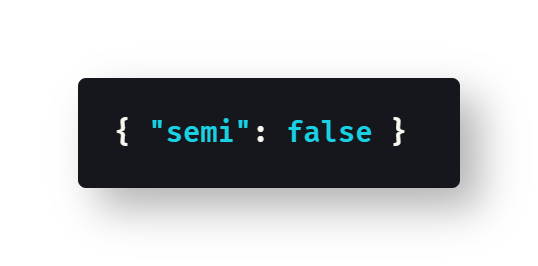
My default .prettierrc file is { "semi": false }I have other minor preferences for Prettier, which I have set up in my Prettier extension for VS Code, but the semicolons definitely have got to go.
Why do I hate semicolons? That’s a topic for another article, but I think they’re unnecessary —after all, every JavaScript statement is placed on a new line. I’ve mentioned before that I love Ruby, because I find Ruby code so readable, and trailing semicolons bother the writer in me. Where’s the next phrase? When I see a semicolon, I want a conjunction. When I don’t get it, I start thinking Conjunction junction, what’s your function?
At the end of the day, it’s the fact that semicolons are optional that bothers me about JavaScript. If they were mandatory, like in C++, I’d be using them, but JavaScript is wishy-washy on the subject. Use them, don’t use them, who cares — it’s JavaScript! That’s why I love Prettier, because it makes semicolons mandatory (by default) or removes them all (my preference).
I recently wrote an article in Level Up Coding about how to use Prettier from the command line to format all files in a directory, as I do it all the time:
The .prettierrc file is a great example of a basic JSON file. As soon as I make my .prettierrc file, I run prettier --write . in the terminal to format all the files and remove semicolons. I run Prettier when starting any project, such as if I start a new app using create-react-app or a Jamstack site with Stackbit.
Frequently Asked Questions about JSON
In this section, I want to rapidly answer some of the most common questions about using the JSON file format in JavaScript.
Can JSON Have Numbers?
Yes. “In JSON, values must be one of the following data types: a string, a number, an object (JSON object), an array, a boolean, null” — W3Schools
Can JSON Have Null Values?
Yes. A value of null in JSON works the same as it does in a JavaScript object, so {nullProperty:null} becomes {"nullProperty":null} in JSON.
Can JSON Keys Have Spaces?
Yes. Just like JavaScript objects, JSON keys (also called properties) need to be in quotes in order to have spaces. That means the object {"space key":true} would be the exact same, {"space key":true}, in JSON format.
By convention, developers use camelCase for JavaScript keys, because the dot . operator cannot access JavaScript object properties with spaces. You have to use bracket [] notation to access object keys with spaces. For the last example, you would need to call obj["space key"] in JavaScript.
Can JSON Have Duplicate Keys?
Yes, but JSON files probably shouldn’t have duplicate keys, since JavaScript objects can’t have duplicate keys. Only the last occurrence of a key is going to be saved when JSON data is parsed using the JSON.parse() function.
“The names within an object SHOULD be unique. [But…] We can have duplicate keys in a JSON object, and it would still be valid. […] most popular implementations (including the ECMAScript specification which is implemented in modern browsers) follow the rule of taking only the last key-value pair.” — Chamal Nanayakkara in DZone
Can JSON Contain Functions?
No. This is one of the major differences between JSON and JavaScript objects, which can and do frequently contain functions. “JSON values cannot be one of the following data types: a function, a date, undefined” — W3Schools
Can JSON Use Single Quotes?
No. “The JSON standard requires double quotes and will not accept single quotes, nor will the parser.” — Sean Sube on StackOverflow
Can JSON Start with an Array?
Yes. For example, try JSON.stringify([1,2,3]), which results in the string "[1,2,3]". Calling JSON.parse("[1,2,3]") will return the array [1,2,3].
Who Developed JSON?
JSON is generally said to have been invented by Douglas Crockford, though he doesn’t take credit for doing so. The team at State Software, which included Crockford, is generally credited with having made JSON in 2001. “Douglas Crockford first specified and popularized the JSON format.” — Wikipedia
Which Characters Need to Be Escaped in JSON?
Several characters need to be escaped in JSON files. Here’s the list:
“The following characters are reserved in JSON and must be properly escaped to be used in strings: Backspace is replaced with
\b, Form feed is replaced with\f, Newline is replaced with\n, Carriage return is replaced with\r, Tab is replaced with\t, Double quote is replaced with\", Backslash is replaced with\\” — FreeFormatter.com
Can You Have Comments in JSON?
No. You can’t have comments in JavaScript objects, after all, so you can’t have comments in JSON. You can make fake comments using underscores, such as a JavaScript object like {__aComment__:"The weather is fine."}, but those comments are still going to be considered data in the JSON file format.
“If you’re having trouble adding comments to your JSON file, there’s a good reason: JSON doesn’t support comments. […] A way to skirt around the comments issue is to add data to your JSON file that function as comments.” — Amy M Haddad in freeCodeCamp
Conclusion
The common JSON file format is something that every JavaScript programmer should be familiar with, even if you don’t use it every day. Because you are eventually going to have to look at a .prettierrc or .eslintrc file (though Prettier supports YAML, as does ESLint, if you really hate JSON).
And let’s not forget the package.json file that every npm project has in its root directory. Sometimes it feels like JSON is everywhere in modern JavaScript development, but don’t worry. JSON is basically the same as working with JavaScript objects, with certain caveats discussed in this article.
Other than configuration files, the best way to get acquainted with JSON is playing with the JSON.parse() and JSON.stringify() methods, so open up the browser console and give it a shot.
Hopefully this article has given you some insight into where JSON came from, why JSON is so popular, and how to use JSON in your JavaScript projects.
Happy coding! 🔥🤩🖥️🤓⌨️😎💻💯
Further Reading
- The SQLizer blog has a great, short history of the JSON file format:
- Juliana Tyler illustrates array of JSON objects on her Medium blog:
- Timothy Robards offers a thorough intro to JSON on his Medium blog:
- WiseL Teach compares JSON objects and arrays on their Medium blog:
- sonia dumitru combines JSON + Ruby in an article on her Medium blog:
- Yong Cui, Ph.D. teaches how to use JSON in Python over in The Startup:
- Rizwan Hasan has a beginner’s guide to JSON on his Medium blog:
- William Hayes, PhD has a love affair with JSON in Towards Data Science:
- OMAR ELGABRY loads Facebook’s API using JSON on his Medium blog:
- Tara Boyle manipulates JSON using Python in Towards Data Science:

Dr. Derek Austin is the author of Career Programming: How You Can Become a Successful 6-Figure Programmer in 6 Months, now available on Amazon.


