

Handle JSON Data Using JSON and Pandas in Python
An introduction to the deserialization and serialization of JSON data in Python.
Introduction
JSON is a very popular standardized data format that’s commonly used to transmit data. This acronym is short for JavaScript Object Notation — a lightweight data-interchange format that consists of key-value pairs.
Given JSON’s remarkable readability and its object-like structure, it has been widely used in web development and other software development settings. Thus, it would be useful to know how JSON data work in Python. This article is going to show you some basic functionalities on how we can read and write JSON data in Python.
JSON Data Structure
Let’s take a look at what a JSON object looks like. As shown below, a JSON object is surrounded by a pair of curly braces {}. We use strings as the keys, and values can be strings and numbers, as well as other valid JSON data types. Each key-value pair is associated using a colon, while key-value pairs are separated by commas.
When JSON data are transmitted, they’re in the form of texts or strings. But actually, when we prepare a JSON object, there are five valid data types, String, Number, Boolean, Array, and Object. In addition, there is a special type called Null, which we use to denote empty values for other data types.
Data Type Conversion
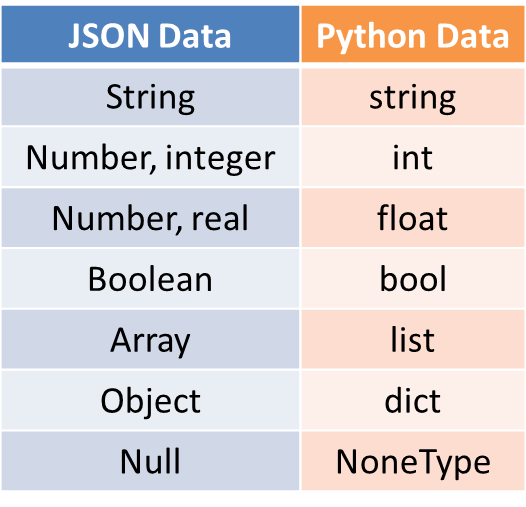
We can handle JSON data in Python using its native data types, namely dict, list, tuple, string, int, float, bool, and NoneType. How can we convert JSON data to and from Python data? Let’s see the conversion table below.
JSON & pandas
The json module is a built-in Python module that is dedicated to handling JSON data by providing various methods to read and write JSON data.
The pandas module is a very popular Python library that provides all important functionalities needed for data processing and analysis, especially for structured data, mainly tabular data. As covered above, JSON data are also structured data by organizing data using key-value pairs, such that it’s not surprising at all the pandas library have handy manipulation tools for JSON data processing.
Read JSON Data
The process of reading and decoding a JSON object data (i.e., strings) is known as deserialization. Let’s see how deserialization can be done using json and pandas in Python.
For demonstration purposes, suppose that we have a file called students.json that has the following data with each key being paired with an object value.
The following code shows you how we can read these this file using json and pandas respectively.
The following data will be printed for the students0 and students1 variables, respectively. If you check their types using the type() function, you’ll find out that students0 is a dict and students1 is a pandas’ DataFrame.
Write JSON Data
The process of writing to a JSON object data (i.e., strings) is known as serialization. Let’s see how serialization can be done using json and pandas in Python.
As you can expect, two files named teacher.json and activities.json will be created. If you open the files, they will be in the expected JSON data format with key-value pairs. The following shows you what they look like.
Conclusions
This article is a brief introduction on the deserialization and serialization of JSON data in Python using two popular modules — JSON and pandas. Certainly, each of these modules has more functions with each of them having more arguments that we can set to process JSON data of different structures. Please refer to the following references for more information.


