
How to Optimize Posts to Rank 1st on Google (While Optimizing for Humans at The Same Time)
A step-by-step guide that shows you how to optimize any post to rank high on Google.

In my previous post, I explained why optimization for humans is as important as SEO optimization.
Now I want to tell you even more… Look…
By the end of this post, you will know more than 90% of people about WordPress blogging and SEO.
Believe it or not, you can do wonders with this knowledge (earn a lot)…
To make good even better, here is the bread and butter of search engine optimization.
Let me show you how to optimize the post to appear high on Google results (and bring you tons of visitors and conversions).
(All this while keeping user experience & readability at the top level.)
Ready?
Here we go.
Section by section.
Note: This article uses WordPress as the blogging platform, but the principles are the same for any other platform you might be using (still, WP is #1 globally, and I highly recommend it).
a) Type your focus keyword in Yoast SEO
Yoast SEO is your friend. Once you finish the keyword research, enter your primary keyword in the Yoast SEO box. (The box is located just below the post form.)
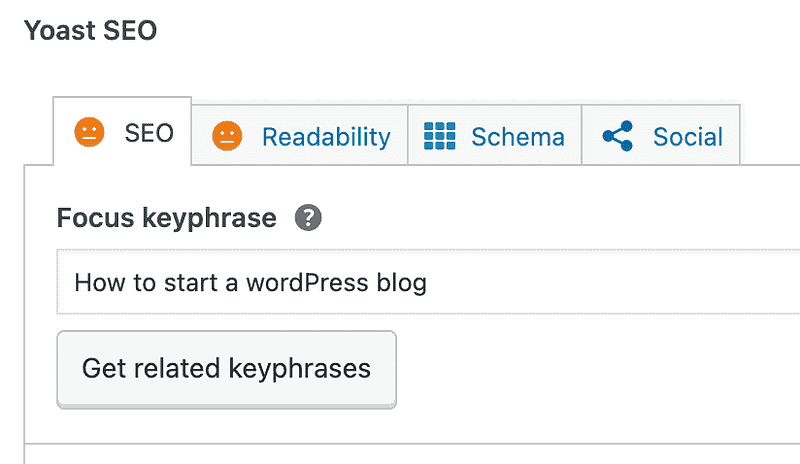
Yoast SEO is going to monitor the post as you write and give you an indication of how well you optimized the post for that keyword.
b) Post Title
Your visitors see this first (already in Google results or social media feeds). Since the attention span is very brief nowadays, keep the title short & the point.
The only task of the title is to grab users’ attention so that they click & visit your post (no more and no less).
It’s the point when the potential visitor stops considering other links/news feed stories and decides to click on your post…
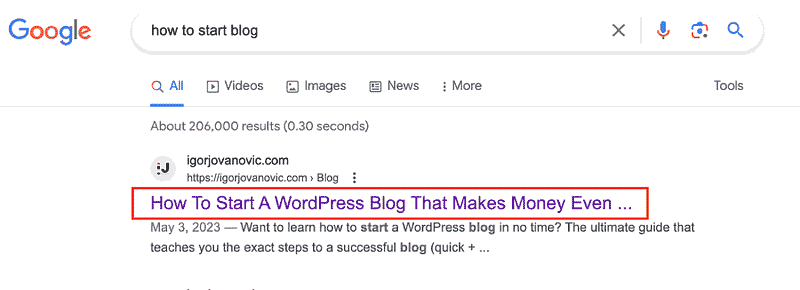
Here are a few points to keep in mind for the best post title.
- Include your primary keyword at the beginning of the title (combine this with the below points)
- Use the primary keyword only once in the title (avoid keyword stuffing)
- Combine the keyword with a phrase that appeals to humans (enclose the phrase after the colon or in the brackets as keyword: phrase or keyword (phrase), e.g., XYZ air cooler is HERE: Why swelter through another hot summer?)
- Make a promise you will deliver in the post body (e.g., How to start a blog that makes money)
- Don’t tell the complete story so that you appeal to visitors’ curiosity (e.g., How I Made a Fortune With a “Fool Idea”)
- Show them ways/reasons as people like learning how to do new things (19 Ways to… 8 Reasons why… How to…)
- Appeal to the fear of losing something valuable (e.g., Top doctors say to throw this vegetable into your garbage)
- Challenge their common sense and write something unexpected (e.g., How advertisements can stop people from buying)
- Leverage fear of loss: it’s the strongest motivator out there (e.g., How to improve your marriage vs. How to stop your divorce or lover’s rejection; 50% of people have high blood sugar levels without knowing: common diabetes symptoms)
Thanks to the killer post title, you have a visitor on your blog. What happens now?
In the next 30 seconds, the person will decide whether to read your post or send it to the “graveyard of the stories untold”…
They will skim through (scroll up & down), look at the post images, and read the first paragraph of your post.
The title has done its job — made the visitor read the first line of your post.
Click here to sign up for bite-sized tips on blogging & making money online (focus on what works).
c) Post Body: Post Intro
After a killer post title, your visitor reads the intro paragraph of the post.
More precisely, they read the first sentence of the intro paragraph…
What’s the goal of that first sentence?
Well, to make them read the second sentence…
Godfathers of copywriting (Joseph Sugarman and others) call this method a slippery slide.
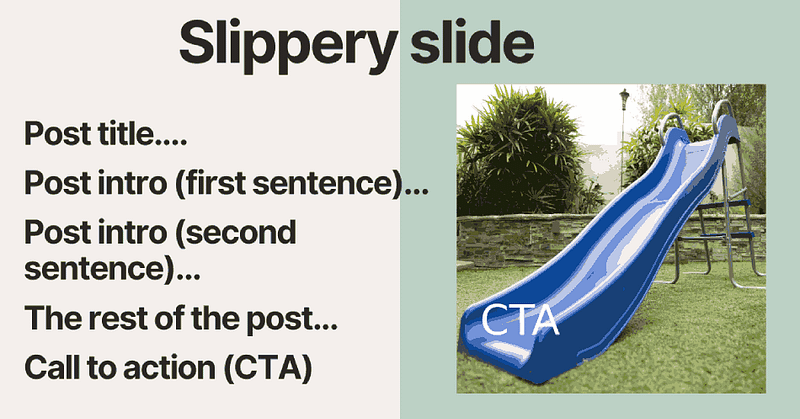
Your reader cannot stop reading the post because every sentence makes them want to read the following one…
Sentence by sentence, all through the end…
Where you ask them for a specific action (e.g., to buy a product or subscribe — this is called Call to Action, and we will talk about it later.)
So, how do you write the intro that sends the visitor down the slippery slide path?
- Write two to three sentences in the intro section (use a strong typeface).
- Include the primary keyword once or twice in the opening.
- Make the first sentence of the intro very, very short (so they read it). You can even use one-word sentences such as O.K., All right, etc.
- Start by asking the question the visitor wants to know more about (e.g., Want to learn how to make a blog that makes money?)
- Make a promise & tell them what’s on the truck for them (e.g., You will learn how to grow your blog from $0 to at least $1000 a month in passive income — all that in under 2 weeks).
- Don’t promise what you can’t deliver (people will find out if you lie to them; commit to something and then deliver it, simple as that).
- Tell your story & why they should care (read the intro of this post for an example)
- Present reliable statistics that persuade the reader (e.g., In the last 5 years, every other employee of Forbes 100 migrated to another country for a better salary. Is this for you in 2023?)
d) Post Body: Graphics
A picture is worth a thousand words… You heard of this saying, right?
Why not use it to enrich your posts further (show, don’t tell)?
The reality is that the reader only scans your post at first.
And they do it to find out two things: a) is the post helpful enough b) is it easy to follow?
Images, GIFs, and infographics add value to your blog post but also serve one other essential purpose…
Think of these as rest areas. The reader needs a pit stop to “charge the batteries” before reading further.
After 300–500 words, try to include one relevant image, GIF, or infographic.
It will make the post easier to read and more informative (and Google will love it more).
Why?
Because Google is also a search engine for images.
The more images you add, the greater your chance of ending up in the image search results (appeal to the people who prefer the visual search & get some extra traffic).
A few last points here:
- Include the primary keyword in the image filename (e.g., how-to-start-blog.png — notice, do not use articles in the image name).
- Optimize the images to use less space (so the post-load time is not impacted).
- Provide the metadata to every image (graphic) and use the primary (and other) keywords here as well.
- (Optional) Add captions to your images.
Got it? Great.
Watch the video below to see how you can add an image to your WordPress post (including how to optimize images to rank well on Google).
P.S. This website offers thousands of copyright-free images that you can use freely in your posts.
Click here to sign up for bite-sized tips on blogging & making money online (focus on what works).
e) Post Body: Paragraphs, subheads, lists, bullet points
Remember
SEO optimization = optimization for humans*
*Still not 100% accurate, but it is coming closer and closer every day.
I have a few more tricks on my sleeve that I want to share with you.
Here are my tips for the best user experience & engaged readers. (Yes, that is how you send them down the most slippery slippery-slide in the world.)
- Use subheadings to provide more “pit stops” to your readers. Typically, introduce a new subheading after 300 words. (Subheadings are
h2,h3,h4,h5, andh6tags.) - Include your primary keyword in the subheadings (once to twice), BUT DO NOT OVERDO IT.
- Use the other relevant keywords in the subheadings occasionally.
- Insert links to your other relevant posts.
- For the long posts (2,500+ words), consider adding the table of content (and link every item to the appropriate section)
- Add lists after the long chunks of text so the reader can also rest here.
- In 300 words, use your primary keyword once to twice.
- Include bullet points to capture the reader’s attention when they only glance over the article (at the early stage).
- Lists and bullet points are also typical “anchors.” Readers usually decide to pause here (because it’s easy to find where they left off).
- Add videos. There is no one size fits all. Some prefer reading, while others prefer watching. Ensure your blog post covers both alternatives to keep most of your readers engaged.
- Make your sentences short, and do not use any advanced/scientific vocabulary (unless necessary).
- Use dividers for plenty of room around the sentences.
- Humor is subjective (use it cautiously because you might lose some readers if they do not like the joke).
- Keep it personal — always use “you” and talk to the reader like a friend (avoid the passive voice).
- If you are a company, never use “we” — people look right through it. Instead, use “I and my team” — it’s much more personal.
- At the beginning or end of the post, introduce yourself to the reader and present your credentials briefly.
If you look carefully, you will see I applied most of these to the post you are reading now… See how I guide you through the text?
You can do the same with your readers…
Just copy/paste the style…
The post you’ve just read is only a taste of my full-blown ultimate guide on blogging & making money online.