
7 WordPress Plugins to Make Your Blog (at Least) 2x Faster [FREE]
Want to speed up your WordPress blog? What if I tell you it only takes 8 minutes of your time and it is 100% free?
The core WordPress functionality is straightforward. The homepage shows the most recent entries summaries & every post entry can be extended to show the full text.
Remember that WordPress is Earth’s #1 blogging platform? How come something this simple can be so popular?
That catch is: you can extend and improve the default WordPress functionalities by using WordPress plugins.
Let me tell you first what a plugin is…
What is a plugin?
It’s an extension that adds a particular feature to your WordPress blog. Think of the share buttons, image galleries, newsletter popups, booking calendars, or really anything else that is not the default behavior.
How much does this cost?
Most plugins are free of charge. Right now, WordPress offers 60,376 free plugins that you can install and use. In 99% of the cases, you can find a free plugin for any feature that your blog requires.
Who creates these plugins?
WordPress is so powerful because of its immense community. Everyone can write a plugin and list it in the WordPress plugins directory (after WordPress approves it). So, there is an army of WordPress developers writing plugins (some do it for business and some do it on a non-profit basis).
Are there premium plugins?
Even though most of the plugins are free of charge, there are some that also have a premium version. This is a more advanced version that adds even more features to your WordPress website. In most cases, you can do everything with free plugins.
Can I write my own plugin?
Writing a plugin requires some programming knowledge. Namely, JavaScript, PHP (+HTML, CSS). It is absolutely not a requirement but if you want more challenges you can give it a try.
Currently, 60k + free plugins are available in the WordPress plugins directory.
(Familiar with Google Play Store or App Store on your mobile? WordPress plugins gallery (directory) is very similar. You browse and select the features you wish to add to your blog.)
You manage (add/remove/enable/disable) plugins directly from your WordPress Admin Dashboard –> Plugins.
This is what the page looks like
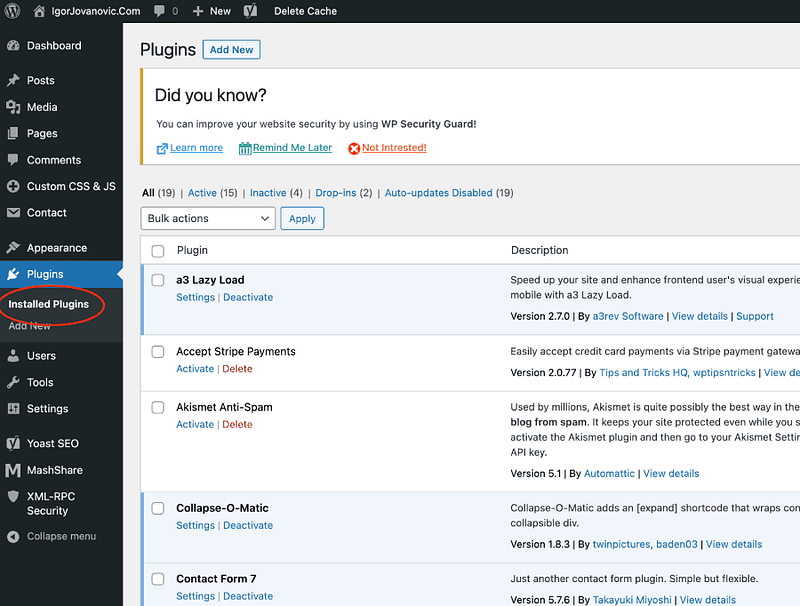
You can access the plugins page by going to the below address (replace yourdomain.com with your actual domain name).
https://yourdomain.com/wp-admin/plugins.php
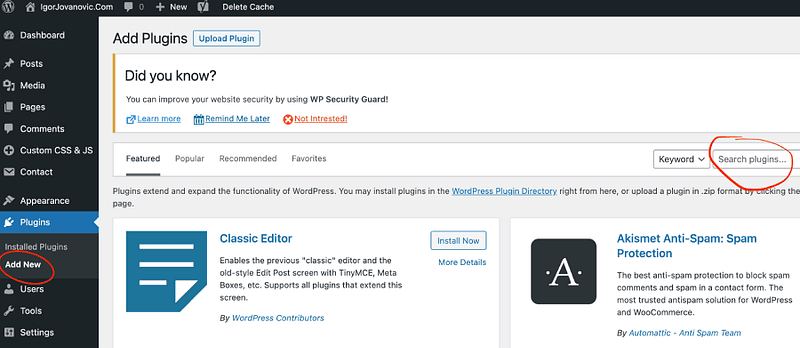
To add a new plugin, go to WordPress Admin Dashboard –> Add New.
On the right-hand side, there is a search box. You can type the plugin name to search the directory and install the one you need.
How do you know what plugins do you need? I will tell you…
Before that, let’s see how you can add your first plugin.
Read on.
How to install (add) a new plugin
Here is how you can add a new plugin. In the video, I installed a plugin called Akismet Anti-Spam. The plugin name is not important right now.
Let’s do a little exercise…
Add one plugin yourself, and then remove it.
Went fine? Read on.
You have just one goal…
What you are going to read next might surprise you…
There are only a few plugins that you really need.
Here is why I think that way.
You want to optimize your website for speed. The more plugins you add, the more code “runs” behind WordPress… This results in a slower website overall and causes long waiting times for the posts to load.
I bet you exit any website that takes more than a few seconds to load (I do the same)…
Why? Because we got used to getting the results right now.
And Google (and other search engines) know that…
That’s why the fastest blogs are favored the most (and on the first page of Google).
To those blogs, Google is sending avalanches of traffic every second. And to the slow ones — none, graveyard.
(More traffic means more earnings.)
With my clients, I have seen tens of WordPress websites that were literally devastated by too many plugins (one blog I worked on had 47 plugins installed). Oh boy…
Makes sense?
Great.
Let me show you now how to do it the right way.
7 plugins every money-making blog has

WordPress does not limit the number of plugins you can add. Still, I recommend keeping this number well below 10 (for optimal performance).
Remember, speed means more traffic, which means more money (details coming up shortly).
Here is the list of plugins that make your blog light & fast (without impacting the performance).
- Yoast SEO | How-To Video — Optimizes your posts & pages for search engines. You need this plugin to rank high on Google.
- Akismet Anti-Spam | How-To Video — Protects your blog from spam comments and keeps bots away.
- WP Super Cache | How-To Video — Stores your posts & pages in a “zipped” format. Compresses all the media/images so that your blog loads lightning-fast.
- Simple Custom CSS and JS | How-To Video — Makes integration with other providers possible (for instance, the newsletter and analytics providers).
- Grow Social | How-To Video — Makes your blog posts easily “sharable” by adding share buttons. Crucial in getting traffic from social networks.
- Contact Form 7 | How-To Video — Plugin that creates a contact page. You need it so that others can send you business proposals and questions via email.
- a3 Lazy Load | How-To Video — Makes images load seamlessly so that the page speed is not impacted (makes posts with images lighter & load faster).
Notice: every plugin in the list has a How-To Video. If you click on the How-To Video link (next to the plugin name), you can watch the video on installing and configuring each plugin.
Subscribe to DDIntel Here.
Have a unique story to share? Submit to DDIntel here.
Join our creator ecosystem here.
DDIntel captures the more notable pieces from our main site and our popular DDI Medium publication. Check us out for more insightful work from our community.
DDI Official Telegram Channel: https://t.me/+tafUp6ecEys4YjQ1