
START GUIDE
How to ace machine learning hyperparameter optimization
Model optimization techniques play a very crucial role in the field of machine learning. These optimization techniques are also used for hyperparameter tuning, leading to better-performing machine learning models for a given dataset. This article shows different ways of hyperparameter tuning of machine learning models in Python.
The previous article was about finding the best-performing machine learning algorithm for the given dataset.
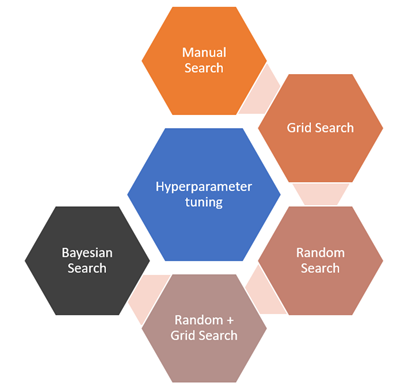
These techniques are often the first step after exploratory data analysis to cross-check if the input features in a given dataset have enough prediction power or not. Also, it is an efficient way to explore various models, and later one can choose the top 10% high performing models for further studies. Once we have few models in our bag which are the plausible candidate to perform well on the dataset, then hyperparameter tuning of these models is done to make them even better. One should also perform cross-validation to evaluate model performance and employ different regularization techniques to avoid over-fitting while training the model. The figure below shows the different methods to perform hyperparameter tuning.
What are Hyperparameters?
Hyperparameters are the model settings specified before the model training process and can’t be changed while training. These settings are tuned for specific problems and can help to make models more skillful. An example of hyperparameters could be the depth and width of neural networks or n_estimators and num_leaves for tree-based models.
On the other hand, the machine learning model learns model parameters during the training process. Examples of model parameters could be the weights of neural networks or slope and intercept of linear regression.
Behind the scenes of hyperparameter tuning
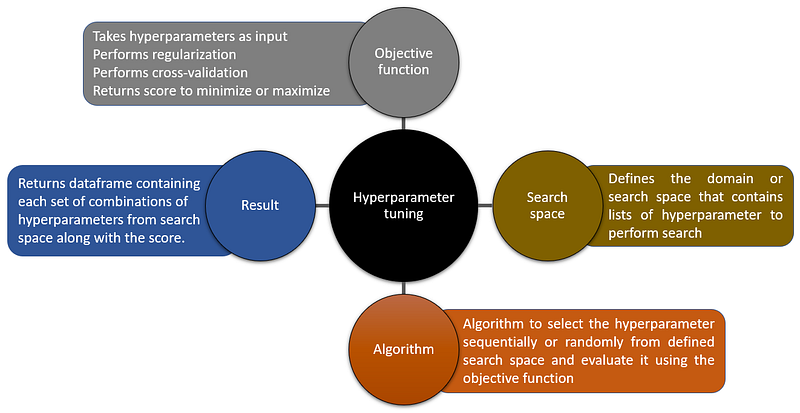
There exist several libraries in Python that offers an easy way to implement hyperparameter optimization. However, this article starts with the core concepts, such as essential functions used behind the scenes, making it easier for readers to understand Bayesian search optimization using hyperopt. The figure below shows the functions behind the optimization technique.
Dataset for this article
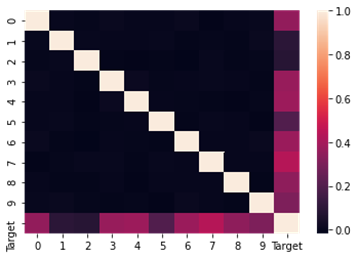
This article uses the make_regression function from the sklearn library to create the dataset. The dataset consists of 10 input features and 1 target column. The code below shows the steps to create the dataset.
Manual Search
Manual search is an inefficient way of hyperparameter tuning. Why inefficient? The number of hyperparameters in the model may result in different combinations to try upon. Manual search means random guessing and keeping a record of the best combinations of hyperparameters which is difficult and time-consuming.
Grid Search
The grid search algorithm sequentially trains the model for every possible combination of hyperparameter values defined in the search space. Assuming the defined search space contains the optimum hyperparameter of the model suitable for the dataset, the grid search would find it. However, it is an inefficient technique because it is computationally intensive.
As stated before, hyperparameter optimization has four methods behind the scene. The code below shows the objective function.
The function includes early stopping as a regularization technique and cross-validation for model evaluation. Root mean square (RMSE) is a loss metric which this function aims to minimize. The next step is to define the search space, also known as the hyperparameter grid.
The code below shows the algorithm function for a grid search.
To save time, MAX_EVALS is used, which stops grid search after 10 rounds. The next step is to evaluate the result.
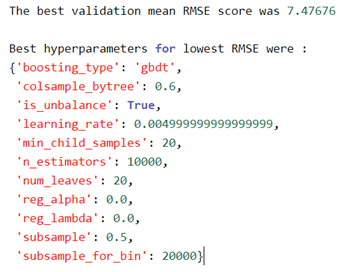
The search ran for 10 rounds and reached the RMSE of 7.47. The search is running sequentially, which only evaluates the first 10 combinations from the entire search space. Now use the best model hyperparameters from above on the test dataset.
An easy way: GridSearchCV
How can we forget GridSearchCV offered by the sklearn library? However, to demonstrate this, a small search space is used to avoid long running time. Below is the search space used.
The code below shows the steps for GridSearchCV.
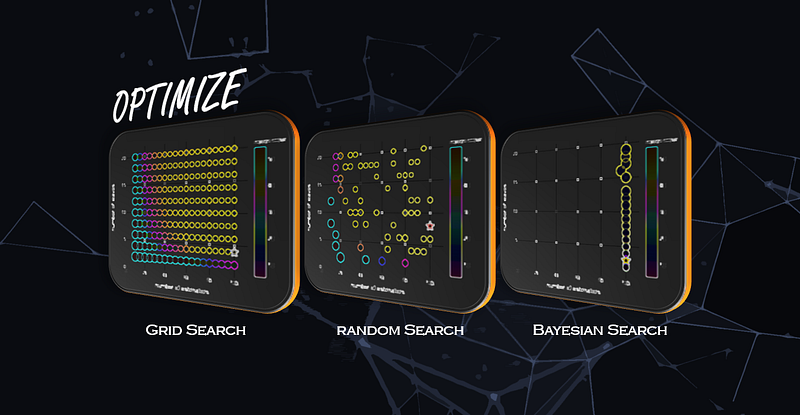
The model evaluates all possible combinations in search space as there is no way to define the breakpoint or number of iterations in GridSearchCV. Hence, it is helpful to know how the algorithm works then one can tweak things as shown in the previous section (setting the MAX_EVALS). The animation below shows how actually grid search algorithm is running through search space. The size of the dot represents the standard deviation, and the gray star represents the best hyperparameter.
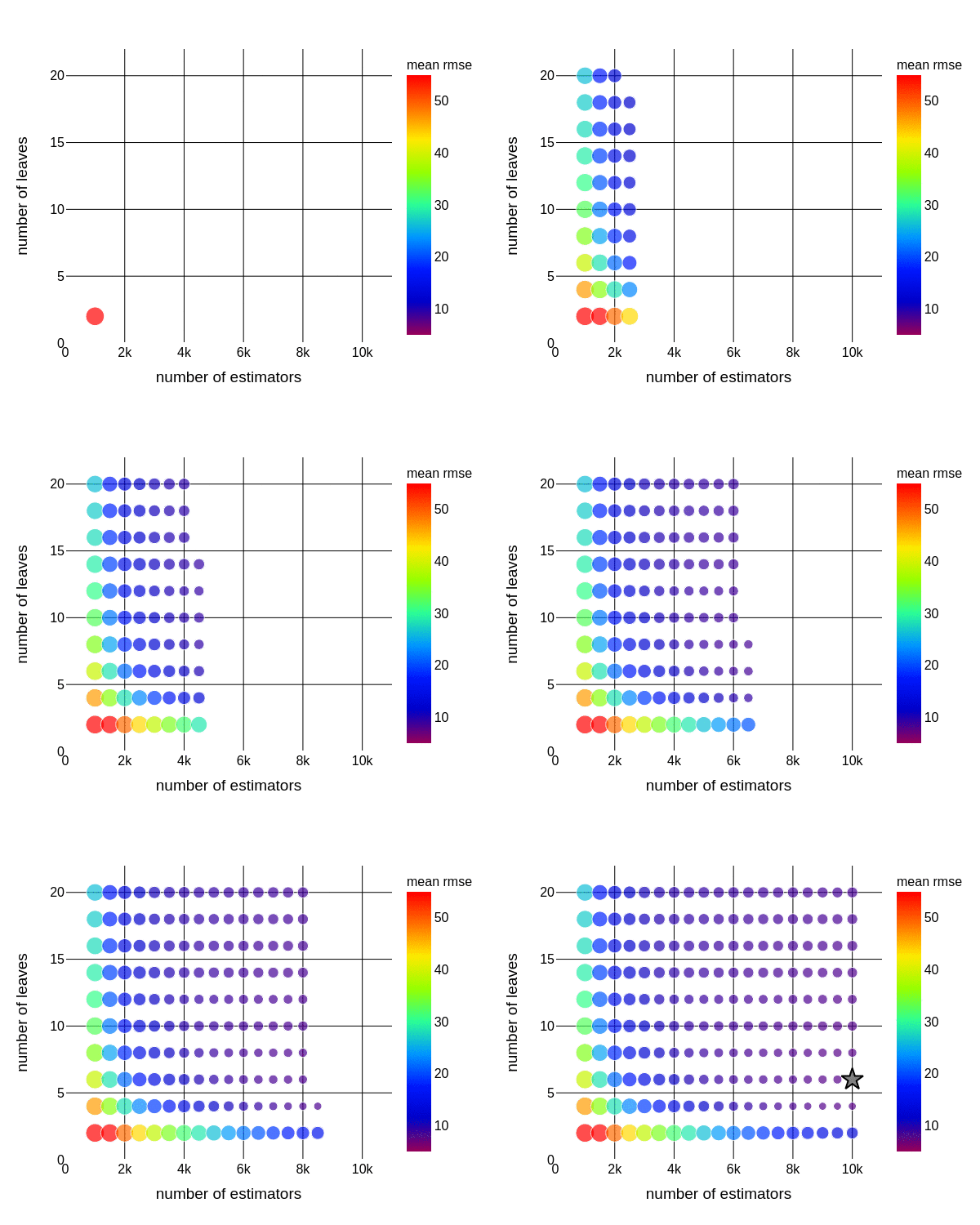
It took 182 iterations for grid search to find the right hyperparameter of a model.
Random Search
As the name suggests, a random search randomly picks up the combinations of hyperparameters from the search space. Initially, people were hesitant to use the random search as one can’t explain the random nature of this algorithm. However, many researchers showed that random search is highly efficient, and in fewer iterations, one can achieve good results.
Several articles claim that random search is faster than grid search, which is not technically accurate. It is efficient, not fast. For example, if you let run the random search for the same number of iteration as the grid search, it would take the same amount of time to evaluate all combinations.
Why efficient?
It is pretty simple to explain. Imagine in the given search space we have a combination of hyperparameter sets which result in lower RMSE. If we assume that each random draw from search space would have only a 5% chance to pick the right combination, then missing the desired combination would be (1–5%)^n. Suppose we need a success rate of 95% then (1–5%)^n = 95%, solve for n, which should be equal to 60. So, in just 60 iterations random search would provide decent results.
We need to change the algorithm for a random search. The objective function and search space would remain the same.
To make it comparable to grid search used MAX_EVALS, which stops random search after 10 rounds. The next step is to evaluate the result.
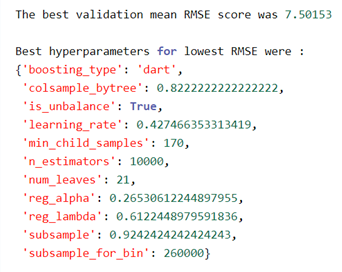
The search ran for 10 rounds and reached the RMSE of 7.50. The search is running randomly, which means it evaluates 10 random combinations from the entire search space. The random search doesn’t guarantee finding the best hyperparameter from search space. Instead, it might be possible that one ends up with the hyperparameter, which is close enough to the best one. Therefore, a random search to narrow the search space followed by a grid search to explore the nearby region is often employed to find good hyperparameters.
An easy way: RandomSearchCV
Of course, sklearn offers RandomSearchCV, which makes it easier to perform random search optimization without writing much code. For demonstration purposes, used the same search space (GridSearchCV) to make the result comparable. Below is the search space used.
The code below shows the steps for RandomSearchCV.
The model runs for 60 iterations, in which it evaluates 60 random combinations. The animation below shows how a random search algorithm is running through search space. The size of the dot represents the standard deviation, and the green star represents the best hyperparameter.
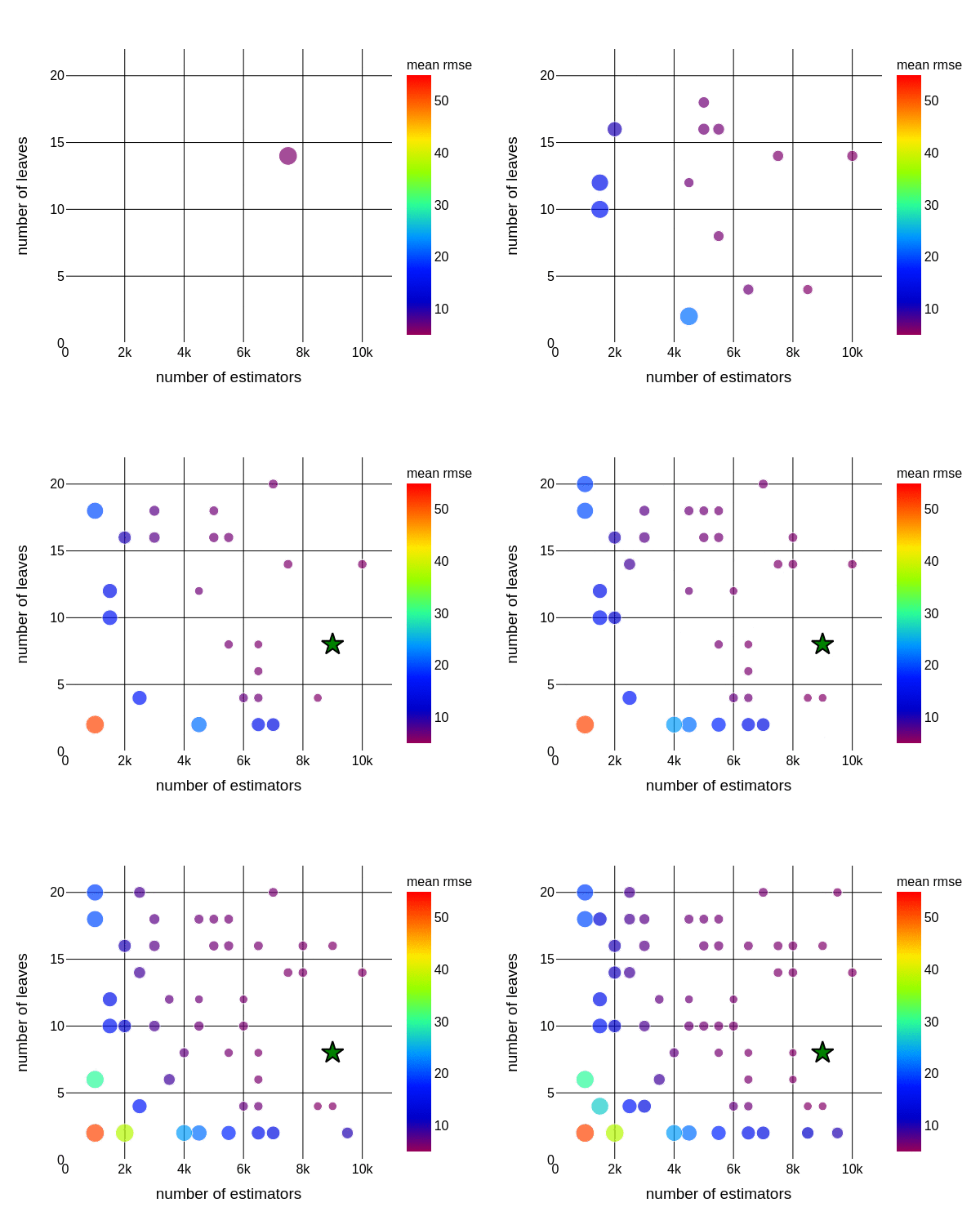
It took 24 iterations for random search to find the optimum hyperparameter of a model.
Random + Grid Search
By default, grid search and random search are independent, meaning each iteration doesn’t know the result of the previous iteration. Hence, no learning is possible.
But what if the best hyperparameter from random search optimization with slight variation fed into grid search?
The animation below shows the combinations of random and grid searches. The size of the dot represents the standard deviation, and the green star represents the optimum hyperparameter found during a random search. Using random search results, a further grid search was performed (in the near region). The red star represents the overall best hyperparameter which resulted in low mean RMSE,
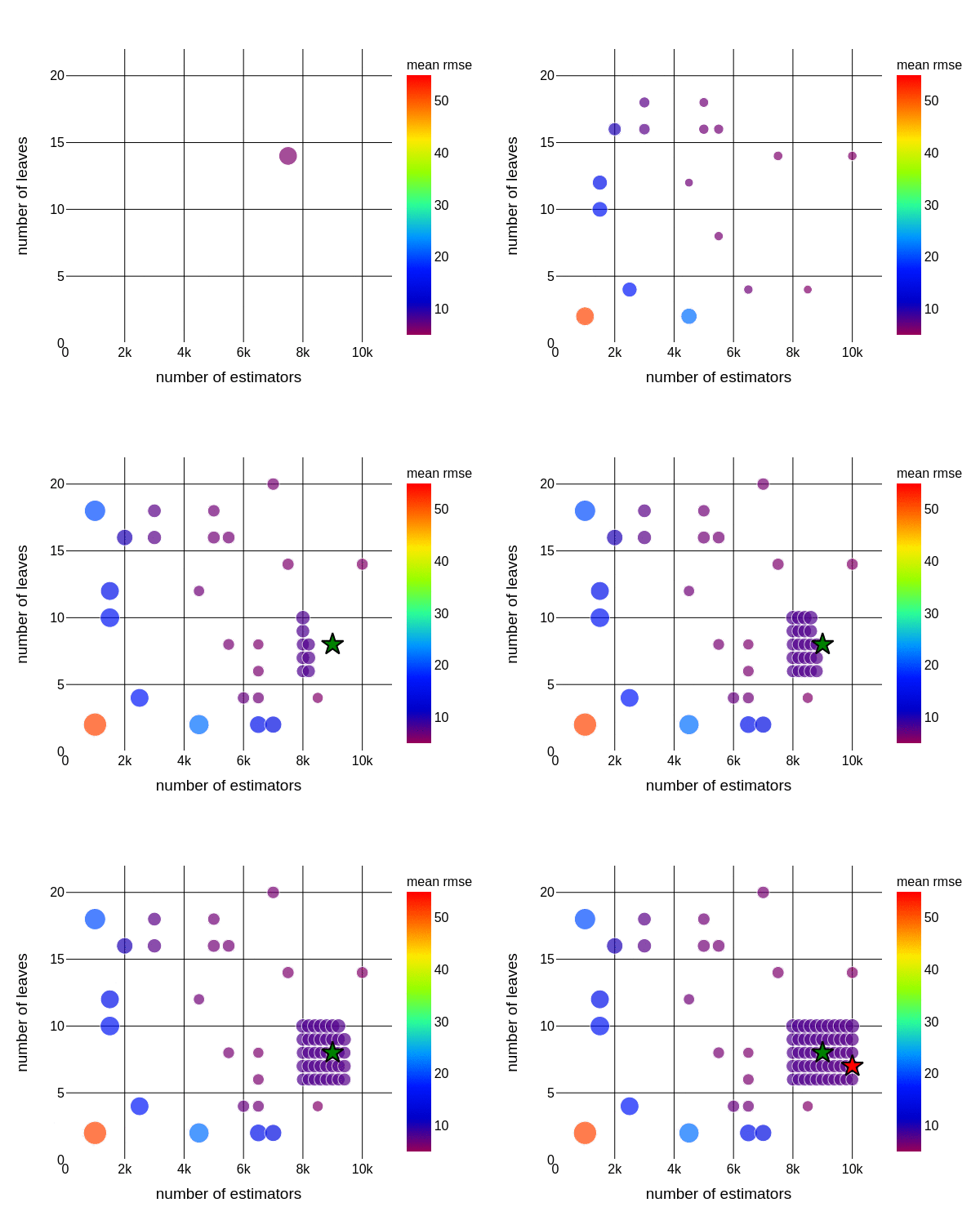
It took 75 iterations for random search followed by a grid search to find the best hyperparameter of a model. The number of iterations is lower than normal grid search (less computational intensive) and lower RMSE than random search (similar to grid search).
Bayesian Search
As stated before, grid search and random searches are uninformed optimization techniques. Performing random search followed by grid search offers some advantages, as one can narrow search space and then perform more specific methods like grid search.
On the other hand, bayesian-based hyperparameter tuning is an informed optimization technique. The algorithm chooses the next hyperparameter based on the previous iteration’s result. In this way, the algorithm spends more time evaluating promising hyperparameters. This optimization technique is efficient and intelligent.
This article uses hyperopt for bayesian optimization. Hyperopt requires objective function, search space, database to store evaluation results and algorithms. The code below shows the objective function.
Next, define the search space. For demonstration purposes, used the same search space (GridSearchCV) to make the result comparable.
Follow the following step to store data in a CSV file and create the search algorithm.
The animation below shows how the bayesian optimizer searches through space. The size of the dot represents the standard deviation, and the yellow star represents the best hyperparameter.
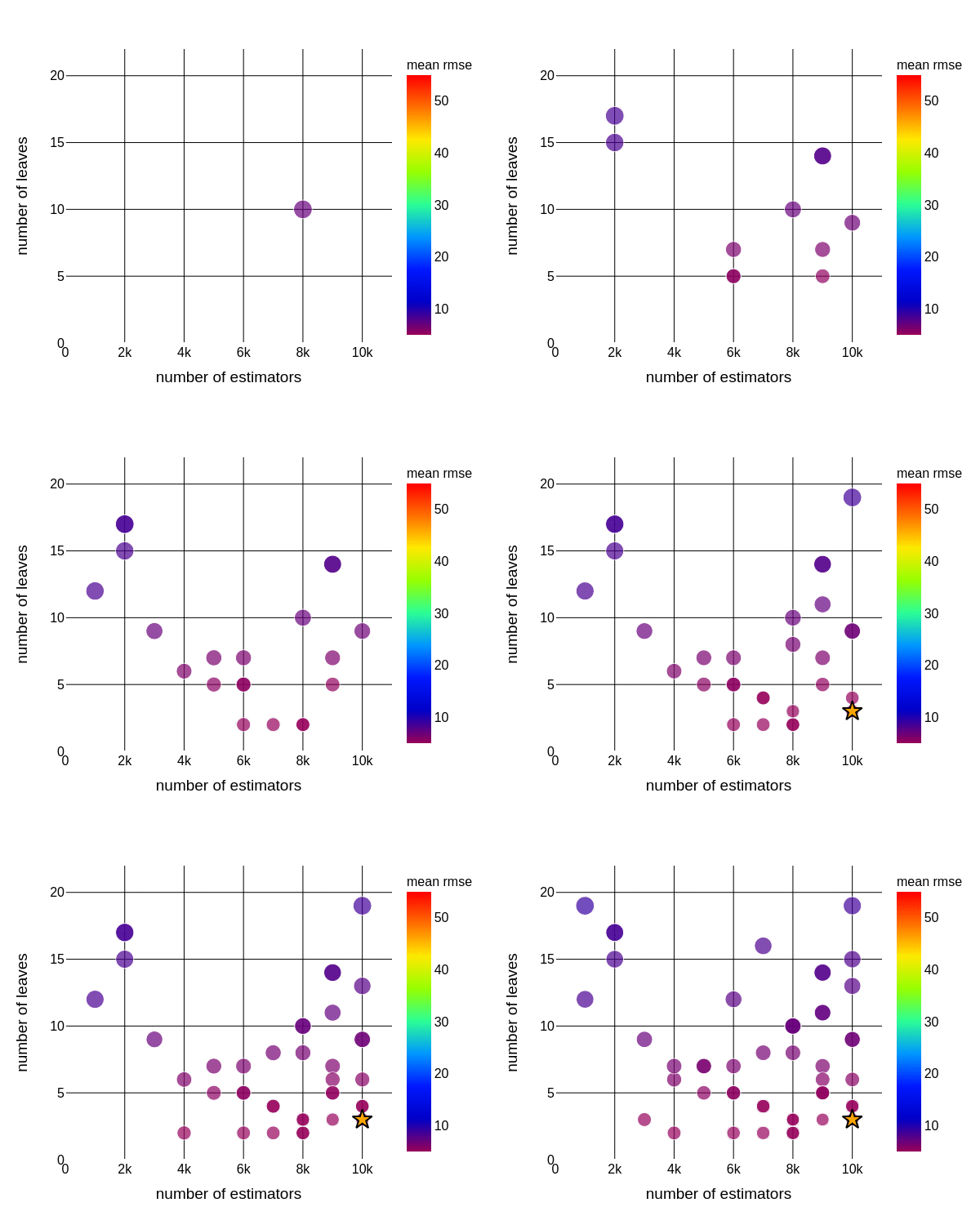
It took 23 iterations for bayesian search to find the right hyperparameter of a model.
That’s it.
I hope you enjoyed this article. Any questions? Have I missed something? Please reach out on my LinkedIn or Twitter.
Further interesting articles:
- How to ace Exploratory Data Analysis
- How to ace Data Visualization
- How to deal with an imbalanced dataset
Follow this Github link to access all the resources used for this article.
Cheers!
Rahul


