avatarLife-is-short--so--enjoy-it

Free AI web copilot to create summaries, insights and extended knowledge, download it at here

3223

Abstract

      </a>
    </div><div id="fa2f" class="link-block">
      <a href="https://readmedium.com/raspberry-pi-4-setup-adguard-on-flatcar-container-linux-f8166b0278f1">
        <div>
          <div>
            <h2>Raspberry Pi 4: Setup AdGuard on Flatcar Container Linux</h2>
            <div><h3>Focusing on bringing up the AdGuard. It will be gradually optimized.</h3></div>
            <div><p>medium.com</p></div>
          </div>
          <div>
            <div style="background-image: url(https://miro.readmedium.com/v2/resize:fit:320/1*83TXIKpLP1bNr5FBXxMl4g.jpeg)"></div>
          </div>
        </div>
      </a>
    </div><h1 id="50b8">Brief Overview: DoT and DoH</h1><p id="c36b">Before I talk about the “Encryption setting”, let me talk about what DoT and DoH try to do in the high level overview.</p><p id="e0ad">( There is a very good post that explains about DoT and DoH — <a href="https://www.cloudflare.com/learning/dns/dns-over-tls/">https://www.cloudflare.com/learning/dns/dns-over-tls/</a> )</p><p id="84d1">In short, DoT and DoH encrypt plaintext DNS traffic in order to prevent malicious parties, advertisers, ISPs, and others from being able to interpret the data.</p><p id="2610" type="7">If DNS queries are not private, then it becomes easier for governments to censor the Internet and for attackers to stalk users’ online behavior.</p><figure id="9267"><img src="https://cdn-images-1.readmedium.com/v2/resize:fit:800/1*PB7hAFAEsDUTNx5qoGwLgA.png"><figcaption></figcaption></figure><figure id="44a8"><img src="https://cdn-images-1.readmedium.com/v2/resize:fit:800/1*f4mTfLS0ToexlwoIxyw2og.png"><figcaption>source: https://www.cloudflare.com/learning/dns/dns-over-tls/</figcaption></figure><h1 id="2ff3">Who is You? Who is DNS Resolver?</h1><p id="1f95">So, now I know the DoT and DoH help encrypt plaintext DNS traffic between me and the DNS Resolver to secure the traffic.</p><p id="bcf6">Let’s take a look little more details. Who is You( or me) and Who is DNS Resolver in the diagram above?</p><p id="cad2">Typically, my computer is the client ( You or Me ) who needs IP of the Domain Name. And, Cloudflare DNS, Google DNS, or other DNS services are the DNS Resolver.</p><p id="5267">Ok, so what?</p><p id="dcf8">Hang on.. I’m NOT done yet.</p><p id="02a8">With the context where there is an AdGuard, who is the DNS Resolver?</p><p id="e395"><b>The AdGuard is the DNS Resolver.</b></p><p id="29c3">OK(?)…</p><h1 id="db07">High Level: DNS Resolution with AdGuard</h1><p id="1d3b">With AdGuard, the high level of DNS Resolution is like below.</p><p id="fa1c">The AdGuard is the first <b>DNS Resolver ( </b>also having DNS cache<b> )</b>. If the AdGuard doesn’t know the requested Domain Name ( because it doesn’t exist in the the <b>DNS cache )</b>, then the AdGuard will ask to the <b>configured upstream DNS</b> in the AdGuard about the requested Domain Name.</p><ol><li>Client asks “apple.com”</li><li>AdGuard checks if the domain name is in AdGuard DNS cache.</li><li>If exists, then AdGuards returns the DNS answer.</li><li>If not exists, then AdGuard asks the upstream DNS resolvers.</li></ol><p id="f14a" type="7">FYI, the DNS re

Options

quest from the AdGuard to the upstream DNS is “Recursive DNS”.</p><p id="1316"><b>It’s important to understand this high level view and the terminologies.</b></p><figure id="05da"><img src="https://cdn-images-1.readmedium.com/v2/resize:fit:800/1*6-ovCl5oH2p7pGwLL3GVNw.png"><figcaption>High Level: DNS Resolution with AdGuard</figcaption></figure><h1 id="6090">Is Encryption setting necessary?</h1><p id="81a8">It depends where the AdGuard is running.</p><p id="4ea2">First, I need to explain what “Encryption setting” is for.</p><p id="1330">The “Encryption setting” is to encrypt the traffic between my computer and the AdGuard.</p><figure id="3ccf"><img src="https://cdn-images-1.readmedium.com/v2/resize:fit:800/1*ShVB0VdudIYPv7UCdNF_JA.png"><figcaption>High Level: DNS Resolution with AdGuard</figcaption></figure><h2 id="c6a5">So, Again, Is it necessary to set Encryption setting?</h2><p id="13cc">Yes, if the AdGuard has to be reached through Public Network ( e.g. Internet ). When the DNS request goes through Public Network, DNS requests have better be protected from the third parties.</p><figure id="fcaf"><img src="https://cdn-images-1.readmedium.com/v2/resize:fit:800/1*0ay8PA73P-8J0O7ZxZEdHQ.png"><figcaption>Encryption setting is recommended if AdGuard is reachable through Internet</figcaption></figure><h2 id="5584">What if AdGuard is in Private Network? ( like HomeLab )</h2><p id="3643">If AdGuard is running in Private Network, then it is not really necessary to encrypt the DNS request traffic.</p><p id="44db">So, NO. it’s not necessary. ( but, if you want, you can do it. )</p><div id="1ccc" class="link-block"> <a href="https://adguard.com/en/blog/in-depth-review-adguard-home.html"> <div> <div> <h2>In-depth review of AdGuard Home - a network-wide web filter</h2> <div><h3>Diving into the details of how AdGuard Home works: the network wide web filter and a great tool for advanced users to…</h3></div> <div><p>adguard.com</p></div> </div> <div> <div style="background-image: url(https://miro.readmedium.com/v2/resize:fit:320/0*Rpec5iDi2xdcbDu2)"></div> </div> </div> </a> </div><h1 id="12d7">NEXT</h1><p id="cb57">In the next post, I’m talking about how to secure DNS requests to Upstream DNS servers in AdGuard.</p><p id="268b">If you know already, you can skip it. If you are not sure about it, why don’t you take a look?</p><div id="510a" class="link-block"> <a href="https://readmedium.com/homelab-adguard-how-to-secure-dns-requests-to-upstream-dns-10c5ee6a392e"> <div> <div> <h2>HomeLab: AdGuard: How to Secure DNS requests to Upstream DNS servers</h2> <div><h3>The DNS requests to Upstream DNS can be secured to protect our privacy.</h3></div> <div><p>medium.com</p></div> </div> <div> <div style="background-image: url(https://miro.readmedium.com/v2/resize:fit:320/1*OhNLHVmhioDQHK4gE5qnHA.jpeg)"></div> </div> </div> </a> </div></article></body>

HomeLab: AdGuard: Encryption setting — Is it even Necessary?

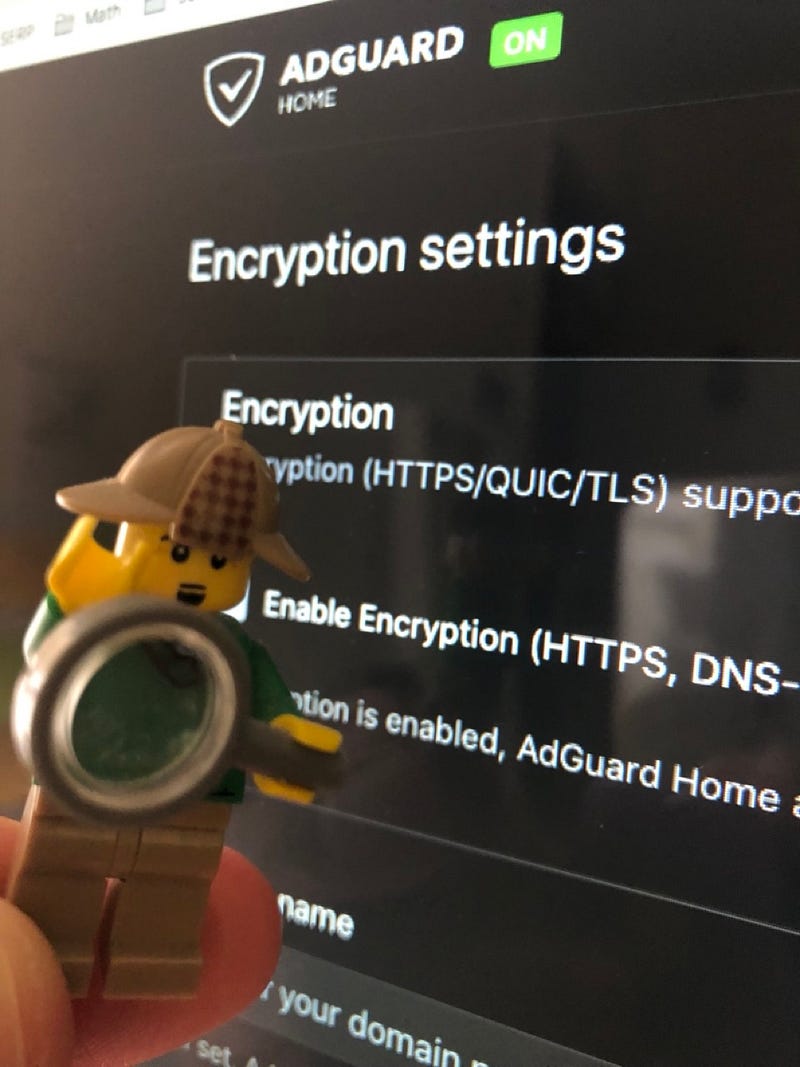
To secure the DNS resolution, DoT ( DNS over TLS ) or DoH ( DNS over HTTPS ) can be used. In AdGuard, is Encryption setting necessary to set to secure the DNS requests?
HomeLab: AdGuard: Encryption setting — Is it even Necessary?

Intro

I’ve worked a series of tasks on AdGuard like below.

  • Setup AdGuard on Flatcar Container Linux
  • Add Local DNS entry into AdGuard ( DNS Rewrite vs. Customer Filtering Rules )
  • Setup AdGuard with UDM SE

The next task was securing DNS resolution by using DoT ( DNS over TLS ) and DoH ( DNS over HTTPS ).

While researching about those DoT and DoH, I got to the “Encryption setting” view in AdGuard. And it made me confused.

This post was the result of the research to resolve the confusion.

Brief Overview: DoT and DoH

Before I talk about the “Encryption setting”, let me talk about what DoT and DoH try to do in the high level overview.

( There is a very good post that explains about DoT and DoH — https://www.cloudflare.com/learning/dns/dns-over-tls/ )

In short, DoT and DoH encrypt plaintext DNS traffic in order to prevent malicious parties, advertisers, ISPs, and others from being able to interpret the data.

If DNS queries are not private, then it becomes easier for governments to censor the Internet and for attackers to stalk users’ online behavior.
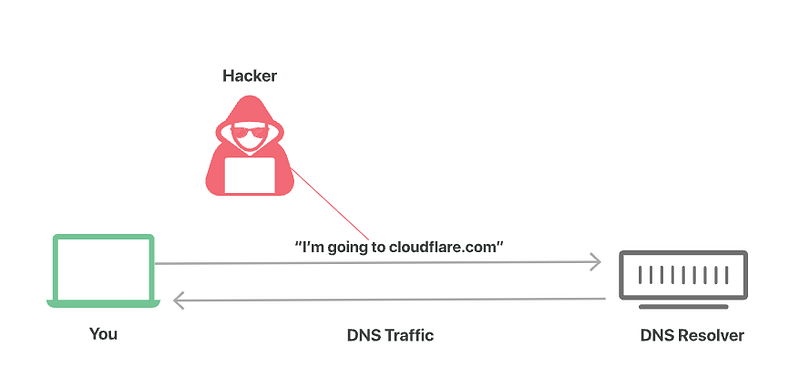
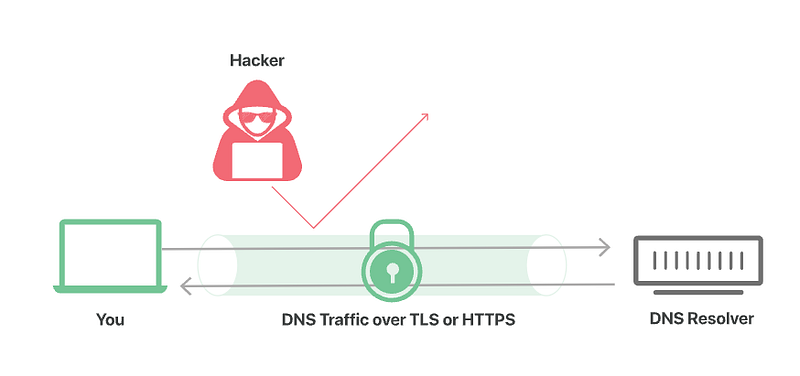
source: https://www.cloudflare.com/learning/dns/dns-over-tls/

Who is You? Who is DNS Resolver?

So, now I know the DoT and DoH help encrypt plaintext DNS traffic between me and the DNS Resolver to secure the traffic.

Let’s take a look little more details. Who is You( or me) and Who is DNS Resolver in the diagram above?

Typically, my computer is the client ( You or Me ) who needs IP of the Domain Name. And, Cloudflare DNS, Google DNS, or other DNS services are the DNS Resolver.

Ok, so what?

Hang on.. I’m NOT done yet.

With the context where there is an AdGuard, who is the DNS Resolver?

The AdGuard is the DNS Resolver.

OK(?)…

High Level: DNS Resolution with AdGuard

With AdGuard, the high level of DNS Resolution is like below.

The AdGuard is the first DNS Resolver ( also having DNS cache ). If the AdGuard doesn’t know the requested Domain Name ( because it doesn’t exist in the the DNS cache ), then the AdGuard will ask to the configured upstream DNS in the AdGuard about the requested Domain Name.

  1. Client asks “apple.com”
  2. AdGuard checks if the domain name is in AdGuard DNS cache.
  3. If exists, then AdGuards returns the DNS answer.
  4. If not exists, then AdGuard asks the upstream DNS resolvers.

FYI, the DNS request from the AdGuard to the upstream DNS is “Recursive DNS”.

It’s important to understand this high level view and the terminologies.
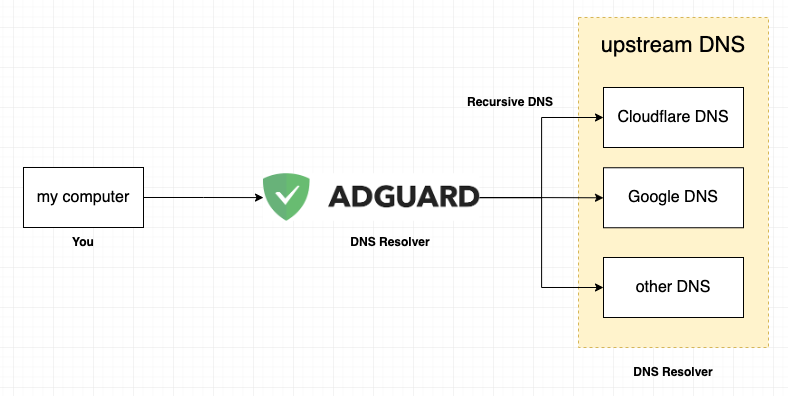
High Level: DNS Resolution with AdGuard

Is Encryption setting necessary?

It depends where the AdGuard is running.

First, I need to explain what “Encryption setting” is for.

The “Encryption setting” is to encrypt the traffic between my computer and the AdGuard.
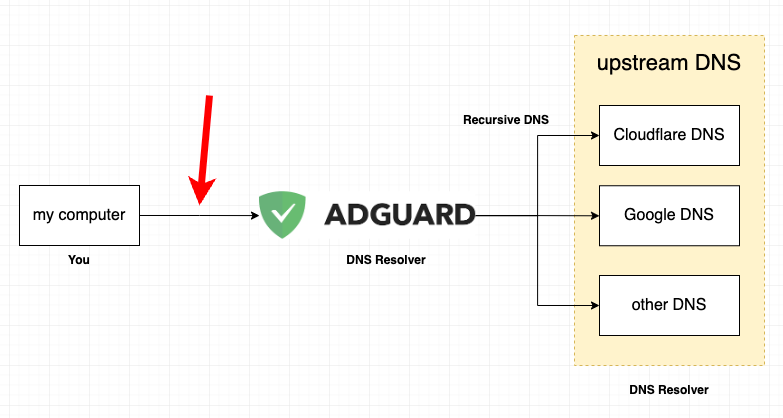
High Level: DNS Resolution with AdGuard

So, Again, Is it necessary to set Encryption setting?

Yes, if the AdGuard has to be reached through Public Network ( e.g. Internet ). When the DNS request goes through Public Network, DNS requests have better be protected from the third parties.
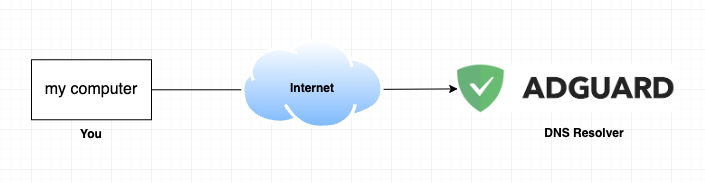
Encryption setting is recommended if AdGuard is reachable through Internet

What if AdGuard is in Private Network? ( like HomeLab )

If AdGuard is running in Private Network, then it is not really necessary to encrypt the DNS request traffic.

So, NO. it’s not necessary. ( but, if you want, you can do it. )

NEXT

In the next post, I’m talking about how to secure DNS requests to Upstream DNS servers in AdGuard.

If you know already, you can skip it. If you are not sure about it, why don’t you take a look?

DNS
Adguard
Dns Over Tls
Dns Over Https
Homelab
Recommended from ReadMedium