
And why?
Here’s How to Use Mem.ai To Learn to Code in SwiftUI and Take Effective Notes
Taking notes is a crucial aspect of the learning process, especially when acquiring new skills such as SwiftUI programming. I began my coding journey prior to using Mem.ai, but the fundamental note-taking principles remain consistent. The primary distinction lies in Mem’s ability to employ Chat for efficient note retrieval, whereas traditional note-taking methods necessitate manual searching or the implementation of a complex naming and tagging system.

Before delving into the specifics of utilizing Mem for saving coding notes and explain the template I’ve devised for this purpose, let me briefly outline why taking coding notes and how I do it are important to me.
How to Take Coding Notes
When learning to code, you typically encounter various areas, spanning from simple coding tasks (e.g., creating a small button) to more intricate concepts like data structures. In both scenarios, it’s essential to comprehensively grasp and document the entire concept.
I place great importance on organizing my notes, achieved primarily through the note’s title or headline. This structure enables me to group related content together without relying on elaborate folder structures or extensive tagging systems (the first doesn’t exist in Mem).
Usually, each of my note begins with a question, providing a clear context. Regardless, I proceed to summarize the entire concept in my own words. While I appreciate a chatbots’ ability to condense information from websites, I find it most effective to use my own words when creating coding notes (it helps me to understand and learn a new concept).
Depending on the nature of the note, I incorporate code snippets for coding-related issues or employ flowcharts and mind maps for more abstract concepts like data structures. This visual representation helps illustrate the concept and provides reusable code segments for future SwiftUI projects.
For complex coding problems, I may not just include code snippets but provide complete examples. Additionally, if I frequently reuse certain code segments, I integrate them into the notes to eliminate redundant workflows.
Like I mentioned earlier, the practice of maintaining thorough coding notes is crucial.
Finally, I include references to any external resources I used to learn or resolve the problem. This ensures that in case my note appears unclear during review, I can always refer back to the original source to refine and alter my note.
Coding Note Template
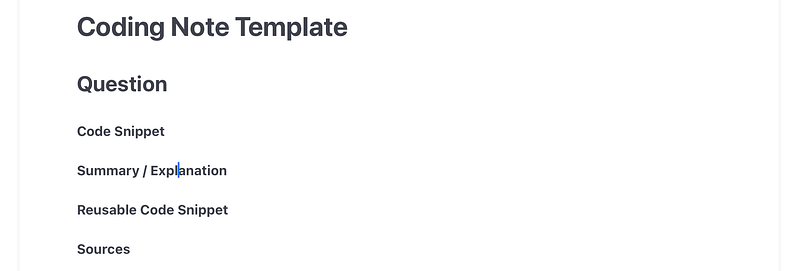
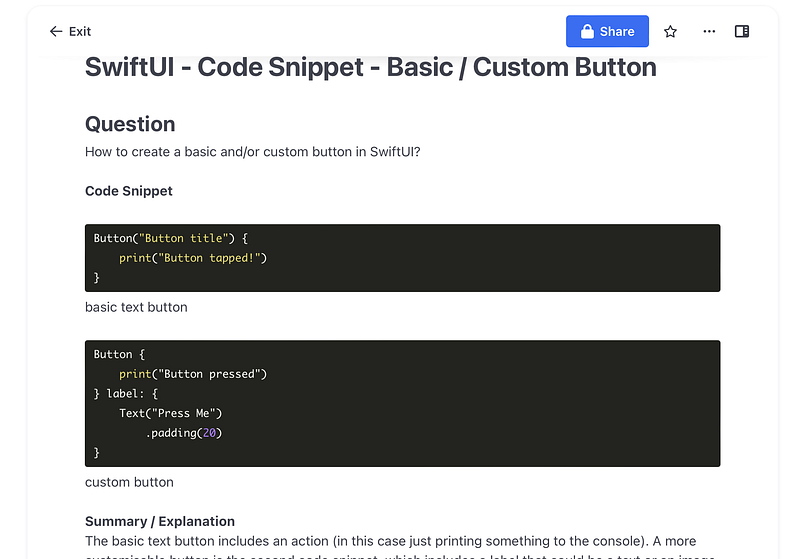
With that in mind, I’ve devised a straightforward coding note template that I regularly reuse within Mem.ai. This template follows precisely the structure I’ve previously described. I organize my notes according to the programming language, specify the content type (in this instance, a code snippet), and finally outline the specific problem (in this case, a SwiftUI button). See second screenshot above for an example.
Can I ask you a favour? If you find this article insightful and enjoy reading it, consider following me for more content about Mem.ai, productivity, Apple and the general landscape of AI. You will really help me to grow this page.
Mem.ai presents code in a user-friendly format, significantly speeding up the process of locating the code I require inside a note. Using this uncomplicated and efficient structure, I’ve amassed a substantial collection of notes, now serving as my personalized code repository. I can also use Mem Chat to help me find the information I’m seeking. For instance, I could simply ask, “What was the code for a custom button?” and it will present me with the code and a link to my note for further reference.
Conclusion
Like I mentioned earlier, the practice of maintaining thorough coding notes is crucial. While Mem can assist you in retrieving information, it’s equally vital that you can revisit and comprehend your notes weeks, months, or even years down the line without relying on search engines. If you can’t do so, then the initial purpose of taking those notes becomes questionable.
The note-taking process should be straightforward, and the adoption of such a basic template structure can significantly expedite this process, making it easier to navigate and understand your notes when you need them most.
Hej there! Can I ask you a favour (it will really help me out to grow this blog)?
If you find this article insightful and enjoy reading it, consider following me please for more content about Apple, Mem, productivity, and the general landscape of AI, as they help me reach a wider audience, enabling others to benefit from my stories and personal experiences. Thanks for reading and enjoy your day!
Here’s even more to read:
SwiftUI
- How To Start Coding For iOS With SwiftUI and Xcode 2023 https://readmedium.com/how-to-start-coding-for-ios-with-swiftui-and-xcode-in-202-ed31fe3e0c67
Note Taking and AI
- Here’s How To Study Better with Mem and Chat https://readmedium.com/heres-how-to-study-better-with-mem-and-chat-0eec6a62d340
- How I Use Arc Max to Research Almost Anything https://readmedium.com/how-i-use-arc-max-to-research-almost-anything-c364892c0e89


