
My Personal Experience
How To Start Coding For iOS With SwiftUI and Xcode 2023
So here we are in 2023 and you finally decided that you want to start coding and have no idea how to start? I was in the same situation a couple of years ago and the start can be quite challenging and sometimes even daunting, but fear no more, it’s actually easier than you might think… thanks to Apples SwiftUI programming language.
I will briefly talk about SwiftUI and give you later on an example of a very simple app to show how easy it is to code. I will also talk about AI in coding and if this will make developers obsolete in the future.

Let’s break this article down and feel free to skip any part:
Tabel of Contents
∘ What is SwiftUI ∘ Prerequisites ∘ How to start coding? ∘ Courses and Ressources ∘ Here’s a Simple Roadmap: ∘ Here’s an App Example to Demonstrate the Simplicity of SwiftUI: ∘ Is AI Beneficial and Worth the Hype? ∘ Conclusion
What is SwiftUI
SwiftUI is a user interface (UI) framework for building applications in the Swift programming language. It was introduced by Apple at the Worldwide Developers Conference (WWDC) in 2019 and is designed for developing applications on various Apple platforms, including iOS, macOS, watchOS, and tvOS. SwiftUI represents a modern approach to building user interfaces and offers a declarative syntax, making it easier for developers to create UI elements and manage the application’s state.
Or in other words you still need to know the syntax and have an understanding of coding, but it’s braindead simple to create apps. I’m going to give you an example as I go along.
So instead of fishing in the dark, SwiftUI allows you to enter code in a very descriptive way and a live preview shows you on the fly what’s going on in your application. This makes coding so much easier and more fun. But Apple didn’t stop there, they have added a lot of predefined views, animations and gestures to make life much easier and since SwiftUI has an data driven approach, the UI will update with data changes to reflect those changes. Okay this might sound more difficult than it actually is.
Here is an example of the starter app in SwiftUI when you create a new project. As you can see the code is very descriptive like with foregroundStyle(.red) — which changes the style / color of the object to red.
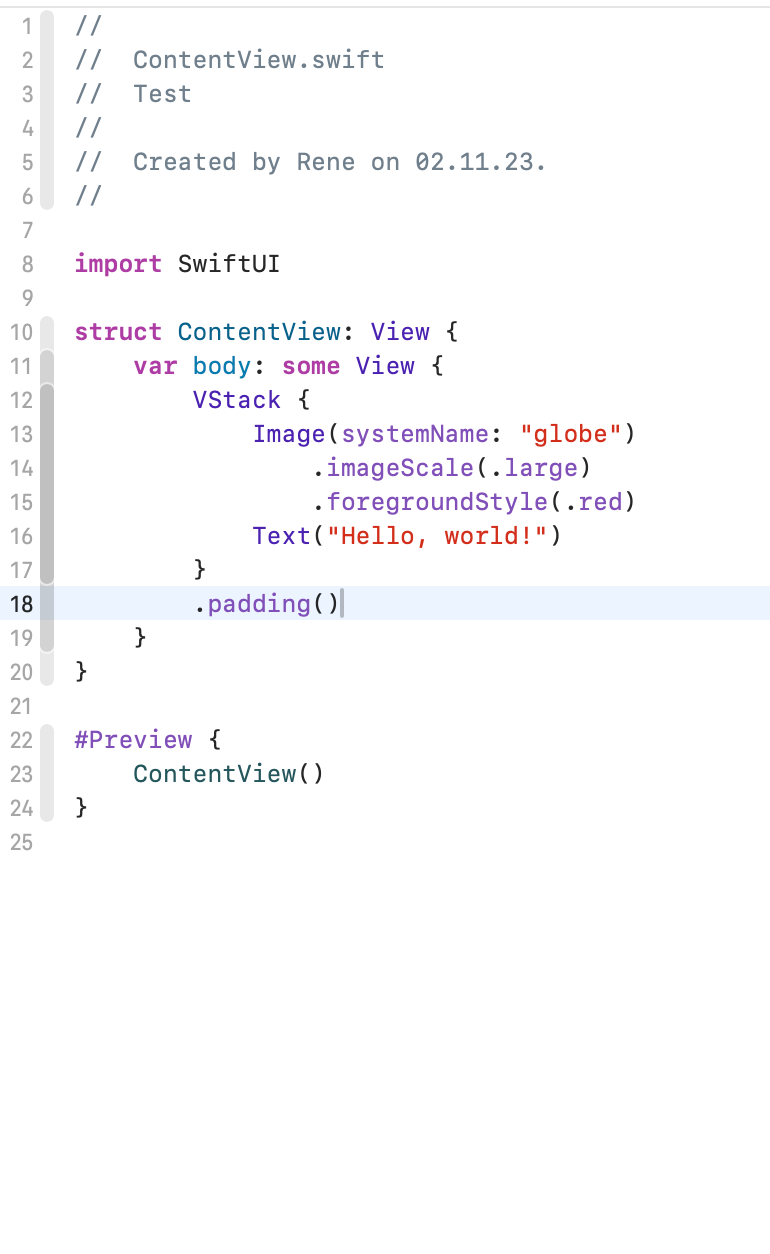
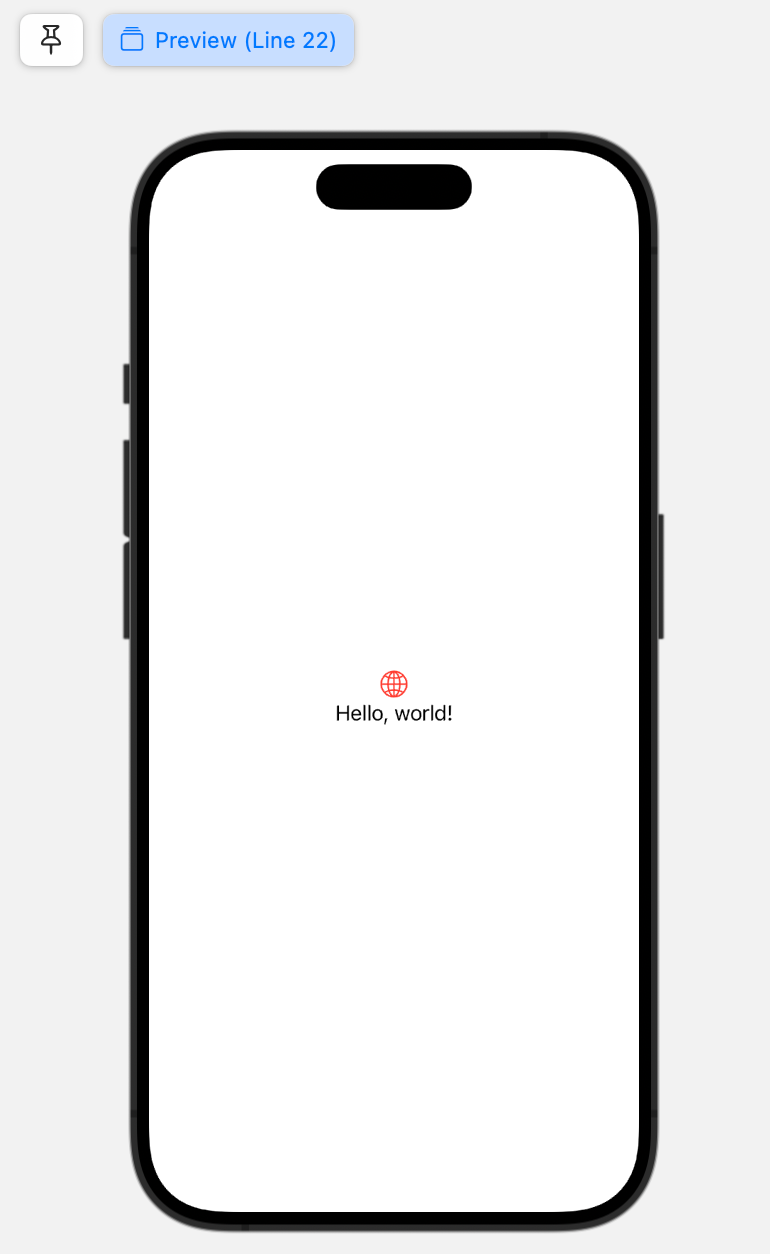
Okay you might argue that this can’t be the whole app and you are right, but this is all we need to code, the rest is done by Apple behind the scenes and we don’t nee to worry about this anymore. When SwiftUI was first presented this sounded to good to be true, but after using it for a couple of years now, I am full on board with this simple approach. And I am happy that this will help a lot more people to develop coding skills.
Prerequisites
So now that you know how easy SwiftUI, Apples programming language is, you might wonder what you need to start coding? Not very much, a Mac, Xcode and some time is all you need.
Xcode Xcode is Apples integrated development environment (in short IDE) for developing software for macOS, iOS, iPadOS, watchOS and tvOS. It is the primary tool used by all developers to create applications for Apple’s various platforms. Xcode provides a comprehensive set of development tools, including code editors, debugging tools, interface builders, and performance analysis instruments. As a beginner you will not need tools to debug or analyse you app, but once you become better you might want to use them and it’s good that this is included.
Xcode is an about 3,2GB download on the Mac App store. Once it is finished just sign-in with your Apple ID and you are good to go. You might wonder if you can use Xcode on a Windows PC, but I have to disappoint you. You will need a Mac (ie. MacBook or iMac).
Apple Developer Program As long as you don’t want to sell your new hot app on the App Store or just test it on a real device, you do not need an Apple Developer Program membership. The membership is $99/year and the entrance fee to use Apples App Store. I would suggest not to subscribe until you have a real app you want to distribute or even sell.
How to start coding?
Here is my story:
In the mid-2010s, I got interested in coding because it seemed like everyone was talking about it and how much money you could make on the App Store. People were sharing stories of making big bucks, and I wanted to join in and grab a piece of it.
But starting to code wasn’t easy. Back in the good old days at school we did have some computer science lessons in Javascript and HTML, but that’s no basis I could use now. And SwiftUI, which made a lot of things much easier, wasn’t even on the horizon yet. So learning to code was actually hard work.
These days it is much easier with SwiftUI, but I would still start with the basics. This includes to know about different variables, basic math for coding and what functions or data structures are. You can find these basics everywhere on the web, just do a quick google search. Usually these basics are also included in complete online courses (I come to this a bit later).
I started with videos on YouTube, but quickly learned that they are too basic for my needs and frankly speaking by that time coding was too difficult for the time I could allocate besides my day job.
This all changed in 2019 when SwiftUI was presented. It was still very basic and only somewhat production ready (today you can use SwiftUI even for advanced apps and code efficiently and quickly), but I saw the potential. SwiftUI was like a fresh start. It got rid of all the complicated things a programmer needed to know and focused on creating beautiful apps as simply as possible. Even basic apps like a counter (I come to this example down below) took only a couple of lines, where before it was dozens, if not even hundreds of lines. Not to mention the difficult process of arranging everything on the view (that is the canvas or screen the app is running on).
So I downloaded the new Xcode, fired it up for the first time and started to play around with the example app (see screenshots above). Changing things was so easy and the documentation much easier to read. In no time I had an old app idea, I tried to create (before SwiftUI was a thing) ready. I was blown away and started to take coding serious again.
And when Apple released the first M1 MacBook Air, which even though it is still compared to todays Chips just an entry cpu, it made coding even more fun and fast. I am still coding on my MacBook Air today and never thought this would be sufficient enough to create real production ready apps, but here we are in 2023 (before I had an expensive Intel based MacBook Pro).
Courses and Ressources
So, where do you begin? As I mentioned earlier, my journey began in the mid-2010s with YouTube, which was a decent starting point. However, things have evolved since then, and you can now find more comprehensive tutorials and skilled developers on the platform. With the growth of platforms like Patreon and Gumroad for selling content, many of the top-notch YouTube courses now offer only introductory content for free. While you can get a grasp of the basics, delving deeper or completing a project often requires a paid subscription or purchase. This isn’t a problem for me, but it’s important to be aware of this change.
Udemy One option I still rely on today is Udemy. It’s an online learning platform where virtually anyone can offer their courses. The quality varies from excellent to so-so, but typically, you can gauge a course’s quality based on its length and user ratings. I’ve gained a lot from Udemy, and they often run sales, making it even more affordable.
While there are other learning platforms out there, I personally find that Udemy offers the best value for the price in terms of course content.
Link to Udemy
Swift Playgrounds These days, Swift Playgrounds is another excellent choice, and it’s not limited to just learning the basics. It’s an app designed for use on iPad or Mac and comes with interactive lessons. You can even create real apps using SwiftUI within the app. The interface is user-friendly and playful, making it an ideal starting point for kids embarking on their coding journey.
Link to Swift Playgrounds
Websites Websites can also serve as valuable resources, particularly when you’re already familiar with coding and just need to find a solution to a specific problem. Google can be your best ally in this case. Many websites offer explanations and solutions for coding issues. Personally, I mainly rely on this option nowadays. However, if you’re just starting out, I’d recommend sticking to a structured course (ideally, complete a few courses) to establish a solid foundation and gain some routine in coding.
Coding Apps I’m not particularly enthusiastic about coding apps because, based on my personal experience, they often fall short when it comes to teaching the fundamentals effectively. It’s worth noting that numerous coding apps are priced higher than Udemy courses on sale, yet they provide only a fraction of the content you can find on Udemy.
Here’s a Simple Roadmap:
- Begin with the basics, especially if you’re a complete beginner. This includes topics like understanding variables.
- Proceed to complete at least one project-oriented course where you build real-world applications.
- Challenge yourself to come up with a straightforward app idea, even if it’s been done before, and try to develop it independently, utilizing online resources and your course materials.
- If you feel confident by now, consider taking on a more substantial iOS app project that you’d like to publish on the App Store.
- Finally, explore the possibility of supporting different platforms, such as MacOS or tvOS, to broaden your app development skills.
Can I ask you a favour? If you find this article insightful and enjoy reading it, consider following me for more content about Mem.ai, productivity, and the general landscape of AI.
Here’s an App Example to Demonstrate the Simplicity of SwiftUI:
To illustrate the simplicity and power of SwiftUI, I’ve developed a straightforward “Counter” app. In this app, every time the user taps a button, it adds +1 to a running total, and there’s also a separate button to reset the count. While it may not win any design awards and isn’t meant for actual use, what’s remarkable is that this app consists of just around 30 lines of code. With some optimization, you could even condense it down to about 20 lines.
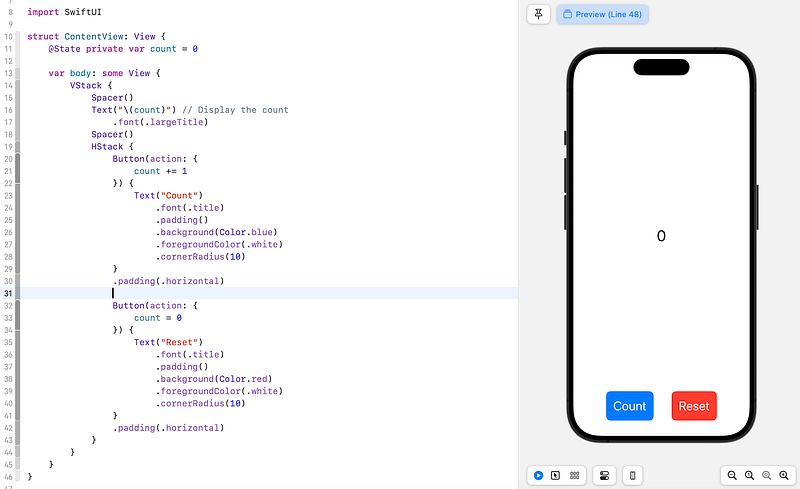
Thanks to SwiftUIs data binding every time the “count” variable changes it’s content (ie. 1 is added or it is reset to 0), the text is updated instantly.
Even if you have no coding background, it’s hard to deny that this code is exceptionally straightforward, underscoring the simplicity of SwiftUI as a programming language. What’s even more appealing is the broad reach of SwiftUI — it allows you to target billions of devices, including iPhones, iPads, Macs, Apple Watches, and Apple TVs.
Furthermore, the process of converting an app to another platform is relatively manageable, making SwiftUI an excellent choice for versatile app development.
Is AI Beneficial and Worth the Hype?
There’s a lot of excitement surrounding AI and its potential to write entire applications, raising questions about the future of developers. However, for the time being, I don’t see a world where computers write apps, rendering developers obsolete.
While it’s true that AI, like ChatGPT, can generate code, it’s crucial to understand that you must provide clear instructions and have a basic grasp of what you want and how apps function. In other words, if you’re unsure about your project, AI won’t magically conjure up a useful application.
Another reason I’m skeptical about a future dominated by AI coding is that without the touch of a designer (UI/UX), AI-generated apps often appear bland. They lack the creativity, interactivity, and uniqueness that human design brings, often following a repetitive pattern.
However, I don’t intend to vilify AI. It can be an invaluable assistant during the coding process. If you have a firm understanding of app development, AI can help you with specific issues. For example, tasks like accessing and writing data to Apple Health can be quite challenging, with limited coverage in courses and online resources. In such cases, AI can be a real asset. You can ask it how to perform these tasks, and it will provide you with code snippets. But you still need the knowledge to effectively integrate these code snippets into your app.
I’ve experimented with having ChatGPT code an entire app by giving it step-by-step instructions. While it did produce a functional app, it was far from being production-ready, especially if you intend to generate sales and receive positive reviews. So, instead of solely relying on AI, I can only advise you to learn how to code, gain a solid understanding of your projects, and then use AI as a helpful tool when you encounter challenges.
Conclusion
SwiftUI has truly revolutionized the world of coding, making it remarkably accessible and user-friendly. I personally embarked on my coding journey in 2019 when SwiftUI was introduced, and I’ve since gone on to create a multitude of apps, both for personal use and for others.
What’s truly remarkable about SwiftUI is how it has dismantled the barriers that used to deter many from delving into coding. The ease of getting started is almost astonishing, and there’s no reason for anyone to be intimidated. Whether you’re a beginner or have no prior coding experience, SwiftUI provides an inviting entry point to app development.
You could argue that SwiftUI has not only democratized the world of app development but also removed the apprehension associated with coding. It has opened up a world of possibilities for individuals, encouraging them to explore their creative potential and turn their app ideas into reality, regardless of their coding background.
Hej there! Can I ask you a favour (it will really help me out to grow this blog)?
If you find this article insightful and enjoy reading it, consider following me please for more content about Apple, Mem, productivity, and the general landscape of AI, as they help me reach a wider audience, enabling others to benefit from my stories and personal experiences. Thanks for reading and enjoy your day!
More to read:
5 Resources to Learn to Code in SwiftUI
https://readmedium.com/5-resources-to-learn-to-code-in-swiftui-bb1c2a05af55