
Go Beyond Simple Notes with Capacities, 12 Supercharged Requirements for Success!
Why Capacities leads the new smart notes applications

NOTES QUEST BACKGROUND
I have an extensive PKM system of notes and information, so I may not be typical in my need for a notes and knowledge system. Like some others, I have been on a quest to find the perfect notes and PKM application so I have used Evernote, Craft, Notion, Apple Notes, Tana, Heptabase, Scrintal, Workflowy, Logseq, Anytype and Obsidian. I have also built my own CMS system using FileMaker which was very powerful but I needed something more focused on content connectivity and cross OS capable. All of the programs I have tried have both positive and negative points, some with exceptional capability but the one that stands out above the rest is Capacities, mostly due to the object based connected architecture.
The requirements I have for a notes and knowledge system cover lots of different use cases, some will undoubtedly be on your list as well. Parts of this Notes and PKM system could be built in a number of other programs but not as easily and not with the flexibility and elegance of Capacities.
THE FUNCTIONALITY OF CAPACITIES
The following is based on Capacities with the Believer level but the free version is also excellent and very usable. Capacities is getting better all the time and currently one of the very best notes and PKM applications. Capacities has a different take using objects which are really content types that can make a huge difference in organization and productivity.
CREATING A KNOWLEDGE BASE
The CEO of Capacities, Stefen Bleher has written an article called ‘How to Create the Knowledge Base of Your Life’ which explains their approach. He has also written an article called Capacities vs. Notion which discusses the many advantages of Capacities. Capacities also works well with a number of key applications, and especially with Hookmark which enables deep links and integrates links with files and applications.
APPLICATION FUNCTIONALITY WILL BE A KEY CONSIDERATION FOR THE PRODUCTIVITY METHOD CHOSEN
There are lots of smart people that are trying to be more productive with different methods including Getting Things Done (GTD), Zen to Done (ZTD), Pomodoro Technique, Time Blocking, and lots of others including Eat the Frog Method (the most difficult task first).
However, using a system like Capacities changes the game completely once set up because everything is connected and folders are replaced with Collections and Tags. Collections can be used to associate and cluster many different attributes of content including topics, status, priority or anything that is needed to constrain content. Content can then be included in multiple collections because it is a flag instead of a physical folder.
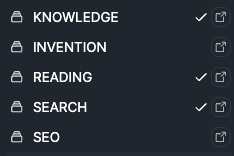
There are lots of core functions for an application to be able to build a powerful notes and PKM system
FUNCTIONAL REQUIREMENTS FOR A POWERFUL NOTES AND PKM SYSTEM
The top 12 functions that are important for me include:
1. Defining and storing specific objects and properties
- The ability to create a content type is a core capability for storing different information effectively. If you were designing a content management system the field types would be of critical importance. It is key functionality in Capacities as well, but the fields are called properties.
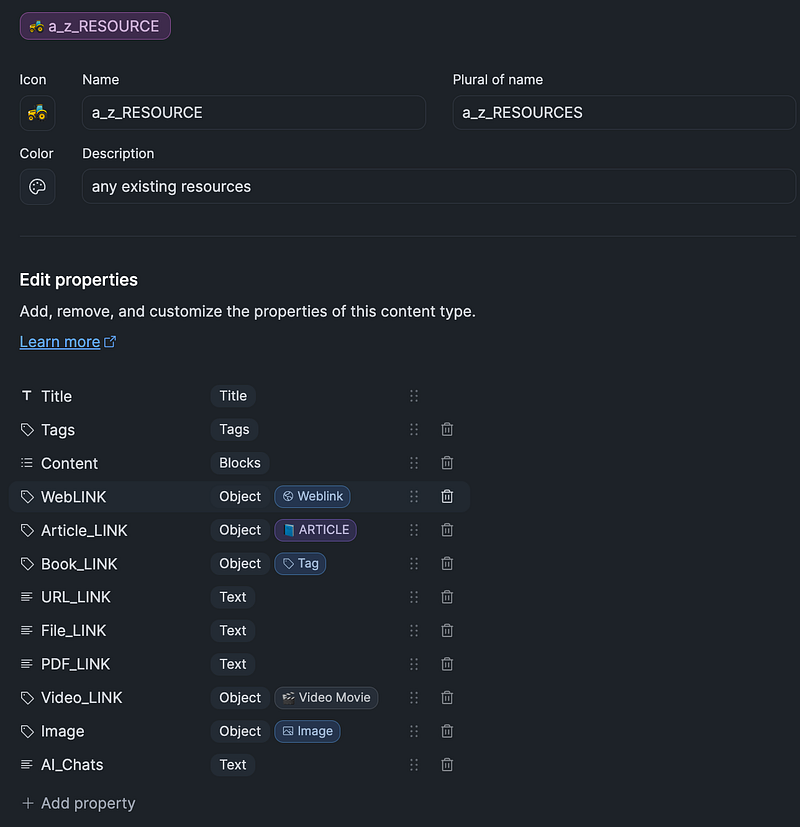
- Capacities makes it easy to specify the object (content type) along with properties (fields). The properties are selected by type such as text, paragraphs, single-select, multi-select, numbers, tags, images, etc. The single-select and multi-select properties can be other objects that you have previously defined and which will be selected through a dropdown and applied to the new object.
- An example of enabling a single-select or multi-select would be an object defined for resources which would include previously defined objects for books, articles, weblinks, videos, files, etc. The object properties definition for RESOURCES looks like:
2. Creating an advanced query that can be stored and re-executed that uses multiple parameters of search criteria
- Having the ability to easily search relevant information in a sea of information is critical for notes or for a PKM system. Capacities has developed a very strong capability to search and return information along with the ability to store the search criteria as an object. The search can then be executed simply by clicking on the query object.
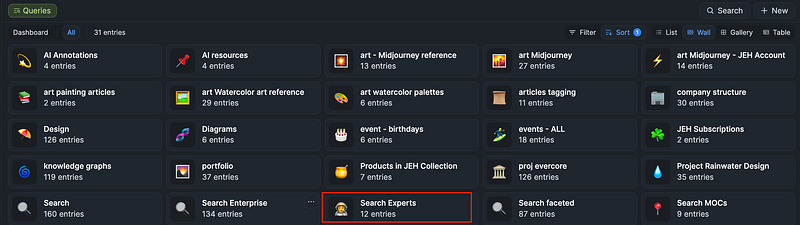
- The screen below shows search objects (saved searches) that were defined with the new advanced search capability and at the time of this writing will soon be released for the Believer level.
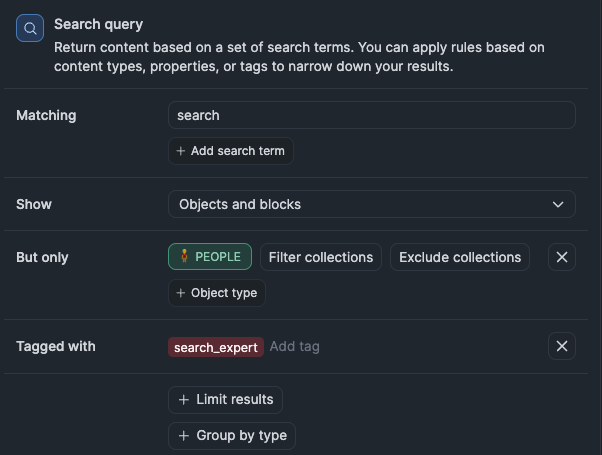
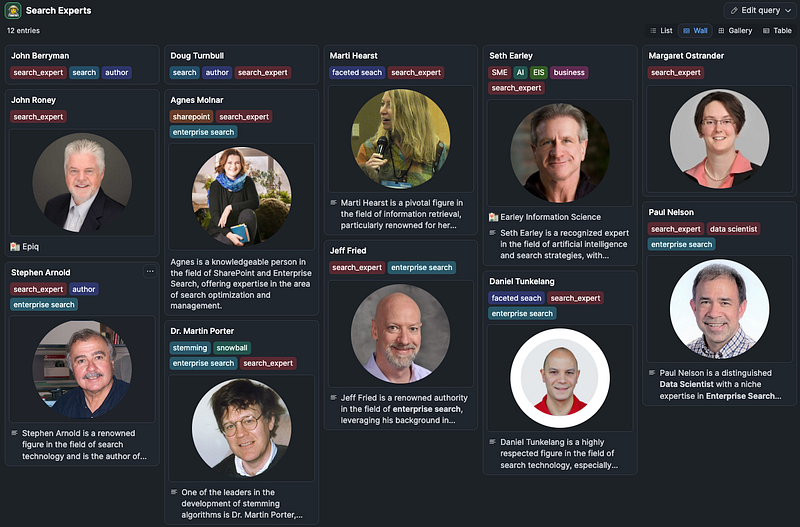
An example of an advanced query for finding search experts is defined in the following configuration screen. The query uses the PEOPLE object along with the search_expert tag:
When the query for ‘search experts’ is run it returns a set of search experts from the People object and is displayed with the Wall view. It can also be displayed as a List, Gallery or Table view.
3. The capability to have AI create content — initially a summary and keywords for annotations, articles and other objects.
- When you define a text property for an object there is an option to have AI generate text which can summarize, fix grammar or other generative functions. The AI Assistant within Capacities provides a limited amount of usage that resets every 24 hours but you can provide your own Openai key to extend this functionality.
- The AI Auto-Fill can be enabled for a text property where the instruction can be entered and it does a great job filling in the information.
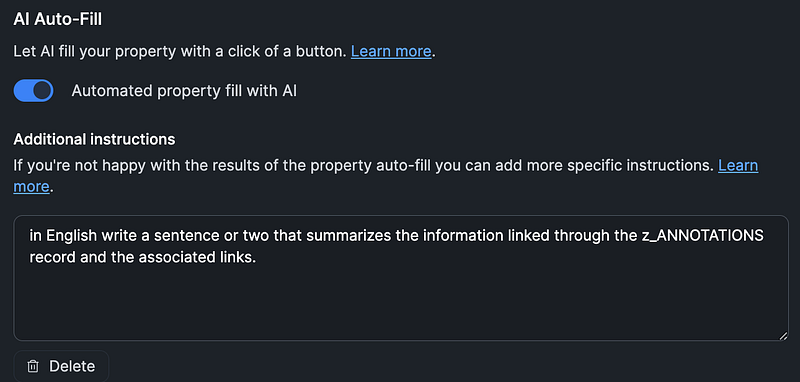
- My article ‘Use Ai to Build a Connected Knowledge System’ details a way to set this up in Capacities.
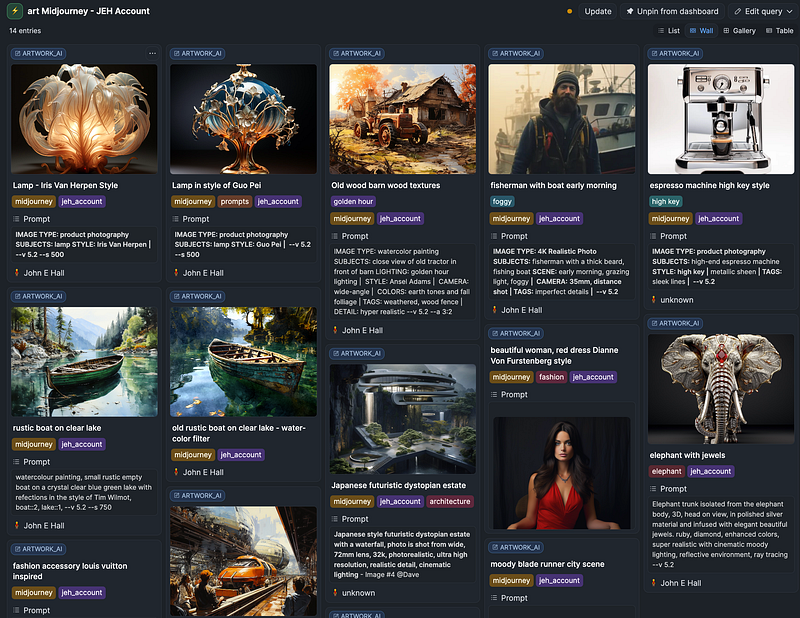
4. Creating a visual catalog of artwork and Midjourney art
- A knowledge system should be able to store various properties along with images and create a visual catalog. Capacities can be set to show selected objects and properties along with images.
- An example of this visual display for Midjourney images looks like:
5. Be able to save annotations from reading and PDF sources and integrate into notes and insights
- Many people use different programs to read articles and books such as with Apple Books, Kindle, PDFs and other read-it-later applications. One of the advantages is to create highlights or annotations so that certain passages can be noted, reviewed and ultimately remembered.
- The program and service Readwise collects annotations from different sources and consolidates them for review. Some notes and PKM applications have developed a link to the collected annotations so they can be easily integrated. Capacities has not yet created the Readwise integration although it is on the roadmap but the annotations can still be used effectively within Capacities. By reviewing the annotations in the Readwise program and copying into a new Capacities annotation object a powerful system is developed and built on the advanced capability of organization and search within Capacities.
- Even without the Readwise program Capacities has a couple of ways to integrate annotations. The first method is to use Hookmark with Skim for PDFs or Apple Books. Another method is to copy annotations from PDFs in the Highlights application. I have an article called ‘Building Your Connected Knowledge System with Setapp, Capacities and Hookmark’ that details using Hookmark with PDFs or annotations with the Highlights application.
6. Be able to link your notes and thoughts together and display linked Graph views
- The functionality of connecting various objects together using the keystroke ‘[[‘ can be very useful and very effective in understanding related information. The Graph view makes this related information discoverable.
- A way of connecting notes is to use the same tag, then by clicking a tag you can bring all objects with that tag into a single view. You can also use the search functionality to build a query that uses a specific tag to bring related objects together in a view.
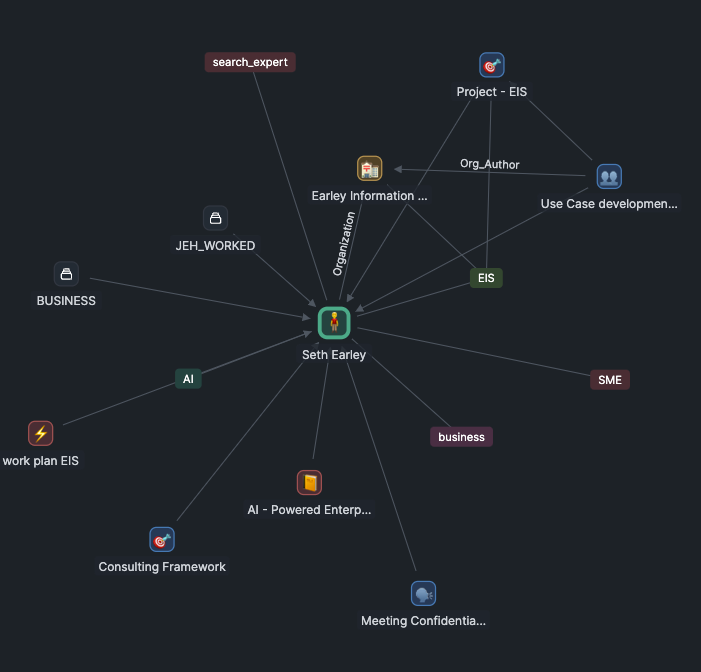
- The view with all ‘search_experts’ tags presents an option to see and navigate all related records in a Graph view as seen below:
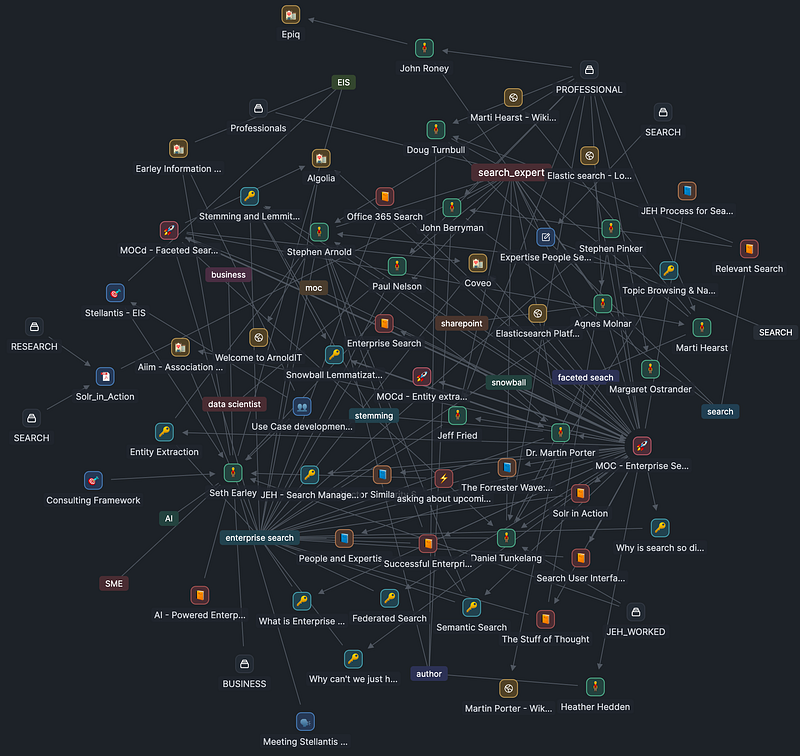
- Note that by understanding the icons it is easy to navigate to one specific type of object. In the above Graph by clicking on the person object — ‘Seth Earley’, I can see everything associated with him including his firm, his book — ‘the AI Powered Enterprise’, a project I worked on, Earley Insights linked from the firm, and other related information. see the below Graph:
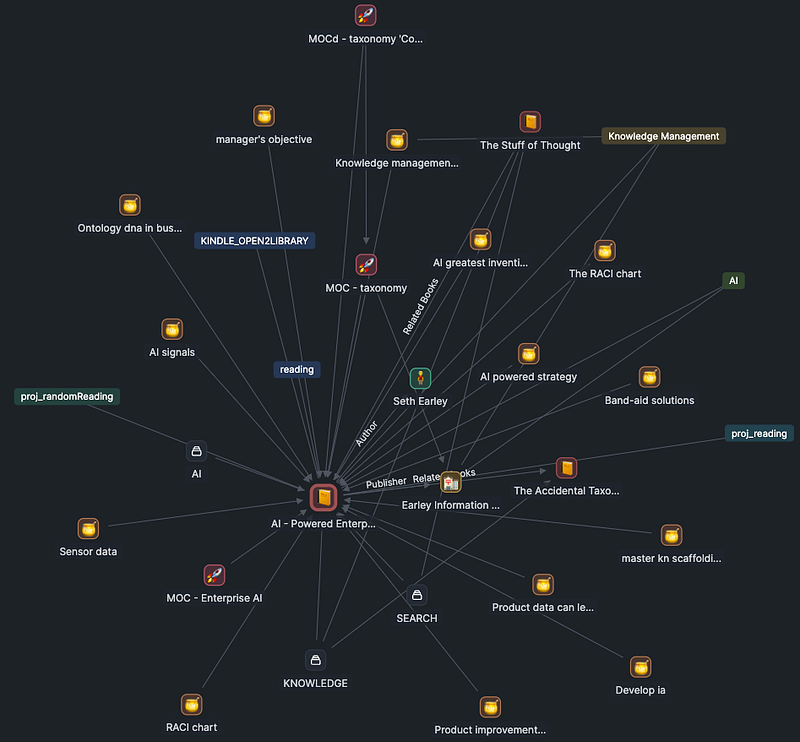
If we continue to navigate by Graph and click the book object — ‘the AI Powered Enterprise’ we surface a set of new related information including annotations saved from the book, related books, a MOC for Enterprise AI and other information:
7. Keep track of specific special locations using What3Words
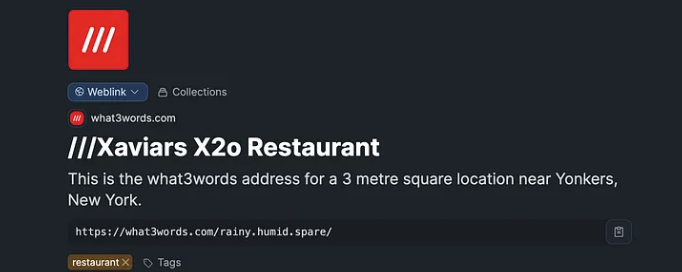
- Having objects connect to other applications can be very useful. One location program that is especially useful for businesses or personal use is What3Words. In the article ‘Connect What3Words Locations to Capacities People and Organization’ I detail how to connect What3Words to Capacities people and organization objects.
- As an example of a What3Words location for Xaviars X2o restaurant that can be stored within Capacities.
8. Be able to use templates to rapidly fill fields
- Templates enable you to pre-fill certain properties which saves a great deal of time when creating new or updating objects. Capacities has additional documentation published about their templates.
9. Ability to connect tasks within Capacities to one of the major task managers
- Being productive for personal or business reasons often means keeping track of tasks. Capacities has built the first part of task capability by enabling tasks to be sent directly to the major task management programs. The second part of enabling tasks, including task management within Capacities, is currently being developed.
- A great task actions Youtube video is available by PKM Beth that explains how this works.

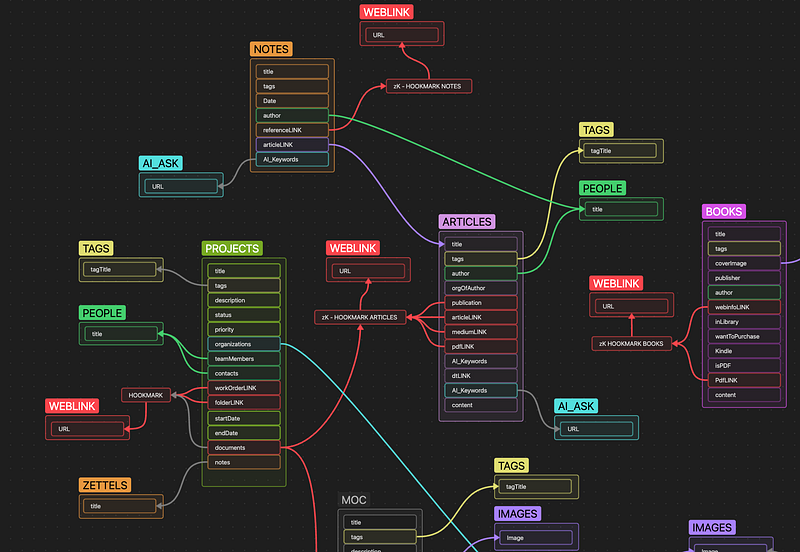
10. Be able to generate or integrate a diagram for visual thinking and learning
- Sometimes it is important to think about things visually to fully understand a complex topic. Davis Oliver has written an excellent article on the art of thinking visually.
- Capacities is not yet like Heptabase, Scrintal or Obsidian in being able to diagram on a whiteboard but it does have the capability of linking out to a specific diagram within another program. I use Obsidian Canvas for diagrams and along with the paid plug-in Canvas Candy for extended diagram functions.
- I discuss a couple of options for integrating diagrams in Capacities in my article on Notes and Visual Notes. I discuss in the article a method to setup a zoom label that when executed will zoom to a selected area of the diagram.
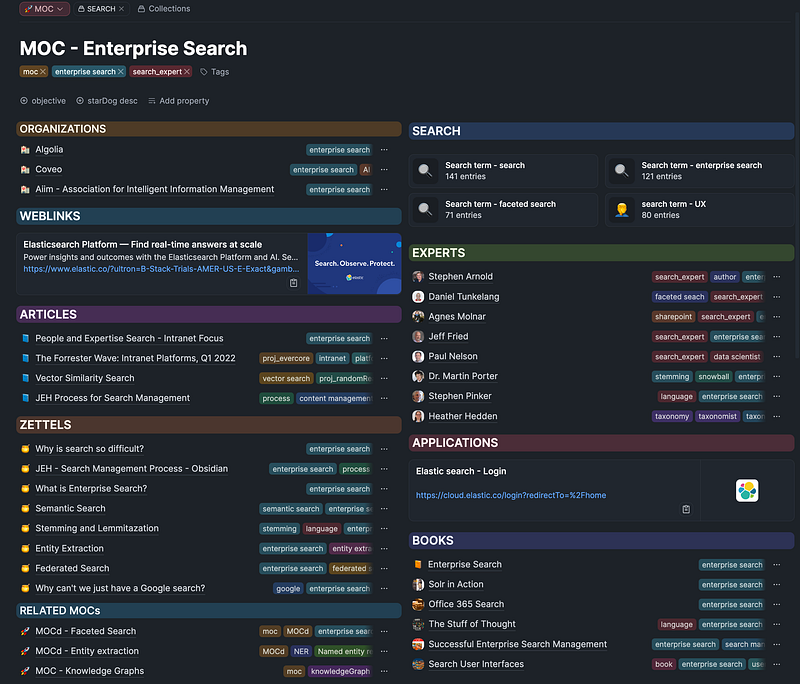
11. Be able to save Map of Content MOC pages
- Being able to build a Map of Content (MOC) can be a great way to create a topic dashboard and a high level overview of a topic. Capacities has an excellent capability to be able to construct MOCs as I have written about in the article ‘Really Organize Your Capacities Information through MOC views’. The article discusses variations in the MOC including a detailed sub-level MOC that is referenced by the MOC called a MOCd.
- Another variation in the MOCs is a high level index view of MOCs which I call the MOC Index that I write about in the article ‘Seeing the Bigger MOCd Index Picture in Capacities’. A MOCd Index creates a type of dashboard that can be used to build a view of your data that is personalized for navigating your content.
- With the new search capability (about to be released in early 2024) a query object can be inserted into a MOC to generate dynamic search results. An example called ‘Search term — enterprise search’ is displayed below, note the query objects on the top right:
12. Be able to integrate with media, programs and files
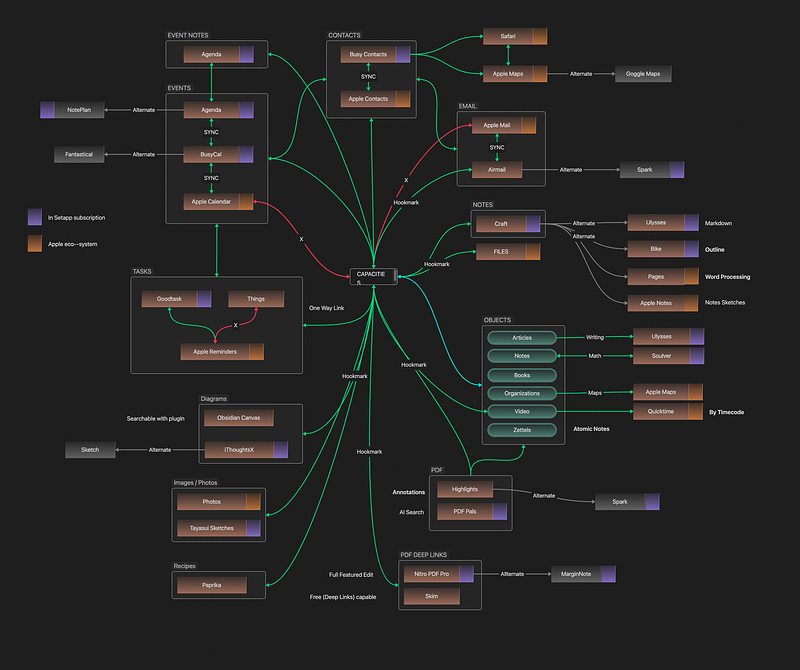
- Capacities is flexible in the way it can integrate with media. Using Hookmark you can associate notes with a specific audio or video location. I have written about how to set this up in my article ‘Using Video Deep Links with Capacities and Hookmark’.
- In another article, ‘Building Your Connected Knowledge System with Settapp, Capacities, and Hookmark’, I discuss the possibilities of creating a knowledge system.
SOME FUNCTIONALITY THAT IS A CONSIDERATION
- Connecting calendars for events — on the roadmap
- Bulk operations — on the roadmap
- Import and Export improvements — on the roadmap
- Full release of iPhone app — beta app is excellent already
- Tablet app — on the roadmap
- Browser extensions — on the roadmap
- Reader apps integration — on the roadmap
- Comprehensive annotations — on the roadmap
- Table support — on the roadmap
- Improvements in Smart Media — on the roadmap
- Automated backup and restore — manual backup working
- Fully developed AI Assistant — Initial AI Assistant working
I hope this article helps people with understanding some of the things that are important for a connected Notes and PKM system. Please feel free to comment or give feedback, thank you!
If you feel like supporting me in my work:
👉🏻 If you want to try Hookmark, it is available in the Setapp subscription, which has dozens of fantastic Mac applications at a great price including the apps listed above. If you want to try Hookmark and Setapp or the other 240+ apps please register via the link below; I will receive a small commission. Thank you very much!
👉🏻 Another way would be give a clap or more to show appreciation. Thank you for reading and your support!


