avatarJohn E Hall

Summary

The article discusses the enhancement of information navigation in Capacities through the implementation of a MOCd Index and Faceted Search, offering users a more efficient way to access desired content without traditional searching.

Abstract

The article introduces the concept of a MOCd Index and Faceted Search as innovative approaches to improve the user experience in navigating content within Capacities. It emphasizes that a significant portion of users prefer guided navigation over conventional search methods. The author highlights the current search capabilities of Capacities, noting its effectiveness in listing results by object type with highlighted terms. However, the article suggests that the integration of Faceted Search principles could significantly elevate the search experience. Additionally, the author discusses the creation of a MOC (Map of Content) Index, which embeds MOC and MOCd (a second-level MOC) views, allowing users to easily access an overview of topics. The article also demonstrates how users can toggle between an open and closed view of the MOC Index once it is pinned, facilitating quick access to a comprehensive collection of MOCs. The author concludes by expressing hope that these features will help users see the bigger picture in managing their information.

Opinions

  • The author believes that at least 50% of users prefer navigating to results rather than using a search bar, despite the prevalence of search engines like Google.
  • Faceted Search is presented as an effective method for filtering search results, widely used by major information and e-commerce sites.
  • The author is optimistic about the upcoming enhancements to Capacities' search function, anticipating that the first improvements will be released soon.
  • The article suggests that Capacities could benefit from incorporating the best search trends, including Faceted Search, to improve its search results.
  • The author endorses the concept of a MOC Index that can embed MOC and MOCd views, considering it a powerful tool for presenting an overview of a topic.
  • The author finds the ability to pin a MOC Index View to easily open and close it, thus viewing all MOCs and MOCds together, to be a valuable feature.
  • The author values the work of PKMBeth and Nick Milo in building MOC views and extends

Seeing the Bigger MOCd Index Picture in Capacities

Getting to What You Need Without Searching

Image courtesy author — created by MidJourney

This will be a short article but it took me some time to figure out a way to surface views and it’s a powerful little trick.

NAVIGATION OR SEARCH

By all Industry standards we know that at least 50% of users would prefer to navigate to results rather than search even though we have become accustomed to being bombarded with an open search bar from Google.

Faceted Search, also called Faceted Navigation, is an effective way to filter your results after you do a search which is why it is used in different flavors on most major information and eCommerce sites including Amazon, NY Times, Home Depot, Lawyers.com and many others.

Amazon faceted search detail

Capacities today has a pretty good search function and presents the results listed by object type while the term is highlighted within a preview of the content.
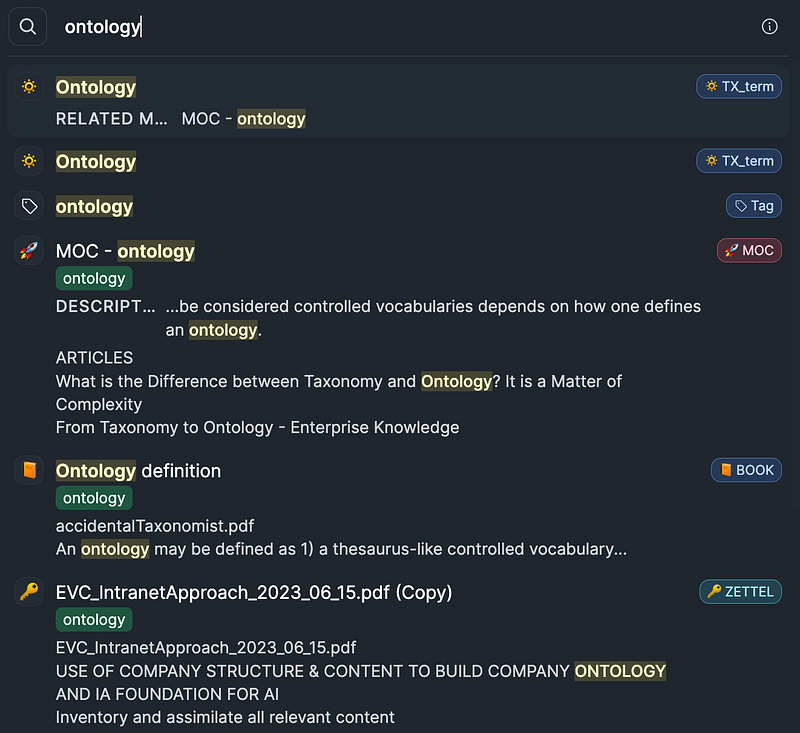
Search Results for the term ‘ontology’

Capacity search results could be improved dramatically if the principles of Faceted Search and the best search trends were implemented. The first improvements to the search function are expected to be released soon.

MAP OF CONTENT — MOC and MOCd VIEWS

I won’t go into how you go about building a MOC view, this has been discussed nicely by PKMBeth and Nick Milo. I have an article that extends the MOC thinking to MOCd as a second level of a MOC. In the article I discuss the possibility of a way Capacities could build an automated dynamic MOC view as a function within the application.

MOC INDEX

A MOC is a great way to present an overview of a topic but what about creating a MOC Index that would embed MOCs and MOCd views? Now what if you could easily open and close the MOC Index View to see all of them together?

Sounds a bit crazy but this can be done by embedding the MOC views in an Index view and then ‘Pin to Space’.

Here is a view of my MOC and MOCd Index that has embedded views:
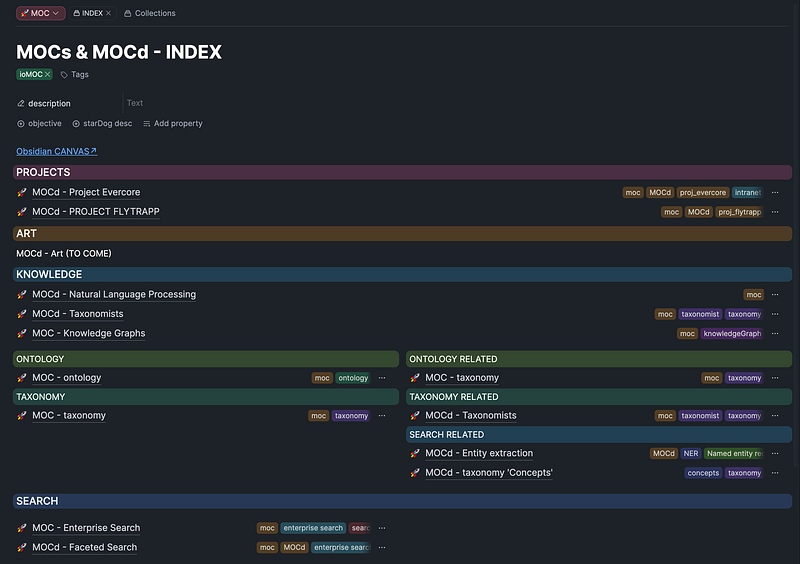
MOC and MOCd Index

Now if you ‘Pin to Space’ you can have the Index closed or open:
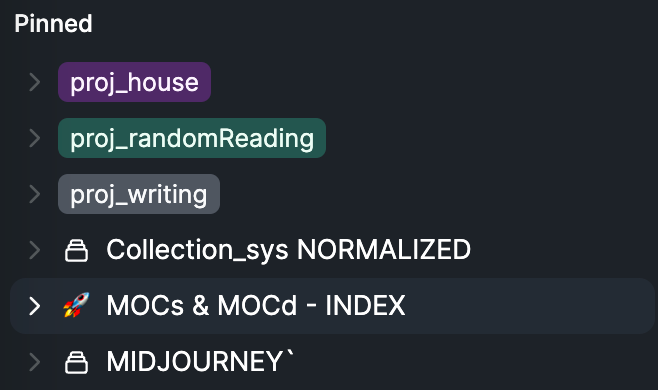
Closed View of Pinned MOC & MOCd Index

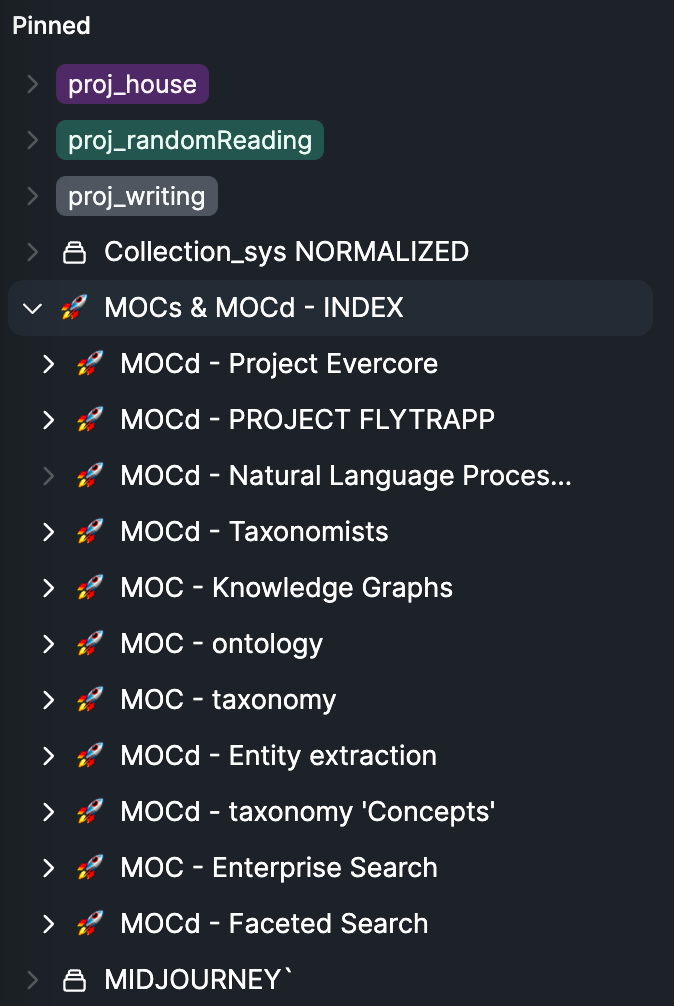
Opened view:

Opened View of Pinned MOC & MOCd Index View

With a couple of clicks you can jump to any MOC or MOCd view where you can select from there.

Hope this helps to see the bigger picture.

For more information on MOCs see

Thank You for reading and for your support!! If you enjoyed this article please consider a Clap. Thank you!

john.e.hall — Medium

Join Medium today, read all my stories and support the writers:

https://medium.com/@john.e.hall/membership

Capacities
Pkm
Knowledge
Knowledge Management
Productivity
Recommended from ReadMedium