avatarJohn E Hall

Free AI web copilot to create summaries, insights and extended knowledge, download it at here

4310

Abstract

which are added as tags. The single thought ( a sentence or two) is calculated as a summary from the annotation object which contains a single detailed concept of a paragraph or two. The ability of AI to create a concise sentence or two as a ‘Nugget’ can save a huge amount of time over doing this manually. An important part of the Nugget is to add your own thoughts and insights.</p><p id="8d89">Annotations are a powerful way to highlight a paragraph or two of detail about a single idea or concept. The annotation can be written manually if it comes from reading a book or it can be highlighted from a source in a more automated way such as with read-it-later services.</p><p id="9b95">A great program to create annotations and highlights is the Mac PDF program <a href="https://highlightsapp.net">Highlights</a> which I have written about in a previous <a href="https://medium.com/@john.e.hall/a-lower-cost-method-for-atomic-thoughts-and-annotations-for-zettelkasten-for-a-second-brain-aecec6741244">article</a>. These annotations can be copied directly to an annotation object in Capacities including a link back to the PDF highlighted paragraph. Another way to capture annotations and deep links to paragraphs is with Hookmark (available in Setapp) and the free Skim PDF application.</p><p id="a4e2">The RAaiN Method is designed for an object based structure where information can be ‘filed’ into more than one category. In Capacities, information is captured within Objects (databases) and collections (selections within the object). The neat part is information that sits within an object can be tagged to one or multiple collections along with relevant tags. This enables creating collections based on topic, status or any criteria that makes sense for organization.</p><h2 id="2766">OBJECT STRUCTURE TO MAKE AI AUTOFILL FUNCTION</h2><p id="c051">The RAaiN method basically sets the object structure and properties so that the auto-fill function is focused on a single concept.</p><p id="5fde">The following are the objects that are defined in Capacities to enable this method. The ‘a_z_’ prefix is used to conceptually group the objects and as a reminder that this is based on Zettelkasten.</p><p id="4b41"><b>a_z_RESOURCES</b> — The Resources object references the object that is a resource and includes Web links, Books, Articles, URLs, Files, PDFs, AI_chats and Videos. By adding a reference to a source all Resources can be viewed together and by adding relevant tags all Resources for a specific topic or area can be surfaced.</p><p id="39ea"><b>a_z_ANNOTATIONS</b> — The Annotations object contains a reference paragraph or two for a single specific concept or idea. <b>It is important to isolate the concept so that the right amount of information is sent to ai for summarization and keyword development.</b> The annotation can be a paragraph copied from a source, created as an annotation such as with the PDF client Highlights, or it can be one of the results from a read-it-later program such as Readwise.</p><p id="5cac"><b>a_z_NUGGET</b> — The Nugget object contains a selected reference to the annotation along with the AI generated summary and a string of keywords for potential tags. Using the built-in ‘AI Auto Fill’ function seems to work well but more testing will need to be done and community feedback will be important for any improvements.</p><p id="76b1">The current allowance for AI generated content seems adequate for one off or limited content generation. In addition, the keywords generated are not linked to tags but Capacities could be developed to either include a fully automated tagging system or a semi-automated system that would allow selection and confirmation from the user to add the proposed tags.</p><h2 id="80ce">CAPACITIES [R]esource [A]nnotation ai [N]ugget PROPERTIES STRUCTURE</h2><p id="b3e2">The following tables represent the objects and properties I have defined, please modify for your own requirements.</p><p id="cbe3">RESOURCE PROPERTIES</p><figure id="4ad1"><img src="https://cdn-images-1.readmedium.com/v2/resize:fit:800/1*w5Oes1YqkbEpQxfaYifYBw.png"><figcaption>Resource object with properties in Capacities</figcaption></figure><p id="b0fb">ANNOTATION PROPERTIES</p><figure id="fa98"><img src="https://cdn-images-1.readmedium.com/v2/resize:fit

Options

:800/1*LHYUtKDoiBjBh5ow8r10iQ.png"><figcaption>Annotation object with properties in Capacities</figcaption></figure><p id="fbb7">NUGGET PROPERTIES</p><figure id="bf54"><img src="https://cdn-images-1.readmedium.com/v2/resize:fit:800/1*vXySS8m-2yf9Y21Xml049g.png"><figcaption></figcaption></figure><h2 id="2b83">EXAMPLE ANNOTATION AND RESULTING NUGGET</h2><p id="432a">The following annotation has been created using the Highlights PDF program by highlighting the paragraphs within the source PDF and hitting the highlight command which stores the text and link to the side panel.</p><figure id="1948"><img src="https://cdn-images-1.readmedium.com/v2/resize:fit:800/1*chLNRquG2RN0vwjeYj5hcw.png"><figcaption>Annotation saved within Highlights program</figcaption></figure><p id="c6fe">This text and link can be copied into a new Capacities annotation record which will be used to then create the Nugget summary and keywords.</p><h2 id="12df">ANNOTATION</h2><figure id="81d1"><img src="https://cdn-images-1.readmedium.com/v2/resize:fit:800/1*SkTTsqNoE9krR9pgj1Upeg.png"><figcaption>Annotation saved with link within the Capacities program</figcaption></figure><h2 id="2af3">RESULTING NUGGET SUMMARY AND KEYWORDS FROM AI</h2><figure id="d004"><img src="https://cdn-images-1.readmedium.com/v2/resize:fit:800/1*ow_fjGpZQOcFbnn34CTvAQ.png"><figcaption>Nugget in Capacities showing AI Fill commands</figcaption></figure><figure id="f819"><img src="https://cdn-images-1.readmedium.com/v2/resize:fit:800/1*TZBZKngZTlVT9nnStSpa1A.png"><figcaption>Nugget content with AI generated tags AI generated summary</figcaption></figure><ul><li>The Annotation is selected from existing annotations.</li><li>The Nugget summary was calculated with the ‘Automated property fill with AI’.</li><li>The Tag_GPT field was calculated to show a string of 5 keywords based on the record information. Create the keywords from this string.</li><li>The Insight field was entered manually with any insights.</li></ul><h2 id="b329">VIEW OF NUGGETS TAGGED WITH ‘CONTENT ANALYSIS’</h2><p id="52f9">An important view of your Nugget knowlege can be created by clicking on one of the tags. In the following example I have clicked on the ‘Content Analysis’ tag and then get presented with all of the other tags included with this tag.</p><figure id="830b"><img src="https://cdn-images-1.readmedium.com/v2/resize:fit:800/1*MmCPus6Ohzdoce78vAG2MQ.png"><figcaption>Capacities wall view of Nuggets from tag ‘Content Analysis’ view</figcaption></figure><p id="8074">From this view you can also get a Graph View showing the relationships limited by the selected tag:</p><figure id="2309"><img src="https://cdn-images-1.readmedium.com/v2/resize:fit:800/1*DkKHiTzdrqsROrfisR2Ddw.png"><figcaption>Capacities graph view of Nuggets from tag ‘Content Analysis’ view</figcaption></figure><p id="27a3">I hope this helps some people get started in using this exciting and very useful AI command. Please comment how this works for you and let the Capacities development team know. What other workflows can become a solution by using an AI auto-fill command?</p><p id="6cb2"><b>If you feel like supporting me in my work:</b></p><p id="966c">👉🏻 If you want to try Hookmark, it is available in the Setapp subscription, which has dozens of fantastic Mac applications at a great price including the apps listed above. <b>If you want to try Hookmark and Setapp or the other 240+ apps please register via the link below; I will receive a small commission. Thank you very much!</b></p><div id="e1c6" class="link-block"> <a href="https://setapp.sjv.io/c/4924419/1731385/5114"> <div> <div> <h2>Hookmark on Setapp | Link files, webpages, PDFs</h2> <div><h3>Save time for you and your colleagues by bookmarking direct links to source material - be it files, PDFs pages, emails…</h3></div> <div><p>setapp.sjv.io</p></div> </div> <div> <div style="background-image: url(https://miro.readmedium.com/v2/resize:fit:320/0*cBPMl4LJAlSaYoiq)"></div> </div> </div> </a> </div><p id="3835">👉🏻 Another way would be give a clap or two to show appreciation. Thank you for reading and your support!</p></article></body>

Use AI to Build a Connected Knowledge System

Use Capacities AI —[R]esource [A]nnotations [ai] [N]uggets

Image generated by author with Midjourney

There are many approaches to building and organizing knowledge and taking notes but not many capitalize on a modern, structured AI approach. This article will present one approach that can help build a connected knowledge system with the help of AI.

AI CAPABILITIES FOR NOTE AND PKM SOFTWARE

When you are looking for a program to support your note taking and PKM requirements there are many considerations and many choices. Some of these programs support AI content suggestions, auto-tagging, and smart search.

In a previous article I discussed the advantages of tagging content and why it’s important to consider doing so. As a recap the main advantages of tagging are:

  • To quickly orient you and provide recommendations for additional related content and insights.
  • Tags can provide the foundation of a powerful search, an advanced boolean search or filtering similar to a faceted search.

When content is auto-tagged it can present related content in ways that would otherwise not be obvious. The notes application Napkin.one uses AI to auto-tag and connect notes and presents content in a unique UI. This seems like the direction Capacities could take which would would make tagging more valuable with much less effort.

THE AI AUTOFILL FUNCTION IN CAPACITIES

Capacities has an interesting way of enabling an AI call that sets the value of a property after it is called. With the right instruction and the proper object setup an AI call to summarize the record or suggest potential tags can be effective. Although Capacities currently does not auto-tag, it certainly would be the next logical step. The AI Auto-fill is available to the Believer level for Capacities and is subject to a limited number of calls per 24 hr. period.

The following instructions are used to create a summary and to create the top keywords for tagging. Note that there are other possibilities for creating instructions which could present solutions to other workflows. There are additional AI generated functions documented for Capacities auto-fill functions.

The instruction used in the z_NUGGET property to create the summary is set to:

‘in English write a sentence or two that summarizes the information linked through the z_ANNOTATIONS record and the associated links’
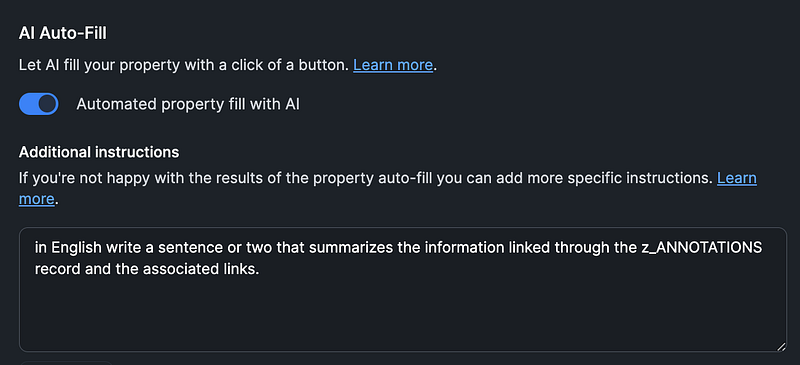
AI Auto-fill setting for summary in Capacities

The instruction used in the tag_GPT property to create the keyword string is set to:

‘In English create a string of the top 5 keywords separated by commas that describe this record linked through the z_ANNOTATIONS record. Only write the keywords and commas, do not add anything extra.’
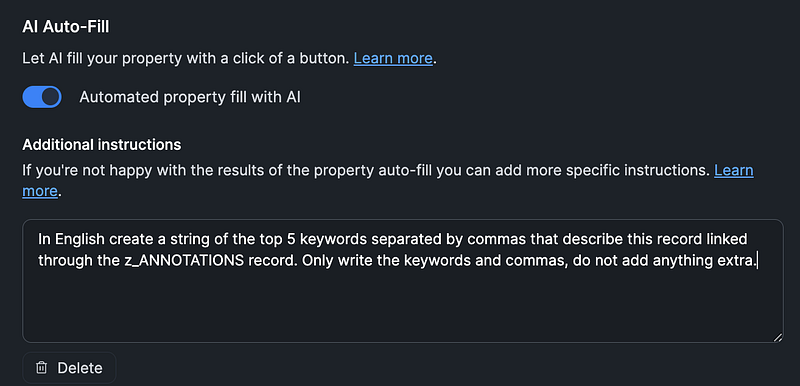
AI Auto-fill setting for keywords in Capacities

THE RAaiN METHOD — CAPACITIES AI PROCESSING

I know we don’t really want another acronym based method for PKM but the approach I’m using, I call the RAaiN Method, is optimized for an object based AI approach.

The RAaiN Method is conceptually based on Zettelkasten where a single concept becomes the building block for connected insights and thoughts. The manual linkage of the original Zettelkasten method is replaced with calculated AI keywords which are added as tags. The single thought ( a sentence or two) is calculated as a summary from the annotation object which contains a single detailed concept of a paragraph or two. The ability of AI to create a concise sentence or two as a ‘Nugget’ can save a huge amount of time over doing this manually. An important part of the Nugget is to add your own thoughts and insights.

Annotations are a powerful way to highlight a paragraph or two of detail about a single idea or concept. The annotation can be written manually if it comes from reading a book or it can be highlighted from a source in a more automated way such as with read-it-later services.

A great program to create annotations and highlights is the Mac PDF program Highlights which I have written about in a previous article. These annotations can be copied directly to an annotation object in Capacities including a link back to the PDF highlighted paragraph. Another way to capture annotations and deep links to paragraphs is with Hookmark (available in Setapp) and the free Skim PDF application.

The RAaiN Method is designed for an object based structure where information can be ‘filed’ into more than one category. In Capacities, information is captured within Objects (databases) and collections (selections within the object). The neat part is information that sits within an object can be tagged to one or multiple collections along with relevant tags. This enables creating collections based on topic, status or any criteria that makes sense for organization.

OBJECT STRUCTURE TO MAKE AI AUTOFILL FUNCTION

The RAaiN method basically sets the object structure and properties so that the auto-fill function is focused on a single concept.

The following are the objects that are defined in Capacities to enable this method. The ‘a_z_’ prefix is used to conceptually group the objects and as a reminder that this is based on Zettelkasten.

a_z_RESOURCES — The Resources object references the object that is a resource and includes Web links, Books, Articles, URLs, Files, PDFs, AI_chats and Videos. By adding a reference to a source all Resources can be viewed together and by adding relevant tags all Resources for a specific topic or area can be surfaced.

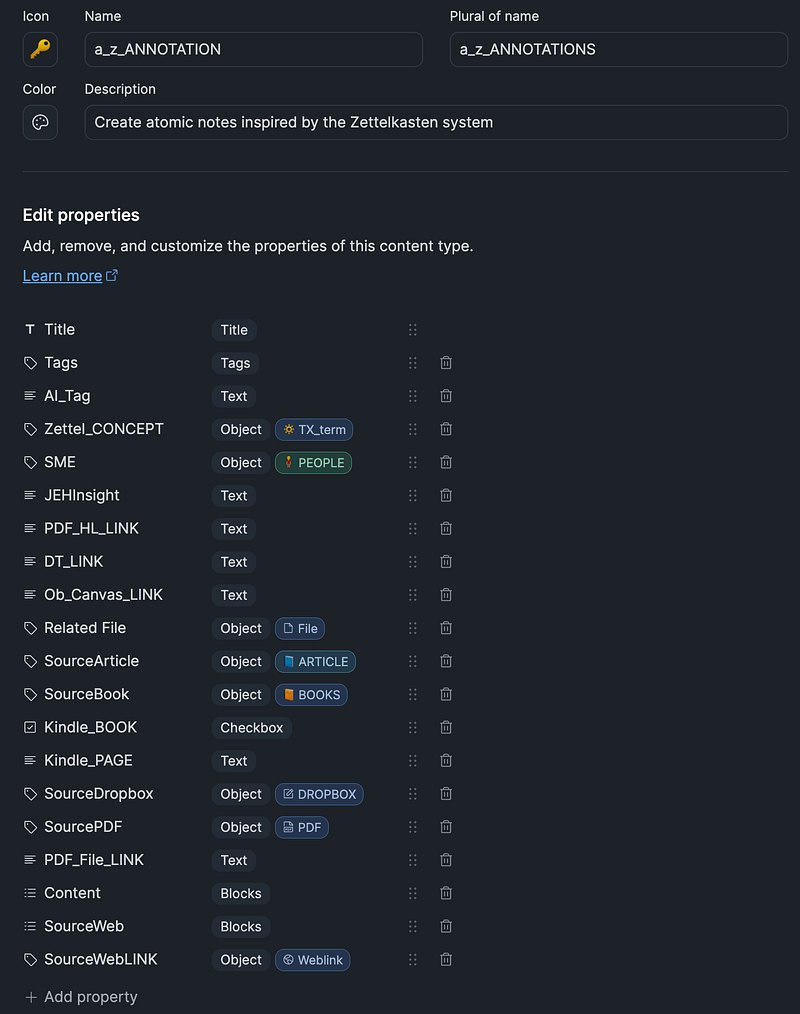
a_z_ANNOTATIONS — The Annotations object contains a reference paragraph or two for a single specific concept or idea. It is important to isolate the concept so that the right amount of information is sent to ai for summarization and keyword development. The annotation can be a paragraph copied from a source, created as an annotation such as with the PDF client Highlights, or it can be one of the results from a read-it-later program such as Readwise.

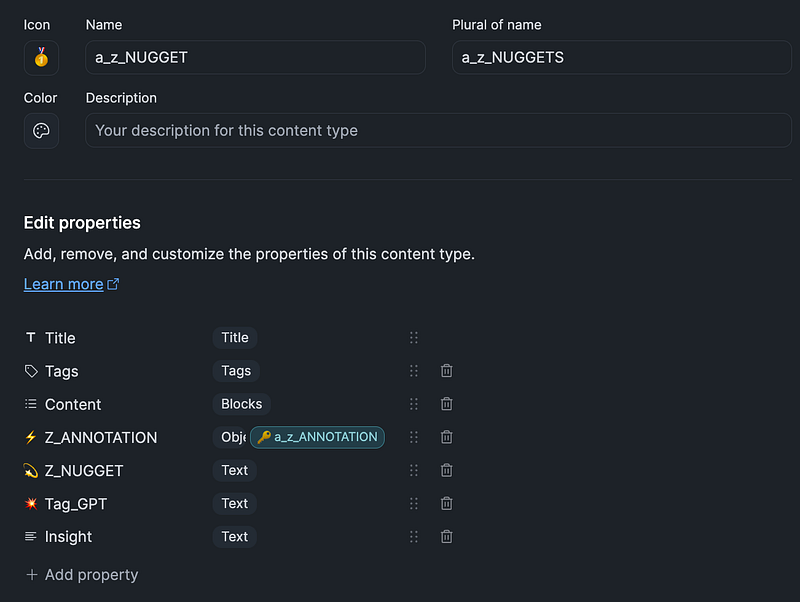
a_z_NUGGET — The Nugget object contains a selected reference to the annotation along with the AI generated summary and a string of keywords for potential tags. Using the built-in ‘AI Auto Fill’ function seems to work well but more testing will need to be done and community feedback will be important for any improvements.

The current allowance for AI generated content seems adequate for one off or limited content generation. In addition, the keywords generated are not linked to tags but Capacities could be developed to either include a fully automated tagging system or a semi-automated system that would allow selection and confirmation from the user to add the proposed tags.

CAPACITIES [R]esource [A]nnotation ai [N]ugget PROPERTIES STRUCTURE

The following tables represent the objects and properties I have defined, please modify for your own requirements.

RESOURCE PROPERTIES
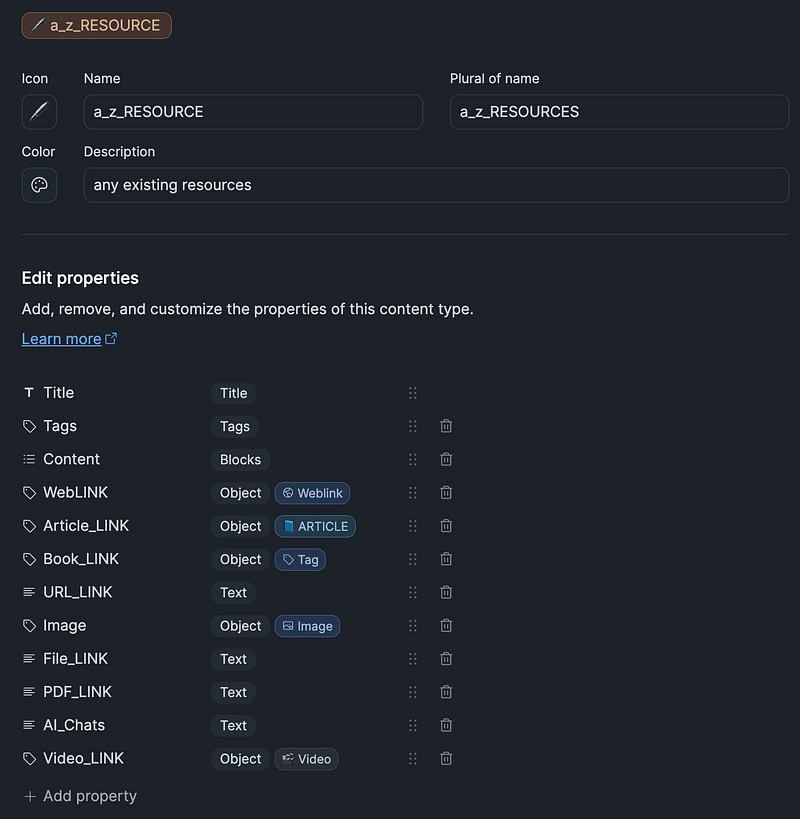
Resource object with properties in Capacities

ANNOTATION PROPERTIES

Annotation object with properties in Capacities

NUGGET PROPERTIES

EXAMPLE ANNOTATION AND RESULTING NUGGET

The following annotation has been created using the Highlights PDF program by highlighting the paragraphs within the source PDF and hitting the highlight command which stores the text and link to the side panel.
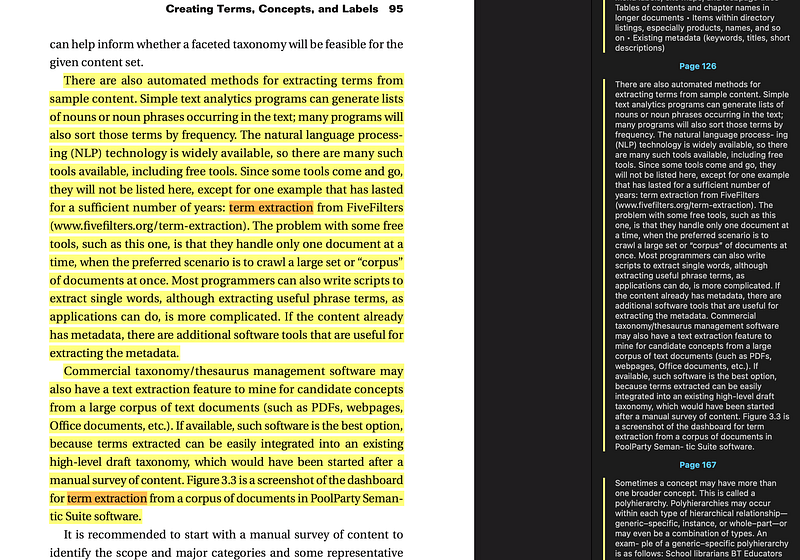
Annotation saved within Highlights program

This text and link can be copied into a new Capacities annotation record which will be used to then create the Nugget summary and keywords.

ANNOTATION
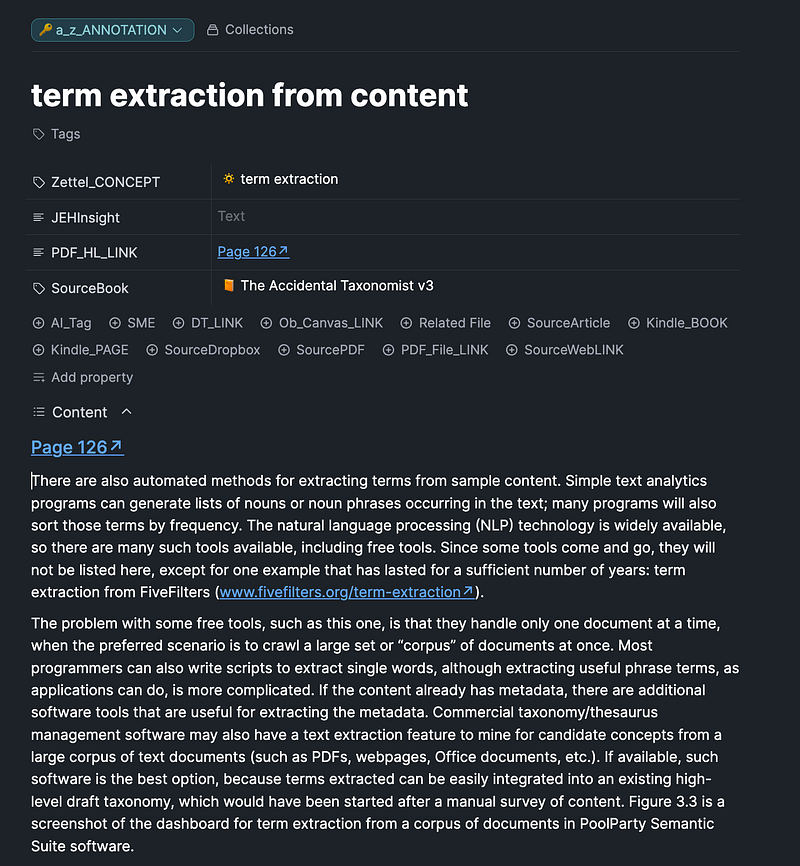
Annotation saved with link within the Capacities program

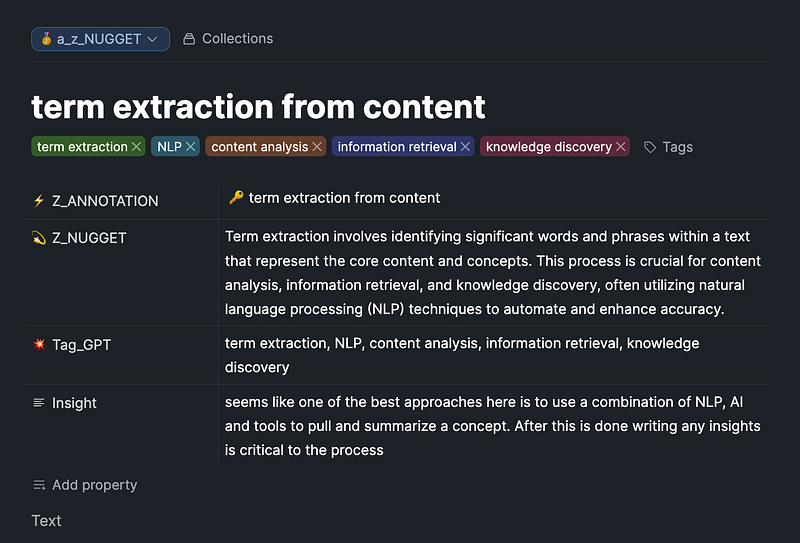
RESULTING NUGGET SUMMARY AND KEYWORDS FROM AI
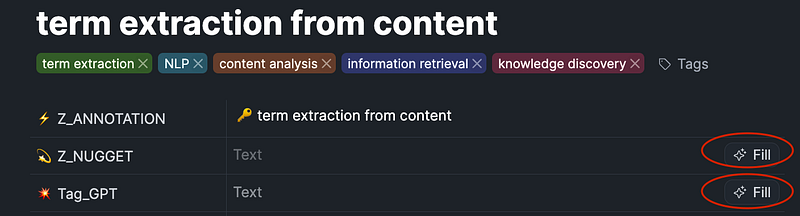
Nugget in Capacities showing AI Fill commands
Nugget content with AI generated tags AI generated summary
  • The Annotation is selected from existing annotations.
  • The Nugget summary was calculated with the ‘Automated property fill with AI’.
  • The Tag_GPT field was calculated to show a string of 5 keywords based on the record information. Create the keywords from this string.
  • The Insight field was entered manually with any insights.

VIEW OF NUGGETS TAGGED WITH ‘CONTENT ANALYSIS’

An important view of your Nugget knowlege can be created by clicking on one of the tags. In the following example I have clicked on the ‘Content Analysis’ tag and then get presented with all of the other tags included with this tag.
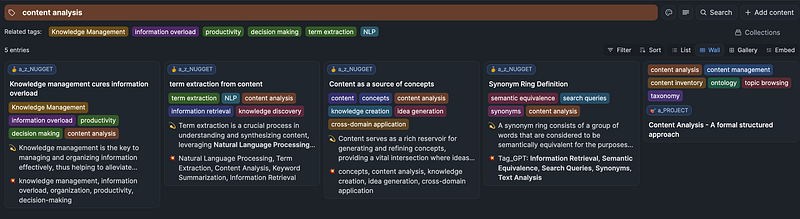
Capacities wall view of Nuggets from tag ‘Content Analysis’ view

From this view you can also get a Graph View showing the relationships limited by the selected tag:
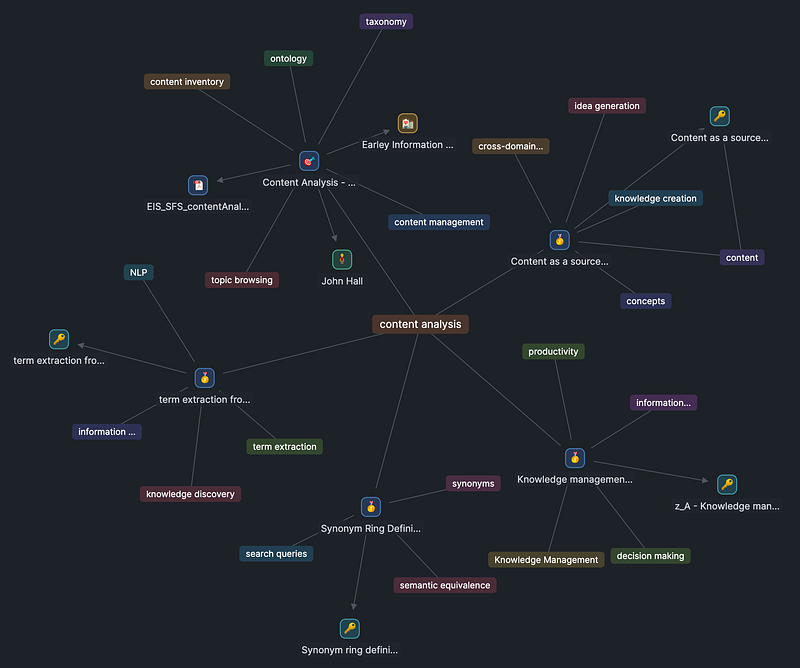
Capacities graph view of Nuggets from tag ‘Content Analysis’ view

I hope this helps some people get started in using this exciting and very useful AI command. Please comment how this works for you and let the Capacities development team know. What other workflows can become a solution by using an AI auto-fill command?

If you feel like supporting me in my work:

👉🏻 If you want to try Hookmark, it is available in the Setapp subscription, which has dozens of fantastic Mac applications at a great price including the apps listed above. If you want to try Hookmark and Setapp or the other 240+ apps please register via the link below; I will receive a small commission. Thank you very much!

👉🏻 Another way would be give a clap or two to show appreciation. Thank you for reading and your support!

Pkm
AI
Productivity
Notes
Knowledge Management
Recommended from ReadMedium