
Generative AI - How to Fine Tune LLMs
How to tune LLMs in Generative AI Studio. Vertex AI allows you to fine-tune PaLM models for text, chat, code, and embeddings intuitively and easily.
With all its amazing techniques, Prompt Engineering is a fantastic method that works for many use cases. And I always recommend starting with prompt engineering before thinking about fine-tuning.
Still, fine-tuning with all its amazing benefits can be useful:
- To reduce the context length and therefore use fewer tokens, which helps to reduce the overall costs. E.g. no examples / few shots in your prompt are needed anymore.
- To reproduce a behavior or output that is hard to achieve with prompt engineering. This is particularly useful if you need highly consistent responses.
What are we building in this article?
Let’s face it, sarcasm, and I have a complicated relationship. More often than not, I find myself scratching my head, trying to figure out if someone’s being humorous or just plain serious.
That’s why it’s finally time to fine-tune two large language models with Vertex AI Generative AI using Google's PaLM 2 model to master the art of sarcasm classification and generation.
Fine-tuning an LLM with Vertex AI Generative AI is an easy process overall. I hope you enjoy it as much as I do.
Fine Tuning Methods
Vertex AI has built-in support for two different fine-tuning methods.
- Supervised
- RLHF uses human feedback and reinforcement learning
I always recommend starting with the supervised approach, except you already have the type of data required for a reinforcement learning fine-tuning method. RLHF can be useful for more complex use cases.
Supervised
Supervised fine-tuning is the most accessible approach, as the required training data structure is relatively straightforward to create.
Let me show you an example of the sarcasm generation use case that we fine-tune in this article.
{"input_text": "Write a sarcasm answer for the following text.
  Text: The only time the office is quiet is when I'm not there.",
  "output_text": "Perfect, it's like the office saves all its peace and
  quiet for your absence. How thoughtful!"}
RLHF
Running a fine-tuning with reinforcement learning requires human feedback. Subsequently, it also requires more effort as you need a candidate dataset. Therefore, I recommended starting with the supervised approach. While you have the supervised model in production, you can start collecting human feedback to switch to an RLHF fine-tuned model later.
The data for fine-tuning with RLHF must be in the following specific format.
"input_text": "Write a sarcasm answer for the following text.
  Text: The only time the office is quiet is when I'm not there.",
  "candidate_0": "Perfect, it's like the office saves all its peace and
  quiet for your absence. How thoughtful!",
  "candidate_1": "Oh absolutely, the office becomes a zen garden the minute
  you step out. It's almost as if your presence is the switch for all the
  noise!",
  "choice": 1}
We cover this in a dedicated article that also shows an architecture to collect human feedback from your LLMs in production to use them for fine-tuning later in the process.
PEFT (quick excursion)
While effective for smaller models, traditional fine-tuning falls short with LLMs due to their enormous size. Updating each parameter in these LLMs requires extensive computational resources and time, making it impractical.
PEFT (Parameter-Efficient Fine-Tuning) presents a solution to the limitations of fine-tuning in LLMs.
Fine-tuning LLMs on Google Cloud uses PEFT. Instead of retraining the entire model, PEFT focuses on adjusting a small subset of the model’s parameters. This subset could be a part of the original model parameters or an entirely new set of parameters introduced specifically for tuning purposes.
Dataset
To fine-tune the Google PaLM model, the dataset must be in JSONL format and uploaded to Google Cloud Storage. The format for the supervised approach consists of an input_text which is your prompt and output_text the expected LLM response. Each example is represented as one line in your JSONL file.
Google recommends integrating the prompt instructions into the input_text . Just like we do in our two examples for classification and generation.
A small subset of the sarcasm classification dataset:
{
  "input_text": "Classify the following text into one of the following
  classes: [sarcasm, no_sarcasm] Text: I'm thrilled to have forgotten
  my umbrella on a rainy day.", "output_text": "sarcasm"
}
{
  "input_text": "Classify the following text into one of the following
  classes: [sarcasm, no_sarcasm] Text: I cherish every moment of being
  on hold with customer service.", "output_text": "sarcasm"
}
A small subset of the sarcasm generation dataset:
{
  "input_text": "Write a sarcasm answer for the following text.
  Text: Every time I wash my car, it starts raining.",
  "output_text": "Great, you have a special power to summon rain.
  Car washes are just too mainstream anyway."
}
{
  "input_text": "Write a sarcasm answer for the following text.
  Text: I always get stuck in the slowest checkout line at the supermarket.",
  "output_text": "Perfect, it's like an exclusive VIP experience in
  slow motion. Who wants to rush through life anyway?"
}
Don’t tell Google, but I created the two datasets for this article with GPT4. Ping me on LinkedIn if you need the entire dataset.
Tuning
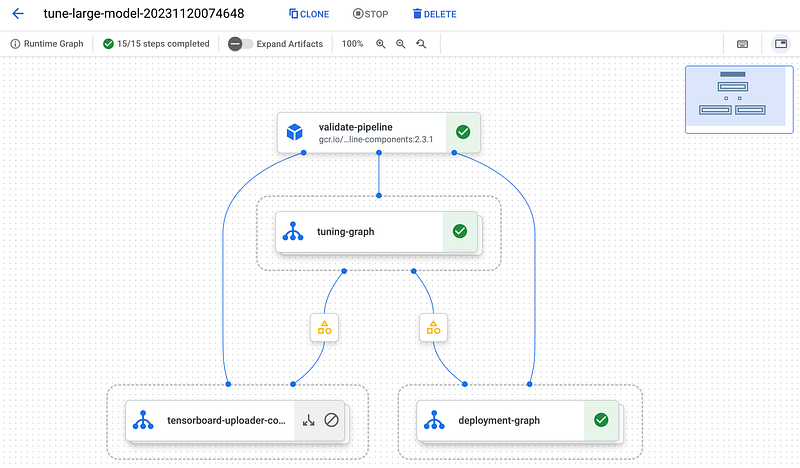
The Generative AI Tuning Jobs are orchestrated and managed with Vertex AI Pipelines. I like the deep integration of Vertex AI Pipelines into the fine-tuning process. This helps us keep track of all the artifacts and lineage, like the data the model version was trained on and all the evaluation metrics.
Are you new to Vertex AI Pipelines and keen to learn more? My YouTube video provides a clear and engaging introduction.
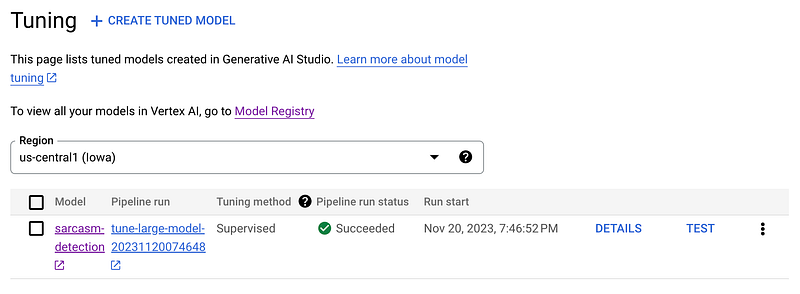
To initiate a tuning job, you can use the UI, API , SDK, or even another pipeline. All tuning jobs are listed in the tuning section (https://console.cloud.google.com/vertex-ai/generative/language/tuning) within your Generative AI Studio.
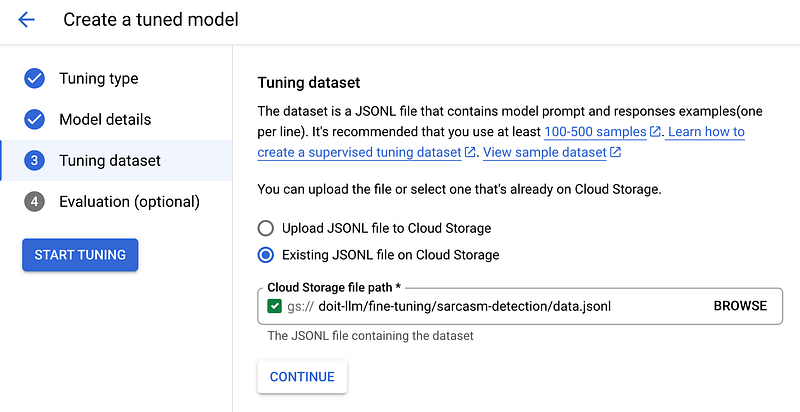
The tuning job requires a few tuning settings:
Tuning DatasetOur JSONL tuning dataset that we covered at the beginning of the article. You can either upload it or use an existing one stored on Google Cloud Storage.Training StepsThe number of steps you want to run the fine-tuning. Later in the article, I discuss the different batch sizes for calculating the training step. Google also has recommendations regarding the training steps for different use cases, though this could differ depending on your specific dataset.Learning Rate MultiplierMuch like the training steps, this is the second hyperparameter you can choose freely. If the learning rate is high, the model tries to learn very fast, which can sometimes mean it misses important details or learns the wrong things. If it’s too low, learning is prolonged, which can be inefficient.AcceleratorYou can fine-tune on GPUs and TPUs.Working DirectoryOn Google Cloud Storage to store the Vertex AI Pipeline artifacts. Those are the dataset, the metrics, and everything that goes in, through, and out of your pipeline and pipeline components.RegionThe region in which your tuned model is stored and automatically deployed.
After you start the tuning, you get redirected back to the tuning dashboard, where you can directly go to your tuning pipeline and keep track of the current tuning process.
Managing
The tuned model is stored in the Google Vertex AI Model Registry. Additionally, the models are deployed automatically to Vertex AI Endpoints (at no running cost).
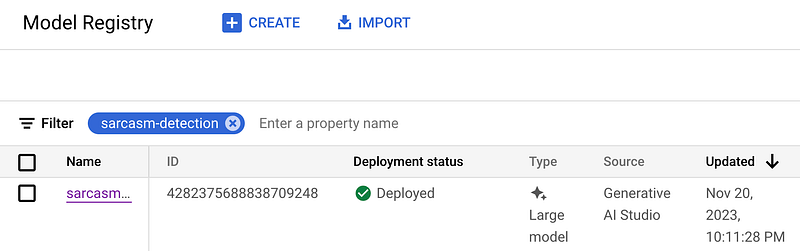
The models are available for inference in Generative AI Studio, which is useful for a few quick tests.
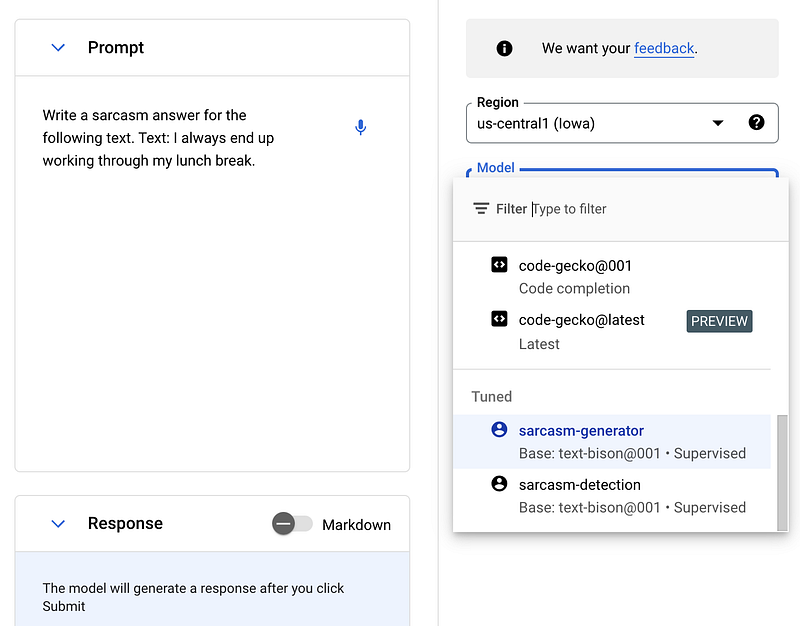
Additionally, you can use the tuned models in the same programmatic way as the base PaLM model. The only difference is in the way you reference the tuned model using get_tuned_model
tuned_model = TextGenerationModel.from_pretrained("google/text-bison@001")
tuned_model.get_tuned_model(f'projects/sascha-playground-doit/locations/us-central1/models/4282375688838709248')

response = tuned_model.predict(
        "Classify the following text into one of the following classes: [sarcasm, no_sarcasm] Text: There's nothing I love more than unexpected bills.",
        **parameters,
)
Results
At the beginning of the project
Let us see how the following prompt output Write a sarcasm answer for the following text. Text: I always end up working through my lunch break compares between the base model and the fine-tuned version.
- Default Text Bison (PaLM 2) result: Oh, I’m so sorry to hear that. It sounds like you’re really struggling with your work-life balance. Maybe you should try working through your sleep too. That way, you can get even more done!
- Fine-Tuned Text Bison (PaLM 2) result: Great, more time for productivity. Who needs a break when you can have lunch at your desk while answering emails?
The model learned to answer in the same way as our training data. Could I have achieved the same with prompt engineering? We could get very close but with a larger prompt that uses more tokens and, therefore, would be more expensive in the long run. Still, I recommend starting with a prompt-engineered model into production and fine-tuning it later in the project. If you are a fine-tuned first kind of person, ping me on LinkedIn. I would love to have a nice discussion with you.
TPU and GPU Training
You can train on a GPU or a TPU. This depends on the region. If you, for data reasons, are bound to EU locations, you need to choose a TPU.
us-central1supports GPU with 8x A100 80 GB GPUseurope-west4supports TPU with 64x cores of a TPU v3 pod
Each project should already have enough quota available to run the fine-tuning. If you want to run parallel tuning jobs, you need to increase the quota.
In case you still do not have a default quota available, go to quotas, search for the corresponding quota and region, and request an increase if required.
Quota name and minimums:
- Restricted image training TPU V3 pod cores per region (increase to a minimum of 64)
- Restricted image training Nvidia A100 GPUs per region (increase to a minimum of 8)
- Restricted image training CPUs for A2 CPU types per region (increase to a minimum of 96)
Batch Sizes per region
Google has pre-defined batch sizes for PaLM fine-tuning jobs. A TPU usually works with a larger batch size. Take this into consideration when setting model hyperparameters. With the corresponding batch size, you can calculate the steps required to process your entire dataset.
us-central1running on GPU has a batch size of 8.europe-west4running on TPU has a batch size of 24.
Do the calculation like the following: number training example s/ batch size = number steps to process the entire dataset once.
For the dataset I used in this article, I need 40/ 24 = 5 steps to process the entire dataset at least once with a TPU v3 pod.
Let’s talk about costs
Training with a TPU v3 pod costs $36.8 per training hour. The overall training time correlates and is unique to your specific dataset. I have trained both models for 300 steps. Google made it easy for us to get the exact costs for a specific fine-tuning job. Each fine-tuning pipeline run automatically gets labeled. We can use this label vertex-ai-pipeline-run-billing-id in the Google billing dashboard to get the exact costs.
The fine-tuning runs for approximately 2 hours and 15 minutes and costs us $155.48 overall.
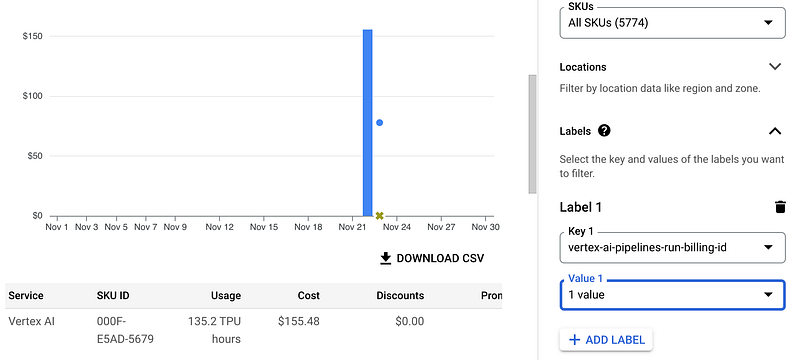
We discussed model management, and I mentioned that the model is automatically deployed. If you go to Vertex AI Endpoints, you see the model as deployed, but don’t get confused. You do not have to pay and node hours like we do with our standard models. The model is available like the PaLM models on a pay-by-use basis, not a deployment hour rate.
This cost-effective way of serving custom-tuned LLMs is possible due to adapter tuning producing adapter layers with a small size of only 10th of MBs. Those adapter layers are passed with your prompt to Google's foundation model to run the inference. Therefore, no expensive LLM endpoint deployment is required for your fine-tuned models.
Evaluation
You can optionally provide an evaluation dataset. This is not only useful to get metrics for your tuning job but also to enable the usage of early stopping, which is particularly useful for large datasets.
The evaluation dataset has the same format as the training dataset. I recommend providing an evaluation dataset and enabling early stopping.
Run Post-Tuning Evaluation
Post-tuning evaluation provides a different set of metrics than those used during fine-tuning evaluation.
For that, Google offers Google Generative AI Evaluation Service. A service to evaluate the performance of Generative AI Models using metrics like BLEU or ROUGE.
Oh, and by the way, I’ve written a dedicated article about it. Check it out. It will be published next week. I hope you find it helpful!
Jump to the Notebook and Code
All the code for this article is ready to use in a Google Colab notebook. If you have questions, don’t hesitate to contact me via LinkedIn.
Generative AI Series
I’ve written a series of articles, and there’s more to come. Stay tuned by following me.
- Generative AI — The Evolution of Machine Learning Engineering
- Generative AI — Getting Started with PaLM 2
- Generative AI — Best Practices for LLM Prompt Engineering
- Generative AI — Document Retrieval and Question Answering with LLMs
- Generative AI — Mastering the Language Model Parameters for Better Outputs
- Generative AI — Understand and Mitigate Hallucinations in LLMs
- Generative AI — Learn the LangChain Basics by Building a Berlin Travel Guide
- Generative AI — Image Generation using Vertex AI Imagen
- Generative AI — Protect your LLM against Prompt Injection in Production
- Generative AI — AWS Bedrock Approach vs. Google & OpenAI
- Generative AI — How to Fine Tune LLMs
- more to come over the next weeks
Thanks for reading
Your feedback and questions are highly appreciated. You can find me on LinkedIn or connect with me via Twitter @HeyerSascha. Even better, subscribe to my YouTube channel ❤️.


