
Forget The Critics, The Apple Studio Display Is Mind-blowing
And it took me less than 30 minutes to confirm…
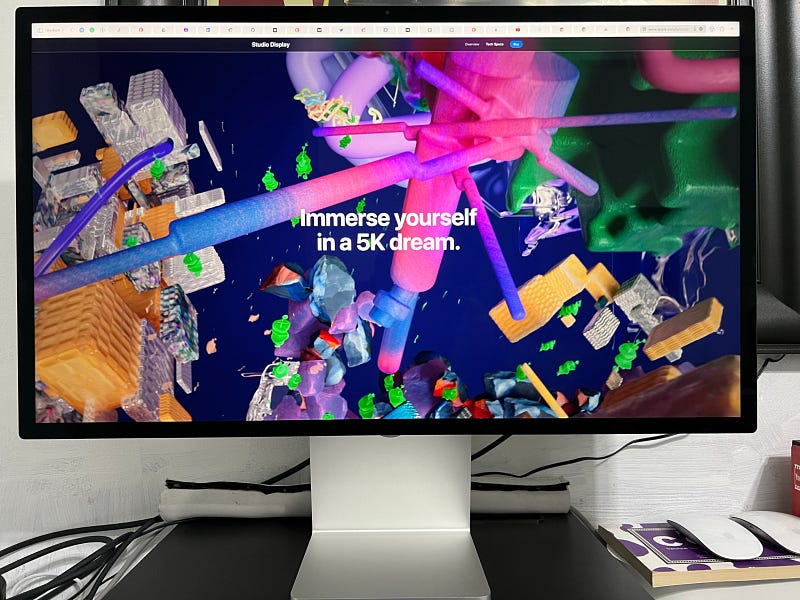
It took nearly three weeks to get my hands on it, but a mere 30 minutes into owning it, I was convinced, no buyer’s remorse for this one. Not one bit. Every critic, including myself, was to one extent or another quite sceptical about the Apple Studio Display, and we all had reasons to be. On paper alone, this is not the easiest of sells, though Apple would probably disagree given how it’s out of stock around the world, and even I had to wait to three weeks to finally get one shipped out to me. Regardless, if you were on the fence, take it from someone who agonised over the decision — after this article, you’ll most likely want to go for it, and you’ll have every reason to.
Out of this world sound
My initial one-liner review after 10 minutes was, “Well, it’s a monitor.”. My best friend, Andrew Gribben suggested I might end up writing my shortest ever article. Forget short-form. That’s more than 100 words too long! And for a second, I was tempted to. The one-sentence review. The first nano-form story on Medium. But it didn’t happen. Obviously. Because I turned the sound on...
You must know something about me. I love music. Not just as an art-form, but as a therapeutic medium. I also collect vinyl. Music has invoked emotions in me that nothing and nobody else could. Therefore, when it comes to music and sound, I’m hard to impress. No, I am not an audiophile. That’s too scientific for what I am. I am looking for the pheromones in music, whatever that means. And the Apple Studio Display hit me with it like nothing before in such a small, discrete package.
It’s basically the AirPods Max without the sweaty ears. But even more than that. Sound truly travels around you, envelops you in new, emotionally complex ways.
I was so impressed by the sound quality that I created an Apple Music Playlist for all of ye to try. Each and every song I am now rediscovering. I’ve never heard Sara Bareilles or Leonard Cohen closer to me. It’s almost uncanny. I am used to good sound, I have been using Bose devices for nearly a decade. The Studio Display just wiped the floor with them. The base, the mids the highs, it’s all there, in fine-fine detail.
I will make one important comment, though. While playing the above songs on YouTube or Spotify does do them some justice, I think the Studio Monitor is so tightly integrated with the Apple ecosystem, that in order to make the most of it, you’ll want to play your songs on Apple Music, or potentially from some lossless or nearly lossless source.
On that note because the Apple Studio Display has beefy speakers, you’ll notice an automatic audio-level decrease after about 2s into every song which is now going to be much more noticeable. It can get annoying, so go into Apple Music > Preferences > Playback, and disable Sound Check. And while you’re there, also enable Lossless. You can thank me in the comments. 😉
Pro-tip — the display sounds best at half-volume when at working-distance. Anything beyond that is overpowering, though still very crisp and full. The same goes for below half-volume. Still very enjoyable, but noticeably less sound-stage.
Picture quality
And this is where my initial one-liner review feels a tad more accurate, but I still feel it’s worth expanding on. Truly objectively, the screen is nothing extraordinary, but I will say it’s above average. But take that with a pinch of salt. You see, I’m used to above-average screens. I have been using MacBooks for about a decade, been staring at the Thunderbolt monitor for about 4 years. I am used to colour consistency, picture crispiness — aka Apple Retina. I got what I expected.
However, stick anyone in front of it who is used to cheapo $200 monitors, and they’ll definitely raise not one, but both eyebrows. 5K is 5K, folks, and that’s 1K extra compared to 99% of the existing competition out there. Just sayin’…
It’s a nice to look at screen. Plain and simple.
And that’s further helped by the glossy glass. Yes. Glossy! It is mind-boggling how something this basic has been ignored by the display industry. I get that matte can be good to reduce reflections, but it also reduces the vibrancy of the screen. I really think all screens should come with the option of being glossy. You don’t like that? Fine. Get the dull one. Look at a dull screen, live a dull life, but let me have my option not to!
Build and design
It’s a cold motherfucker! No, seriously. This thing is cold! Took it out of the box and felt like the coldest monitor I ever touched. That’s aluminium for ya baby! It’s a sturdy monitor, just the way I like ’em. No more wobbly stands to contend with. This thing sits where you put it, and sits well.
If this thing starts wobbling, run, hide, it’s an earthquake!
Now, about that controversial stand. Yup, it’s still controversial. So is the power-cable.
But, more on paper than in real-life. I got the base model with the tilt-only feature. Why? Because in reality that heigh-adjustment option, Apple selling, is minimal. It’s +-5cm. And while the ladies might say +5cm helps in the bedroom, it does a lot less for this monitor. I stuck it on the same raiser my previous 28” 4K Samsung was. It’s perfect. Sits just about a cm over my 16” MacBook Pro.
The little things that matter
Because every reviewer out there will be nitpicking this display to shreds, I’m going to do the same, except the opposite way around. I’ll focus on all the great little bits (mostly, with one notable exception), bobs and babs because altogether they make a big difference. You know, just like with food. A bit of salt, pepper, garlic, and you have a culinary experience as opposed to just a… feeding session.
My biggest gripe with my previous Samsung, LG and frankly every monitor that wasn’t Apple, was the power LED. I don’t understand the disturbing fetish of screen manufacturers with crazy-bright, blinking LEDs of various designs and colours. I don’t need it. Nobody needs it. Trees are dying because of those bloody annoying LEDs. Feckin’ kill the LEDs already! And that’s one thing the Apple Studio Display does well. There is no LED. There is no power button. It’s on when the computer is on, it’s off when the computer is off. And whenever I wake the laptop up, it’s instantly on. It just works! Unlike every single monitor I had before that needed at least a couple of seconds to realise what planet it was on.
OK. Webcam. It’s shite. In its current state, it’s pretty bad. I feel like it’s 2012 again. It’s that bad. CenterStage works like a charm, I’ll give ’em that, but panning shit doesn’t make it any less shit. Apple claims they’ll have an update to fix it. I would like to see that. Very much. Otherwise, I’ll have some embarrassing explaining to do to my friends and colleagues, which I would very much like to avoid. I did pay 1800 euros after all. At present, a $20 bucks webcam offers better quality. How Apple managed to miss this, is frankly beyond me.
But let’s get back to the good stuff because there is plenty left to say. A single connection. You’d think this is nothing to write home about, but it kind of is. You see, that single connection to my 16” MacBook Pro, charges it, carries the video signal, and extends my laptop with another three USB-C ports. And if that wasn’t enough, I get to throw my MagSafe charger into the drawer too! Now that’s neat! One less brick to deal with, one less cable to tuck away, yet I still get three extra ports. This is a step up even from the Apple Thunderbolt monitor. I know some folks are whining themselves to sleep about wanting a MagSafe, but I say we ignore them.
Whiners will whine, regardless of what you give them. They’re like the in-laws. Nothing’s ever good enough.
The wrong reason not to get it — price.
Ahh, the price. We can’t not mention the price. Apple and its omnipresent elephant in the room, right? It’s a big elephant too, according to many. But… is it?
Look, I am not going to pretend this is a cheap, or even a competitively priced display, but calling it expensive is probably a stretch. First of all cost is relative to one’s budget. Ten bucks is a lot of money when you have zero. Spending $10 on something you don’t need, is also irresponsible, and this is why the Apple Studio Display is not expensive. Because it’s not for those who don’t need it.
Frankly, for the most part, those who need it, can likely already afford it, and those who unfortunately can’t, should not knock it just because of its price-tag. Don’t be a hater. This is an objectively premium display, and those who need it will use it will use it for work, for professional workflows, like I am.
Those who will not use this monitor for work, have all the right to buy it, but it’s a bad investment. Most of us, who buy this display, will recover the money. In my case, my Medium writing will pay for it. For others, it’s their software development work, design work, whatever else that pays decent money. And that’s how Apple markets it too, so keep that in mind.
Not a display, an ecosystem display
That’s the bottom-line really with this display. It’s not your average garden-variety monitor you stick on your desk, plug into your desktop or laptop and call it a day.
This is an integrated display. A natural and very much needed integration into the current Apple ecosystem.
That A13 chip inside the cold aluminium shell says it all. The Apple Studio Display becomes a natural extension to your MacBook Air, MacBook Pro, Mac mini, Mac Studio and every software feature and service Apple has. For those who care little or at all about the Apple ecosystem, this will sound like tech-abomination, ludicrous in ways they won’t be able to put into words, akin to buying a Lamborghini in Tibetan Tuiwa.
For the rest of us, however, who live in the city with smooth roads and no hill in sight, let us have our Lambo. We get the point of the Studio Display. For us, it’s the very things we wanted and screamed for since the Thunderbolt Display was discontinued. For us, this is Christmas, thankfully without the annoying blinking lights. Just the present, nicely packaged, premium, the way we like it.
I’m not saying you should buy it, but don’t knock it, ‘till you tried it… 😉
Attila Vago — Software Engineer improving the world one line of code at a time. Cool nerd since forever, writer of codes and blogs. Web accessibility advocate, Lego fan, vinyl record collector. Loves craft beer!


