
Apple Tricked Us With The M1 iPad Air — Early Hands-On Impressions
A “new” old iPad Air, a sneaky, but clever move by Apple…
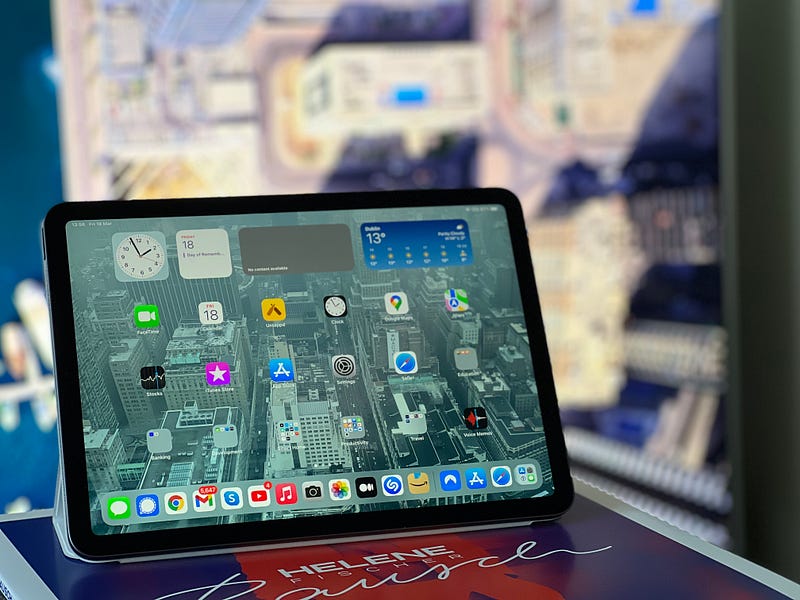
Should you get the new iPad Air? That’s probably the question on many folks’ mind, right after all the more important things in life. Getting the new iPad Air is beyond a first world problem right now. Having said that, it’s worth taking a closer gander at it, and I am doing just that.
I wasn’t planning to get it this year, but then Apple decided to throw in the M1 chip, and that got me convinced somehow. In all honesty, I rarely refresh my iPads. The last iteration I owned was the 3rd generation, which I traded in with a somewhat faulty display. Still got 100 bucks for it, though, so yay me!
My options were either this 5th generation iPad Air or last year’s iPad Pro, but no amount of reviews were able to convince me to go for the Pro. To truly appreciate the Pro, one will eventually resort to getting the magic keyboard folio thingy, and at that point it costs more than an M1 MacBook Air. This year’s iPad Air, however, is an odd duckling. It’s very much last year’s duck for all intents and purposes, just incredibly beefed up smarts. Looking at it side by side, it’s practically an iPad Pro with a few barely noticeable features missing like 120Hz refresh rate, Face ID, and a couple less speakers.
The M1 iPad Air is so close to the iPad Pro, it makes the Pro feel overpriced.
And that’s actually the first big benefit of this year’s model of the Air. Costs 200 bucks less than the Pro. When you factor in that those 200 bucks can get you an extra Apple Pencil 2 and a folio case, should you want or need those, the cost-benefit analysis is leaning heavily towards the Air.
The reason I keep calling it last year’s duck, is because in pretty much every way I can think of the 5th generation iPad Air is really a 4th generation iPad Air in terms of looks and feel, but revamped internals — the M1 chip, which I am intimately familiar with since 2020 in all of its iterations except the M1 Ultra, which brings me to an interesting realisation.
The 5th generation iPad Air is sporting a two-year-old processor! Sneaky, but clever…
Indeed. At this stage in 2022, the M1 is a two-year-old processor. Oh, how times flies! In a way, Apple got us all excited about last year’s iPad Air, with two years ago’s processor. Sneaky, but also clever because really, it’s probably the best illustration of how good the M1 is, and just how suitable it is for virtually any device Apple builds. Heck, I wouldn’t be surprised at this point if a future iPhone ended up with the M1 SOC inside!
Speaking of performance, the M1 iPad Air behaves like… well, every iPad out there. Over the years, we’ve gotten used to simply flawless experiences from all the iPads out there, even the bog-standard ones. Moving from the 3rd generation to the 5th generation via a simple iCloud backup was entirely uneventful, and if I had to guess on performance alone (using day-to-day apps) which generation device I was using, I would not be able to tell. Perhaps the apps installed a bit faster, but I have no numbers to support my gut feeling on that.
I can’t really feel I have a new iPad Air. Not when doing standard tasks, media consumption and internet browsing.
It’s hard to do an overall review of the new M1 iPad Air because in no way does it feel like it’s new. If you have last year’s model, stick to that one, and the same goes for the 3rd generation as well. Heck, if all you’re doing is writing, browsing, social media, music and movies, you may as well just go for the bog-standard iPad, and ignore the Air entirely.
The iPad Air 5’s better and Center Stage capable camera is hardly a reason to spend your hard-earned cash.
If, however, you’re looking to move to an iPad-first workflow with tools involving more intense processing, the M1 iPad Air is likely the best bang for your buck out there right now. I, for one, will put its capabilities to the test and attempt to build a web app and an iOS app on this new machine and see how capable it really is, so if you’re a software engineer or planning to become one, you may want to subscribe to see what my experience building apps on the M1 iPad Air will be like. You bet, I’m curious myself to find out!
P.S. Fun fact. I wrote this entire article on the new M1 iPad Air, in Ulysses with an external Magic Keyboard.
Attila Vago – Software Engineer improving the world one line of code at a time. Cool nerd since forever, writer of codes and blogs. Web accessibility advocate, Lego fan, vinyl record collector. Loves craft beer!


