
Flutter Desktop Plugin
Create a Flutter Desktop Plugin!
How to write my own Flutter Desktop Plugin ? Hmmm….
All in one Flutter resource: https://flatteredwithflutter.com/flutter-desktop-plugin/
Pre-Requisite…
In case you are still new to Flutter Desktop and want to set up first, check out this article here…
Begin…
At the end of this article, you should be able to create your plugins for Desktop….
We will structure this article into :
- Creating Desktop Plugin
- Using Desktop Plugin in Flutter application
- Enable support for Windows
Creating Desktop Plugin
We need to run a command,
flutter create --org com.flatteredwithflutter --template=plugin init_dsktp_pluginBreakdown :
- To create a plugin, we need to use
--template=pluginflag - The name of our plugin will be
init_dsktp_plugin - Use the
--orgoption to specify your organization, mostly in the reverse order…i.e,com.flatteredwithflutter
After running this command, you should now have a project structure like this,
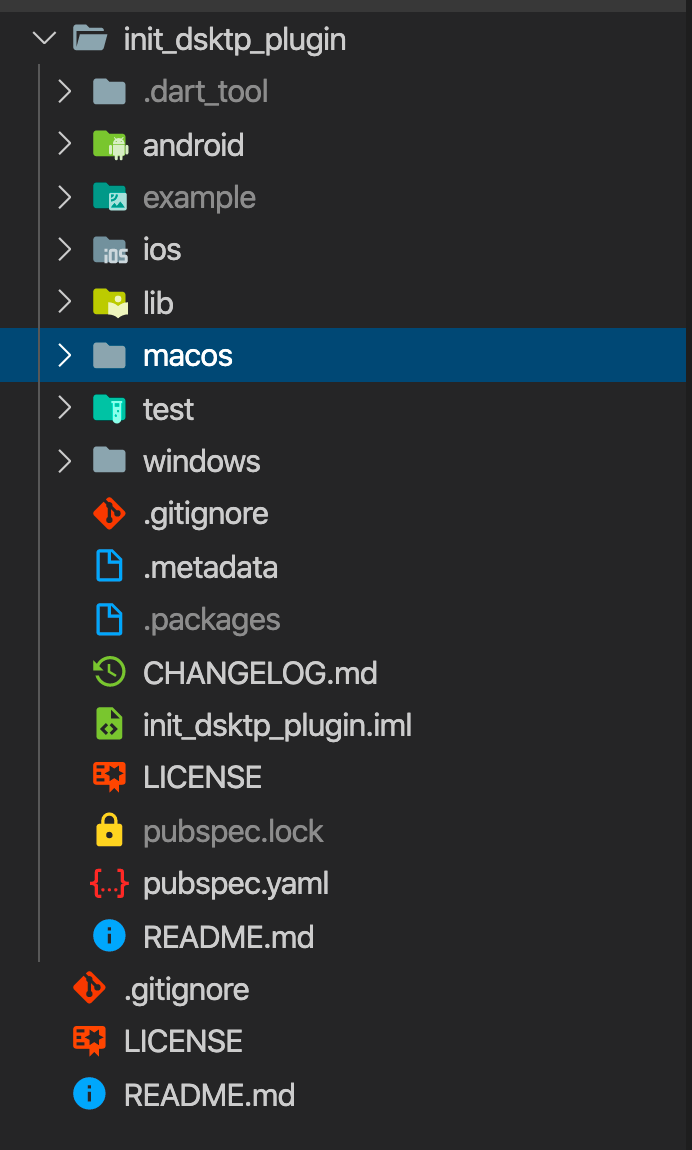
Here, the folder name is same as you specified during the plugin creation command…Note : Windows folder is added later.
Inside the pubspec.yaml, you can specify the platforms, you want to support…
Inside the lib folder, you can see init_dsktp_plugin.dart. This is the entry point, for outside Flutter application, into our plugin…
We expose a method called platformVersion .
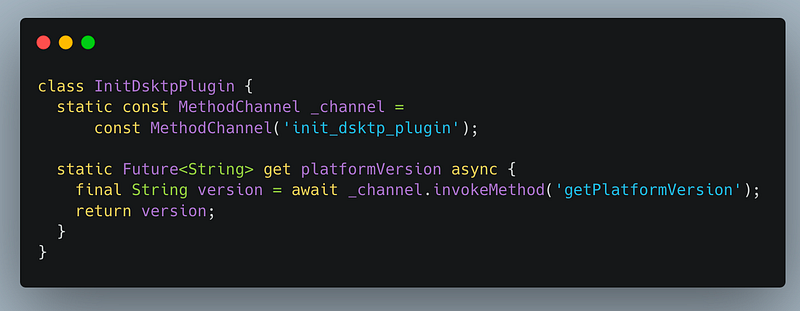
The name of our method channel is init_dsktp_plugin and method name is getPlatformVersion . Note: this should be same in the implementation files.
Implementation…
Inside the macOS folder, we see InitDsktpPlugin.swift .. This file is the brain of the plugin…
Steps :
- Register the plugin with the method channel as specified in the dart file..(see above)

Note: See the method channel is same as dart file one.
2. Implement the method..
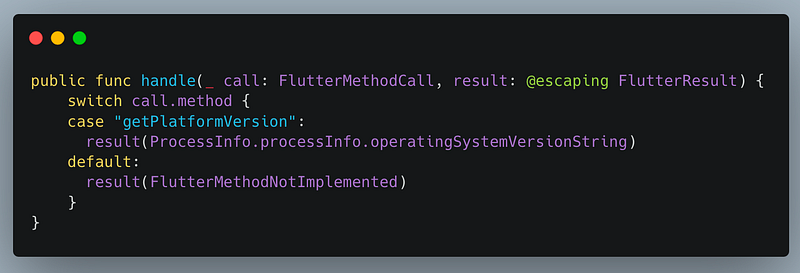
This function is invoked whenever Flutter application calls a method of our plugin…We can have n number of cases here…
For our plugin, we have just getPlatformVersion . Inside this, we invoke
ProcessInfo.processInfo.operatingSystemVersionStringNow, this ProcessInfo is specific to macOS. Read the doc. here. As per the docs :
operatingSystemVersionString
A string containing the version of the operating system on which the process is executing.
The result is collected and passed via FlutterResult..As per the docs,
FlutterResult : A method call result callback.
Used for submitting a method call result back to a Flutter caller. Also used in the dual capacity for handling a method call result received from Flutter.
Using Desktop Plugin in Flutter application
Lets use the plugin created above in our desktop application…
Steps :
- Open the
pubspec.yamlof our Flutter Desktop Application, and include the plugin dependency as
...
dependencies:
  init_dsktp_plugin:
    git:
      url: https://github.com/AseemWangoo/plugins.git
      path: ./init_dsktp_plugin
...
By default, it takes the source code from the master branch.
2. Use the plugin, as any other dependency now…
FutureBuilder<String>(
   future: InitDsktpPlugin.platformVersion,
   builder: (context, snapshot) {
     // YOUR LOGIC
   },
)
Enable support for Windows
Warning : The plugin APIs, plugin tooling, and plugin structure for Windows are not at all stable. This means you should not publish Windows plugin implementations to pub.dev as anything published now will almost certainly not work with the final Flutter Windows support.
But we are devz, we like to explore !!!!
Steps :
- Download the windows folder from here….or individual files from here
- Change the
ProjectNameinplugin.vcxprojto your plugin's name.
In our case, it’s init_dsktp_plugin
3. Change the ProjectGuid in plugin.vcxproj to a new UUID. Generate online here.
4. Change the FlutterPluginName in PluginInfo.props to your plugin's name.
In our case, it’s init_dsktp_plugin
5. Search for comments containing *** in the .h and .cpp file, and update the code as described in the comment..
In our case, SAMPLE has been replaced by INIT_DSKTP_PLUGIN and “sample_plugin” with “init_dsktp_plugin”
Articles related to Flutter Desktop:


