Flutter and TweenAnimationBuilder
What if I want to create my own animation…?Hmm…
All in one Flutter resource: https://flatteredwithflutter.com/tweenanimationbuilder-in-flutter/
Free AI web copilot to create summaries, insights and extended knowledge, download it at here
3983
Abstract
attr">end</span>: <span class="hljs-number">2</span> * math.pi), builder: (, <span class="hljs-keyword">double</span> angle, __) { <span class="hljs-keyword">return</span> Transform.<span class="hljs-title function_ invoke__">rotate</span>( <span class="hljs-attr">angle</span>: angle, <span class="hljs-attr">child</span>: earth, ); }, ),</pre></div><p id="b75d">Here, we have the following properties:</p><ul><li><b>duration</b> : 5 seconds</li><li><b>tween</b> : A tween of double, when the widget first builds, it animates from <a href="https://master-api.flutter.dev/flutter/animation/Tween/begin.html">Tween.begin</a> to <a href="https://master-api.flutter.dev/flutter/animation/Tween/end.html">Tween.end</a>.</li><li><b>builder</b> : widget to build ..(In our case <b>Transform</b>, which takes the value from <b>Tween<double>)</b></li></ul><h2 id="89ba">When to use TweenAnimationBuilder….</h2><figure id="dc8c"><img src="https://cdn-images-1.readmedium.com/v2/resize:fit:800/1*QRtNIPSJKMmqf0Pqikqb8Q.png"><figcaption>Flutter and TweenAnimationBuilder….</figcaption></figure><blockquote id="8068"><p>As Flutter team recommends , we should use <b>TweenAnimationBuilder</b> for the above use cases…</p></blockquote><p id="4337"><b>Performance optimization….</b></p><p id="7525">As per official documentation…</p><ol><li>If your <a href="https://master-api.flutter.dev/flutter/widgets/TweenAnimationBuilder/builder.html">builder</a> function contains a subtree that does not depend on the animation, it’s efficient to build that subtree once.</li><li>pass the pre-built subtree as the <a href="https://master-api.flutter.dev/flutter/widgets/TweenAnimationBuilder/child.html">child</a> parameter</li></ol><p id="cedc">Use case,</p><div id="142c"><pre><span class="hljs-keyword">final</span> <span class="hljs-type">Image</span> <span class="hljs-variable">sun</span> <span class="hljs-operator">=</span> Image.asset(<span class="hljs-string">'assets/images/sun.jpeg'</span>);</pre></div><div id="643e"><pre><span class="hljs-type">static</span> <span class="hljs-keyword">final</span> colorTween = <span class="hljs-built_in">ColorTween</span>(begin: Colors.blue, end: Colors.orange);</pre></div><div id="6ffc"><pre><span class="hljs-regexp">//</span><span class="hljs-regexp">//</span><span class="hljs-regexp">//</span>/</pre></div><div id="ede9"><pre><span class="hljs-selector-tag">TweenAnimationBuilder</span>( <span class="hljs-attribute">child</span>: sun, <span class="hljs-attribute">duration</span>: const <span class="hljs-built_in">Duration</span>(<span class="hljs-attribute">seconds</span>: <span class="hljs-number">5</span>), <span class="hljs-attribute">tween</span>: colorTween, <span class="hljs-attribute">builder</span>: (, <span class="hljs-attribute">Color</span> <span class="hljs-attribute">color</span>, Widget child) { <span class="hljs-selector-tag">return</span> <span class="hljs-selector-tag">ColorFiltered</span>( <span class="hljs-attribute">colorFilter</span>: ColorFilter.<span class="hljs-built_in">mode</span>(<span class="hljs-attribute">color</span>, BlendMode.modulate), <span class="hljs-attribute">child</span>: child, ); }, )</pre></div><div id="4449"><pre><span class="hljs-regexp">//</span><span class="hljs-regexp">//</span><span class="hljs-regexp">//</span>/</pre></div><p id="f493">Here, we have the following properties:</p><ul><li><b>duration</b> : 5 seconds</li><li><b>tween</b> : A tween of color, this time a static Tween defined outside of the TweenAnimationBuilder.</li><li><b>builder</b> : widget to build ..(In this case, only the colorFiltered Widget)</li></ul><h2 id="bcdd">ColorFiltered Widget…</h2><p id="2bce">Applies a <a href="https://api.flutter.dev/flutter/dart-ui/ColorFilter-class.html">ColorFilter</a> to its child,</p><figure id="0493"><img src="https://cdn-images-1.readmedium.com/v2/resize:fit:800/1*bUaZoVGh-ajK7oWPBzWDgA.png"><figcaption
Options
ColorFiltered widget….</figcaption></figure><p id="8c28">Use case :</p><div id="d676"><pre><span class="hljs-selector-tag">ColorFiltered</span>( <span class="hljs-attribute">colorFilter</span>: ColorFilter.<span class="hljs-built_in">mode</span>(Colors.orange, BlendMode.modulate), <span class="hljs-attribute">child</span>: <span class="hljs-comment">// YOUR CHILD,</span> )</pre></div><p id="52f3">Here, we have the following properties:</p><ul><li><b>colorFilter</b> : which color you want to show, along with the <a href="https://api.flutter.dev/flutter/dart-ui/BlendMode-class.html"><b>BlendMode</b></a></li><li><b>child : </b>what is the child on which you want to apply this filter…</li></ul><h2 id="f2be">Toggle Button…</h2><p id="f501">A horizontal set of toggle buttons.</p><figure id="72f3"><img src="https://cdn-images-1.readmedium.com/v2/resize:fit:800/1*o8BuQIv-RIJm1aCzLYk-xA.png"><figcaption>ToggleButton…</figcaption></figure><p id="987b">List of <a href="https://api.flutter.dev/flutter/material/ToggleButtons/children.html">children</a> are laid out in a row. State of each button is controlled by <a href="https://api.flutter.dev/flutter/material/ToggleButtons/isSelected.html">isSelected</a>.</p><p id="7b52">The length of <a href="https://api.flutter.dev/flutter/material/ToggleButtons/isSelected.html">isSelected</a> has to match the length of the <a href="https://api.flutter.dev/flutter/material/ToggleButtons/children.html">children</a> list.</p><div id="16b9"><pre><span class="hljs-keyword">final</span> isSelected = <<span class="hljs-built_in">bool</span>>[<span class="hljs-literal">false</span>, <span class="hljs-literal">false</span>, <span class="hljs-literal">false</span>];</pre></div><div id="a42f"><pre><span class="hljs-regexp">//</span><span class="hljs-regexp">//</span></pre></div><div id="1d80"><pre>ToggleButtons( children: <Widget>[ Ico<span class="hljs-meta">n</span>(Icons.ac_unit), Ico<span class="hljs-meta">n</span>(Icons.<span class="hljs-keyword">call</span>), Ico<span class="hljs-meta">n</span>(Icons.cake), ], onPressed: (int <span class="hljs-keyword">index</span>) { setState(() { isSelected[<span class="hljs-keyword">index</span>] = !isSelected[<span class="hljs-keyword">index</span>]; }); }, isSelected: isSelected, ),</pre></div><p id="e94a">Here, we have the following properties:</p><ul><li><b>children</b>: no. of widgets in the toggle button</li><li><b>isSelected: </b>list of boolean (Should be equal to the children’s widgets)</li><li><b>onPressed</b>: Change the selection state of the items inside toggle button</li></ul><p id="e04f">Articles related to Flutter:</p><div id="6ddf" class="link-block"> <a href="https://readmedium.com/using-selector-in-provider-b32113d5da64"> <div> <div> <h2>Using Selector in Provider</h2> <div><h3>Using selector in provider</h3></div> <div><p>medium.com</p></div> </div> <div> <div style="background-image: url(https://miro.readmedium.com/v2/resize:fit:320/1*fpwzgIlvCRRDrr04A21ZQw.png)"></div> </div> </div> </a> </div><div id="3eeb" class="link-block"> <a href="https://readmedium.com/flutter-and-services-638ebfbbe47f"> <div> <div> <h2>Flutter and Services</h2> <div><h3>Want to use android services in flutter? See how!</h3></div> <div><p>medium.com</p></div> </div> <div> <div style="background-image: url(https://miro.readmedium.com/v2/resize:fit:320/1*AOqCwCWVhfwFHgPZ36Jf2A.png)"></div> </div> </div> </a> </div><figure id="ab34"><img src="https://cdn-images-1.readmedium.com/v2/resize:fit:800/1*rpTl0ep9orbTrbRhvOmw-w.gif"><figcaption></figcaption></figure></article></body>
Flutter and TweenAnimationBuilder
What if I want to create my own animation…?Hmm…
All in one Flutter resource: https://flatteredwithflutter.com/tweenanimationbuilder-in-flutter/
This article lays focus on the following widgets

In simple words, now you can create your own Custom Implicit Animations with TweenAnimationBuilder…
Note : To use TweenAnimationBuilder, you need to have the latest stable Flutter channel (1.12.13+hotfix-5)
What is TweenAnimationBuilder…?
A widget builder that animates the property of a Widget to a target value…
TweenAnimationBuilder(
duration: // YOUR DURATION,
tween: // YOUR TWEEN,
builder: (_, angle, __) {
return child;
},
)Using example…
TweenAnimationBuilder(
duration: const Duration(seconds: 5),
tween: Tween<double>(begin: 0, end: 2 * math.pi),
builder: (_, double angle, __) {
return Transform.rotate(
angle: angle,
child: earth,
);
},
),Here, we have the following properties:

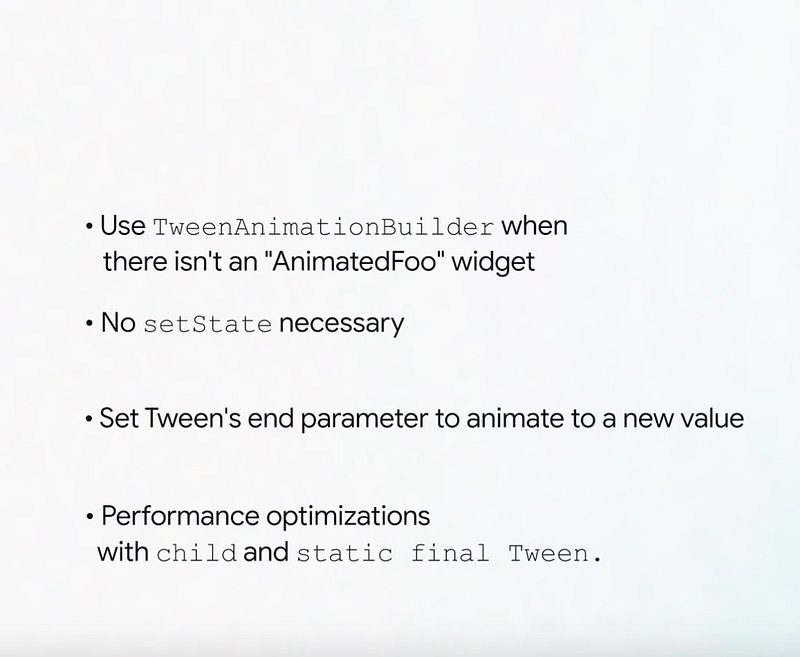
As Flutter team recommends , we should use TweenAnimationBuilder for the above use cases…
Performance optimization….
As per official documentation…
Use case,
final Image sun = Image.asset('assets/images/sun.jpeg');static final colorTween = ColorTween(begin: Colors.blue, end: Colors.orange);///////TweenAnimationBuilder(
child: sun,
duration: const Duration(seconds: 5),
tween: colorTween,
builder: (_, Color color, Widget child) {
return ColorFiltered(
colorFilter: ColorFilter.mode(color, BlendMode.modulate),
child: child,
);
},
)///////Here, we have the following properties:
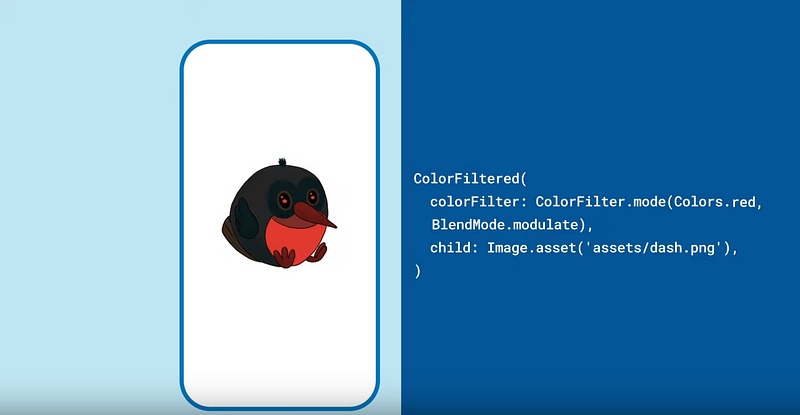
Applies a ColorFilter to its child,

Use case :
ColorFiltered(
colorFilter: ColorFilter.mode(Colors.orange, BlendMode.modulate),
child: // YOUR CHILD,
)Here, we have the following properties:
A horizontal set of toggle buttons.

List of children are laid out in a row. State of each button is controlled by isSelected.
The length of isSelected has to match the length of the children list.
final isSelected = <bool>[false, false, false];////ToggleButtons(
children: <Widget>[
Icon(Icons.ac_unit),
Icon(Icons.call),
Icon(Icons.cake),
],
onPressed: (int index) {
setState(() {
isSelected[index] = !isSelected[index];
});
},
isSelected: isSelected,
),Here, we have the following properties:
Articles related to Flutter: