
Using Selector in Provider
Using selector in provider
How to use Selector in Provider? Hmm…
All in one Flutter resource: https://flatteredwithflutter.com/using-selector-in-provider/
Pre-Requisite:
This article assumes the reader knows the use of Provider.
Begin…
View the demo here
Website: https://web.flatteredwithflutter.com/#/
We will cover briefly about
- Selector
- Using Selector with Provider

Current Status
Let's start by describing what we have currently. In our demo, we have an input form with 3 fields:
- Name Field
- Age Field
- Email Field
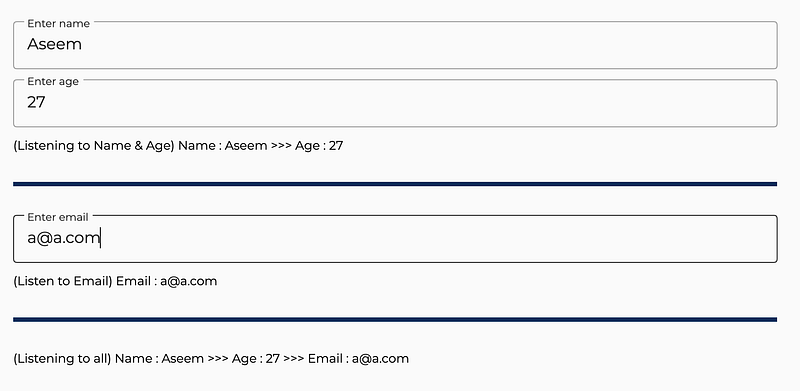
There are 3 text fields, which basically show us the values inside each of the input fields.
Approach 1 (All this time I took)
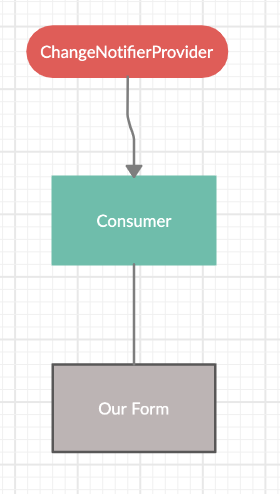
As per this approach, we would have a
- ChangeNotifierProvider, at the top of the widget tree.
- Followed by a consumer, before we start our form
- Finally, our Form UI
Things to consider:
Your Form fields will undergo unnecessary builds. Let me explain.
For instance, say you are entering the age field, other fields (name and email field), will continue rebuilding since the Consumer widget is above the Form.
This is true for any other field also.
As per the Consumer documentation:
builder may be called multiple times (such as when the provided value change).
In our case, we just have 3 fields inside FormUI, so we can go with approach1, but what if we had a complex UI, think about it!
Approach 2 (Using Selector in Provider)
When I started to use Provider in Flutter, most of the times, it was either
Now we will use a Selector.
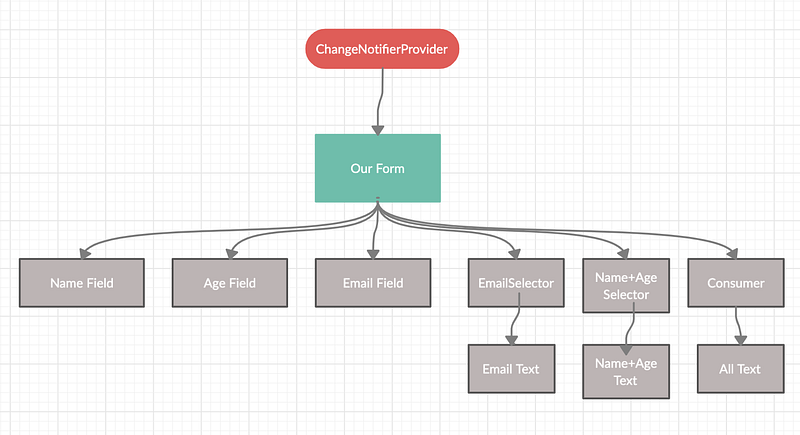
In this approach, we have ChangeNotifierProvider at the top, followed by our UI.
For adding values to our model (ChangeNotifier model, UserData) we use
context.read
()
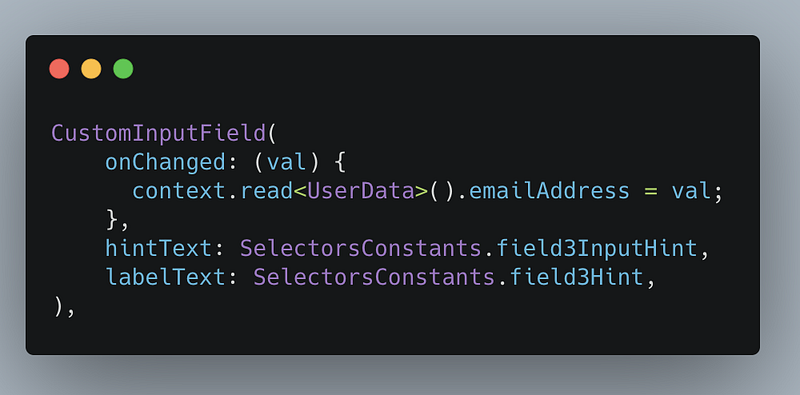
This is an extension included in Provider, now we have the input inside our model(UserData).
Note: Setting of the value, notifies the model since the setter implements notifyListeners.
set emailAddress(String emailAddress) {
   _emailAddress = emailAddress;
   notifyListeners();
}
// SIMILAR FOR NAME AND AGESimilarly, we do this for all the input fields (name, age, and email)
Let's say, we want to display the values entered in these fields in real-time.
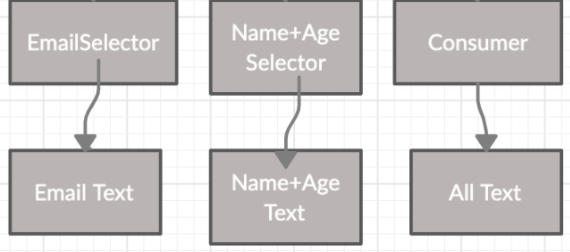
- Email Text should only listen to Email Field.
- Name + Age Text should only listen to changes in Name and Age Fields
- For displaying all values of the form, we need to listen to every field
Email Text
final _email =
context.select<UserData, String>((model) => model.emailAddress);
return Text('(Listen to Email) Email : $_email');We use context.select.
As per documentation
Watch a value of type [T] exposed from a provider, and listen only partially to changes.
By using [select], instead of watching the entire object, the listener will rebuild only if the value returned by
selectorchanges.
Hence for email text, we select only the email field and get notified when it changes.
Name + Age Text
Here, we want to listen to two fields from our notifier model.
Time to introduce a new package tuple.
This package gives us options to select the number of values and comes recommended by Provider. Currently supports 7 values.
To select multiple values without having to write a class that implements
==, the easiest solution is to use a "Tuple" from tuple
Since we need 2 fields, we use Tuple2
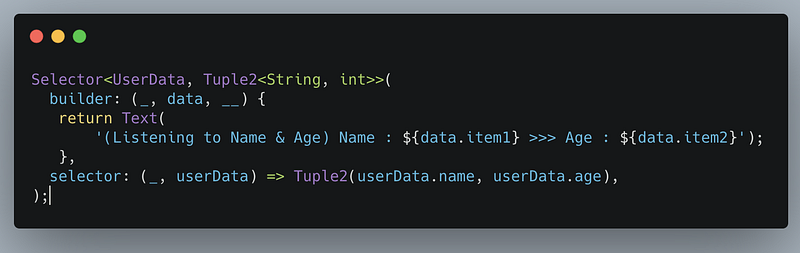
Here, we use the Selector widget
An equivalent to [Consumer] that can filter updates by selecting a limited amount of values and prevent rebuild if they don’t change.
Criteria: Tuple2 of Name field and age field, Tuple2
Inside our builder, we can retrieve these values by
data.item1 // For name, since First value of Tuple is Stringdata.item2 // For age, since Second value of Tuple is intAll Text
Here, we need to listen to all the values inside our notifier model. This turns out to be a good use-case for Consumer.
Consumer<UserData>(
  builder: (_, data, __) {
    return Text(
          '(Listening to all) Name : ${data.name} >>> Age : ${data.age} >>> Email${data.emailAddress}',
    );
  },
);
Hosted URL: https://web.flatteredwithflutter.com/#/

Interesting Articles related to Forms here:


