
Flutter Web and Streams
Using streams in Flutter Web
How to use streams in Flutter Web? Hmm…
All in one Flutter resource: https://flatteredwithflutter.com/flutter-web-and-streams/
Pre-Requisite:
This article assumes the reader has the knowledge of streams and Flutter Hooks. In case, you are unsure about hooks, refer to
Level : Kind of High!
Begin…
View the demo here
Website: https://fir-signin-4477d.firebaseapp.com/#/
We will cover briefly about
- Streams inside Forms
- Using Flutter Hooks

Streams inside Forms
The parent widget is a HookWidget
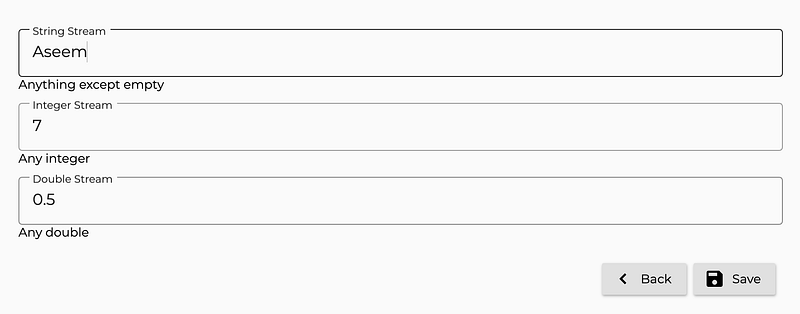
class _StreamsView extends HookWidget {}Inside this widget, we have created a form having 3 fields
- The first field accepts anything except a blank
- The second field accepts any valid integer
- The third field accepts any valid double
First Field
At the very basic, it is a StreamBuilder widget
StreamBuilder<String>(
      stream: _formHooks.field1Stream,
      builder: (context, snapshot) => CustomInputField(
       onChanged: (val) {
          formHooks.field1Controller.add(val);
       },
       initialValue: data.first,
       showError: snapshot.hasError,
       errorText: snapshot.error.toString(),
    ),
)
final _formHooks = FormHooks();
This FormHooks is a class which comprises of all the hooks used for this form.
Things needed for our first widget: One stream controller and one stream
FormHooks() {
  field1Controller = useStreamController<String>();
}
// INPUT FIELD 1 (STRING)
Stream<String> get field1Stream => field1Controller.stream;StreamController<String> field1Controller;field1Stream is bind to our StreamBuilder’s stream.
stream: _formHooks.field1Stream
Any changes to the input field, while typing is handled by the field1Controller.
onChanged: (val) {
    formHooks.field1Controller.add(val);
},
There are different ways to add data inside a StreamController.
- fieldController.add(data)
- fieldController.sink.add(data)
What’s the difference? Well, they both do the same thing!
We have used 1st approach.
Note: Other 2 fields (Field2 and Field3), only use different streams, rest everything remains the same, as explained above.
Article on Flutter hooks:
Using Flutter Hooks
We use the useStreamController from the Flutter Hooks for our stream.
Notes:
- Creates an [StreamController] automatically disposed of.
- By default, the stream is a broadcast stream
Validating User Inputs
We don’t want to assume the data entered would always be correct, hence we want to validate our form.
The approach taken in this article was using StreamTransformer.
As per docs, StreamTransformer is
Transforms a Stream.
When a stream’s Stream.transform method is invoked with a StreamTransformer, the stream calls the bind method on the provided transformer. The resulting stream is then returned from the Stream.transform method.
As we have 3 fields accepting different types of data, we create our transformers accordingly.
StringValidator
StreamTransformer<String, String> validation() =>
   StreamTransformer<String, String>.fromHandlers(
      handleData: (field, sink) {
      if (field.isNotEmpty) {
         sink.add(field);
      } else {
         sink.addError('YOUR ERROR MESSAGE');
      }
   },
);
We used the fromHandlers which
Creates a StreamTransformer that delegates events to the given functions.
handleData: (field, sink) -> field is of type String and sink is of type EventSink
The validation logic for the string is
if (field.isNotEmpty) {
     sink.add(field);
} else {
     sink.addError('YOUR ERROR MESSAGE');
}
In short, we are checking our input for length=0 only. However, you can customize this logic as per your requirement.
Notice, the addError property, if the logic goes inside the else case, addError is activated and the error stream is passed back to the StreamBuilder.
Our StreamBuilder displays the error message as:
showError: snapshot.hasError,
errorText: snapshot.error.toString(),
and now our new stream would look like this :
// INPUT FIELD 1 (STRING)
Stream<String> get field1Stream => field1Controller.stream.transform<String>(validation());
Notice the stream.transform here. In the final product, we have created a factory for the validators.
IntegerValidator
StreamTransformer<String, String> validation() =>
    StreamTransformer<String, String>.fromHandlers(
      handleData: (field, sink) {
        final _kInt = int.tryParse(field);
        if (_kInt != null && !_kInt.isNegative) {
          sink.add(field);
        } else {
          sink.addError('YOUR ERROR MESSAGE');
        }
    },
);
Parameters and the rest remain the same as per the above explanation, except the validation logic.
Here, we are validating the input as
final _kInt = int.tryParse(field);
if (_kInt != null && !_kInt.isNegative) {
   sink.add(field);
} else {
   sink.addError('YOUR ERROR MESSAGE');
}
The input is checked if can be parsed (using tryParse) or is non-negative.
Note: In case you use parse, you will encounter exceptions for invalid inputs. However, tryParse returns null for those cases and the result is caught inside else statement.
Note: This validator doesn’t accept decimals, since an integer doesn’t accept a decimal.
DoubleValidator
StreamTransformer<String, String> validation() =>
    StreamTransformer<String, String>.fromHandlers(
      handleData: (field, sink) {
      final _kDouble = double.tryParse(field);
      if (_kDouble != null && !_kDouble.isNegative) {
         sink.add(field);
      } else {
         sink.addError('YOUR ERROR MESSAGE');
      }
    },
);
Parameters and the rest remain the same as per the StringValidator explanation, except the validation logic.
Here, we are validating the input as
final _kDouble = double.tryParse(field);
if (_kDouble != null && !_kDouble.isNegative) {
    sink.add(field);
} else {
    sink.addError('YOUR ERROR MESSAGE');
}
The input is checked if can be parsed (using tryParse) or is non-negative. Similar to the above.
Note: This validator accepts decimals since a double accepts a decimal.
Save Form
Our button saves, should only be enabled if all the validators are passed.
StreamBuilder<bool>(
stream: formHooks.isFormValid,
   builder: (context, snapshot) {
   final _isEnabled = snapshot.data;
   return RaisedButton.icon(
      onPressed: _isEnabled ?()=>debugPrint(data.toString()):null,                                                                                                               label: const Text(StreamFormConstants.save),
      icon: const Icon(Icons.save),
   );
 },
),
isFormValid is a Stream that listens to all the three input field streams.
Stream<bool> get isFormValid {
 _saveForm.listen([field1Stream, field2Stream, field3Stream]);

 return _saveForm.status;
}
There is a good and detailed explanation for this part here.
Production Tips :
- Use initialData for streams, they are useful, to begin with, some data.
- Use tryParse for validations (int or double)
- Combine the transformers as a Factory, and expose a single class. Link here.
Articles related to Flutter Web:

Hosted URL : https://fir-signin-4477d.firebaseapp.com/#/
Phew…..


