Flutter and Services
How to interact with Services in android ? Hmm….
All in one Flutter resource: https://flatteredwithflutter.com/flutter-and-services/
Free AI web copilot to create summaries, insights and extended knowledge, download it at here
6224
Abstract
} catch (InterruptedException e) { <span class="hljs-comment">// TODO Auto-generated catch block</span> e<span class="hljs-selector-class">.printStackTrace</span>(); } } <span class="hljs-built_in">stopSelf</span>(); }</pre></div><div id="4889"><pre>}</pre></div><p id="7a52">Things to Note :</p><ol><li>The value is passed back <b>via Intent using key as “DATAPASSED”</b></li><li>Once the logic is completed, <b>stopSelf</b> is called…</li><li>We have used <b>intent.setAction()</b> [which sets the general action to be performed, to be used by BroadCast Receiver]</li></ol><h2 id="e3cc">Get data in Activity from Service….</h2><ol><li>Create a BroadcastReceiver in the Activity Class as :</li></ol><div id="cda6"><pre><span class="hljs-keyword">private</span> <span class="hljs-class"><span class="hljs-keyword">class</span> <span class="hljs-title">MyReceiver</span> <span class="hljs-keyword">extends</span> <span class="hljs-title">BroadcastReceiver</span> </span>{</pre></div><div id="0660"><pre> <span class="hljs-meta">@Override</span> <span class="hljs-keyword">public</span> <span class="hljs-function"><span class="hljs-keyword">void</span> <span class="hljs-title">onReceive</span><span class="hljs-params">(Context arg0, Intent arg1)</span> </span>{
<span class="hljs-keyword">int</span> datapassed = arg1.getIntExtra(<span class="hljs-string">"DATAPASSED"</span>, <span class="hljs-number">0</span>);</pre></div><div id="71f7"><pre> Toast.makeText(MainActivity.<span class="hljs-keyword">this</span>, <span class="hljs-string">"Value from service !!\n"</span> + <span class="hljs-string">"Data passed: "</span> + <span class="hljs-built_in">String</span>.valueOf(datapassed), Toast.LENGTH_LONG).<span class="hljs-keyword">show</span>();</pre></div><div id="34d7"><pre> }</pre></div><div id="6515"><pre>}</pre></div><p id="dc02">Things to Note :</p><ul><li>While extending a class to <b>BroadcastReceiver</b>, we need to implement <b>onReceive</b>.</li><li>We get the intent as “<b>DATAPASSED</b>” and the<b> value as int </b>(As we defined in the Service (Look above section))</li></ul><p id="6de6">2. Register the BroadCastReceiver in <b>onStart</b> as :</p><div id="3371"><pre>myReceiver = <span class="hljs-keyword">new</span> <span class="hljs-type">MyReceiver</span>(); IntentFilter intentFilter = <span class="hljs-keyword">new</span> <span class="hljs-type">IntentFilter</span>(); intentFilter.addAction(SimpleService.MY_ACTION); registerReceiver(myReceiver, intentFilter);</pre></div><p id="7b8b">3. Unregister the BroadCastReceiver in <b>onStop</b> as :</p><div id="94ec"><pre>if (myReceiver != null) { <span class="hljs-built_in">unregisterReceiver</span>(myReceiver); }</pre></div><h2 id="8a90">Enter Flutter….</h2><p id="8ef6">We need a mechanism to call the service from Flutter…..</p><ol><li>Change the MainActivity to implement MethodChannel…</li></ol><div id="1c0b"><pre>public <span class="hljs-class"><span class="hljs-keyword">class</span> <span class="hljs-title">MainActivity</span> <span class="hljs-keyword">extends</span> <span class="hljs-title">FlutterActivity</span> <span class="hljs-title">implements</span> <span class="hljs-title">MethodChannel</span>.<span class="hljs-title">MethodCallHandler</span></span></pre></div><p id="e87b">2. Override the method <b>onMethodCall </b>and make changes as<b>:</b></p><div id="c632"><pre><span class="hljs-meta">@Override</span> <span class="hljs-keyword">public</span> <span class="hljs-built_in">void</span> <span class="hljs-title function_">onMethodCall</span>(<span class="hljs-params">MethodCall call, MethodChannel.Result result</span>) {</pre></div><div id="b77b"><pre><span class="hljs-keyword">try</span> { <span class="hljs-keyword">if</span> (call.method.<span class="hljs-keyword">equals</span>(<span class="hljs-string">"connect"</span>)) { connectToService(); keepResult = <span class="hljs-literal">result</span>; } <span class="hljs-keyword">else</span> <span class="hljs-keyword">if</span> (serviceConnected) {</pre></div><div id="ce85"><pre> if (call.method.equals(<span class="hljs-string">"start"</span>)) { String _data <span class="hljs-operator">=</span> SimpleService.helloFromService()<span class="hljs-comment">;</span> result.success(_data)<span class="hljs-comment">;</span> }</pre></div><div id="1803"><pre> } <span class="hljs-keyword">else</span> { result.<span class="hljs-built_in">error</span>(<span class="hljs-literal">null</span>, <span class="hljs-string">"App not connected to service"</span>, <span class="hljs-literal">null</span>); } } catch (Exception e) { result.<span class="hljs-built_in">error</span>(<span class="hljs-literal">null</span>, e.getMessage(), <span class="hljs-literal">null</span>); }</pre></div><div id="1470"><pre>}</pre></div><p id="1345">Things to Note :</p><ul><li>We are exposing “<b>connect</b>” and “<b>start</b>” methods to Flutter framework..</li><li>On the call to “<b>connect</b>”, <b>connectToService</b> function is called, which activates the service (Created above)….</li></ul><div id="127b"><pre><span class="hljs-function"><span class="hljs-keyword">private</span> <span class="hljs-keyword">void</span> <span class="hljs-title">connectToService</span>()</span> { <span class="hljs-keyword">if</span> (!serviceConnected) {</pre></div><div id="1730"><pre>Intent service = <span class="hljs-keyword">new</span> <span class="hljs-built_in">Intent</span>(<span class="hljs-keyword">this</span>, SimpleService.<span class="hljs-keyword">class</span>); <span class="hljs-built_in">startService</span>(service); serviceConnected = <span class="hljs-literal">true</span>;</pre></div><div id="45f5"><pre>} <span class="hljs-keyword">else</span> { <span class="hljs-keyword">if</span> (keepResult != <span class="hljs-literal">null</span>) { keepResult.success(<span class="hljs-literal">null</span>); <span class="hljs-attr">keepResult</spa
Options
n> = <span class="hljs-literal">null</span>; } } }</pre></div><ul><li>This calls <b>startService() </b>which is important to start a service…</li></ul><p id="3dcf">3. In the <b>onCreate</b> of the MainActivity, include the following line:</p><div id="dc38"><pre>new MethodChannel(getFlutterView(), CHANNEL).<span class="hljs-built_in">set</span>MethodC<span class="hljs-literal">all</span>Handler(this::<span class="hljs-keyword">on</span>MethodC<span class="hljs-literal">all</span>);</pre></div><p id="4ff8">4. Important variables :</p><div id="ebc9"><pre><span class="hljs-keyword">static</span> <span class="hljs-keyword">final</span> <span class="hljs-type">String</span> <span class="hljs-variable">TAG</span> <span class="hljs-operator">=</span> <span class="hljs-string">"Main Activity....."</span>; <span class="hljs-keyword">static</span> <span class="hljs-keyword">final</span> <span class="hljs-type">String</span> <span class="hljs-variable">CHANNEL</span> <span class="hljs-operator">=</span> <span class="hljs-string">"com.example.services_demo/service"</span>; MyReceiver myReceiver; MethodChannel.<span class="hljs-type">Result</span> <span class="hljs-variable">keepResult</span> <span class="hljs-operator">=</span> <span class="hljs-literal">null</span>;</pre></div><div id="b9dd"><pre>boolean serviceConnected <span class="hljs-operator">=</span> false<span class="hljs-comment">;</span></pre></div><p id="af85">Things to Note :</p><ul><li>Value of variable <b>CHANNEL</b>, should be same in the Flutter (see below)..</li><li>This CHANNEL, registers the Android Native Code with the Flutter…</li></ul><h2 id="18e3">Dart / Flutter Side :</h2><ol><li>Initialize platform variable as</li></ol><div id="cd12"><pre><span class="hljs-keyword">static</span> <span class="hljs-keyword">const</span> <span class="hljs-keyword">platform</span> = MethodChannel(<span class="hljs-string">'com.example.services_demo/service'</span>);</pre></div><p id="3733"><b><i>Note: This value is same as the variable CHANNEL (see above)…</i></b></p><p id="8deb">2. In the initState,</p><div id="8a8e"><pre><span class="hljs-keyword">@override</span> void initState() { super<span class="hljs-selector-class">.initState</span>(); <span class="hljs-built_in">connectToService</span>(); }</pre></div><p id="e55f">and inside <b>connectToService</b>,</p><div id="a9f4"><pre>Future<<span class="hljs-keyword">void</span>> connectToService() <span class="hljs-keyword">async</span> { <span class="hljs-keyword">try</span> { <span class="hljs-keyword">await</span> platform.invokeMethod<<span class="hljs-keyword">void</span>>(<span class="hljs-string">'connect'</span>); <span class="hljs-built_in">print</span>(<span class="hljs-string">'Connected to service'</span>); } <span class="hljs-literal">on</span> Exception <span class="hljs-keyword">catch</span> (e) { <span class="hljs-built_in">print</span>(e.toString()); } }</pre></div><blockquote id="22a6"><p>Note : ‘<b>connect</b>’ is the same value as declared in the <b>MainActivity ‘s OnMethodCall</b></p></blockquote><p id="7ac9">3. After we have successfully connected to the service, now we can receive any data from it…</p><div id="900a"><pre>Future<<span class="hljs-built_in">String</span>> getDataFromService() <span class="hljs-keyword">async</span> { <span class="hljs-keyword">try</span> { <span class="hljs-keyword">final</span> result = <span class="hljs-keyword">await</span> platform.invokeMethod<<span class="hljs-built_in">String</span>>(<span class="hljs-string">'start'</span>); <span class="hljs-keyword">return</span> result; } <span class="hljs-keyword">on</span> PlatformException <span class="hljs-keyword">catch</span> (e) { <span class="hljs-built_in">print</span>(e.toString()); }</pre></div><div id="b902"><pre> <span class="hljs-keyword">return</span> <span class="hljs-string">'No Data From Service'</span>; }</pre></div><blockquote id="3faf"><p>Note : ‘<b>start</b>’ is the same value as declared in the <b>MainActivity ‘s OnMethodCall</b></p></blockquote><p id="0d5f">Articles related to Flutter:</p><div id="5555" class="link-block"> <a href="https://readmedium.com/flutter-web-and-machine-learning-64ab1f315001"> <div> <div> <h2>Flutter Web and Machine Learning</h2> <div><h3>Using machine learning in flutter web? Check now!</h3></div> <div><p>medium.com</p></div> </div> <div> <div style="background-image: url(https://miro.readmedium.com/v2/resize:fit:320/1*SdPiZ5-s0F5Z3E5ENO1d8A.png)"></div> </div> </div> </a> </div><div id="eb31" class="link-block"> <a href="https://readmedium.com/flutter-web-sockets-and-aws-95e41f1a8425"> <div> <div> <h2>Flutter, Web Sockets and AWS</h2> <div><h3>How to use web sockets and aws in flutter</h3></div> <div><p>medium.com</p></div> </div> <div> <div style="background-image: url(https://miro.readmedium.com/v2/resize:fit:320/1*GRyBCXFG9sSg_4Ts8Ar5wQ.png)"></div> </div> </div> </a> </div><div id="53e8" class="link-block"> <a href="https://readmedium.com/flutter-web-and-location-2be96d3ad3e"> <div> <div> <h2>Flutter Web and Location</h2> <div><h3>Get user location in flutter web? Find out here!</h3></div> <div><p>medium.com</p></div> </div> <div> <div style="background-image: url(https://miro.readmedium.com/v2/resize:fit:320/1*lnmBizAwO6KtWydYWKkItg.png)"></div> </div> </div> </a> </div><blockquote id="b66a"><p><b>Source Code : <a href="https://github.com/AseemWangoo/services_demo">https://github.com/AseemWangoo/services_demo</a></b></p></blockquote><figure id="206c"><img src="https://cdn-images-1.readmedium.com/v2/resize:fit:800/1*rpTl0ep9orbTrbRhvOmw-w.gif"><figcaption></figcaption></figure></article></body>
Flutter and Services
How to interact with Services in android ? Hmm….
All in one Flutter resource: https://flatteredwithflutter.com/flutter-and-services/
Although Flutter is quite powerful, sometimes you need to interact with platform-specific things…
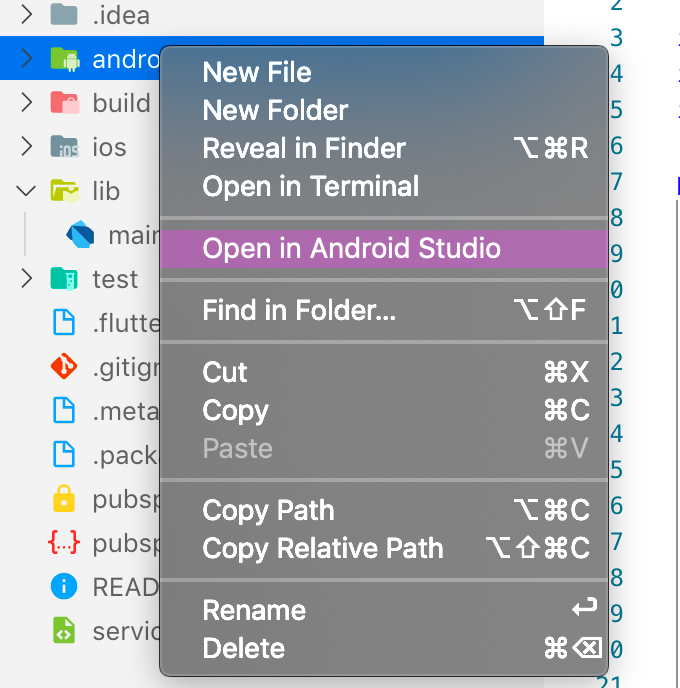
This article focuses on how to get data from the android Services…
Note: This code is not compatible with iOS…
Service is an application component that can perform long-running operations in the background, and it doesn't provide a user interface. For example, a service can handle network transactions, play music, perform file I/O, or interact with a content provider, all from the background.

A started service is one that another component starts by calling startService(), which results in a call to the service's onStartCommand() method.
When a service is started, it has a lifecycle that’s independent of the component that started it. The service can run in the background indefinitely, even if the component that started it is destroyed. As such, the service should stop itself when its job is complete by calling stopSelf(), or another component can stop it by calling stopService().

2. Create service in Android Studio…
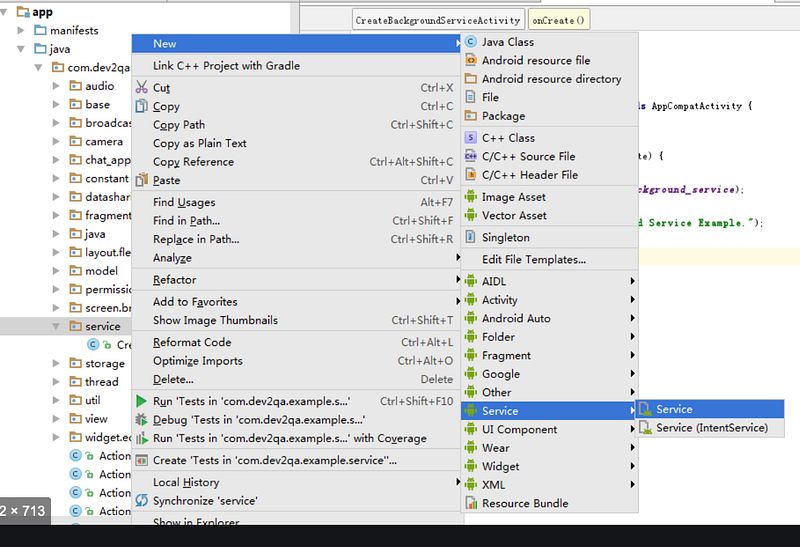
This takes care of adding Service in the Android Manifest.xml….
Note : We will be selecting the Service here…
3. In the onStartCommand, we can implement our custom logic..In our case, we have added the following code :
MyThread myThread = new MyThread();
myThread.start();Below is the code for MyThread class :
public class MyThread extends Thread {@Override
public void run() {
for (int i = 0; i < 1; i++) {
try {
Thread.sleep(500);
Intent intent = new Intent();
intent.setAction(MY_ACTION);intent.putExtra("DATAPASSED", i);
_currentValue = i;sendBroadcast(intent);
} catch (InterruptedException e) {
// TODO Auto-generated catch block
e.printStackTrace();
}
}
stopSelf();
}}
Things to Note :
private class MyReceiver extends BroadcastReceiver { @Override
public void onReceive(Context arg0, Intent arg1) {
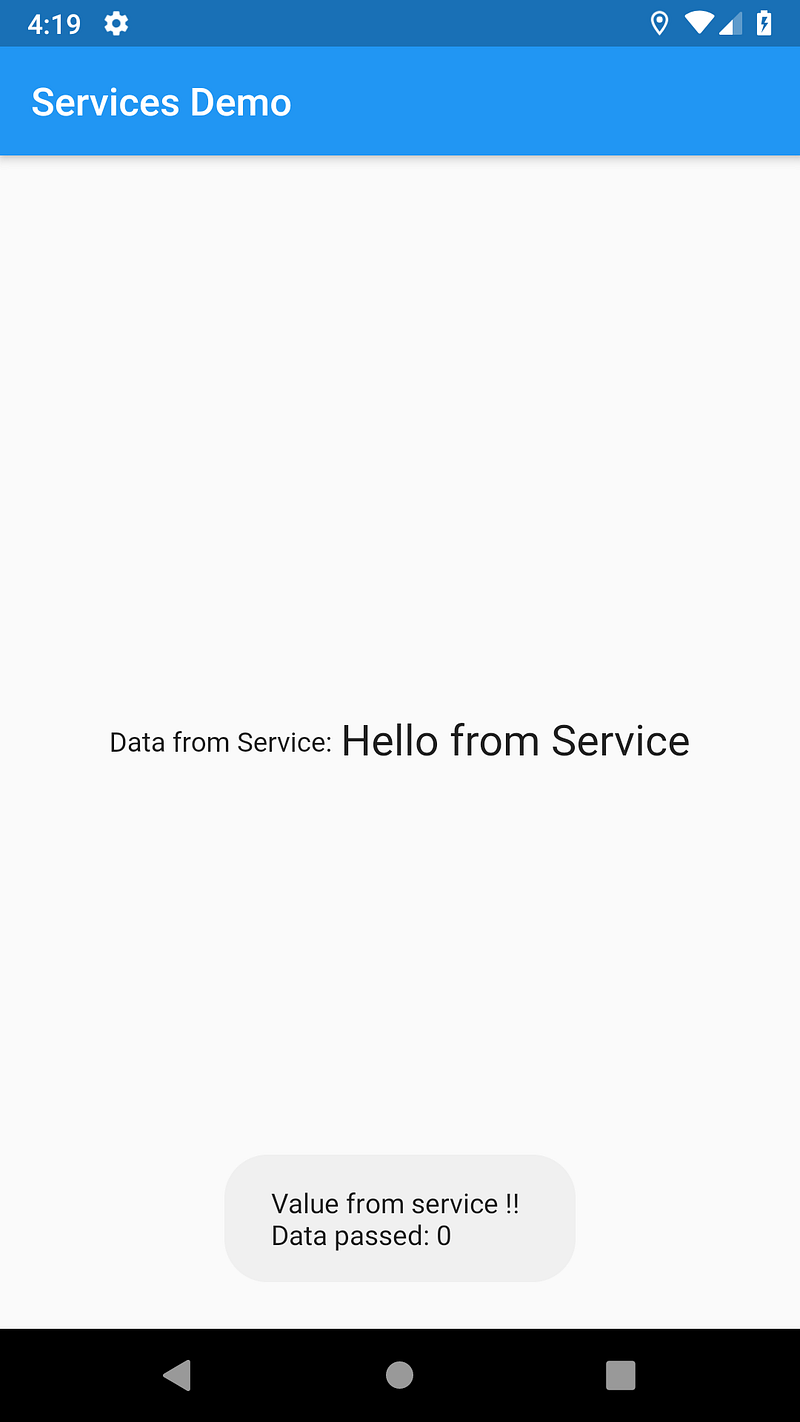
int datapassed = arg1.getIntExtra("DATAPASSED", 0); Toast.makeText(MainActivity.this,
"Value from service !!\n"
+ "Data passed: " + String.valueOf(datapassed),
Toast.LENGTH_LONG).show();}
}
Things to Note :
2. Register the BroadCastReceiver in onStart as :
myReceiver = new MyReceiver();
IntentFilter intentFilter = new IntentFilter();
intentFilter.addAction(SimpleService.MY_ACTION);
registerReceiver(myReceiver, intentFilter);3. Unregister the BroadCastReceiver in onStop as :
if (myReceiver != null) {
unregisterReceiver(myReceiver);
}We need a mechanism to call the service from Flutter…..
public class MainActivity extends FlutterActivity implements MethodChannel.MethodCallHandler2. Override the method onMethodCall and make changes as:
@Override
public void onMethodCall(MethodCall call, MethodChannel.Result result) {try {
if (call.method.equals("connect")) {
connectToService();
keepResult = result;
} else if (serviceConnected) { if (call.method.equals("start")) {
String _data = SimpleService.helloFromService();
result.success(_data);
} } else {
result.error(null, "App not connected to service", null);
}
} catch (Exception e) {
result.error(null, e.getMessage(), null);
}}
Things to Note :
private void connectToService() {
if (!serviceConnected) {Intent service = new Intent(this, SimpleService.class);
startService(service);
serviceConnected = true;} else {
if (keepResult != null) {
keepResult.success(null);
keepResult = null;
}
}
}3. In the onCreate of the MainActivity, include the following line:
new MethodChannel(getFlutterView(), CHANNEL).setMethodCallHandler(this::onMethodCall);4. Important variables :
static final String TAG = "Main Activity.....";
static final String CHANNEL = "com.example.services_demo/service";
MyReceiver myReceiver;
MethodChannel.Result keepResult = null;boolean serviceConnected = false;Things to Note :
static const platform = MethodChannel('com.example.services_demo/service');Note: This value is same as the variable CHANNEL (see above)…
2. In the initState,
@override
void initState() {
super.initState();
connectToService();
}and inside connectToService,
Future<void> connectToService() async {
try {
await platform.invokeMethod<void>('connect');
print('Connected to service');
} on Exception catch (e) {
print(e.toString());
}
}Note : ‘connect’ is the same value as declared in the MainActivity ‘s OnMethodCall
3. After we have successfully connected to the service, now we can receive any data from it…
Future<String> getDataFromService() async {
try {
final result = await platform.invokeMethod<String>('start');
return result;
} on PlatformException catch (e) {
print(e.toString());
} return 'No Data From Service';
}Note : ‘start’ is the same value as declared in the MainActivity ‘s OnMethodCall
Articles related to Flutter:
Source Code : https://github.com/AseemWangoo/services_demo