
Difference between Docker, Kubernetes, and Podman?
Comparing Containerization Tools: Understanding the Differences between Docker, Kubernetes, and Podman for Application Deployment and Management
Hello folks, one of the most common question on DevOps Engineer and Software developer interviews now a days is difference between Docker, Kubernetes, and Podman? What they are and when to use them. If you are preparing for Java developer interviews and asked this question and looking for answer then you have come to the right place.
In the past, I have shared several resources for Java interviews like 21 Software Design Pattern questions, 10 Microservice Scenario based questions, 20 SQL queries from Interviews, 50 Microservices questions, 60 Tree Data Structure Questions, 15 System Design Questions, and 35 Core Java Questions and 21 Lambda and Stream questions and in this article, I am going to to answer this frequently asked question once for both Developers and DevOps.
Docker, Kubernetes, and Podman are all popular containerization tools that allow developers and DevOps to package and deploy applications in a consistent and efficient manner.
Here is the basic overview of them:
Docker is a popular containerization platform that allows developers to create, deploy, and run applications in containers. Docker provides a set of tools and APIs that enable developers to build and manage containerized applications, including Docker Engine, Docker Hub, and Docker Compose.
While, Kubernetes is an open-source container orchestration platform that automates the deployment, scaling, and management of containerized applications. Kubernetes provides a set of APIs and tools that enable developers to deploy and manage containerized applications at scale, across multiple hosts and environments.
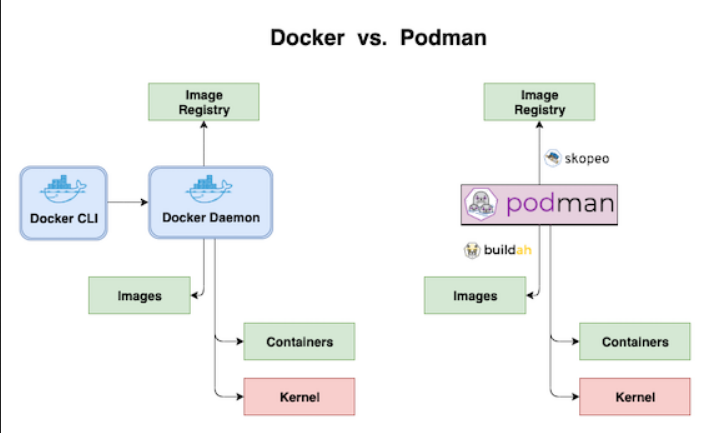
And, Podman is a containerization tool that is similar to Docker, but with a different architecture. Podman does not require a daemon to run containers, and it is compatible with Docker images and registries. Podman provides a simple command-line interface for creating and managing containers, and it can be used as a drop-in replacement for Docker in many cases.
Now that we have basic idea of what they are and what they do, let’s deep dive into them to understand how they work as well.
By the way, if you are not a Medium member then I highly recommend you to join Medium and read great stories from great authors from real field. You can join Medium here
What is Docker? How does it work?
As I said, Docker is an open-source platform that enables developers to automate the deployment and management of applications within containers. It provides a way to package an application and its dependencies into a standardized unit called a container, which can be run on any compatible system without worrying about differences in operating systems or underlying infrastructure.
Here’s few important Docker concepts which you as a Developer or DevOps Engineer should know :
1. Containerization
Docker utilizes containerization technology to create isolated environments, known as containers, for running applications. Containers are lightweight and encapsulate the application code, runtime, system tools, libraries, and dependencies required to run the application. This allows applications to run consistently across different environments, ensuring that they behave the same regardless of the underlying system.
2. Docker Images
A Docker image serves as a template for creating containers. It is a read-only snapshot that contains the application code and all the necessary dependencies. Docker images are created using a Dockerfile, which is a text file that specifies the steps to build the image. Each step in the Dockerfile represents a layer in the image, allowing for efficient storage and sharing of images.
3. Docker Engine
The Docker Engine is the core component of Docker. It is responsible for building and running containers based on Docker images. The Docker Engine includes a server that manages the containers and a command-line interface (CLI) that allows users to interact with Docker.
4. Docker Registry
Docker images can be stored in a registry, such as Docker Hub or a private registry. A registry is a centralized repository for Docker images, making it easy to share and distribute images across different systems. Developers can pull pre-built images from registries or push their own custom images for others to use.
5. Container Lifecycle
To run an application, Docker creates a container from an image. Containers are isolated and have their own filesystem, processes, and network interfaces. They can be started, stopped, paused, and removed as needed. Docker provides a set of commands and APIs to manage the lifecycle of containers, allowing for easy scaling, updates, and monitoring.
6. Container Orchestration
While Docker itself provides container management capabilities, it also works seamlessly with container orchestration platforms like Kubernetes. These platforms enable the management of large clusters of containers, handling tasks such as load balancing, scaling, and automated deployments across multiple hosts.
Overall, Docker simplifies the process of packaging, distributing, and running applications by utilizing containerization technology. It helps developers achieve consistency, portability, and scalability for their applications, making it a popular choice in modern software development and deployment workflows.
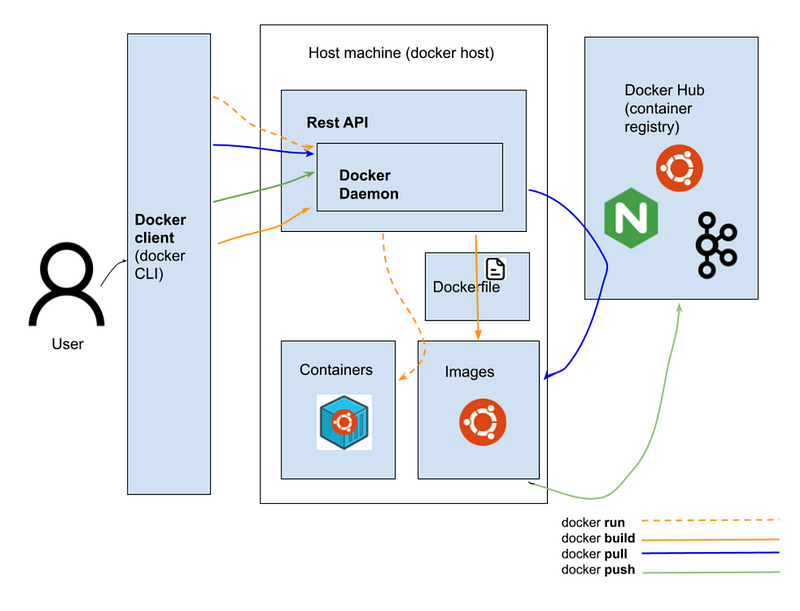
Here is also a nice diagram which highlights key components of Docker and how it works:
What is Kubernetes? How does it work?
Both Docker and Kubernetes are like brothers and they are often refereed together but they are very different from each other. Kubernetes is an open-source container orchestration platform that automates the deployment, scaling, and management of containerized applications. It provides a framework for running and coordinating multiple containers across a cluster of machines, making it easier to manage complex distributed systems.
Here are important Kubernetes or K8 concepts which I think every developer or DevOps should learn and know:
1. Cluster Architecture
Kubernetes operates in a cluster architecture, which consists of a master node and multiple worker nodes. The master node manages the cluster and coordinates the overall operations, while the worker nodes are responsible for running the containers.
2. Pods
The basic unit of deployment in Kubernetes is a pod. A pod is a logical group of one or more containers that are co-located and share the same resources, such as network namespace and storage. Containers within a pod can communicate with each other using localhost. Pods are treated as ephemeral units and can be easily created, updated, or terminated.
3. Replica Sets and Deployments
Replica Sets define the desired number of identical pod replicas to be running at any given time. They ensure high availability and scalability by automatically managing and maintaining the desired number of pod instances. Deployments are a higher-level abstraction that allows you to manage and update Replica Sets declaratively, enabling seamless rolling updates and rollbacks of application versions.
4. Services
Kubernetes Services provide stable network endpoints to connect to a set of pods. They enable load balancing and expose the containers within a pod to other services or external clients. Services abstract the underlying pod instances, allowing applications to communicate with other components without worrying about their dynamic nature.
5. Labels and Selectors
Kubernetes uses labels and selectors to enable flexible and dynamic grouping and selection of objects. Labels are key-value pairs attached to pods, deployments, services, and other Kubernetes objects. Selectors are used to filter and match objects based on their labels, allowing for targeted operations and grouping of related resources.
6. Scaling and Auto-Scaling
Kubernetes allows you to scale applications by adjusting the number of pod replicas. Horizontal Pod Autoscaling (HPA) is a feature that automatically scales the number of pod replicas based on resource utilization metrics such as CPU or memory usage.
7. Container Networking
Kubernetes also manages networking between pods and nodes. Each pod gets its own IP address, and containers within a pod can communicate with each other using localhost. Kubernetes provides network plugins that facilitate container networking and enable communication across pods and clusters.
8. Cluster Management
Kubernetes also offers extensive cluster management capabilities, including rolling updates, secrets management, configuration management, and health monitoring. It provides a declarative approach to define the desired state of the system, allowing Kubernetes to continuously monitor and reconcile the actual state with the desired state.
9. Container Storage:
Kubernetes supports various storage options, including persistent volumes and storage classes. Persistent volumes provide a way to decouple storage from the lifecycle of pods, enabling data persistence and sharing across pods and container restarts.
By abstracting the complexities of managing containers at scale, Kubernetes enables developers to focus on application logic rather than infrastructure management. It provides a robust and scalable platform for deploying and managing containerized applications, making it a popular choice for building modern, cloud-native systems.
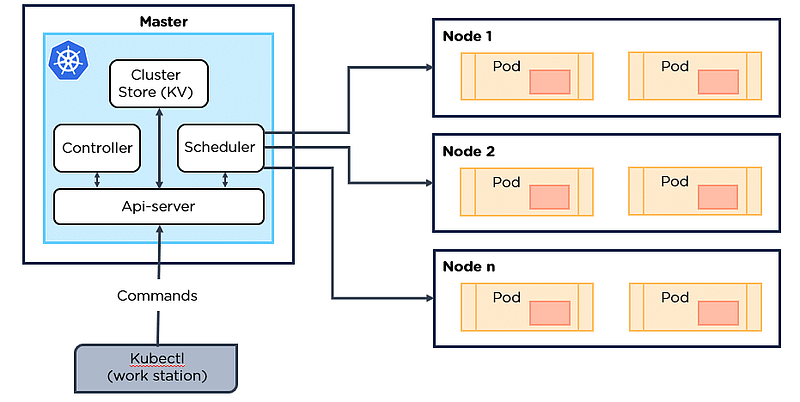
Here is a nice diagram which shows different component of K8 or Kubernetes and how they work together:
What is Podman? How does it work?
Now that you already know What is Docker and Kuberntes, its time to take a look another popular tool called Podman which is often seen as an alternative to Docker. Podman is an open-source container runtime and management tool that provides a command-line interface (CLI) for managing containers. It aims to be a compatible alternative to Docker, offering a Docker-compatible API and allowing users familiar with Docker to transition easily. Podman is designed to provide a secure and lightweight container experience.
Here’s an overview of how Podman works and importnat Podman concepts you should know:
1. Container Runtime:
Podman serves as a container runtime, which means it can create and run containers. It uses the Open Container Initiative (OCI)-compatible container format, which ensures compatibility with other container runtimes and allows Podman to run OCI-compliant containers.
2. CLI Compatibility
Podman’s CLI is designed to be familiar to Docker users. It provides commands similar to Docker CLI, allowing users to manage containers, images, volumes, and networks with ease. This compatibility makes it easier for developers and system administrators to transition from Docker to Podman without significant changes to their workflows.
3. Rootless Containers
One notable feature of Podman is its support for rootless containers. It allows non-root users to run containers without requiring privileged access. This enhances security by isolating containers from the host system and reducing the risk of container escapes.
4. Container Management
Podman provides a range of management capabilities, such as creating, starting, stopping, and removing containers. It supports network configuration, allowing containers to communicate with each other and the host system. Podman also provides options for managing container volumes, environment variables, and resource constraints.
5. Container Images
Like Docker, Podman relies on container images as the basis for creating containers. It can pull and push container images from various container registries, including Docker Hub. Podman can also build images locally using a Dockerfile or import images from other container runtimes.
6. Pod Support:
Podman extends beyond individual containers and supports the concept of pods, similar to Kubernetes. Pods are a group of containers that share the same network namespace and resources. Podman allows users to create and manage pods, enabling more complex deployments and communication patterns between containers.
7. Integration with Orchestration Platforms
While Podman can be used as a standalone container runtime, it can also integrate with container orchestration platforms like Kubernetes. It can act as the container runtime for Kubernetes pods, allowing users to leverage Podman’s features and compatibility within a Kubernetes cluster.
8. Security Focus
Podman places a strong emphasis on security. It supports features such as user namespace mapping, which maps container user IDs to non-root user IDs on the host, enhancing container isolation. Podman also integrates with security-enhancing technologies like SELinux and seccomp profiles to provide additional layers of protection.
Podman aims to provide a seamless transition for Docker users while emphasizing security and lightweight container management. It offers compatibility, flexibility, and a user-friendly CLI, making it a compelling option for those seeking an alternative container runtime.
What is difference between Docker, Kubernetes, and Podman?
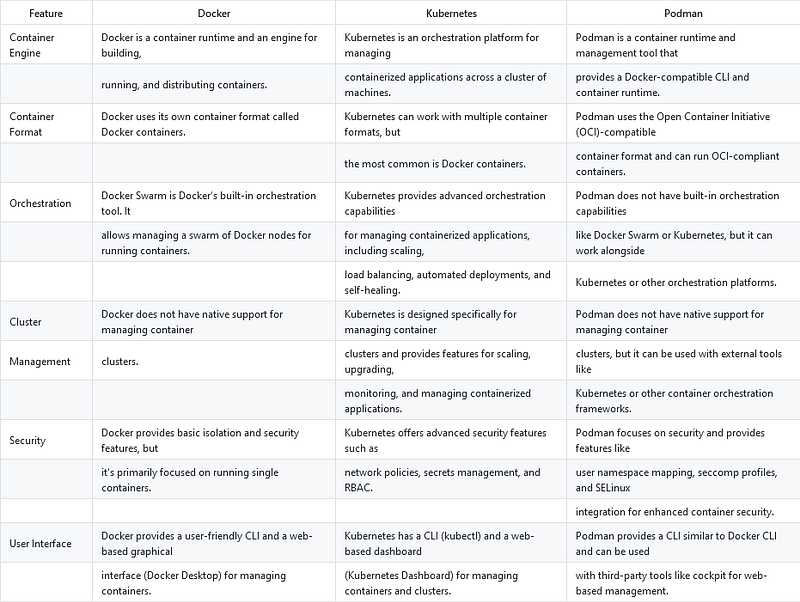
Here are the key differences between Docker, Kubernetes, and Podman, I have compared them on different points which are mainly features, and capabilities each of these tools provides like containerization and container management etc.
1. Container Engine
Docker is primarily a container runtime and engine for building, running, and distributing containers. Kubernetes, on the other hand, is an orchestration platform designed for managing containerized applications across a cluster of machines. Podman is a container runtime and management tool that provides a Docker-compatible CLI and container runtime.
2. Container Format
Docker uses its own container format called Docker containers. Kubernetes can work with multiple container formats, but Docker containers are the most common choice. Podman, on the other hand, uses the Open Container Initiative (OCI)-compatible container format and can run OCI-compliant containers.
3. Orchestration
Docker has Docker Swarm, its built-in orchestration tool, which allows managing a swarm of Docker nodes for running containers. Kubernetes, on the other hand, provides advanced orchestration capabilities for managing containerized applications, including scaling, load balancing, automated deployments, and self-healing. Podman does not have built-in orchestration capabilities like Docker Swarm or Kubernetes, but it can work alongside Kubernetes or other orchestration platforms.
4. Cluster Management
Docker does not have native support for managing container clusters. Kubernetes, on the other hand, is specifically designed for managing container clusters and provides features for scaling, upgrading, monitoring, and managing containerized applications. Podman does not have native support for managing container clusters but can be used with external tools like Kubernetes or other container orchestration frameworks.
5. Security
For Security comparison, Docker provides basic isolation and security features, but its primary focus is on running single containers. Kubernetes offers advanced security features such as network policies, secrets management, and RBAC. Podman, on the other hand, focuses on security and provides features like user namespace mapping, seccomp profiles, and SELinux integration for enhanced container security.
6. User Interface
When it comes to comparing UI, Docker provides a user-friendly CLI and a web-based graphical interface (Docker Desktop) for managing containers. Kubernetes has a CLI tool called “kubectl” and a web-based dashboard (Kubernetes Dashboard) for managing containers and clusters. While, Podman provides a CLI similar to the Docker CLI and can be used with third-party tools like Cockpit for web-based management.
And, if you like tables, here is a nice table where I have put all the differences between Docker, Kubernetes, and Podman in tabular format:
These are the fundamental differences between Docker, Kubernetes, and Podman, each serving different purposes in the containerization ecosystem.
That’s all about the difference between Docker, Kubernetes, and Podman. In summary, Docker is a popular containerization platform for creating and managing containers, Kubernetes is a container orchestration platform for managing containerized applications at scale, and Podman is a containerization tool with a different architecture that can be used as a drop-in replacement for Docker in many cases.
Each of these tools serves a different purpose, and they can all be used together to provide a comprehensive containerization solution for developers but more important is that every Developer and DevOps should be aware of these tools.
Additionally, you can also prepare Microservices Questions like difference between API Gateway and Load Balancer, SAGA Pattern, how to manage transactions in Microservices, and difference between SAGA and CQRS Pattern, they are quite popular on interviews.
And, if you are not a Medium member then I highly recommend you to join Medium and read great stories from great authors from real field. You can join Medium here


