
Customer Journey Maps vs. User Journeys
CX series #1: The basics
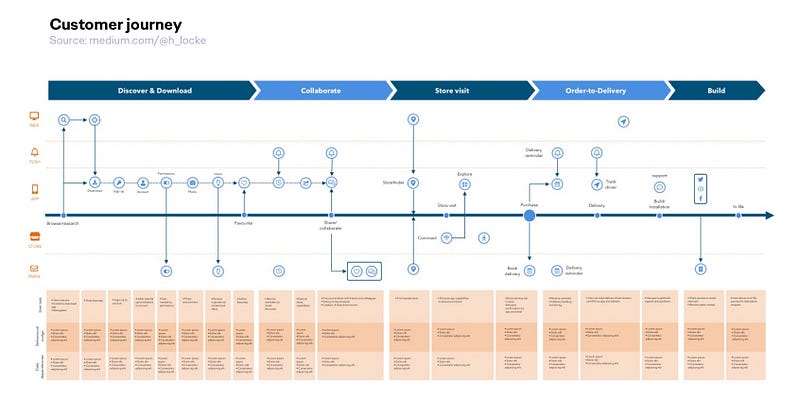
A long time ago (circa 2014) I developed a reasonably complex UCD methodology for multi-channel customer journey mapping — the kind of thing that requires qualified UX or Service Design practitioners to execute, but that, when properly executed, could truly leverage the power of modern MarTech stacks such as Adobe or Salesforce.
As I was training people around the world, the one thing that came up over and over was the knowledge gap between basic user flows/journeys and multichannel customer journey mapping. Never assume.
So I’ve decided to dedicate some time to writing a series on Customer Experience and Customer Journey mapping— starting from the basics and progressing to more advanced stuff— in the hope that some of y’all find it useful.
What is a customer journey map?
A customer journey map generally shows the stages of the journey a customer goes through in the use, purchase or experience of your product or service.
Generally, the journey is mapped from left to right (assuming for now, you are not working with RTL languages), with specific stages highlighted, and customer action/activity stated below each section.
What is the difference between a customer journey and a user journey/flow?
There are some key differences — but a caveat as always — it’s less important what you call deliverables, and more important that your team all use the same words to describe things.
1. What does a user journey/flow look like?
If you are a UX, IA or product design practitioner, you will probably be familiar with a user journey map or user flow. This is something that demonstrates the key steps as your user moves through your product.
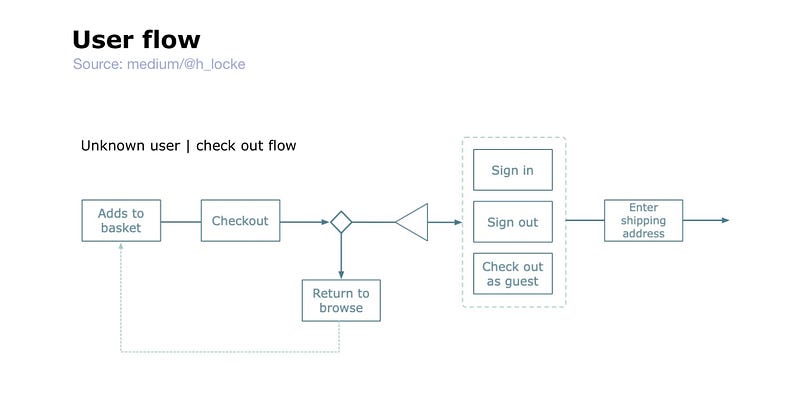
It is most likely something you represent as boxes-and-arrows, or perhaps as a wireflow. (If you want to get more into the different IA deliverables involved in product design, here’s a previous post).
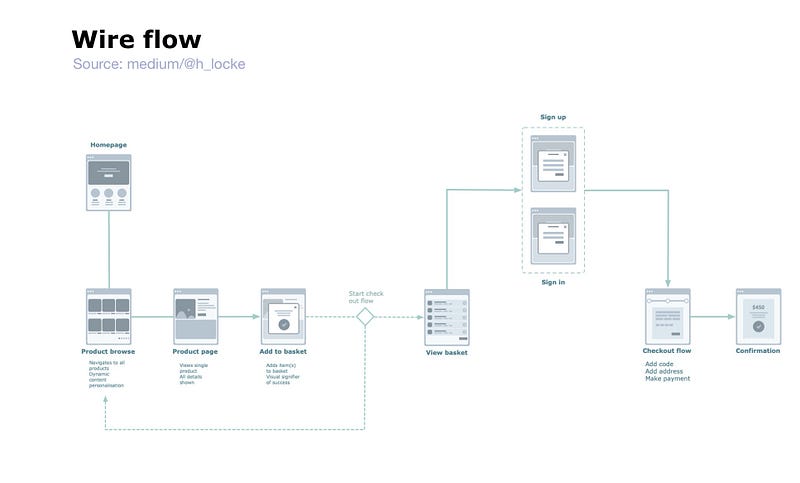
This is obviously not set in stone, and the more experience you have, the more you can flex and adapt deliverables, but for now, let’s keep the definitions simple.
2. What does a customer journey look like?
A customer journey is usually not boxes and arrows. (Though I admit when I first started out I tried to combine the two and made a dreadful mess. Comment if you want me to write about THAT in future).
A customer journey is often a large map, with stages of interaction between customer and experience. This is a lot more than a journey from screen-to-screen — it happens across multiple channels or touchpoint. The content and the journey described is generally higher level (more macro than micro) in a customer journey than a user journey.
Why would you need a Customer Journey map rather than a User Journey?
The simplest way to decide is on these criteria:
- Am I showing a journey from screen to screen or from channel to channel?
- Are there multiple touchpoints involved?
- Are there multiple stakeholders or departments involved?
Already I imagine some of you are thinking “but my product also involves other touchpoints”. Yes, it most likely does. And yes, you could use both. But again, it’s about the problem you’re trying to solve — are you describing the journey from screen to screen within your product, or the wider system of touchpoints and experiences that surround it?
What goes into a customer journey map?
Well this is one giant It Depends. Because it’s down to you as a practitioner, based on what your team and stakeholders need.
A map generally contains:
- Stages of the journey
- User or customer actions
- Key moments such as sign up, purchase, repurchase, problem resolution. If you are working with a marketing team you may include lapsing and win-back stages.
- The channels or touchpoint customers are interacting with
- What the customer might be thinking, feeling or saying
- Barriers, pain points or opportunities (depending on the purpose of your map — stay tuned for more on that)
Of course there are many other things you can include. For example when working with tech platforms, I also often include data capture, data enablement, and testing & measurement frameworks.
In terms of the actual methodology for generating something useful and user-centred will be the topic of a subsequent post. 👉 Subscribe to be notified when each post drops, and I’ll come back and update this article with the link when it’s live
How would you use a Customer Journey map?
Customer journey maps are incredibly useful when you need to zoom out from screens and see a product or service as a customer experiences it within their wider daily life, or across multiple channels.
They are great for working with stakeholders, sharing cross-team knowledge, building a shared understanding and are also a brilliant excuse to do wide ranging primary research into customer needs and experiences. They can also show product dependencies, user pain points and opportunities to carry out further research or design work.
Beyond this, there are two key versions of a customer journey map that one tends to need to create as a practitioner working with stakeholders — current state, and future state. I’ll be addressing those in my next post in this series. 👉 Subscribe to be notified when each post drops.
Hello 👋
Did you know, you can 👉 subscribe for free to get notified of any new articles I write. Woot.
I’ve even made a ton of helpful lists, depending on what you’re most interested in.


