
Chapter 16 Coding our Microservice (Part 6)
Adding OpenAPI Documentation

The following list is the previous chapters of this series:
- Chapter 1 — Introduction to Microservices
- Chapter 2 — Introduction to Microservices (Part 2)
- Chapter-3 Domain-driven design and microservices
- Chapter -4 Advantages of using Go for web development
- Chapter — 5 Understanding HTTP Protocols and REST APIs
- Chapter-6 HTTP Package in Golang
- Chapter 7 — Step-by-step guide on building a simple web service using Go
- Chapter 8 “ Documenting our APIs — Introduction to OpenAPI”
- Chapter 9 -Building a Microservice with Go (Defining the technologies )
- Chapter 10-Structuring our project
- Chapter 11- Coding our Microservice (Part 1)
- Chapter 12 — Coding our Microservice (Part 2)
- Chapter 13 — Coding our Microservice (Part 3)
- Chapter 14 — Coding our Microservice (Part 4)
- Chapter 15 — Coding our Microservices (Part 5)
I recommend you take a look at the previous chapters if you have not read them yet. That will help you to get more knowledge in this wonderful world of “Microservices architecture”.
In this chapter, we will delve into the world of OpenAPI configuration. We will tackle the essential files and settings that are crucial for defining OpenAPI in our project. These elements form the backbone of our API documentation, making it easier for other developers and users to understand and adopt our programming interfaces.
In this use case, we will be utilizing the Swaggo library, which offers seamless integration with Gin-Gonic, the framework employed in our microservice. Swaggo’s primary purpose is to automate the generation of OpenAPI documentation files, simplifying the documentation process significantly.
By implementing Swaggo, we can define our entire API description by grouping tags within comments preceding each function definition. In this particular use case, we are centralizing the primary API description within the main file. Additionally, we are incorporating Swaggo descriptions for every endpoint defined within our microservice. This approach streamlines the documentation process, making it more efficient and organized.
Before starting let’s start installing Swaggo:
go install github.com/swaggo/swag/cmd/swag@latest
After that run the following to generate the needed packages:
swag init -d cmd,internal --parseDependency --parseInternal --parseDepth 2For more details, you can read the official documentation at the following link: https://github.com/swaggo/gin-swagger
/cmd/main.go
The first thing that needs to be done is add the imports:
import
   _ "github.com/go-microservices/shopping-cart-service/docs"
   _ "github.com/swaggo/files"
   _ "github.com/swaggo/gin-swagger"
After that, we can add the OpenAPI specifications by using the swaggo tags.
That swaggo configuration defines key metadata for the Shopping Cart API. It provides information such as the API title, version, a general description, terms of service, contact information for API support, license details, and the API’s location on the server. It also sets the host and base path for the API. These details are essential for generating accurate and comprehensive OpenAPI documentation that clearly and consistently describes the functionality and features of the Shopping Cart API.
//  @title          Shopping Cart API
//  @version        1.0
//  @description    APIs to manage shopping cart.
//  @termsOfService http://swagger.io/terms/
//  @contact.name   API Support
//  @contact.url    http://www.swagger.io/support
//  @contact.email  [email protected]
//  @license.name   Apache 2.0
//  @license.url    http://www.apache.org/licenses/LICENSE-2.0.html
// @host        localhost:8080
// @BasePath    /api/v1
func main() {
   ...
}
Adding documentation for api/handler/shopping_cart/handler.go
POST Shopping cart
This Swaggo configuration serves as comprehensive documentation for the “Create” operation within the Shopping Cart API. It begins with a clear and concise summary followed by an in-depth description of the operation’s purpose. Additionally, it categorizes this endpoint under the “Shopping Cart” tag, providing context for its functionality. The inclusion of the “Accept” directive highlights the API’s capability to handle JSON data.
Furthermore, this configuration defines a vital request parameter named request, specifying that it anticipates a JSON object conforming to the dto.ShoppingCartRequest structure in the request body. Error handling is also meticulously detailed, outlining the expected responses and corresponding HTTP status codes, ensuring robust error reporting.
Lastly, the “Router” directive precisely outlines the endpoint’s route, which is “/shopping-cart” and designates the HTTP POST method for this operation, creating a complete and well-documented specification for the “Create” operation in the Shopping Cart API.
// Create godoc
//
// @Summary Creates Shopping Cart
// @Description Create a new Shopping Cart
// @Tags Shopping Cart
// @Accept json
// @Param request body dto.ShoppingCartRequest true "shopping cart info"
// @Success 201
// @Failure 400 {object} template_errors.TemplateError
// @Failure 500 {object} template_errors.TemplateError
// @Router /shopping-cart [post]
func (sc shoppingCartHandler) Create(c *gin.Context) {
...
}
GET Shopping Cart
This Swaggo configuration is focused on documenting the “Get” operation within the Shopping Cart API.
This configuration categorizes the endpoint under the “Shopping Cart” tag, signifying its relevance to this particular functionality. It explicitly specifies that the API will produce data in JSON format, giving a clear expectation of the response format.
Defines a parameter, “id,” via the “Param”. It is marked as mandatory and represents the “User ID.” This signals that clients must include this parameter in the URL path to access the operation successfully.
A robust approach to error handling is implemented, presenting a comprehensive list of potential responses along with their corresponding HTTP status codes. This meticulous documentation ensures that any encountered issues are well-documented, simplifying the process of debugging and issue resolution.
Lastly, the “Router” directive outlines the endpoint’s URL as “/shopping-cart/{id}” and designates the HTTP GET method for this operation.
// Get godoc
//
// @Summary Get User Shopping Cart
// @Description Returns a Shopping Cart
// @Tags Shopping Cart
// @Produce json
// @Param id path string true "User ID"
// @Success 200 {object} dto.ShoppingCartResponse
// @Failure 400 {object} template_errors.TemplateError
// @Failure 404 {object} template_errors.TemplateError
// @Failure 500 {object} template_errors.TemplateError
// @Router /shopping-cart/{id} [get]
func (sc shoppingCartHandler) Get(c *gin.Context) {
...
}
Add Product to “Shopping Cart” OpenAPI documentation
The following swaggo configuration is tailored for documenting the “Create” operation within the context of managing products in the Shopping Cart API.
The “Tags” directive categorizes this endpoint under the “Products” category, indicating its relevance within the broader scope of product management. It clearly states that the API accepts data in JSON format, establishing the expected data format for incoming requests.
A pivotal “Param” directive introduces the “request” parameter, which is defined as mandatory and expects a JSON object of the type “dto.ProductReq” in the request body. This provides clear guidance to clients on how to structure their requests to interact with this operation effectively.
The configuration meticulously defines the expected success and error responses. In the case of success, it specifies a 201 HTTP status code, indicating a resource creation success.
For potential errors, it outlines two potential scenarios: a 400 Bad Request error and a 500 Internal Server Error, both documented with detailed response objects of the “template_errors.TemplateError” type.
Finally, the “Router” directive identifies the endpoint’s URL as “/product” and it designates the HTTP POST method for this operation.
api/handler/product/handler.go
// Create godoc
//
// @Summary Adds products to shopping cart
// @Description Add product to shopping cart
// @Tags Products
// @Accept json
// @Param request body dto.ProductReq true "shopping cart info"
// @Success 201
// @Failure 400 {object} template_errors.TemplateError
// @Failure 500 {object} template_errors.TemplateError
// @Router /product [post]
func (p productHandler) Create(c *gin.Context){
...
}
List Products from “Shopping Cart” OpenAPI documentation
The following swaggo configuration is designed to document the “Get” operation, specifically for retrieving a list of products in the context of a shopping cart.
The “Tags” directive categorizes this endpoint under the “Products” category, indicating its relevance in the context of product management. It also specifies that the API will produce responses in JSON format, clarifying the expected data format for the API’s output.
A “Param” directive describes the “shoppingCartId” parameter, which is mandatory and expected as a part of the URL path. This parameter represents the unique identifier of the shopping cart, providing the means to specify which shopping cart’s products are being requested.
The configuration defines the expected success and error responses meticulously. In the case of success, it specifies a 202 Accepted HTTP status code, indicating that the request was received and is processing, and it is accompanied by an array of “dto.ProductResp” objects in JSON format, representing the list of products.
For potential errors, it outlines three distinct scenarios: a 400 Bad Request error, a 404 Not Found error, and a 500 Internal Server Error. Each of these errors is documented with detailed response objects of the “template_errors.TemplateError” type, offering clear and structured information about potential issues that might arise during this operation.
Finally, the “Router” directive defines the endpoint’s URL as “/product/{shoppingCartId}” and designates the HTTP GET method for this operation.
“api/handler/product/handler.go”
// Get godoc
//
// @Summary Get shopping cart products
// @Description List products in shopping cart
// @Tags Products
// @Produce json
// @Param shoppingCartId path string true "shopping cart ID"
// @Success 202 {array} dto.ProductResp
// @Failure 400 {object} template_errors.TemplateError
// @Failure 404 {object} template_errors.TemplateError
// @Failure 500 {object} template_errors.TemplateError
// @Router /product/{shoppingCartId} [get]
func (p productHandler) Get(c *gin.Context){
...
}
Delete Product from Shopping Cart
The following swaggo configuration is specifically tailored to document the “Delete” operation for removing products from a shopping cart based on their unique identifiers.
Under the “Tags” directive, this endpoint is categorized as part of the “Products” section, signifying its relevance in product management within the API. It informs that this API accepts parameters and responses in JSON format, setting clear expectations regarding data format.
A critical aspect of this configuration is the “Param” directive that defines the “productId” parameter. This parameter is mandatory and expected as part of the URL path, representing the unique identifier of the product to be deleted from the shopping cart.
The configuration also explicitly defines the expected outcomes for this operation. In the case of success, it specifies a 202 Accepted HTTP status code, indicating that the request to delete the product was accepted for processing.
For potential errors, it delineates three distinct scenarios: a 400 Bad Request error, a 404 Not Found error, and a 500 Internal Server Error. Each of these errors is documented with detailed response objects of the “template_errors.TemplateError” type, offering precise and structured information about potential issues that may occur during this operation.
Lastly, the “Router” directive outlines the endpoint’s URL as “/product/{productId}” and designates the HTTP DELETE method for this operation.
// Delete godoc
//
// @Summary Delete shopping cart products by ID
// @Description Delete products in shopping cart
// @Tags Products
// @Param productId path string true "product ID"
// @Success 202
// @Failure 400 {object} template_errors.TemplateError
// @Failure 404 {object} template_errors.TemplateError
// @Failure 500 {object} template_errors.TemplateError
// @Router /product/{productId} [delete]
func (p productHandler) Delete(c *gin.Context) {
...
}
Update Product quantity OpenAPI documentation
The following Swaggo configuration is tailored to document the “Update” operation for modifying the quantity of a product within a shopping cart.
Under the “Tags” directive, this endpoint is categorized as part of the “Products” section, indicating its relevance in managing product-related actions within the API. Additionally, it specifies that the API accepts data in JSON format, setting expectations for the data format in requests and responses.
One important aspect of this configuration is the definition of parameters using the “Param” directive. It introduces two essential parameters:
- productId This parameter is marked as mandatory and is expected as part of the URL path. It represents the unique identifier of the product to be updated within the shopping cart.
- request This parameter expects a JSON object of type “dto.ProductQuantity” It signifies that the client must provide data conforming to this structure to update the product quantity.
The configuration also explicitly outlines the expected outcomes for this operation. In the case of success, it specifies a 202 Accepted HTTP status code, indicating that the request to update the product quantity was accepted for processing.
For potential errors, it outlines three possible scenarios: a 400 Bad Request error, a 404 Not Found error, and a 500 Internal Server Error. Each of these errors is documented with detailed response objects of the “template_errors.TemplateError” type, offering precise and structured information about potential issues that may arise during this operation.
Lastly, the “Router” directive defines the endpoint’s URL as “/product/{productId}” and designates the HTTP PATCH method for this operation.
api/handler/product/handler.go
// Update godoc
//
// @Summary Update shopping cart products
// @Description Update product quatity in shopping cart
// @Tags Products
// @Accept json
// @Param productId path string true "Product ID"
// @Param request body dto.ProductQuantity true "Product quantity request"
// @Success 202
// @Failure 400 {object} template_errors.TemplateError
// @Failure 404 {object} template_errors.TemplateError
// @Failure 500 {object} template_errors.TemplateError
// @Router /product/{productId} [patch]
func (p productHandler) Update(c *gin.Context) {
...
}
After making changes to the Swaggo configurations, we need to regenerate the configuration files by executing the same command used previously. If everything is in order, the resulting configuration files will be located inside the “docs” package.
To regenerate the Swagger documentation, execute the following command:
swag init -d cmd,internal --parseDependency --parseInternal --parseDepth 2Once this is done, let’s revisit a crucial step from the previous sections where we defined the “loadRoutes” function. As you may recall, we included the following line within it:
func (api apiV1) loadRoutes() {
...
    r.GET("/swagger/*any", ginSwagger.WrapHandler(swaggerFiles.Handler))
...
}
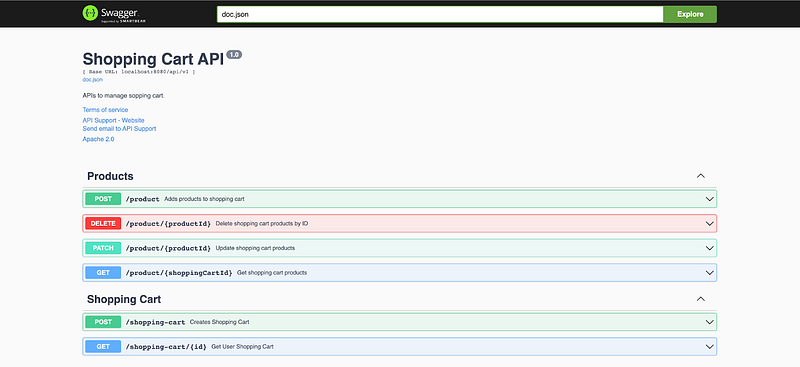
By incorporating this line, the service will automatically load the OpenAPI documentation when it starts up. Users can access this documentation by navigating to the following URL: “http://localhost:8080/swagger/index.html". This user-friendly interface provides detailed information about the API, making it easier for developers and clients to understand and interact with the service.
Figure 4.1 shows the result:
Conclusion
In this chapter, we have delved into the exciting world of OpenAPI and how it can revolutionize software development by providing a clear and detailed specification for APIs. We’ve seen how OpenAPI promotes standardization, documentation, and interoperability, making it easier for development teams to collaborate and adopt best practices.
Furthermore, we’ve taken it a step further by learning how to integrate Swagger (or Swaggo) into our code. Swagger is not only a visual documentation tool but can also be a powerful development tool, enabling developers to interact with APIs more efficiently and effectively.
By adding Swagger to our project, we’ve improved the visibility and accessibility of our APIs, which can result in more effective communication between development teams and stakeholders. Additionally, by simplifying debugging and testing of our APIs, we’ve enhanced the quality and robustness of our software.
OpenAPI and Swagger are powerful tools that can elevate the quality of our software development projects by providing a solid foundation for API documentation and interaction. In the next chapter, we will continue to explore how these tools can be applied in real-world scenarios and how they can benefit our software development projects.
Next readings …
Wait for Chapter 17 “Coding our Microservice (Part 7) — Deploying our microservice”.


