
Chapter 8 “ Documenting our APIs — Introduction to OpenAPI”
Building our first Webservice with Go (Part 5)

The following list is the previous chapters of this series:
- Chapter 1 — Introduction to Microservices
- Chapter 2 — Introduction to Microservices (Part 2)
- Chapter-3 Domain-driven design and microservices
- Chapter -4 Advantages of using Go for web development
- Chapter — 5 Understanding HTTP Protocols and REST APIs
- Chapter-6 HTTP Package in Golang
- Chapter 7 — Step-by-step guide on building a simple web service using Go
I recommend you take a look at the previous chapters if you have not read them yet. That will help you to get more knowledge in this wonderful world of “Microservices architecture”.
Structure
In this chapter, the following topics will be covered:
- Introduction to OpenAPI — Documenting our APIs
- Advantages of using Open API
- Document our APIs
Introduction
This chapter introduces one of the powerful technologies named OpenAPI which is commonly used in web development since it contributes to the important part of the microservices documentation more specialized in documenting the APIs definitions.
In this chapter will be mentioned the description of what OpenAPI is, how to create OpenAPI documentation, the advantages of using OpenAPI, and more.
By definition, we can find on its official website that OpenApi “The OpenAPI Specification is a specification language for HTTP APIs that provides a standardized means to define your API to others. You can quickly discover how an API works, configure infrastructure, generate client code, and create test cases for your APIs. Read more about how you can get control of your APIs now, understand the full API lifecycle, and communicate with developer communities inside and outside your organization”. You can find more information on the OpenAPI official website https://www.openapis.org/.
In other words, OpenAPI, formerly known as Swagger, is an open-source specification for describing and documenting “Application Programming Interfaces”. It is a valuable tool for API developers and providers as it enables the description of an API that is accessible via HTTP or HTTP-like protocols, helping to standardize and document consistently, making the API easier for other developers to understand and use.
Another feature is to provide a standard and understandable way to define the structure of a web API, including endpoints, allowed HTTP methods, parameters, expected responses, and other relevant information. These specifications are defined in either JSON or YAML format, allowing developers to describe how to interact with their API in a precise and detailed manner. In addition, it facilitates the automatic generation of interactive documentation and the creation of client libraries for different programming languages.
Advantages of using OpenAPI
When we implement OpenAPI as part of our software solution we are taking advantage of the significant advantages offered by this technology, which will facilitate the integration, the consumption of APIs, and the understanding of the APIs defined in our microservices. Listed below are the main benefits offered by OpenAPI.
Facilitates integration
OpenAPI provides a detailed description of the APIs, this simplifies integration into third-party applications, as developers can easily understand how to interact with the APIs and what to expect from the responses. This feature helps speed up the integration process in our development.
A contract between the provider and the consumer
OpenAPI serves as a clear and concise contract between the API provider and the API consumers. This improves collaboration between development teams and helps reduce misunderstandings related to API specifications.
Easier validation and testing
With the implementation of OpenAPI in our projects, it is possible to carry out validations and automatic tests in the API. This helps to catch bugs and potential problems at an early stage of development.
Encourages standardization
OpenAPI promotes the standardization of APIs, which facilitates interoperability between different services and applications. Consistent standards improve the experience of whoever is going to implement the APIs exposed in the service.
Reduces dependency between teams
When dedicated teams develop microservices and their APIs, OpenAPI provides exceptional support as it explains the documentation of the APIs in detail so that the developers who implement it do not have to be in constant communication to resolve doubts related to the operation of the API.
Facilitates API adoption and growth
By providing clear and structured documentation, OpenAPI makes it easier for other developers to adopt and implement the API in their projects. This can increase the popularity and growth of the API.
Documenting our APIs using OpenAPI
To write our OpenAPI document usually use a file with JSON or YAML types, commonly called openapi.json or openapi.yaml. The OpenAPI documentation could be constituted by the ROOT file and if there are too many APIs it can be split into multiple JSON or YAML files, for clarity.
This topic very briefly describes these two formats and compares them and we are going to see a little example.
OpenAPI YAML example:
The following block shows how a YAML file to define an OpenAPI documentation looks. In this example, the POST and GET APIs are related to products for the e-commerce application that we are using as an example.
openapi: 3.0.0
info:
  version: 1.0.0
  title: E-commerce Product API

tags:
  - name: Product Operations
    description: Endpoints related to product management

paths:
  /products:
    post:
      summary: Add a new product
      description: Allows adding a new product to the system
      operationId: addProduct
      tags:
        - Product Operations
      requestBody:
        required: true
        content:
          application/json:
            schema:
              type: object
              properties:
                name:
                  type: string
                price:
                  type: number
                  format: double
                quantity:
                  type: integer
              required:
                - name
                - price
                - quantity
            example:
              name: "T-Shirt"
              price: 19.99
              quantity: 100
      responses:
        '200':
          description: Product added successfully
        '400':
          description: Invalid product data

  /products/{id}:
    get:
      summary: Get a product by ID
      description: Retrieves an existing product from the system based on its ID
      operationId: getProductByID
      tags:
        - Product Operations
      parameters:
        - name: id
          in: path
          description: ID of the product to retrieve
          required: true
          schema:
            type: string
      responses:
        '200':
          description: Product retrieved successfully
          content:
            application/json:
              schema:
                type: object
                properties:
                  id:
                    type: string
                  name:
                    type: string
                  price:
                    type: number
                    format: double
                  quantity:
                    type: integer
              example:
                id: "123456"
                name: "T-Shirt"
                price: 19.99
                quantity: 100
        '404':
          description: Product not found
OpenAPI JSON example:
The following shows how a JSON file to define OpenAPI documentation looks. In this example, we define the POST and GET APIs related to products for the e-commerce application that we are using as an example.
{
  "openapi": "3.0.0",
  "info": {
    "version": "1.0.0",
    "title": "E-commerce API",
    "description": "This is an example API for an e-commerce service."
  },
  "tags": [
    {
      "name": "Product Operations",
      "description": "Endpoints related to product management"
    }
  ],
  "paths": {
    "/products": {
      "post": {
        "summary": "Add a new product",
        "description": "Allows adding a new product to the system",
        "operationId": "addProduct",
        "tags": ["Product Operations"],
        "requestBody": {
          "required": true,
          "content": {
            "application/json": {
              "schema": {
                "type": "object",
                "properties": {
                  "name": {
                    "type": "string"
                  },
                  "price": {
                    "type": "number",
                    "format": "double"
                  },
                  "quantity": {
                    "type": "integer"
                  }
                },
                "required": ["name", "price", "quantity"]
              },
              "example": {
                "name": "T-Shirt",
                "price": 19.99,
                "quantity": 100
              }
            }
          }
        },
        "responses": {
          "200": {
            "description": "Product added successfully"
          },
          "400": {
            "description": "Invalid product data"
          }
        }
      }
    },
    "/products/{id}": {
      "get": {
        "summary": "Get a product by ID",
        "description": "Retrieves an existing product from the system based on its ID",
        "operationId": "getProductByID",
        "tags": ["Product Operations"],
        "parameters": [
          {
            "name": "id",
            "in": "path",
            "description": "ID of the product to retrieve",
            "required": true,
            "schema": {
              "type": "string"
            }
          }
        ],
        "responses": {
          "200": {
            "description": "Product retrieved successfully",
            "content": {
              "application/json": {
                "schema": {
                  "type": "object",
                  "properties": {
                    "id": {
                      "type": "string"
                    },
                    "name": {
                      "type": "string"
                    },
                    "price": {
                      "type": "number",
                      "format": "double"
                    },
                    "quantity": {
                      "type": "integer"
                    }
                  },
                  "example": {
                    "id": "123456",
                    "name": "T-Shirt",
                    "price": 19.99,
                    "quantity": 100
                  }
                }
              }
            }
          },
          "404": {
            "description": "Product not found"
          }
        }
      }
    }
  }
}
While both formats are valid for defining OpenAPI files, is important to mention the YAML format is more readable compared to the JSON file, which is the primary reason for its widespread adoption in OpenAPI solutions. YAML has become more popular due to its readability and ease of use, resulting in increased productivity and clearer code understanding for developers. However, it is essential to note that the choice between YAML and JSON depends on the specific preferences and requirements of the project at hand.
Below are additional comparisons between using YAML and JSON to define OpenAPI files:
- Concise Syntax YAML employs a more concise and less repetitive syntax than JSON, making it easier to write and read for developers.
- Comments YAML supports comments, allowing developers to add notes and explanations within the file, enhancing understanding and maintainability of the code.
- Hierarchical Structure YAML utilizes a hierarchical structure based on indentation, providing a clearer and more natural organization of information compared to JSON’s nested structure.
- No Need for Quoted to define Keys In YAML, keys do not require quotes, reducing the number of characters and improving readability compared to JSON, where keys must be quoted.
- Support for Data Types YAML offers broader support for different data types, such as dates and regular expressions, making it more suitable for describing complex information compared to JSON.
- Inheritance Support YAML supports inheritance, enabling the definition of templates and their extension at various points in the file, facilitating code reuse and structuring of complex files.
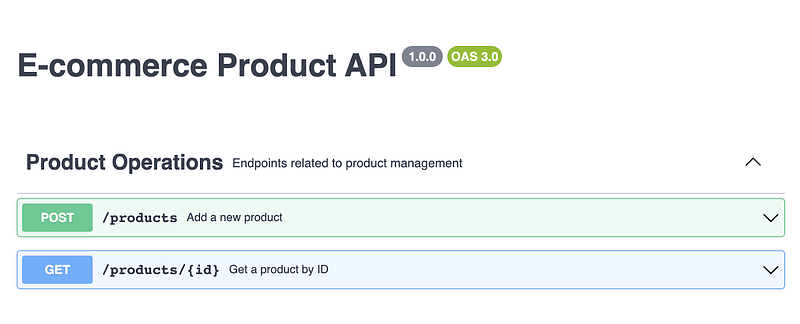
Retaking the files analyzed before, If we copy and paste the content of those files YAML or JSON in the online swagger editor ‘https://editor.swagger.io/’ we can review and validate if our description is correct. The output is the same for both options the only difference is the format used to write the documentation.
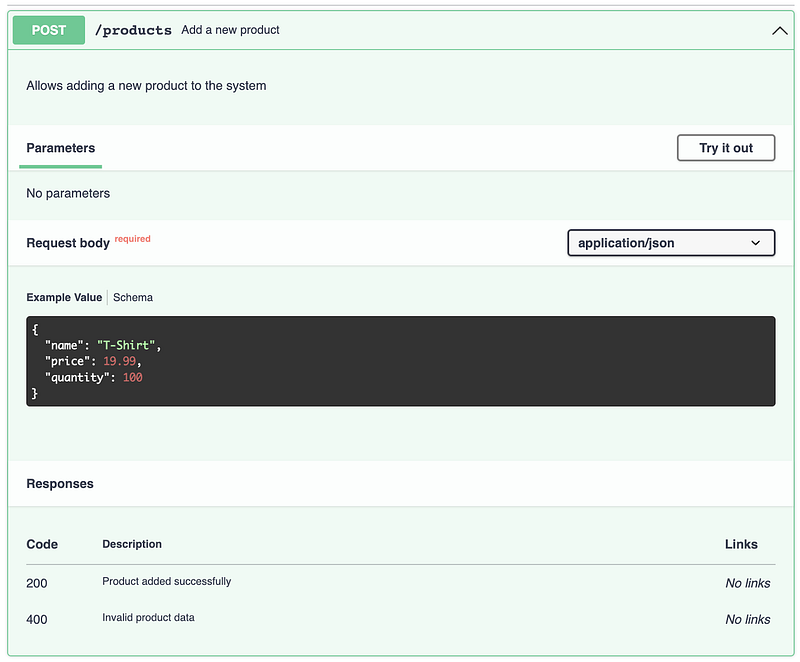
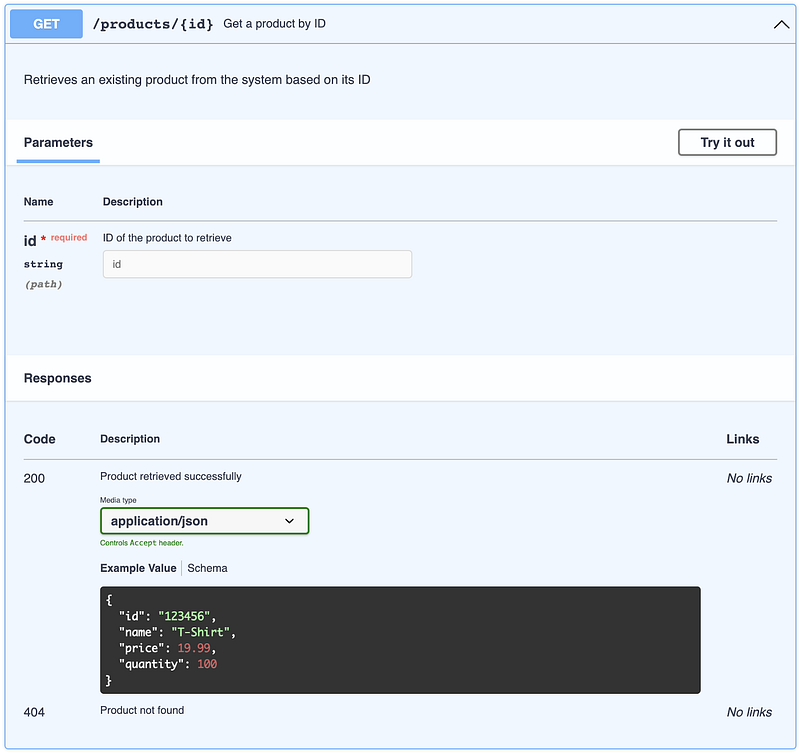
Using the Swagger Editor allows us to ensure the accuracy of our API descriptions, regardless of the chosen format, YAML or JSON. The editor streamlines the validation process, ensuring that our documentation adheres to the OpenAPI specifications and is visually represented in a user-friendly manner.
The following images show visual the result of OpenAPI:
Figure 2.5 shows how the APIs could be grouped by the related model or domain. In the example, the POST and GET products are part of Product Operations.
Figures 2.6 and 2.7 show the API details, In that view, could be seen the API specs, the path, query params, the request body, the response body, and the possible status codes. In addition, in that view, the API can be tested.
Figures 2.7 show the API details, In that view, could be seen the API specs, the path, query params, the request body, the response body, and the possible status codes. In addition, in that view, the API can be tested.
Conclusion
Remember, OpenAPI is one of the most popular technologies for documenting APIs, as it plays a crucial role in API design and development, providing a standardized and efficient way to describe, document, and consume APIs, which improves collaboration, quality of code, interoperability, and API adoption in the development community.
Next readings …
Wait for Chapter 9 “Building a Microservice With Go”.
https://readmedium.com/chapter-9-building-a-microservice-with-go-124edb3845c7


