avatarIsrael Josué Parra Rosales

Free AI web copilot to create summaries, insights and extended knowledge, download it at here

8413

Abstract

ter, r *http.Request)</span></span> { log.Println(<span class="hljs-string">"On GET products"</span>)

response := []Product{ { ID: <span class="hljs-string">"some-id-001"</span>, Name: <span class="hljs-string">"PC Gamer"</span>, Price: <span class="hljs-number">3500</span>, Quantity: <span class="hljs-number">10</span>, }, { ID: <span class="hljs-string">"some-id-002"</span>, Name: <span class="hljs-string">"PC Gamer Pro"</span>, Price: <span class="hljs-number">4500</span>, Quantity: <span class="hljs-number">4</span>, }, }

jsonResponse, err := json.Marshal(response) <span class="hljs-keyword">if</span> err != <span class="hljs-literal">nil</span> { w.WriteHeader(http.StatusInternalServerError) http.Error(w, err.Error(), http.StatusInternalServerError) <span class="hljs-keyword">return</span> } w.Header().Set(<span class="hljs-string">"Content-Type"</span>, <span class="hljs-string">"application/json"</span>) w.WriteHeader(http.StatusOK) w.Write(jsonResponse) }

<span class="hljs-comment">// see description (8)</span> <span class="hljs-function"><span class="hljs-keyword">func</span> <span class="hljs-title">createProduct</span><span class="hljs-params">(w http.ResponseWriter, r *http.Request)</span></span> { log.Println(<span class="hljs-string">"On POST products"</span>)

body, err := io.ReadAll(r.Body) <span class="hljs-keyword">if</span> err != <span class="hljs-literal">nil</span> { http.Error(w, <span class="hljs-string">"Error reading request body"</span>, http.StatusInternalServerError) <span class="hljs-keyword">return</span> }

<span class="hljs-keyword">var</span> newProduct Product err = json.Unmarshal(body, &newProduct) <span class="hljs-keyword">if</span> err != <span class="hljs-literal">nil</span> { http.Error(w, <span class="hljs-string">"Bad Request"</span>, http.StatusBadRequest) <span class="hljs-keyword">return</span> }

<span class="hljs-keyword">if</span> newProduct.Name == <span class="hljs-string">""</span> { http.Error(w, <span class="hljs-string">"Bad Request - Name can not be empty"</span>, http.StatusBadRequest) <span class="hljs-keyword">return</span> }

<span class="hljs-keyword">if</span> newProduct.Price == <span class="hljs-number">0</span> { http.Error(w, <span class="hljs-string">"Bad Request - Name can not be $0"</span>, http.StatusBadRequest) <span class="hljs-keyword">return</span> } w.WriteHeader(http.StatusCreated) }</pre></div><p id="c919"><b>Explaining the code:</b></p><p id="ddc5"><b>Description 1</b> In that point, a struct named “<b><i>Product</i></b>” is defined. That <b><i>struct</i></b> will be used to process the request and response body. For this example, the “<b><i>Product</i></b>” struct defines the properties that describe a product in our e-commerce system like name, quantity, and price.</p><p id="56a1"><b>Description 2</b> The server is created in the function “CreateServer” which implements the logic related to registering the server routes and starting up the server.</p><p id="0740"><b>Description 3 </b>This point defines a handler function to listen to the root path of the server “/”, it will respond with “<b><i>Root</i></b>” string.</p><p id="f310"><b>Description 4</b> This point has defined the handler for “<b><i>products</i></b>”. When the server gets a request to “/products” will be handled by that function. This handler is working as a group for all the requests related to products, for this example are just two GET /products and POST products.</p><p id="1865"><b>Description 5 </b>To handle the request method the example implements a switch control, that helps to validate and choose which logic will be executed, in the first case executes a GET request, in the second case executes the POST request, and if there is a different HTTP method in the request, the API will response with an error.</p><p id="7ba8">Is important to mention that value to know the request method is obtained from the <b><i>“r *http.Request” </i></b>param to be more specific by accessing to “<b><i>r.Method</i></b>” property<b><i>.</i></b></p><p id="eff2"><b>Description 6 </b>http.ListenAndServe runs the server in the localhost:800, if an error is returned then the execution is stopped</p><p id="9e54"><b>Description 7 <i>getProduct(w http.ResponseWriter, r *http.Request)</i></b>. That function will handle the GET request. For this example is created a hardcoded array of products that is converted to a JSON object.</p><p id="82f5">To prepare the HTTP response the handler function sets the content type to JOSN by using w.Header().Set(…) . After that, the function handler sets the HTTP status code using w.WriteHeader(http.StatusOK). To finalize the function logic the response object is added with w.Write(jsonResponse)</p><p id="0b3f"><b>Description 8 <i>createProduct(w http.ResponseWriter, r *http.Request).</i></b> This function handles the POST request. In its logic read the request object and parse from JSON to our product struct and is processed. This function, unlike the GET handler, does not return a response body and only sets the HTTP status code.</p><p id="a218">If the code is executed by using <b><i>go run cmd/server/main.go </i></b>in the command line, we could make a request to our server using CURL commands or using a tool like Postman (<a href="https://www.postman.com/">https://www.postman.com/</a>).</p><p id="fbbb">Figure 2.3 shows the result of performing the GET request to list the products.</p><figure id="7730"><img src="https://cdn-images-1.readmedium.com/v2/resize:fit:800/0*H5s0Sar_4sD_y7Sc"><figcaption><b><i>Figure 2.3</i></b><i>: Requesting the Server using Postman — GET Request</i></figcaption></figure><p id="98ea">Figure 2.4 shows the result of performing the POST request to create a new product.</p><figure id="5a51"><img src="https://cdn-images-1.readmedium.com/v2/resize:fit:800/0*0glDdYQFIKvYSaZ5"><figcaption><b><i>Figure 2.4</i></b><i>: Requesting the Server using Postman — POST request</i></figcaption></figure><h2 id="61fc">Creating the client</h2><p id="6ed9">The purpose of this example is to provide a comprehensive understanding of developing an application that incorporates an HTTP client from code. In this scenario, we will define two essential functions: one to consume the “<b><i>GET /products</i></b>” API and another to consume the “<b><i>POST /products</i></b>” API.</p><p id="bc08">Throughout this exercise, you will gain insight into creating a client to perform requests related to the APIs developed in the previous section when the server was created. To achieve this, we will utilize the “<b><i>net/http</i></b>” package, which equips us with the necessary tools to consume an HTTP server. Additionally, we will explore the implementation of the “<b><i>encoding/json</i></b>” package, which facilitates parsing the JSON data obtained from the request into a structured Go representation.</p><p id="910e">By delving into this code example, you will acquire valuable skills in developing robust HTTP clients and effectively handling different types of API interactions.</p><p id="8c50"><b><i>chapter-seven/cmd/client/main.go</i></b></p><div id="98ab"><pre><span class="hljs-keyword">package</span> main

<span class="hljs-keyword">import</span> ( <span class="hljs-string">"log"</span> <span class="hljs-string">"github.com/chapter-seven/internal/client"</span> ) <span class="hljs-function"><span class="hljs-keyword">func</span> <span class="hljs-title">main</span><span class="hljs-params">()</span></span> { client.GetProducts() client.CreateProduct() }</pre></div><p id="6288"><b>Explaining the code: </b>Here is defined the main function that will execute our client code. Inside of the main is called the client functions to get products and create products.</p><p id="8837"><b><i>chapter-seven/internal/client/client.go</i></b></p><div id="e7db"><pre><span class="hljs-keyword">package</span> client

<span class="hljs-keyword">import</span> ( <span class="hljs-string">"bytes"</span> <span class="hljs-string">"encoding/json"</span> <span class="hljs-string">"io"</span> <span class="hljs-string">"log"</span> <span class="hljs-string">"net/http"</span> )

<span c

Options

lass="hljs-keyword">const</span> baseURL <span class="hljs-type">string</span> = <span class="hljs-string">"http://localhost:8080"</span>

<span class="hljs-keyword">type</span> product <span class="hljs-keyword">struct</span> { ID <span class="hljs-type">string</span> <span class="hljs-string">json:"id"</span> Name <span class="hljs-type">string</span> <span class="hljs-string">json:"name"</span> Price <span class="hljs-type">float32</span> <span class="hljs-string">json:"price"</span> Quantity <span class="hljs-type">int</span> <span class="hljs-string">json:"quantity"</span> }

<span class="hljs-comment">// see description (1)</span> <span class="hljs-function"><span class="hljs-keyword">func</span> <span class="hljs-title">GetProducts</span><span class="hljs-params">()</span></span> { log.Println(<span class="hljs-string">"Getting products"</span>)

   <span class="hljs-comment">// see description (2)</span>

resp, err := http.Get(baseURL + <span class="hljs-string">"/products"</span>) <span class="hljs-keyword">if</span> err != <span class="hljs-literal">nil</span> { log.Fatal(<span class="hljs-string">"Error requesting products: %w"</span>, err) }

<span class="hljs-comment">// see description (3)</span> <span class="hljs-keyword">var</span> respBody []product body, err := io.ReadAll(resp.Body) <span class="hljs-keyword">if</span> err != <span class="hljs-literal">nil</span> { log.Fatal(<span class="hljs-string">"Error reading body bytes response: %w"</span>, err) }

err = json.Unmarshal(body, &respBody) <span class="hljs-keyword">if</span> err != <span class="hljs-literal">nil</span> { log.Fatal(<span class="hljs-string">"Error unmarshaling response: %w"</span>, err) } log.Println(respBody) }

<span class="hljs-comment">// see description (4)</span> <span class="hljs-function"><span class="hljs-keyword">func</span> <span class="hljs-title">CreateProduct</span><span class="hljs-params">()</span></span> { log.Println(<span class="hljs-string">"Creating product"</span>)

   <span class="hljs-comment">// see description (5)</span>

newProduct := product{ Name: <span class="hljs-string">"Gaming Console"</span>, Price: <span class="hljs-number">120</span>, Quantity: <span class="hljs-number">3</span>, }

requestBody, err := json.Marshal(newProduct) <span class="hljs-keyword">if</span> err != <span class="hljs-literal">nil</span> { }

   <span class="hljs-comment">// see description (6)</span>

resp, err := http.Post(baseURL+<span class="hljs-string">"/products"</span>, <span class="hljs-string">"application/json"</span>, bytes.NewBuffer(requestBody)) <span class="hljs-keyword">if</span> err != <span class="hljs-literal">nil</span> { log.Fatal(<span class="hljs-string">"Error requesting products: %w"</span>, err) }

log.Println(resp.Status) log.Println(resp.StatusCode) }</pre></div><p id="7c0e"><b>Explaining the code:</b></p><p id="f32e"><b>Description 1 </b>function GetProducts(..). This function contains the logic related to the request to <b><i>GET /products </i></b>API.</p><p id="97d3"><b>Description 2 </b>At this point the code is implemented to build a simple HTTP client, Golang provides the function “<b><i>http.Get</i></b>” that is part of the “<b><i>net/http</i></b>” package. That function allows to make a simple Get request providing the URL.</p><p id="59d3">The function returns the server “<b><i>response</i></b>” and an “<b><i>error</i></b>”. the response contains information related to the status code, response body, headers, etc. On the other hand, the error is returned if there is an issue when trying to do the request.</p><p id="afbc">Is important to mention that there are more elaborated alternatives to building an HTTP client, we are going to study each one of them in the following chapters.</p><p id="367a"><b>Description 3 </b>The response body returned by “<b><i>http.Get</i></b>” is of type io.ReadCloser, the code intends to use the response data, to do that is needed to define a product array and make use of the “<b><i>json.Unmarshal()</i></b>” function that will unmarshal the JSON format to a Golang struct.</p><p id="2ca5"><b>Description 4 </b>Function CreateProduct(). This function defines the needed code to build an HTTP client that requests a POST API, in this case, POST /products.</p><p id="04bf"><b>Description 5 </b>The POST request needs a Request Body, in this part of the process is defined a new product using the “<b>product</b>” struct. We need to marshal the request object passing the Golang struct values to a JSON object that will be used in the request.</p><p id="6a66"><b>Description 6 </b>With the function “<b><i>http.Post</i></b>” can be created a simple HTTP client to consume a POST API. That function gets as a param the URL, the content type, and the request object. The function returns the server response and the error. As part of the response information, we can find the status code, and the status with those values we can know if the request was successful or if it is returning an error. On the other hand, the error will be returned when there is an issue requesting the server.</p><p id="fe8c">Before executing the client, be sure that the server is running, after that, the client can be executed using the command “<b><i>go run cmd/client/main.go</i></b>”. In the console will be printed the Request results like the following:</p><div id="486f"><pre>|<span class="hljs-number">2023</span>/08/02 <span class="hljs-number">16</span>:<span class="hljs-number">55</span>:<span class="hljs-number">21</span> Getting products |<span class="hljs-number">2023</span>/08/02 <span class="hljs-number">16</span>:<span class="hljs-number">55</span>:<span class="hljs-number">21</span> [{some-<span class="hljs-built_in">id</span>-001 PC Gamer <span class="hljs-number">3500</span> <span class="hljs-number">10</span>} {some-<span class="hljs-built_in">id</span>-002 PC Gamer Pro <span class="hljs-number">4500</span> <span class="hljs-number">4</span>}] |<span class="hljs-number">2023</span>/08/02 <span class="hljs-number">16</span>:<span class="hljs-number">55</span>:<span class="hljs-number">21</span> Creating product |<span class="hljs-number">2023</span>/08/02 <span class="hljs-number">16</span>:<span class="hljs-number">55</span>:<span class="hljs-number">21</span> <span class="hljs-number">201</span> Created |<span class="hljs-number">2023</span>/08/02 <span class="hljs-number">16</span>:<span class="hljs-number">55</span>:<span class="hljs-number">21</span> <span class="hljs-number">201</span></pre></div><p id="ccfe">In conclusion, throughout the topic a practical approach was presented on how to develop a web server in Golang, using the net/http library. Addressing essential aspects such as the definition of routes, the management of requests and the proper use of HTTP methods, providing a solid foundation for the creation of robust and scalable web applications.</p><p id="d34b">In addition, the development of an HTTP client from code was explored, to interact with APIs created in the exercise related to our web server, at this point we learned how to consume different endpoints using the GET and POST methods, and highlighted the importance of handling responses and errors correctly for a smooth and reliable experience.</p><p id="21a2">With this knowledge base, we are preparing for the next chapters where we will fully focus on the development of microservices in Golang as well as many important aspects such as communication and security.</p><p id="38dc">Next readings …</p><p id="2167">Wait for Chapter 8 “ Documenting our APIs — Introduction to OpenAPI”.</p><div id="023b" class="link-block"> <a href="https://readmedium.com/chapter-8-documenting-our-apis-introduction-to-openapi-abffa1bd678d"> <div> <div> <h2>Chapter 8 “ Documenting our APIs — Introduction to OpenAPI”</h2> <div><h3>Building our first Webservice with Go (Part 5)</h3></div> <div><p>medium.com</p></div> </div> <div> <div style="background-image: url(https://miro.readmedium.com/v2/resize:fit:320/1*RFgd-3oiRIKRRYhEkNzfIQ.jpeg)"></div> </div> </div> </a> </div></article></body>

Chapter 7 — Step-by-step guide on building a simple web service using Go

Building our first Webservice with Go (Part 4)
The following list is the previous chapters of this series:

I recommend you take a look at the previous chapters if you have not read them yet. That will help you to get more knowledge in this wonderful world of “Microservices architecture”.

Structure

In this chapter, the following topics will be covered:

  • Step-by-step guide on building a simple web service using Go
  • Create a web server — step-by-step code
  • Defining the HTTP server
  • Adding routes
  • Handling request
  • Using the HTTP methods
  • Create a Client — step-by-step code
  • How to consume a REST service from code
  • How to send data to the request
  • How to read the response

Introduction

In this section, we will embark on the journey of designing a small web server step by step, harnessing the power of the net/http package mentioned earlier. Our primary goal is to create a fully functional web service, after which we will proceed to develop a client code to consume the APIs exposed by the server.

Throughout the process of crafting our server, we will cover fundamental aspects, including defining the HTTP server, establishing routes, handling incoming requests, and utilizing various HTTP methods.

Conversely, when building our client, we will delve into crucial concepts, such as consuming a REST service programmatically, sending data within the request, and effectively reading the response.

In order to facilitate a comprehensive understanding of each step and implementation, we will provide detailed explanations of the code used in our example. By doing so, you will gain valuable insights into web development using Go and be well-equipped to apply this knowledge to your own projects.

The server example is based on an e-commerce application that allows the management of the products. For this example just going to be added two APIs “create products” and “list products”.

Let’s start defining the code structure, which will be defined using the golang standard structure.

chapter-seven/
├── cmd/
│   ├── client/
│   │   └── main.go
│   │
│   └── server/
│       └── main.go
│
├── internal/
│   ├── client/
│   │   └── client.go
│   │
│   └── server/
│       └── server.go
│
└── go.mod

Creating the web server

The main objective of this code is to provide a hands-on experience in creating a web server using Go’s “net/http” package. Throughout this example, we will explore crucial aspects of web service development, including route registration, defining request handling functions, and the proper usage of HTTP methods to perform specific actions effectively.

In this concise illustration, inspired by an e-commerce scenario, we will design two APIs associated with the “/products” URL. Notably, one API will be dedicated to processing GET requests, while the other will focus on handling POST requests. This distinction enables us to cater to different types of interactions with the server.

By following this practical example, you will gain valuable insights into building robust web servers with Go, empowering you to apply this knowledge to a wide range of web application projects. Let’s start with this exciting journey of web service development with Go!

chapter-seven/cmd/server/main.go

package main

import (
 "log"
 "github.com/chapter-seven/internal/server"
)

func main() {
 log.Println("Starting web server at port 8080")
 server.CreateServer()
}

chapter-seven/internal/server/server.go

package server

import (
   "encoding/json"
   "io"
   "log"
   "net/http"
)

// see description (1)
type Product struct {
   ID string `json:"id"`
   Name string `json:"name"`
   Price float32 `json:"price"`
   Quantity int `json:"quantity"`
}

// see description (2)
func CreateServer() {
   // see description (3)
   http.HandleFunc("/", func(w http.ResponseWriter, r *http.Request) {
      w.Write([]byte("Root"))
  })


  // see description (4)
  http.HandleFunc("/products", func(w http.ResponseWriter, r *http.Request) {
      // see description (5)
      switch r.Method {
        case http.MethodGet:
           getProduct(w, r)
        case http.MethodPost:
          createProduct(w, r)
       default:
         w.WriteHeader(http.StatusMethodNotAllowed)
         http.Error(w, "Method not allowed", http.StatusMethodNotAllowed)
         return
     }
  })
  
  // see description (6)
  if err := http.ListenAndServe(":8080", nil); err != nil {
     log.Println("Can not start server", err.Error())
     return
  }
}

// see description (7)
func getProduct(w http.ResponseWriter, r *http.Request) {
   log.Println("On GET products")

   response := []Product{
      {
         ID: "some-id-001",
         Name: "PC Gamer",
         Price: 3500,
         Quantity: 10,
      },
      {
         ID: "some-id-002",
         Name: "PC Gamer Pro",
         Price: 4500,
         Quantity: 4,
      },
   }


   jsonResponse, err := json.Marshal(response)
   if err != nil {
      w.WriteHeader(http.StatusInternalServerError)
      http.Error(w, err.Error(), http.StatusInternalServerError)
      return
   }
   w.Header().Set("Content-Type", "application/json")
   w.WriteHeader(http.StatusOK)
   w.Write(jsonResponse)
}

// see description (8)
func createProduct(w http.ResponseWriter, r *http.Request) {
   log.Println("On POST products")

   body, err := io.ReadAll(r.Body)
   if err != nil {
      http.Error(w, "Error reading request body", http.StatusInternalServerError)
      return
   }

   var newProduct Product
   err = json.Unmarshal(body, &newProduct)
   if err != nil {
      http.Error(w, "Bad Request", http.StatusBadRequest)
      return
   }

   if newProduct.Name == "" {
      http.Error(w, "Bad Request - Name can not be empty", http.StatusBadRequest)
      return
   }

   if newProduct.Price == 0 {
      http.Error(w, "Bad Request - Name can not be $0", http.StatusBadRequest)
      return
   }
   w.WriteHeader(http.StatusCreated)
}

Explaining the code:

Description 1 In that point, a struct named “Product” is defined. That struct will be used to process the request and response body. For this example, the “Product” struct defines the properties that describe a product in our e-commerce system like name, quantity, and price.

Description 2 The server is created in the function “CreateServer” which implements the logic related to registering the server routes and starting up the server.

Description 3 This point defines a handler function to listen to the root path of the server “/”, it will respond with “Root” string.

Description 4 This point has defined the handler for “products”. When the server gets a request to “/products” will be handled by that function. This handler is working as a group for all the requests related to products, for this example are just two GET /products and POST products.

Description 5 To handle the request method the example implements a switch control, that helps to validate and choose which logic will be executed, in the first case executes a GET request, in the second case executes the POST request, and if there is a different HTTP method in the request, the API will response with an error.

Is important to mention that value to know the request method is obtained from the “r *http.Request” param to be more specific by accessing to “r.Method” property.

Description 6 http.ListenAndServe runs the server in the localhost:800, if an error is returned then the execution is stopped

Description 7 getProduct(w http.ResponseWriter, r *http.Request). That function will handle the GET request. For this example is created a hardcoded array of products that is converted to a JSON object.

To prepare the HTTP response the handler function sets the content type to JOSN by using w.Header().Set(…) . After that, the function handler sets the HTTP status code using w.WriteHeader(http.StatusOK). To finalize the function logic the response object is added with w.Write(jsonResponse)

Description 8 createProduct(w http.ResponseWriter, r *http.Request). This function handles the POST request. In its logic read the request object and parse from JSON to our product struct and is processed. This function, unlike the GET handler, does not return a response body and only sets the HTTP status code.

If the code is executed by using go run cmd/server/main.go in the command line, we could make a request to our server using CURL commands or using a tool like Postman (https://www.postman.com/).

Figure 2.3 shows the result of performing the GET request to list the products.
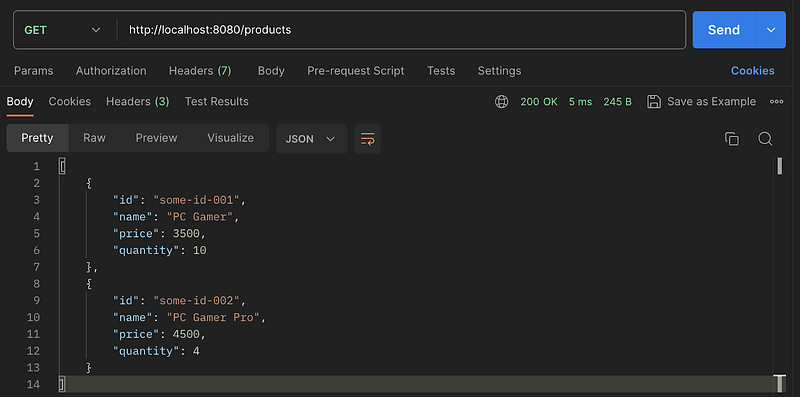
Figure 2.3: Requesting the Server using Postman — GET Request

Figure 2.4 shows the result of performing the POST request to create a new product.
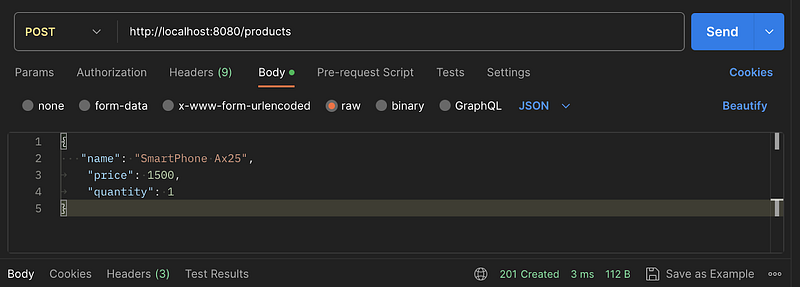
Figure 2.4: Requesting the Server using Postman — POST request

Creating the client

The purpose of this example is to provide a comprehensive understanding of developing an application that incorporates an HTTP client from code. In this scenario, we will define two essential functions: one to consume the “GET /products” API and another to consume the “POST /products” API.

Throughout this exercise, you will gain insight into creating a client to perform requests related to the APIs developed in the previous section when the server was created. To achieve this, we will utilize the “net/http” package, which equips us with the necessary tools to consume an HTTP server. Additionally, we will explore the implementation of the “encoding/json” package, which facilitates parsing the JSON data obtained from the request into a structured Go representation.

By delving into this code example, you will acquire valuable skills in developing robust HTTP clients and effectively handling different types of API interactions.

chapter-seven/cmd/client/main.go

package main

import (
 "log"
 "github.com/chapter-seven/internal/client"
)
func main() {
     client.GetProducts()
     client.CreateProduct()
}

Explaining the code: Here is defined the main function that will execute our client code. Inside of the main is called the client functions to get products and create products.

chapter-seven/internal/client/client.go

package client

import (
 "bytes"
 "encoding/json"
 "io"
 "log"
 "net/http"
)

const baseURL string = "http://localhost:8080"

type product struct {
 ID       string  `json:"id"`
 Name     string  `json:"name"`
 Price    float32 `json:"price"`
 Quantity int     `json:"quantity"`
}

// see description (1)
func GetProducts() {
 log.Println("Getting products")
 
       // see description (2)
 resp, err := http.Get(baseURL + "/products")
 if err != nil {
  log.Fatal("Error requesting products: %w", err)
 }

 // see description (3)
 var respBody []product
 body, err := io.ReadAll(resp.Body)
 if err != nil {
  log.Fatal("Error reading body bytes response: %w", err)
 }


 err = json.Unmarshal(body, &respBody)
 if err != nil {
  log.Fatal("Error unmarshaling response: %w", err)
 }
 log.Println(respBody)
}

// see description (4)
func CreateProduct() {
 log.Println("Creating product")

       // see description (5)
 newProduct := product{
  Name:     "Gaming Console",
  Price:    120,
  Quantity: 3,
 }

 requestBody, err := json.Marshal(newProduct)
 if err != nil {
 }
        
       // see description (6)
 resp, err := http.Post(baseURL+"/products", 
                         "application/json", bytes.NewBuffer(requestBody))
 if err != nil {
  log.Fatal("Error requesting products: %w", err)
 }

 log.Println(resp.Status)
       log.Println(resp.StatusCode)
}

Explaining the code:

Description 1 function GetProducts(..). This function contains the logic related to the request to GET /products API.

Description 2 At this point the code is implemented to build a simple HTTP client, Golang provides the function “http.Get” that is part of the “net/http” package. That function allows to make a simple Get request providing the URL.

The function returns the server “response” and an “error”. the response contains information related to the status code, response body, headers, etc. On the other hand, the error is returned if there is an issue when trying to do the request.

Is important to mention that there are more elaborated alternatives to building an HTTP client, we are going to study each one of them in the following chapters.

Description 3 The response body returned by “http.Get” is of type io.ReadCloser, the code intends to use the response data, to do that is needed to define a product array and make use of the “json.Unmarshal()” function that will unmarshal the JSON format to a Golang struct.

Description 4 Function CreateProduct(). This function defines the needed code to build an HTTP client that requests a POST API, in this case, POST /products.

Description 5 The POST request needs a Request Body, in this part of the process is defined a new product using the “product” struct. We need to marshal the request object passing the Golang struct values to a JSON object that will be used in the request.

Description 6 With the function “http.Post” can be created a simple HTTP client to consume a POST API. That function gets as a param the URL, the content type, and the request object. The function returns the server response and the error. As part of the response information, we can find the status code, and the status with those values we can know if the request was successful or if it is returning an error. On the other hand, the error will be returned when there is an issue requesting the server.

Before executing the client, be sure that the server is running, after that, the client can be executed using the command “go run cmd/client/main.go”. In the console will be printed the Request results like the following:

|2023/08/02 16:55:21 Getting products
|2023/08/02 16:55:21 [{some-id-001 PC Gamer 3500 10} {some-id-002 PC Gamer Pro 4500 4}]
|2023/08/02 16:55:21 Creating product
|2023/08/02 16:55:21 201 Created
|2023/08/02 16:55:21 201

In conclusion, throughout the topic a practical approach was presented on how to develop a web server in Golang, using the net/http library. Addressing essential aspects such as the definition of routes, the management of requests and the proper use of HTTP methods, providing a solid foundation for the creation of robust and scalable web applications.

In addition, the development of an HTTP client from code was explored, to interact with APIs created in the exercise related to our web server, at this point we learned how to consume different endpoints using the GET and POST methods, and highlighted the importance of handling responses and errors correctly for a smooth and reliable experience.

With this knowledge base, we are preparing for the next chapters where we will fully focus on the development of microservices in Golang as well as many important aspects such as communication and security.

Next readings …

Wait for Chapter 8 “ Documenting our APIs — Introduction to OpenAPI”.

Golang
Software Development
Software Engineering
Software Architecture
Computer Science
Recommended from ReadMedium