
Calculating Packet and IP Header Lengths
CM.5 Digging into a packet header to decipher the field values
Part of a series on Cybersecurity Math. Also, Network Security.
Free Content on Jobs in Cybersecurity | Sign up for the Email List
In the last post I provided an introduction to how we use math with network packets to calculate the location and size of data.
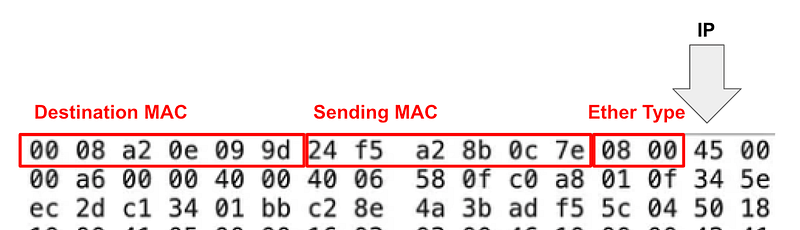
We looked the specifications for ethernet to see how RFCs define what data exists in a packet header and what size it should be. By understanding the length of the ethernet header, we could determine where the IP header starts.
Now let’s look at lengths in general. I think the fact that packet lengths were described separately for each layer across pages and pages of data makes things more confusing. So we are going to look at lengths and layers for our packet all at once.
We already determined that the size of our Ethernet header and where the IP header starts.
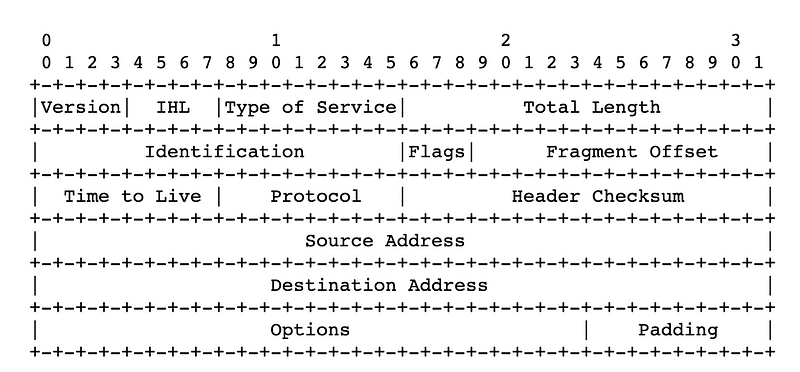
Now we need to know something about an IP header. We can find the format of the IP header in RFC 791.
Byte Offset
Sometimes when you learn about network packets they will refer to the byte offset. Remember from the prior post that we are using bits because computers operate in binary numbers. In the last post I explained that there are 8 bits in byte, and that network packet header lengths are often defined in bytes, though you can also express the length in bits.
So what’s a “byte offset”? It means that we’re looking at a packet location in relation to the 0 starting point above. Sometimes people refer to something in byte offset 3 and you need to know what that means. The third byte offset would be in position three below.

As you can see “Version” and “IHL” which stands for “IP Header Length” do not take up a full byte. So this approach hurts my brain a little bit. To overcome this you’ll hear people talk about nibbles which are half a byte (ha ha). The upper nibble is the first half of the byte and the lower nibble is the second half of the byte. But the nibbles are not really above or below each other. They are side to side. So why didn’t they say the first nibble and the second nibble? I suppose then you’d need to know if first is starting from the right or the left. And then you get to fields like the don’t fragment bits in IP or the TCP flags which only requires a bit.
I’m not going to use that approach to convert my packet to human readable data. I’m just going to count bits and bytes. I find it easier. But do whatever works for you. And you’ll need to know those things in certain conversations.
Determining the starting point and length of any field in a packet
As you can see there are a number of pieces of data in the IP Packet header. One of them is the total length of the packet shown above.
The data in the first row has 32 bits.
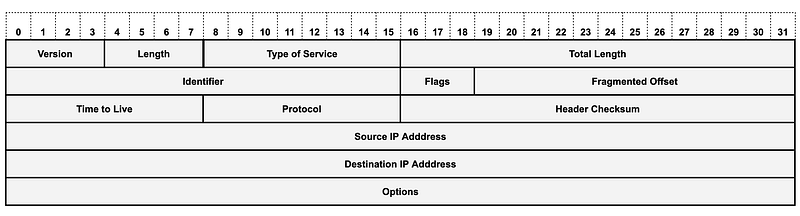
We start counting from 0 because that is the first number a computer can represent or store by turning bits on and off. I explained how computers use binary numbers here.
I like to think of the packet header as a grid like this:
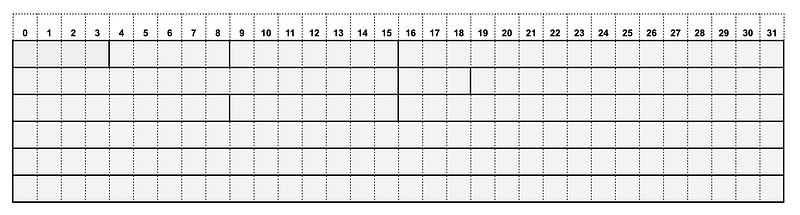
If I know where the IP header starts, and the length of each field in the IP header, I can calculate where any field starts and where it ends. It doesn’t matter if that field falls at a byte boundary or not. Let’s look at some examples.
IP Version
The IP header starts with the version of IP that the packet contains (IPv4 or IPv6). As you can see it is 4 bits. One hexadecimal character is 4 bits in length.
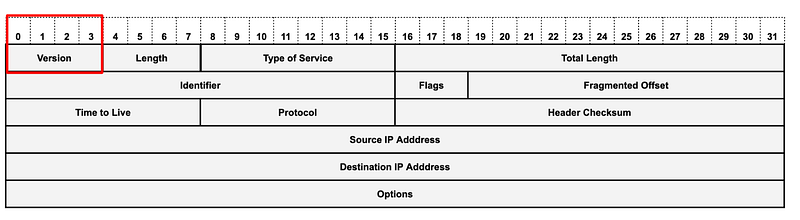
Just to get this out of the way 4 bits is called a nibble and this is the lower nibble of the 0 byte offset but that definition is kind of weird to me.
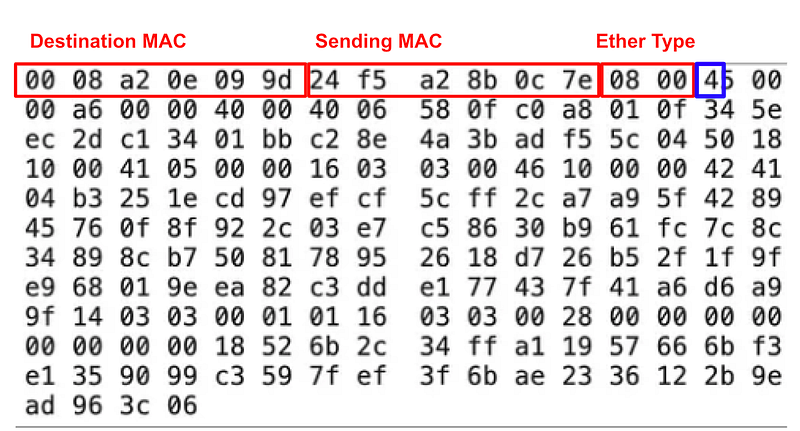
For my understanding, I call it the first field in the IP header and it’s 4 bits long, represented by one hexadecimal character which in our packet is 0x04.
What is 0x04 in decimal? Refer back to our chart in my prior post or calculate it out if you like. Remember Base 10 is decimal.
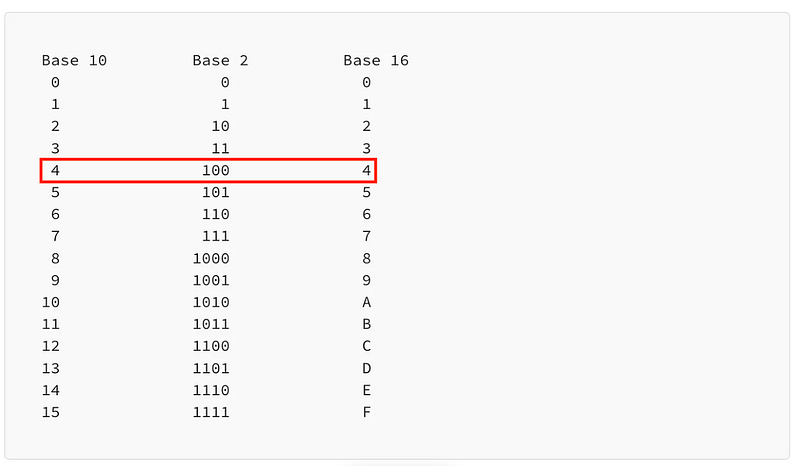
The value is 4. The IP version in this packet is IPv4.
If this value contained 6 the packet would be IPv6 and the header would be formulated according to the IPv6 standard instead.
A bit off-topic: What happens if the value contains some other number? Well the networking equipment cannot be sure what the version is so they should drop it, in my opinion. But not all networking equipment does what it should do. Does some RFC define what network devices are supposed to do with an invalid version? I’m not seeing it but may be it’s in there somewhere in some updated RFC. Regardless of what any RFC says, it’s invalid data that should not be processed.
What does your networking equipment do when it gets an invalid version? Curious? Check out Scapy for packet crafting and test it!
Calculating the total length of a packet
I can see above that the Total Length field starts at the 17th bit in the IP header. (Remember we’re starting from 0).
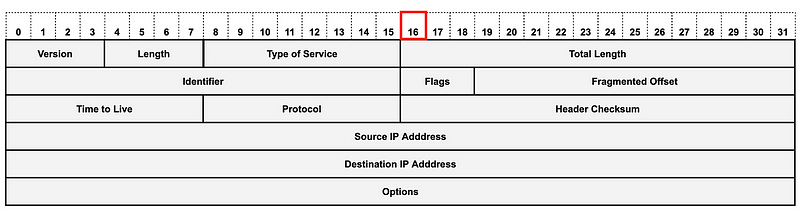
I know from the last post that there are 8 bits in a byte and 2 hexadecimal characters in a byte. Or I could remember that a hexadecimal digit is 4 bits in length. Whatever works.
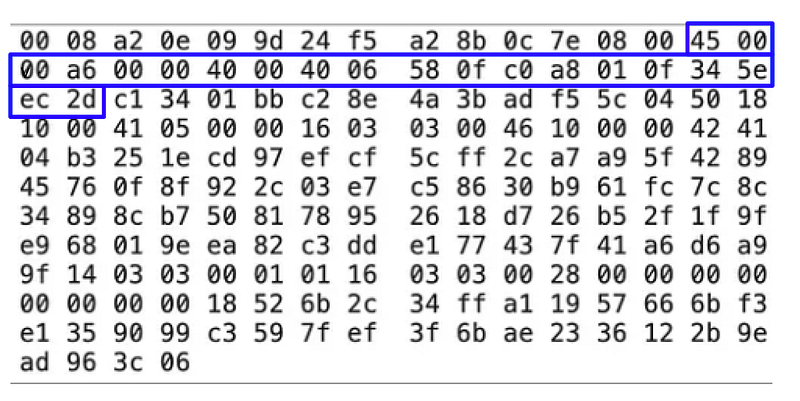
So I can count 16 bits or 2 bytes or 4 hexadecimal digits from the end of the ethernet header to find the start of the Total Length field of the IP Header. Notice that I have 4 hexadecimal digits in the blue box below (45 00).
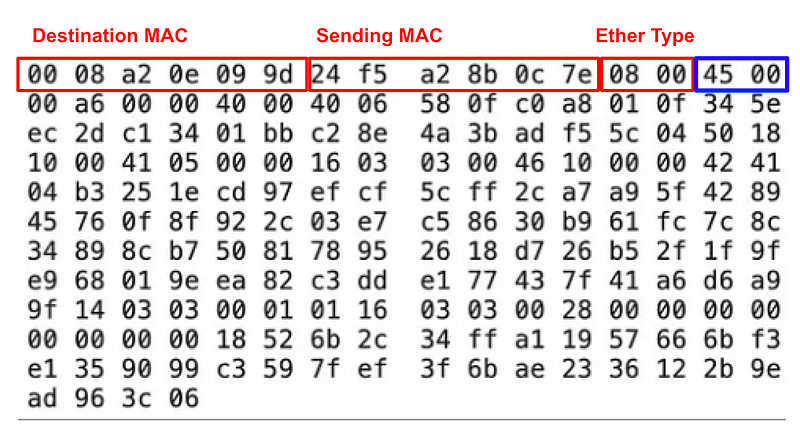
That Total Length field of the IP header starts after those characters. I can see from my grid above that the size of the Total Length field is 16 bits or 2 bytes or 4 hexadecimal digits. So I can calculate where that field ends the same way.
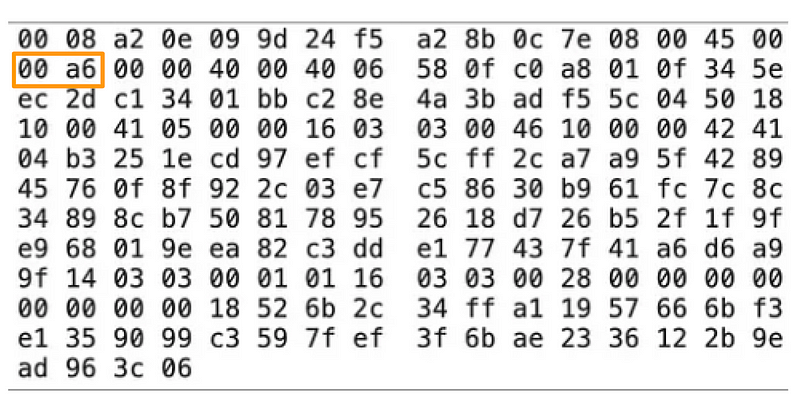
The hexadecimal value for the total length of this packet is 00 a6. Cool cool. What?
Using the method from a prior post, map out the binary digits to calculate a decimal value.
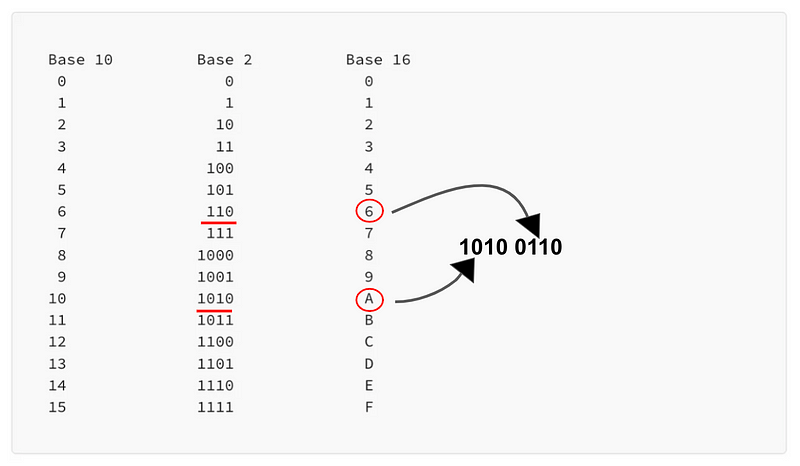
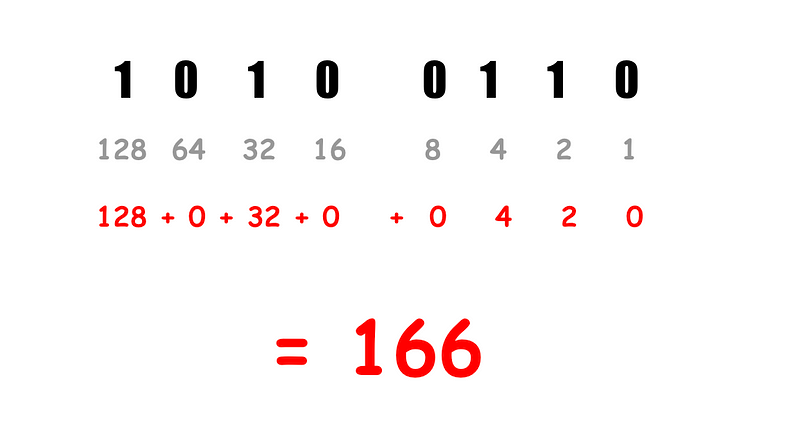
Calculate the decimal number.
What does the Total Length field mean exactly? What is that number? Again, we refer to the specification.
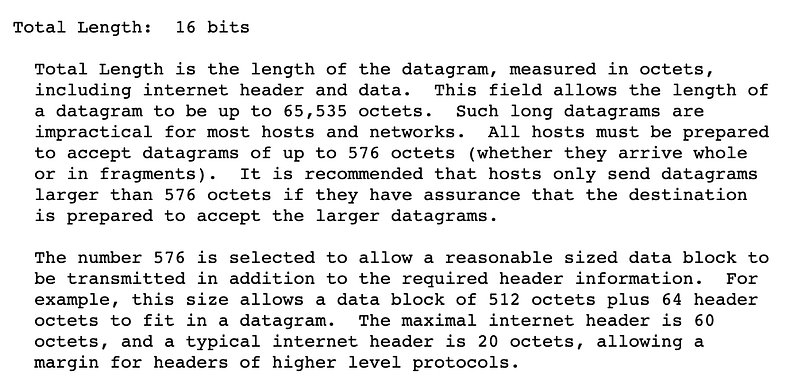
Mind you a lot has changed since this RFC was written in 1981 and it has some updates, as you can see in the links at the top of the page. But this definition gives us what we need to answer our question.
What’s an octet?
The octet … consists of eight bits.
If you want a better reference you can dig through the links at the bottom of that page.
A byte is 8 bits long and an octet is 8 bits so a byte is an octet.
Our packet, starting with the internet header to the end is 166 bytes.
Check your work
If I want to check our math we can count the bytes in our packet to see if it adds up.
We have 16 columns of bytes and 11 rows of bytes + 4 extra bytes.
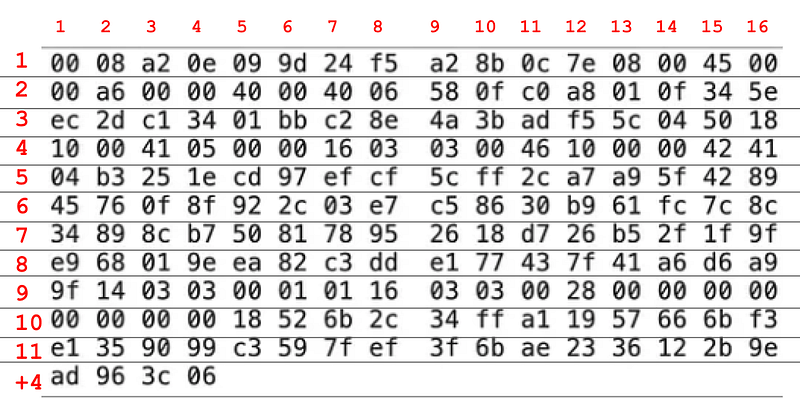
16 x 11 + 4 = 180 bytes in our packet.
Why doesn’t this add up to 166? Read the specification again.

The total length field of the IP header does not include the length of the ethernet header so we’ll need to subtract the length of the ethernet header. Remember we figure out the length of that header in the last post and it was 14 bytes.
180 - 14 = 166!Yay math! =)
Find the end of the IP header
Where is the end of the IP header? There’s a field in the IP header called IHL for Internet Header length.
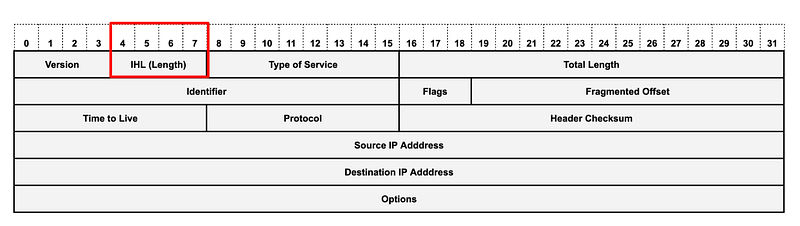
Since we know where the IP header starts, we can count over 4 bits or one hexadecimal character to get the value of the length of the IP header in hexadecimal: 0x05.
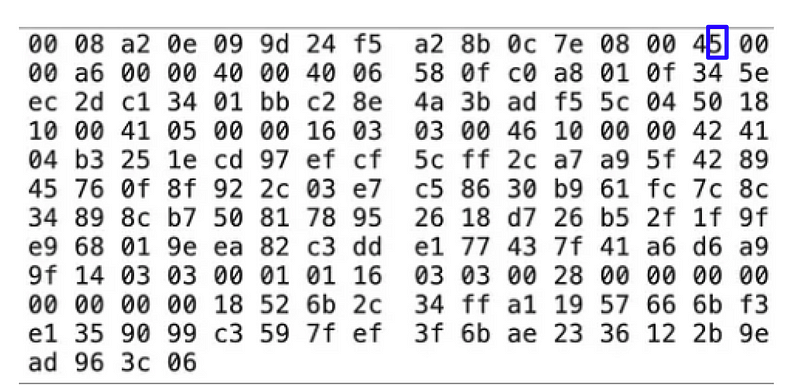
What is 0x05 in decimal? Refer to your chart or memorize it or calculate it as we did before. It’s 5.
But wait! There’s more. We have to refer back to the specification to see what this 5 means exactly.

What’s a 32 bit word? Back to our friend Wikipedia (which has many other references if you want to dive into them and verify the information).
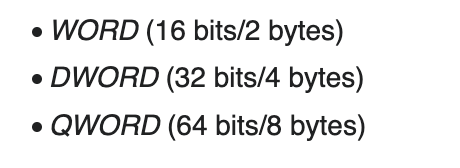
A 32 bit Word (DWord by this definition) is 4 bytes. I’m not getting into where that all comes from but you can research it if you are curious. At any rate our IHL or Internet Header Length is 5 32-bit words or in 5 x 4 bytes = 20 bytes.
Or to simplify that:
Multiply the value of the Internet Header Length field by 4 to get the length in bytes.
5 x 4 = 20 bytes
Now we can count out 20 bytes from the start of the IP header to find the end of the IP header.
And with that information, you can use the RFC to figure out the values of any of the other fields in the IP header and how they are used by reading the RFC (supplemented with up to date and easier to understand content).
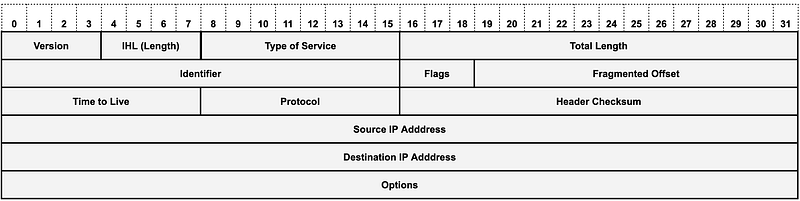
Note that the Options field is optional (imagine that) and is not generally found on IP packets coming from the Internet. If they do exist on the IP header and the packet is coming from the Internet you might want to inspect that packet more closely. Options are used more commonly in a TCP header (which, if used, would be the next layer or header in IPv4).
Which layer comes next?
Remember our sample layers from a prior post:
- Ethernet (Data Link Layer or Link Layer)
- IP (Network Layer or Internet Layer)
- TCP / UDP / etc. (Transport Layer)
- DNS / HTTP / etc. (Application Layer)
So far we’ve cover the Ethernet and the IP headers.
What comes next? We’ll figure that out in the next post.
Follow for updates.
Teri Radichel | © 2nd Sight Lab 2023
The best way to support this blog is to sign up for the email list and clap for stories you like. That also helps me determine what stories people like and what to write about more often. Other ways to follow and support are listed below. Thank you!
About Teri Radichel:
~~~~~~~~~~~~~~~~~~~~
Author: Cybersecurity for Executives in the Age of Cloud
Presentations: Presentations by Teri Radichel
Recognition: SANS Difference Makers Award, AWS Security Hero, IANS Faculty
Certifications: SANS
Education: BA Business, Master of Software Engineering, Master of Infosec
Company: Cloud Penetration Tests, Assessments, Training ~ 2nd Sight Lab
Like this story? Use the options below to help me write more!
~~~~~~~~~~~~~~~~~~~~~~~~~~~~~~~~~~~~~~~~~~~~~~~~~~~~~~~~~~~~~
❤️ Clap
❤️ Referrals
❤️ Medium: Teri Radichel
❤️ Email List: Teri Radichel
❤️ Twitter: @teriradichel
❤️ Mastodon: @[email protected]
❤️ Facebook: 2nd Sight Lab
❤️ YouTube: @2ndsightlab
❤️ Buy a Book: Teri Radichel on Amazon
❤️ Request a penetration test, assessment, or training
via LinkedIn: Teri Radichel
❤️ Schedule a consulting call with me through IANS ResearchMy Cybersecurity Book: Cybersecurity for Executives in the Age of Cloud



