
Counting in Hexadecimal (Base 16)
CM.3 When the numbers run out, use letters
~~~~~~~~~~~~~~~~~~~~~~~~~~~~~~~~~~~~~~~~~~~~~~~~~~~~~~~~~~~
⚙️ Part of my series on Automating Cybersecurity Metrics. The Code.
🔒 Related Stories: Cybersecurity Math | Cybersecurity
💻 Free Content on Jobs in Cybersecurity | ✉️ Sign up for the Email List
~~~~~~~~~~~~~~~~~~~~~~~~~~~~~~~~~~~~~~~~~~~~~~~~~~~~~~~~~~~
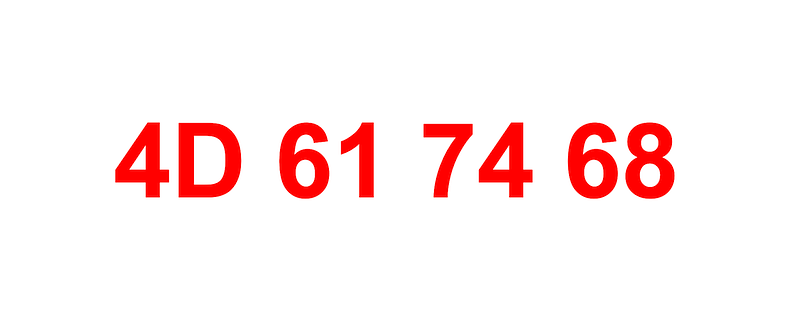
In the last post, I explained how numbering systems and bases work. We looked at binary and decimal and touched on hexadecimal. I showed you how to count in binary.
In this post, we’ll look at counting in hexadecimal, or a 16 base numbering system. You’ll see a lot of data represented in hexadecimal format in cybersecurity. You often do not need to translate it into some other format as your tools will do this for you in many cases.
But you might if an attacker is trying to trick your tools or there is a bug in your program! You might also be digging into hexadecimal values if you are looking at the magic bytes used to identify files or attempting to reverse engineer malware. As a penetration tester perhaps you leverage numbers in a hexadecimal format in certain types of bypass attacks. You may also be trying to find anomalies and attacks in network packets.
Hexadecimal Digits
Remember the method I told you for counting in any numbering system in the last post?
Any time you hit the number of base digits
- set the digit to zero
- add one to the left.
We’ll let’s say our base is 16. We start counting, following that rule an what happens when we get to 9?
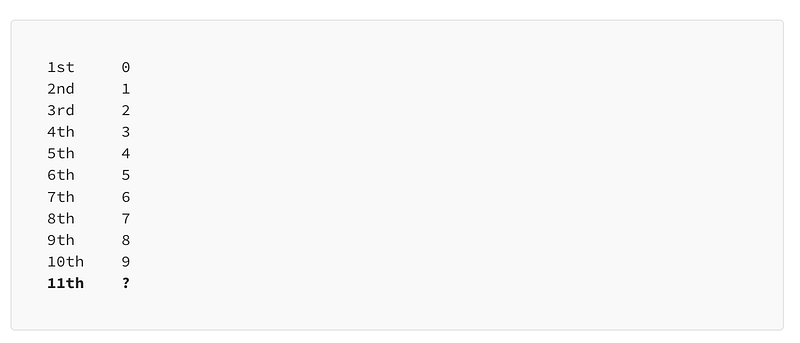
What's the next digit? We're not to the base yet (16) so we don't want to add a new column yet or set the current digit to 0. We’ve run out of single digit numbers of the decimal numbering system variety. To overcome this we use alphabetical characters for the digits over 9 until we get to the 16th digit.
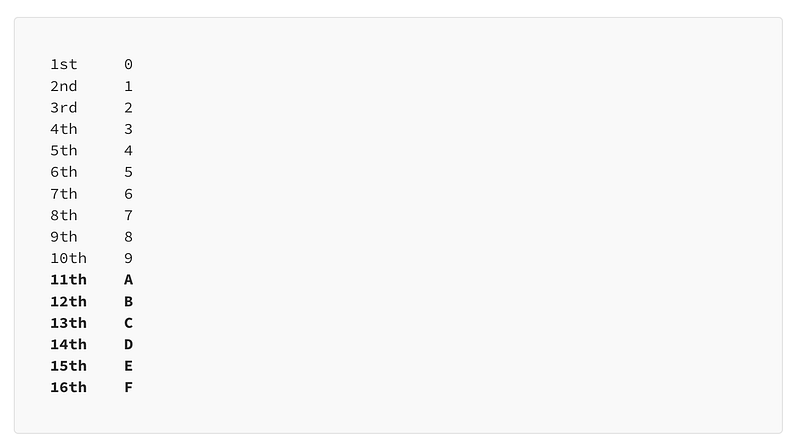
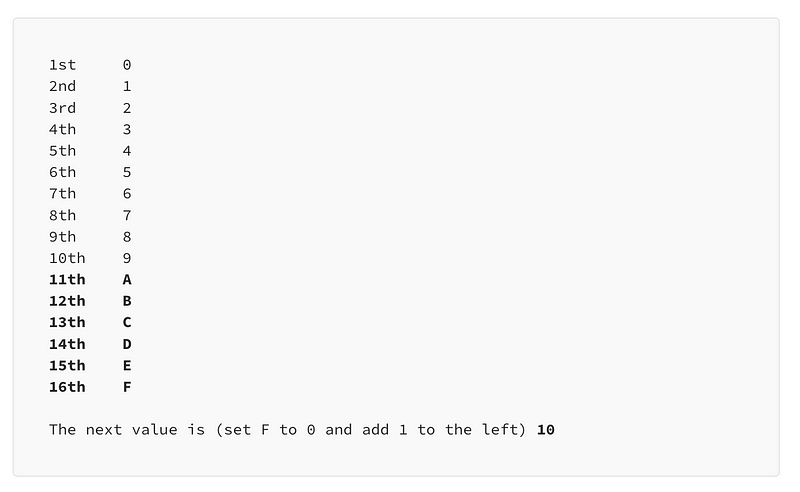
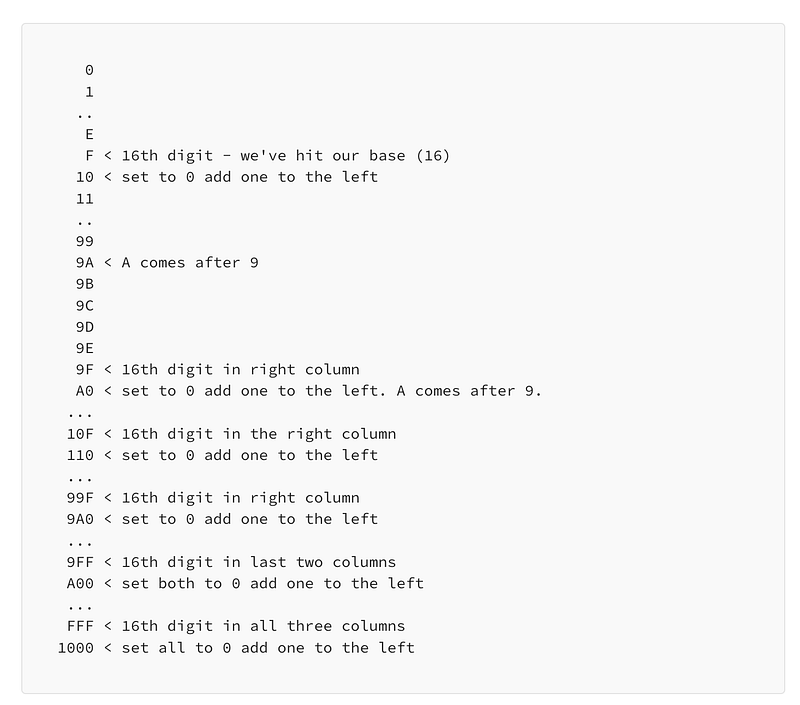
Once we hit the base (the 16th “digit”, which is F), we set the value to 0 and add one to the left:
Using the same logic from the last post we can map binary to hexadecimal and decimal numbers:
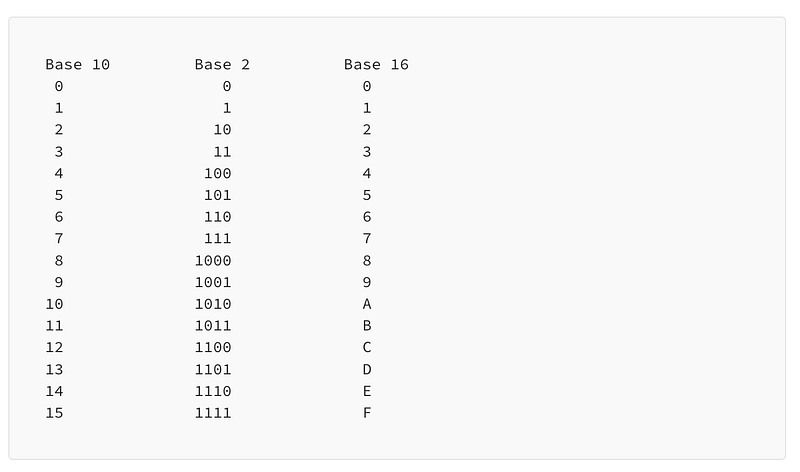
As explained in the last post, it may be handy to memorize some of these basic numbers.
Distinguishing hexadecimal numbers from decimal numbers
You might see hexadecimal written with a 0x in front of it to distinguish it from decimal. In other words:
Ox0
0x1
0x2
...
0xF
Why is this important? Consider the number 17 in decimal which happens to be the number that represents the UDP protocol in networking. If you have used firewalls or Network Access Control Lists (NACLs) in AWS you may have seen that you can set the protocol to 17 when you want to indicate that UDP is allowed in your firewall rule. 17 is the decimal representation of UDP.
Now if you start learning about networking packet headers you’ll learn that there’s a field in the IP packet header that defines the protocol the packet contains. When you’re looking at a packet in hexadecimal format you’re going to see that the UDP protocol is represented as the number 11.
So if I say the protocol is number 11 — you’ll want to know if I’m talking about number 11 in hexadecimal, or decimal. Because the number 11 in decimal is a completely different protocol according to IANA (Internet Assigned Numbers Authority):
If I just say protocol 11 it could mean Network Voice Protocol:
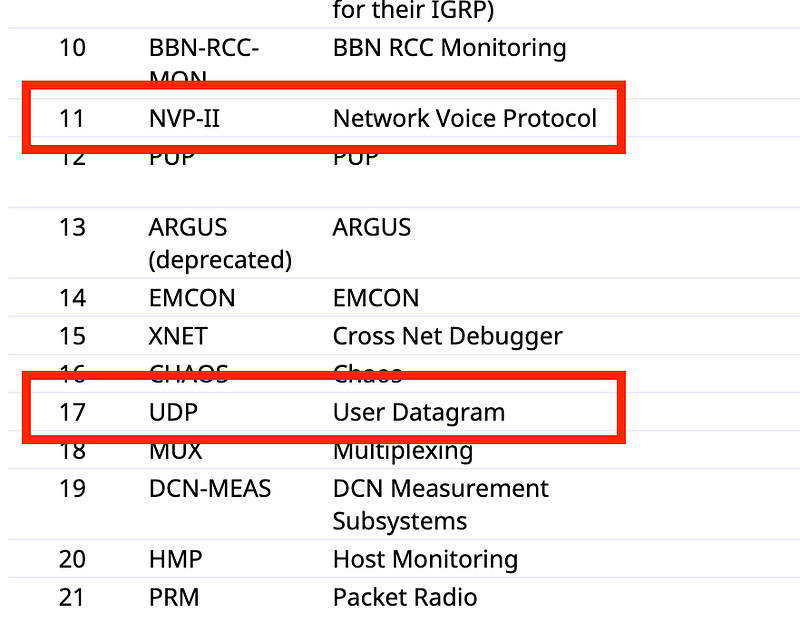
But what I might have meant was protocol 0x11 in hexadecimal which is 17 in decimal which is the UDP protocol.
That’s why it’s important to write hexadecimal numbers with a prefix of 0x.
Counting in hexadecimal
Counting works in a similar way to the last post if you want to use my particular method of counting in any numbering system. When you hit the digit that exceeds the base, set it to 0 and add 1 to the left.
If you don’t understand what I mean by setting the digit to zero and adding one to the left, you might want to go back and read the last post where I explained that in a lot more detail.
In hexadecimal:
- Digits 0–9 match counting in decimal.
- When you add 1 to 9 it becomes A.
- When you add 1 to A it becomes B and so on up to F.
- When you add one to F you need to set it to 0 and add one to left because you’ve hit the base of the numbering system.
Let’s do some counting in hex. I skipped over some digits so you can see the transitions. You can use online calculators to validate the results.
To verify that I have counted correctly I can use this nifty command to print out hexadecimal values for various decimal ranges:
seq 150 165 | while read n; do printf "%04X \n " $n; doneI modified it slightly from one of the answers in this post:
In the above example, I want to display the digits between 150 and 165 in hex. The output shows that I have correctly transitioned 9F to A0. The output includes two leading 0s but those do not change the value of my hexadecimal characters.
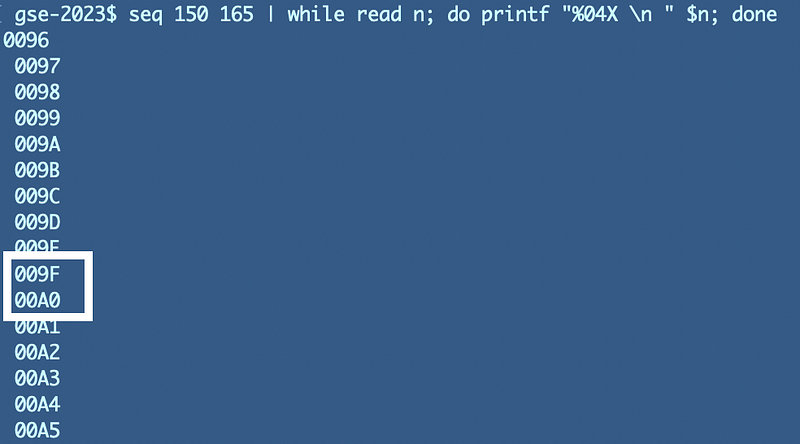
To reiterate when we hit the 16th digit (F) we changed it to 0 and added 1 to the left. The left was 9 and in hexadecimal the next digit is A. So we ended up with A0.
Now that you know how to count in hexadecimal let’s translate hexadecimal like this:
4D 61 74 68
to binary, decimal, and text in some upcoming posts.
Follow for updates.
Teri Radichel | © 2nd Sight Lab 2023
About Teri Radichel:
~~~~~~~~~~~~~~~~~~~~
⭐️ Author: Cybersecurity Books
⭐️ Presentations: Presentations by Teri Radichel
⭐️ Recognition: SANS Award, AWS Security Hero, IANS Faculty
⭐️ Certifications: SANS ~ GSE 240
⭐️ Education: BA Business, Master of Software Engineering, Master of Infosec
⭐️ Company: Penetration Tests, Assessments, Phone Consulting ~ 2nd Sight Lab
Need Help With Cybersecurity, Cloud, or Application Security?
~~~~~~~~~~~~~~~~~~~~~~~~~~~~~~~~~~~~~~~~~~~~~~~~~~~~~~~~~~~~~
🔒 Request a penetration test or security assessment
🔒 Schedule a consulting call
🔒 Cybersecurity Speaker for PresentationFollow for more stories like this:
~~~~~~~~~~~~~~~~~~~~~~~~~~~~~~~~~~~~~~~~~~~~~~~~~~~~~~~~~~~~~
❤️ Sign Up my Medium Email List
❤️ Twitter: @teriradichel
❤️ LinkedIn: https://www.linkedin.com/in/teriradichel
❤️ Mastodon: @teriradichel@infosec.exchange
❤️ Facebook: 2nd Sight Lab
❤️ YouTube: @2ndsightlab


