Numbering systems (base 2, base 10, base 16)
CM.2 Counting in different numeric languages and why it matters in cybersecurity
~~~~~~~~~~~~~~~~~~~~~~~~~~~~~~~~~~~~~~~~~~~~~~~~~~~~~~~~~~~
⚙️ Part of my series on Automating Cybersecurity Metrics. The Code.
🔒 Related Stories: Cybersecurity Math | Cybersecurity
💻 Free Content on Jobs in Cybersecurity | ✉️ Sign up for the Email List
~~~~~~~~~~~~~~~~~~~~~~~~~~~~~~~~~~~~~~~~~~~~~~~~~~~~~~~~~~~
In my last post I introduced this series on the mathematical basis for cybersecurity analysis.
Often in cybersecurity we’re looking at low level data that is in a different format than we’re used to reading as humans. Why is that? Because it’s faster for computers and networking equipment to process this data in these other formats.
Why do computers and networks process data in different formats than those we can easily read? A computer needs a way to physically store and operate on the data on a piece of hardware. How is a piece of metal going to represent a word in the English or any other human language? In the case of computers, it’s physically making changes to hardware to represent data.
Here’s the definition of a computer circuit from Encyclopedia Brittanica:
Computer circuits are binary in concept, having only two possible states. They use on-off switches (transistors) that are electrically opened and closed in nanoseconds and picoseconds (billionths and trillionths of a second).
Let’s start from what you see on the screen and work our way backwards to what gets stored on the computer hardware. Storing and displaying data on a computer is like a switchboard where things get turned on and off to represent the word you are writing. Consider how this scoreboard works. How does the scoreboard represent the number 16 compared to how it writes the number 20? The scoreboard turns on different lights to represent the number.
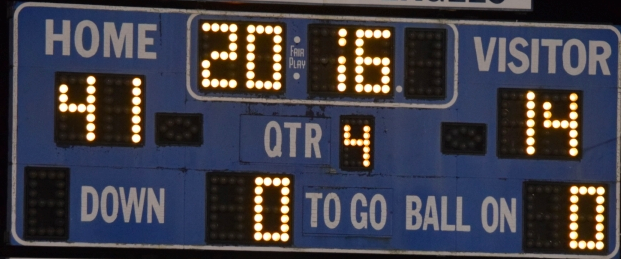
A computer screen works similar to the above to graphically represent data. You have to know which pixels to turn on and what color to make them to represent a picture on a computer screen. That’s how a computer screen translates physical hardware and light into something that you can visually understand.
I explained in another post how I programmed in TI basic when I was 12 and wrote a program that displayed an American flag. I literally set the color code of each pixel on the screen to create my flag. My flag had a few more pixels than this but this graphic gives you an idea what I mean. Each pixel (represented by a box in the grid below) is a different color to come up with a picture that looks something like an American flag. The more and smaller pixels we use, the closer we can come to something that looks closer to an actual America flag with 50 stars and proper spacing. It might take many pixels to create a single star that looks more realistic.
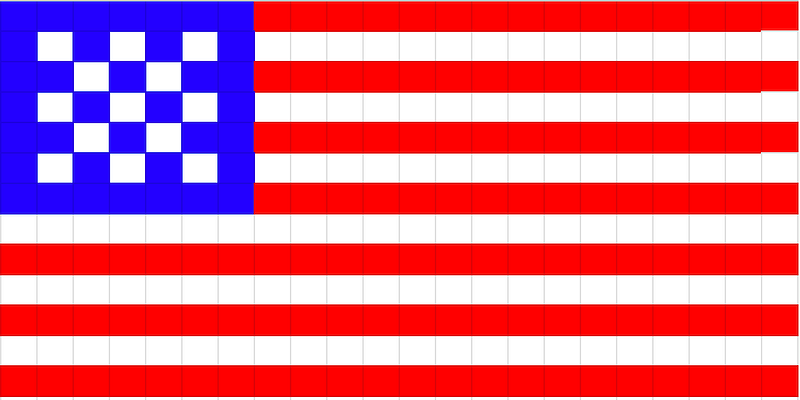
Things were much simpler then and much more rudimentary — and pixels were huge relative to today — like those lights on the scoreboard above.
Computer speak
At the lowest level, computers “speak” in numbers, not words or graphics. Data is stored and processed using on-off switches that translate to numbers that form a language that the computer understands. The numbers a computer understands get translated to something that gets displayed on a computer screen that a human can read. In addition to speaking in numbers, computers use a different numbering system (called binary) than the one you use to keep score at a basketball or football game (called decimal).
To display a letter such as “A” in the format a human understands, the computer must translate what it has stored in a numeric format to the number code that represents a letter. Then the software that displays words on the screen translates that numeric code for the letter you want to see into the graphical format that a human can read.
To see what I mean take a look at this portion of a conversion table from Rapid Tables. If you want to display the letter T (for Teri!) that is is represented in at the lowest level on a computer as a series of switches turned on and off. On is represented by 1 and off is represented by 0.
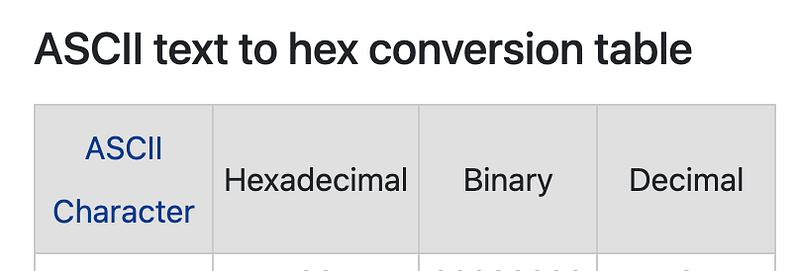
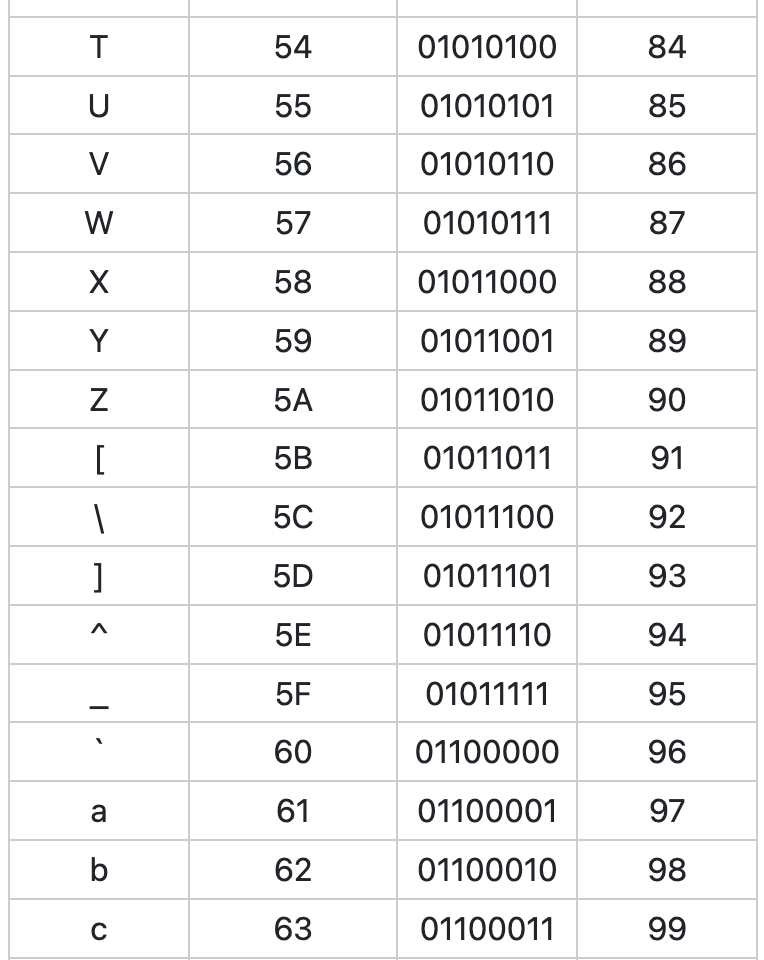
In the table above you can see the letter T is represented as 01010100 in the third column. That’s a representation of the letter in binary format. Binary is the language computers speak. If a computer needs to store a T it has 8 switches an it turns some of them on and some of them off to represent a T. Computers operate in binary as that most closely aligns with the physical switches they use to store and process data. The 1s and 0s relate to switches being turned on and off.

It wouldn’t make sense to translate 01011010 to T every time the computer needs to process the character T. That would be like you translating the word “hello” to “bonjour” and back every time you wanted to say “hello” to someone. Instead you just speak the language you know. You only translate “hello” to “bonjour” if you happen to be in Quebec or France or somewhere else where they natively speak French. If you don’t translate “hello” to “bonjour” the person you are speaking to might not understand you.
If you are a programmer you might have seen something like this:
char(84)That’s a representation of the letter T using the decimal number that is the equivalent of 01010100. You can see in the table above that the decimal column above contains 84. The decimal number is the number you’re used to using on a day to day basis. It’s easier for you to read, understand and remember char(84) compared to char(01010100). 84 is also shorter to write and takes up less space visually.
If you tried to write char(01010100) in your programming language that may or may not work. That depends on whether the programming language you are using has been written to understand binary, or if it is expecting to translate a decimal number back to a language the computer understands. This may depend on the libraries in your application or the operating system as well.
In some applications, such as Wireshark that I explained how to use in a past post to sniff network traffic, you will see characters represented as hexadecimal numbers.
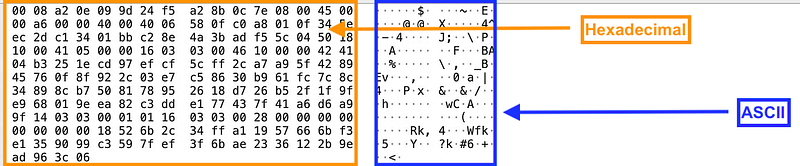
What is that? Well, a hexadecimal number can be translated to either binary or decimal. A hexadecimal number takes up less space on the screen than either a decimal or a binary number. Take a look at the letters x, y, z in our chart above. The letter x is represented as 120 in decimal, but using hexadecimal it can be represented in only two letters — 78. We can view the data more compactly.
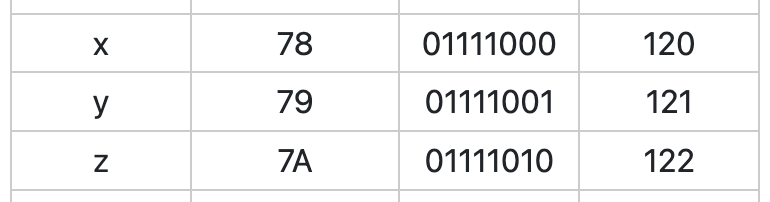
In addition, hexadecimal translates more easily to binary because you can easily divide any hexadecimal number by 2.
By the way, why does the ASCII text above look like gibberish instead of something human-readable? Because it is encrypted or encoded. I cover those topics in my book at the bottom of my post and may touch on them in this blog more later.
The dots represent values that do not translate to an ASCII character. Consider a number that does not exist in the above table. How would you translate to that to a character?
ASCII (American Standard Code for Information Interchange) is a way to translate characters from computer-speak into letters used in the English language. What if you are trying to represent Chinese characters? Well, now we have another translation problem. We need to translate ASCII characters to Chinese characters which has it’s own set of challenges. Now many computer systems will use Unicode instead, which attempts to maintain a global mapping of characters in any language to a code that a computer can understand.
Refer to the last post where I explained that 01001101 01100001 01110100 01101000 is “Math” in binary. Notice in the above table that lower case t and uppercase T are represented by different binary numbers. Can you write MATH in binary? I already showed you the code for the letter T. :-)
Use the chart at the bottom of this page. You can check to see if your answer is correct using the online tool at the top.
Why hexadecimal instead of decimal?
I mentioned above that we use hexadecimal instead of decimal because it’s divisible by two so easier to translate to binary. Let’s think about that concept in terms of decimal.
Count to 100 by 10’s.
10, 20, 30, 40, 50, 60, 70, 80, 90, 100
Let’s say you wanted to build system where flipping a light switch on represents 10. You would need 10 switches.
Now let’s say you designed your system so that each switch represented 9 instead. How may switches would you need to turn on to represent 100?
9, 18, 27, 36, 45, 54, 63, 72, 81, 90, 99 …???
We can’t evenly get to 100. We’d need some work around to make our use of switches that represent 9 digits to represent the number 100. It would be easier to translate our switches to count to 100 if we use a number that we can divide into 100 and get a result with no remainder.
In the case of computers we have the opposite problem. We are starting with switches that can have a value of up to 2 positions. Therefore if we use a numbering system that divides into 2 we can easily translate from our condensed numbering system (hexadecimal) back to binary. This is a much bigger topic that I am oversimplifying, but it helps you get the idea that low level system designers picked hexadecimal for reason. It wasn’t just a random numbering system picked out of a hat.
Do I really need to know this?
The translation of numbers in one base numbering system to another is like learning a foreign language. Over time, you may actually start to recognize the values in alternate formats without the need to translate them, if you spend enough time doing it.
Depending on your job, you may never need to translate numbers and data back to binary and hexadecimal. But understanding how these things work, even at a high level, can help you write programs that are faster and more accurate. Those who understand how numbers get translated around in applications and computers can choose appropriate programming languages and libraries that process data efficiently. They will also understand problems related to translating decimal numbers into binary which can lead to rounding errors.
Attackers use this knowledge of low level translations and storage mechanisms to breach computer systems and networking. Let’s say you wrote a filter for your program to ensure that an attacker cannot enter the ampersand (&) into a text box in a web form. Well, as a pentester, I know that I can simply use a different types of encoding (there are many) of the ampersand to bypass that filter. Which one works depends on how your programming language of choice processes the data I pass in, and where the data gets displayed on a screen. This is why filtering out characters to solve a security problem often doesn’t work. You need to understand and validate that your application only accepts what it is allowed and weeds out the rest.
Numbering System Base
I showed you how to represent the letter “T” and the letter “x” above using different numbering systems. Numbering systems have a base.
We will consider the following numbering systems here for the purposes of our discussion:
Binary: Base 2
Decimal: Base 10
Hexadecimal: Base 16
When we’re dealing with computers, often we are using binary (base 2) or hexadecimal (base 16). We often translate these numbers to a system we are more familiar with and understand — base 10. That’s the system you learned when you were a toddler. Count to 10…1, 2, 3, 4, 5, 6, 7, 8, 9, 10.
But what is a base actually?
Here’s an explanation I created to understand bases and numbering systems by using it in practice and visualizing it.
Start counting in single digits as per usual, starting with 0 (i.e. 0, 1, 2, 3, 4). You are using decimal or base 10. Remember to start with zero and that counts as your first digit. We are going to count up to 10 digits.
Count up to 10 digits:
---------------------
1st digit:  0
2nd digit:  1
3rd digit:  2
4th digit:  3
5th digit:  4
6th digit:  5
7th digit:  6
8th digit:  7
9th digit:  8
10th digit: 9
Every time you reach the base number of digits (10 digits in this case), set the digit to 0 and add one to the left. That gives us now two columns of digits.
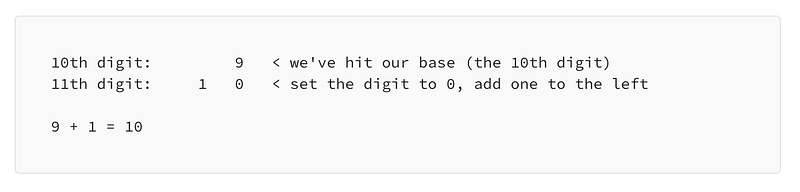
Now you would continue adding 1 to your digit farthest to the right. Whenever you hit the base digit (10th digit), you add one to the left. Since we have a number to the left now, whenever our right most column hits our base number of digits, the number to the left increases by one.
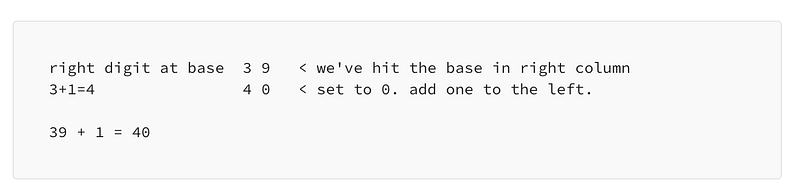
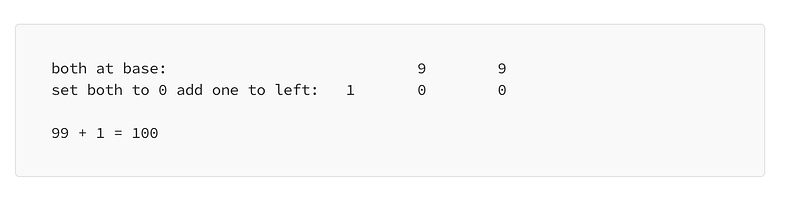
When your left digit hits the base or 10th digit, you set that left column digit to 0 and add a one to the left of it. In other words when you are counting and you get to 99, both numbers have hit the base, so set both digits to 0 and add 1 to the left.
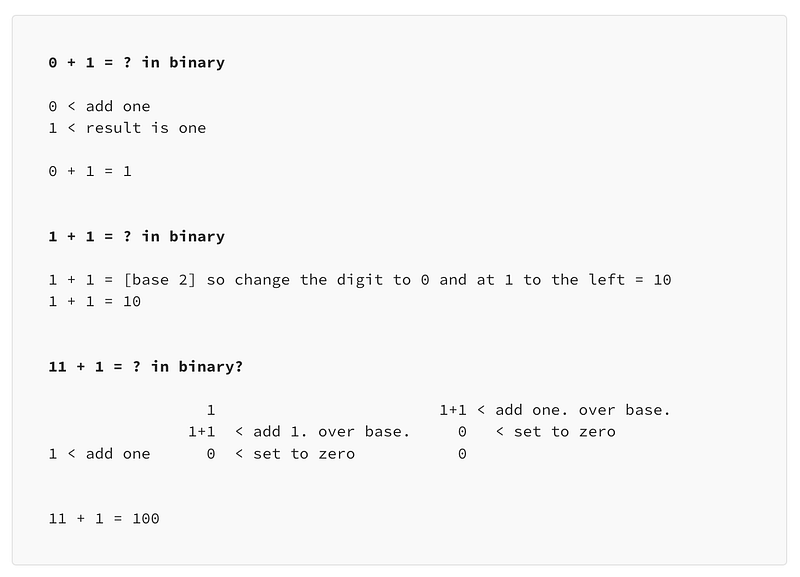
Let’s do the same thing in base 2, except this time let’s count up to 15.
Just think back to the formula and visualize it, if it helps.
Any time you hit the number of base digits (2)
- set the digit to zero
- add one to the left.
If the value to the left has hit the base number of digits
- set the value to 0
- add one to the left.
In greater detail.
Here’s a visualization of counting in base 2 compared to base 10:
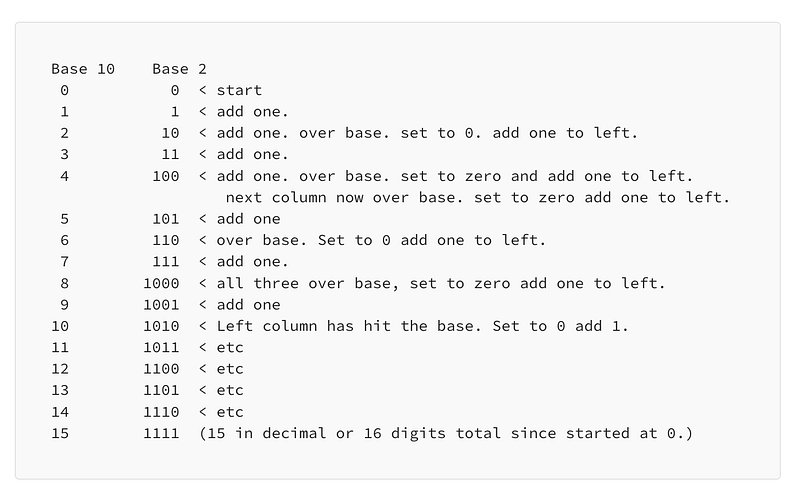
That is my personal way of trying to make sense of the concept of number basing systems in a logical or visual manner — without a mathematical formula or exponentials. I’m thinking about the physical representation, the same way a computer would think about it. A computer would need to be flipping switches on and off to represent all those ones and zeros.
To help yourself understand it, try writing the table above from scratch and think through it. Add one digit at a time until you hit the base. Then set the digit to zero and add one to the left.
Memorize common calculations
The most important thing to help me understand this initially, was to write it out. You also need to practice until it becomes second nature if you need to use and understand the translations.
To make it easier to quickly translate certain common numbers you can create flash cards and memorize values — the same way you do with math facts. When I say what is “7 x 7” most of you don’t sit there and calculate it out like I’m doing above, right? You likely remember from teachers like my parents drilling it into your brain through math facts in grade school that 7 x 7 = 49. You probably don’t even need to think about it (if you studied your math facts!)
What numbers come up regularly that you might want to to memorize or have handy in a chart at least? Maybe for networking 0–15 (16 digits). Those are the numbers I’ve provided to you above. If you’re working in networking and computers you’re going to see those numbers a lot and it may help to be able to quickly translate those back to decimal, or even hexadecimal.
Why do we care about binary?
You’ve probably seen screens full of 1’s and 0’s in graphics used generically to represent data on computers in marketing materials. All data is ultimately represented in 1’s and 0’s when we’re working with computers and networks. These ones and 0’s are referred to as “bits.” They are the smallest unit of data a computer processes.
Computers store and process data in a binary format by “flipping bits” on and off. You can think of a 1 in binary as a bit that has been flipped on. The 0 represents a bit that has been flipped off or vise versa. A bit that is on represents 1 and a bit that is flipped off represents 0.
Most of the time we’re not concerned with the individual bits that a computer is processing when we’re interacting with it. We are generally viewing the data in some more human friendly format. The computer is translating the things we understand to the things the computer or networking equipment understands for us.
However, if you start working in networking, you will learn about something called “packet headers.” When sending data over the network, different devices along the way read these headers to understand what to do with a packet and where to send it.
In some cases, an individual bit (called a tcp flag), is set either to 1 or 0. This single bit in a packet can completely change the result of what happens to a packet. Those single bit indicators tell a networking device that a packet should be processed or dropped, for example. When something is not working, we may need to inspect these individual bits in a packet header to understand what is happening as I had to do recently while investigating strange issues on my network.
Additionally, malware might use something called a bit flipping attack. As explained in this Wikipedia article that could change a value in a cipher text (encrypted data) such that an attacker receives $10,000 instead of $1,000 if an attacker can figure out which bits to flip when a cryptographic flaw exists.
Some numbers may not be stored precisely on computers in binary format which can lead to rounding errors in financial programs.
Those who test computer programs need to be aware of this problem. Programmers need to ensure they code works properly on whatever type of hardware they run their programs. Security professionals need to understand how a malicious insider in a company might use the above knowledge to siphon off money from financial systems.
Bits matter!
I’ll write more about numbering and math on computers as time allows. I’ll also be getting back to my cloud governance and metrics topic shortly. I’m unfortunately distracted by another objective at the moment but almost done.
Follow for updates.
Teri Radichel | © 2nd Sight Lab 2023
About Teri Radichel:
~~~~~~~~~~~~~~~~~~~~
⭐️ Author: Cybersecurity Books
⭐️ Presentations: Presentations by Teri Radichel
⭐️ Recognition: SANS Award, AWS Security Hero, IANS Faculty
⭐️ Certifications: SANS ~ GSE 240
⭐️ Education: BA Business, Master of Software Engineering, Master of Infosec
⭐️ Company: Penetration Tests, Assessments, Phone Consulting ~ 2nd Sight Lab
Need Help With Cybersecurity, Cloud, or Application Security?
~~~~~~~~~~~~~~~~~~~~~~~~~~~~~~~~~~~~~~~~~~~~~~~~~~~~~~~~~~~~~
🔒 Request a penetration test or security assessment
🔒 Schedule a consulting call
🔒 Cybersecurity Speaker for PresentationFollow for more stories like this:
~~~~~~~~~~~~~~~~~~~~~~~~~~~~~~~~~~~~~~~~~~~~~~~~~~~~~~~~~~~~~
❤️ Sign Up my Medium Email List
❤️ Twitter: @teriradichel
❤️ LinkedIn: https://www.linkedin.com/in/teriradichel
❤️ Mastodon: @teriradichel@infosec.exchange
❤️ Facebook: 2nd Sight Lab
❤️ YouTube: @2ndsightlab