avatarVinoth Kumar Karuppuchamy

Free AI web copilot to create summaries, insights and extended knowledge, download it at here

2483

Abstract

ailability</li><li>Scalability & Elasticity</li><li>Redundancy & Disaster Recovery</li><li>Better resource costs</li></ol><p id="4a8b"><b>On Demand Access</b></p><p id="79fd">With cloud computing,</p><p id="995d">“You get whatever you want, wherever you want, whenever you want.”</p><p id="a785">Businesses can simply get a physical machine or a virtual storage device in a desired location whenever they need, on demand.</p><p id="5d4c"><b>High Availability</b></p><p id="5351">Your cloud computing resources come with upto 99.99% availability SLAs. Once allocated, they are literally never be unavailable. This could be arguable for a few resources but this mostly is the case.</p><p id="5eaf"><b>Scalability & Elasticity</b></p><p id="67b2">At any point of time, you can scale up or scale down your resources. Say you have one virtual machine hosting your application at time, you can choose to scale it to say 5 machines when there is heavy load and you can then scale it down to 1 machine when the load is normal.</p><p id="c733"><b>Redundancy & Disaster Recovery</b></p><p id="9d7d">With cloud computing, you get a high percentage of redundancy with services and storages offered. Say you have data stored on storage in Region A, it can easily be replicated in Region B to facilitate failover or to serve customers in Region B.</p><p id="f81e">If in case there is is disaster in one of the regions your application is hosted, there are in place mechanisms to facilitate faster and smoother recovery to another region or to another cloud or even to your in-house data centers.</p><p id="229e"><b>Better Costs</b></p><p id="7377">With cloud, “you pay for only what you use” for that period. You do not have to pay for buying physical machines or for infrastructure setup and maintenance and security setup, they are all available in house.</p><p id="88db">These are just few of the many advantages of embracing cloud. There are too many to point out here individually.</p><blockquote id="6da8"><p><b>V. Basic Cloud Offerings:</b></p></blockquote><p id="7723">If you are reading about cloud or know cloud already, you must already be aware of three basics offerings from cloud namely:</p><p id="8d76"><b>IaaS — Infrastructure as a Service</b></p><p id="e441">In this the cloud providers are responsible for providing customers with the infrastructure that is needed for development or hosting their applications such as virtual machines. Customers are responsible f

Options

or maintaining anything that runs on top of the infrastructure such as runtimes, OS, etc…</p><p id="ebc9"><b>PaaS — Platform as a Service</b></p><p id="058c">In PaaS, customers are provided with all the infrastructure and components needed to host their application. Cloud provider basically takes care of underlying infrastructure including OS, runtimes, storage, etc… You just have to code and run your application.</p><p id="961a"><b>SaaS — Software as a Service</b></p><p id="6fd9">In SaaS, the customer can access all the needed application services over the internet. GSuite, a comprehensive suite of office offerings such as email, worksheets, etc.. from google is an example of SaaS.</p><p id="83db">Below picture from <a href="https://en.wikipedia.org/wiki/Cloud_computing">wikipedia</a> provides a high level overview of these three cloud offerings.</p><figure id="ff05"><img src="https://cdn-images-1.readmedium.com/v2/resize:fit:800/1*RHntBcOFgc5MNSzm9Z7HrQ.png"><figcaption></figcaption></figure><p id="f5cb">Though, Cloud has now diversified into many more offerings these three form the base.</p><p id="2d24">Wells that’s it for now. Do check my other articles on <a href="https://readmedium.com/containers-virtual-machines-and-physical-systems-the-know-how-9d7b331a2c1a">containers</a>, <a href="https://readmedium.com/docker-what-is-it-how-does-it-work-8f006946f4fc">docker </a>and <a href="https://readmedium.com/running-your-application-as-docker-container-2129954ad59d">running your application on docker container</a> if you want to learn what these buzzwords mean and want to understand them.</p><p id="fd7e">Thank you for reading! Keep learning!!</p><figure id="1ef4"><img src="https://cdn-images-1.readmedium.com/v2/resize:fit:800/0*Piks8Tu6xUYpF4DU"><figcaption></figcaption></figure><p id="9b5e"><b>Follow us on <a href="https://twitter.com/joinfaun">Twitter</a> </b>🐦<b> and <a href="https://www.facebook.com/faun.dev/">Facebook</a> </b>👥<b> and join our <a href="https://www.facebook.com/groups/364904580892967/">Facebook Group</a> </b>💬<b>.</b></p><p id="c972"><b>To join our community Slack </b>🗣️ <b>and read our weekly Faun topics </b>🗞️,<b> click here⬇</b></p><figure id="83d1"><img src="https://cdn-images-1.readmedium.com/v2/resize:fit:800/0*oSdFkACJxs5iy1oR"><figcaption></figcaption></figure><h2 id="3062">If this post was helpful, please click the clap 👏 button below a few times to show your support for the author! ⬇</h2></article></body>

Beginners guide to Cloud Computing

If you’re someone just getting started in cloud computing, this article is for you.

I. Decoding the myth

One of the first and foremost things that you have to understand is, what is cloud? Is it something in the sky ? or Does it mean resources that float in the cloud?

Or maybe it is a friendly monster from the sky!

If you think about cloud, physically it boils down to the below quote.
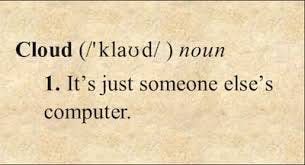
But does this abstract definition really define the cloud offerings of these days? Not one bit.

Though we can agree on this argument of cloud being someone’s else’s computer, it really doesn’t justify the offerings of cloud.

II. What is cloud computing?

Cloud computing is basically accessing storage and compute resources over the internet.

III. How is it helpful?

In today’s digital world, any business that operates needs a lot of computational resources to run their applications and has a lot of data which needs to be stored and processed. This is where cloud comes into picture.

Traditionally businesses used to host their applications and store their data on their in-house data centers. Data centers are physical server warehouses which are built and managed by businesses.

But with business owned data centers, you have certain drawbacks such as large investment to setup your own physical infrastructure and machines, higher operating costs especially when you have to scale your application or have to host it in a different place, maintenance and security overhead and so on.

Cloud computing comes to the rescue of businesses which cannot afford large investments, businesses which want to be more agile, businesses which want lesser infrastructure maintenance overhead.

IV. Some of the features of cloud

  1. On demand access
  2. High availability
  3. Scalability & Elasticity
  4. Redundancy & Disaster Recovery
  5. Better resource costs

On Demand Access

With cloud computing,

“You get whatever you want, wherever you want, whenever you want.”

Businesses can simply get a physical machine or a virtual storage device in a desired location whenever they need, on demand.

High Availability

Your cloud computing resources come with upto 99.99% availability SLAs. Once allocated, they are literally never be unavailable. This could be arguable for a few resources but this mostly is the case.

Scalability & Elasticity

At any point of time, you can scale up or scale down your resources. Say you have one virtual machine hosting your application at time, you can choose to scale it to say 5 machines when there is heavy load and you can then scale it down to 1 machine when the load is normal.

Redundancy & Disaster Recovery

With cloud computing, you get a high percentage of redundancy with services and storages offered. Say you have data stored on storage in Region A, it can easily be replicated in Region B to facilitate failover or to serve customers in Region B.

If in case there is is disaster in one of the regions your application is hosted, there are in place mechanisms to facilitate faster and smoother recovery to another region or to another cloud or even to your in-house data centers.

Better Costs

With cloud, “you pay for only what you use” for that period. You do not have to pay for buying physical machines or for infrastructure setup and maintenance and security setup, they are all available in house.

These are just few of the many advantages of embracing cloud. There are too many to point out here individually.

V. Basic Cloud Offerings:

If you are reading about cloud or know cloud already, you must already be aware of three basics offerings from cloud namely:

IaaS — Infrastructure as a Service

In this the cloud providers are responsible for providing customers with the infrastructure that is needed for development or hosting their applications such as virtual machines. Customers are responsible for maintaining anything that runs on top of the infrastructure such as runtimes, OS, etc…

PaaS — Platform as a Service

In PaaS, customers are provided with all the infrastructure and components needed to host their application. Cloud provider basically takes care of underlying infrastructure including OS, runtimes, storage, etc… You just have to code and run your application.

SaaS — Software as a Service

In SaaS, the customer can access all the needed application services over the internet. GSuite, a comprehensive suite of office offerings such as email, worksheets, etc.. from google is an example of SaaS.

Below picture from wikipedia provides a high level overview of these three cloud offerings.
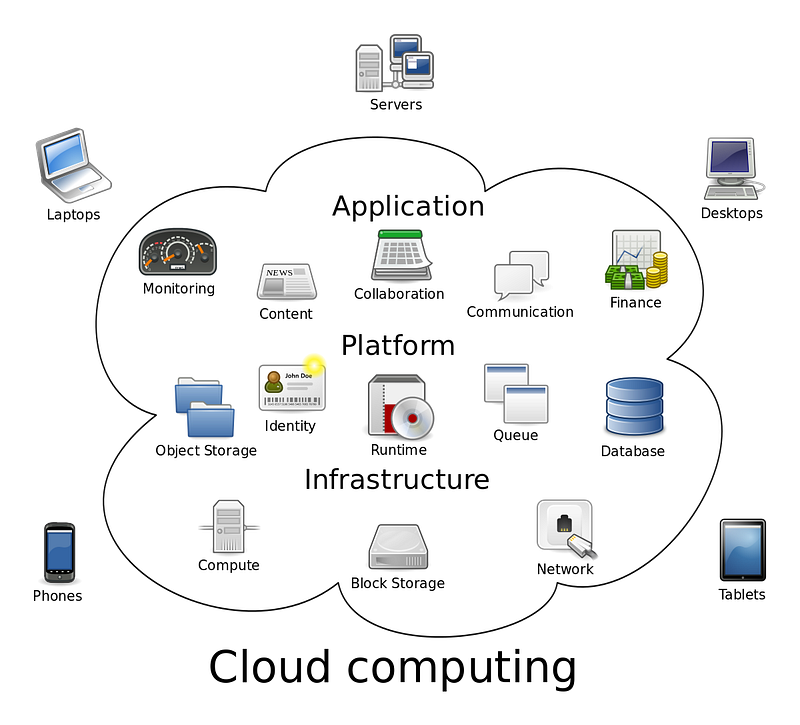
Though, Cloud has now diversified into many more offerings these three form the base.

Wells that’s it for now. Do check my other articles on containers, docker and running your application on docker container if you want to learn what these buzzwords mean and want to understand them.

Thank you for reading! Keep learning!!

Follow us on Twitter 🐦 and Facebook 👥 and join our Facebook Group 💬.

To join our community Slack 🗣️ and read our weekly Faun topics 🗞️, click here⬇

If this post was helpful, please click the clap 👏 button below a few times to show your support for the author! ⬇

Cloud Computing
Google Cloud Platform
AWS
Azure
Recommended from ReadMedium