avatarVinoth Kumar Karuppuchamy

Free AI web copilot to create summaries, insights and extended knowledge, download it at here

2548

Abstract

ware to generate your application container image. Below is an example docker file, which lists layers used to build an application image:</p><blockquote id="36f2"><p>FROM ubuntu:15.04 COPY . /app RUN make /app CMD python /app/app.py</p></blockquote><p id="a801">Once you have built a container image from docker file, you can run this image anywhere to create a container made up of all these image layers.</p><p id="692a">Below picture shows the container image made of read-only layers and a thin read/write container layer created on top of these layers created at run-time when a container is spun up.</p><figure id="6109"><img src="https://cdn-images-1.readmedium.com/v2/resize:fit:800/1*l8YiwkfvUQsG_uGv9OyJDw.jpeg"><figcaption>Container Image</figcaption></figure><p id="7600"><b>What constitutes docker?</b></p><p id="b65a">Docker or Docker engine is a client-server application that consists of three major components</p><p id="287d">1. Docker Daemon (dockerd) — Daemon process that runs in the background. It is responsible for creating container images, containers and managing them. This is your server.</p><p id="ce3e">2. REST APIs — Provides interface needed to talk with daemon and instruct it on what needs to be done.</p><p id="53d7">3. Docker Command Line Interface (docker) — Provides a way for us to connect with daemon process using APIs.</p><p id="00bc">Below picture shows how these three are interconnected.</p><figure id="de21"><img src="https://cdn-images-1.readmedium.com/v2/resize:fit:800/1*MYX0ClbWoitxS0RNUVvj8A.png"><figcaption>Docker Engine</figcaption></figure><p id="05ad"><b>Docker Work Flow</b></p><p id="9255">Below picture depicts a typical docker workflow:</p><p id="95d9">It consists of your docker client (say CLI), docker host that runs your docker daemon and registry storing your container images.</p><figure id="3d34"><img src="https://cdn-images-1.readmedium.com/v2/resize:fit:800/1*vkeWJzJ6LH_F0YlFMLEt8Q.png"><figcaption>Docker Architecture</figcaption></figure><p id="94c5">When you are working with docker you have to be familiar with 3 major docker commands.</p><p id="2530"><i> docker build</i> (in pic highlighted by ….)</p><p id="0aa9">This command is used to build a fresh image from your docker file and store it to your local docker image directory. This image can later be published to registry.</p><p id="124d"><i> docker pull</i> (in pic highlighted by — — —)</p><p id="217f">This command lets you pull an existing image from a docker registry and save it to your local docker image

Options

directory. Later on, this image can be used to spin up containers.</p><p id="a7b0"><i>$ docker run</i> (in pic highlighted by — . — . — )</p><p id="f8b5">This command lets you run a container out of an existing container image.</p><p id="002c">That’s it for now then. Thanks for reading! Hope this article helps you come to terms with some of the docker concepts. You can read more about these concepts in below links</p><div id="2e0d" class="link-block"> <a href="https://docs.docker.com/v17.09/engine/userguide/storagedriver/imagesandcontainers/#images-and-layers"> <div> <div> <h2>About images, containers, and storage drivers</h2> <div><h3>To use storage drivers effectively, you must understand how Docker builds and stores images. Then, you need an…</h3></div> <div><p>docs.docker.com</p></div> </div> <div> <div style="background-image: url(https://miro.readmedium.com/v2/resize:fit:320/0*Vc6SNT0iJsO03j1K)"></div> </div> </div> </a> </div><div id="bcdf" class="link-block"> <a href="https://docs.docker.com/engine/docker-overview/"> <div> <div> <h2>Docker overview</h2> <div><h3>Docker is an open platform for developing, shipping, and running applications. Docker enables you to separate your…</h3></div> <div><p>docs.docker.com</p></div> </div> <div> <div style="background-image: url(https://miro.readmedium.com/v2/resize:fit:320/0*8jzrIjsMqTZnppnP)"></div> </div> </div> </a> </div><figure id="1ef4"><img src="https://cdn-images-1.readmedium.com/v2/resize:fit:800/0*Piks8Tu6xUYpF4DU"><figcaption></figcaption></figure><p id="9b5e"><b>Follow us on <a href="https://twitter.com/joinfaun">Twitter</a> </b>🐦<b> and <a href="https://www.facebook.com/faun.dev/">Facebook</a> </b>👥<b> and join our <a href="https://www.facebook.com/groups/364904580892967/">Facebook Group</a> </b>💬<b>.</b></p><p id="c972"><b>To join our community Slack </b>🗣️ <b>and read our weekly Faun topics </b>🗞️,<b> click here⬇</b></p><figure id="83d1"><img src="https://cdn-images-1.readmedium.com/v2/resize:fit:800/0*oSdFkACJxs5iy1oR"><figcaption></figcaption></figure><h2 id="3062">If this post was helpful, please click the clap 👏 button below a few times to show your support for the author! ⬇</h2></article></body>

Docker — What is it? How does it work?

In this article, we will try to understand what is docker? how does it work? what are various docker components? and look at a simple docker workflow.

What is docker?

Docker provides a platform to develop, ship and run your applications anywhere.

What does this mean? Let’s look at the impact of docker in developing, shipping and running applications, individually.

Develop:

Using docker, you develop, build and package your application and it’s dependencies into a ‘container’.

Ship:

This container can be shipped as a ‘container image’ and published into registries such as dockerhub. Anyone who needs the container image can access them from these registries.

Run / Deploy:

Once you have the container image, without worrying much about the underlying environment, you can run your container image anywhere to bring up your container/application. A container can run the same anywhere as they are self-contained.

How is this made possible?

‘Build, ship and run any app, anywhere’ is made possible by using ‘containers’ and the way they are packaged and made available as ‘container images’ by platforms such as docker.

What are containers and container images?

Containers:

To oversimplify, Containers are super isolated processes that run on a host system. These processes have their own file system, network, user groups, processes, hostnames and everything needed to function as independent systems. They are lightweight as they use the host OS itself to run and only take up resources that are needed for your application to run and nothing else.

Though containers have been available in Linux for many years now, the ease at which you can create containers using docker and ease at which you can package docker container images and distribute them is the major reason for the boom in container industry in last few years. To know more about how containers have evolved, read my another blog about physical servers, VMs, and containers here.

Container images:

You stack up layer after layer of your application dependencies and application software to generate your application container image. Below is an example docker file, which lists layers used to build an application image:

FROM ubuntu:15.04 COPY . /app RUN make /app CMD python /app/app.py

Once you have built a container image from docker file, you can run this image anywhere to create a container made up of all these image layers.

Below picture shows the container image made of read-only layers and a thin read/write container layer created on top of these layers created at run-time when a container is spun up.
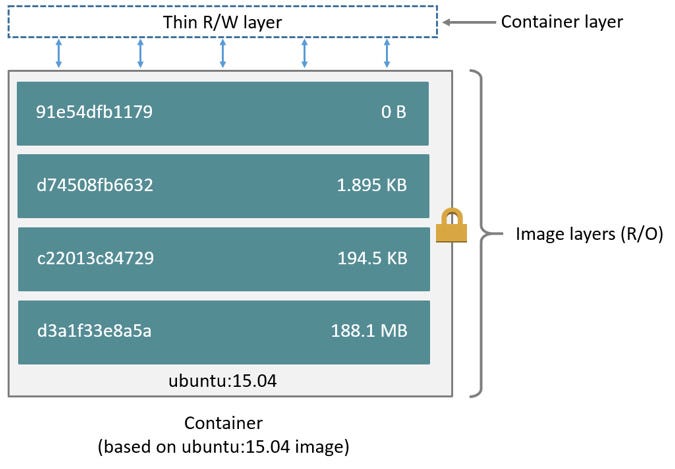
Container Image

What constitutes docker?

Docker or Docker engine is a client-server application that consists of three major components

1. Docker Daemon (dockerd) — Daemon process that runs in the background. It is responsible for creating container images, containers and managing them. This is your server.

2. REST APIs — Provides interface needed to talk with daemon and instruct it on what needs to be done.

3. Docker Command Line Interface (docker) — Provides a way for us to connect with daemon process using APIs.

Below picture shows how these three are interconnected.
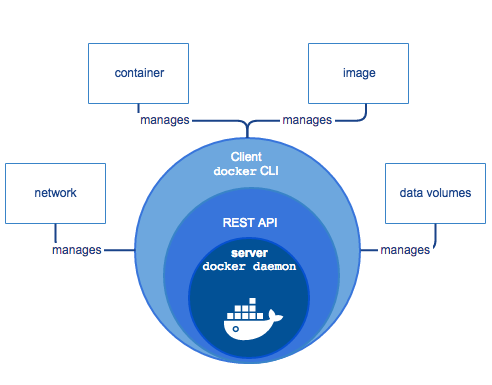
Docker Engine

Docker Work Flow

Below picture depicts a typical docker workflow:

It consists of your docker client (say CLI), docker host that runs your docker daemon and registry storing your container images.
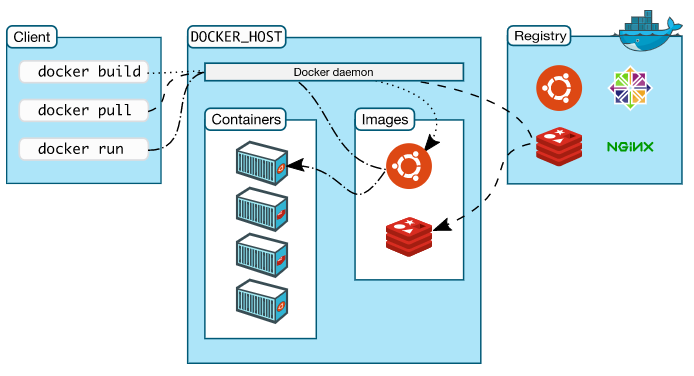
Docker Architecture

When you are working with docker you have to be familiar with 3 major docker commands.

$ docker build (in pic highlighted by ….)

This command is used to build a fresh image from your docker file and store it to your local docker image directory. This image can later be published to registry.

$ docker pull (in pic highlighted by — — —)

This command lets you pull an existing image from a docker registry and save it to your local docker image directory. Later on, this image can be used to spin up containers.

$ docker run (in pic highlighted by — . — . — )

This command lets you run a container out of an existing container image.

That’s it for now then. Thanks for reading! Hope this article helps you come to terms with some of the docker concepts. You can read more about these concepts in below links

Follow us on Twitter 🐦 and Facebook 👥 and join our Facebook Group 💬.

To join our community Slack 🗣️ and read our weekly Faun topics 🗞️, click here⬇

If this post was helpful, please click the clap 👏 button below a few times to show your support for the author! ⬇

Docker
Recommended from ReadMedium