
Containers, Virtual Machines and Physical Systems — The Know-how
Any application, web or otherwise, will need to be hosted on a system for it to function. These systems are often called as servers. for example, web applications have to be hosted on a powerful web server and made available over internet to serve web pages.
How these servers/systems have evolved over time and what physical systems, virtual machines and containers bring into the table?
Physical Systems / Servers:
Earlier days, Individual physical systems were used to host individual applications. Say, you need a web server to cater your web application, you will have to buy a dedicated physical machine with so and so configuration to power it up. Again if you need a mail server to cater your mailboxes, you have to buy a new physical system. Your physical infrastructure keeps growing as your need grows.
In most of the cases, these servers are underutilized i.e. say If I have a server with 8 GB RAM and 2 CPU cores, more often then not only less percentage of memory and computing power is utilized. Below picture depicts physical system infrastructure needed for an enterprise to have it’s own web, mail and file servers.
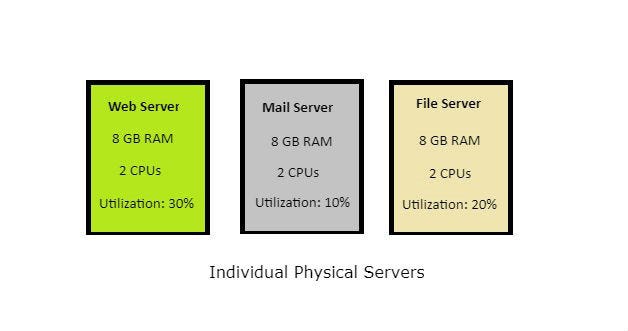
Having to buy a new set of hardware every time you need a server, low hardware utilization percentage, high maintenance costs are some of the problems with using individual physical servers.
Virtual Machines:
What does a virtual machine do, that makes it preferable over physical systems?
A Virtual machine provides a way to make a single physical system work as multiple isolated systems, resulting in higher infrastructure usage and reduced physical hardware infrastructure overhead.
How is it achieved?
Using hypervisor that runs on your host system, you can effectively split your underlying physical infrastructure into multiple smaller units that can run multiple isolated systems.
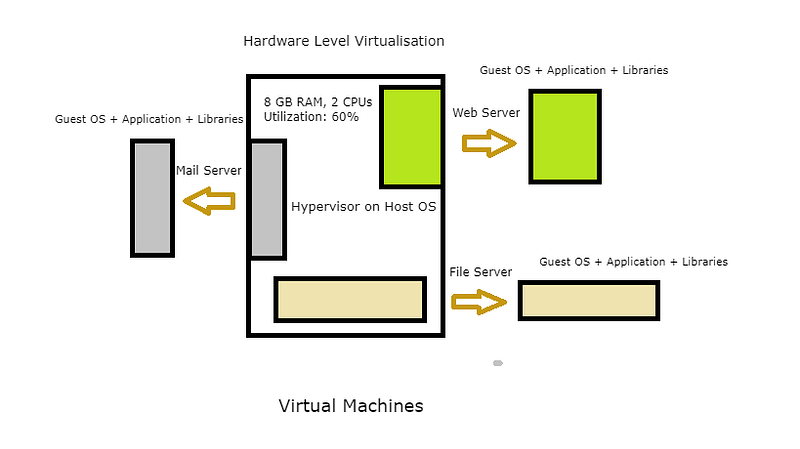
Say you have a system with 16GB RAM and 4 CPU cores which runs on Windows, using a VirtualBox(Oracle Open Source hypervisor) in your host system, you can bring up another system that runs on CentOS or Ubuntu with 8 GB RAM and 2 CPU cores. You can then host say Apache web server on your Guest Ubuntu Virtual Machine while a windows server runs on your host. This is OS-level virtualization as a newly created system runs on its own guest OS and not on the host OS.
Virtual machines eliminate the need for a new physical system whenever you need a new server and they provide a high level of isolation between the host and guest. They also have a high utilization percentage and fewer maintenance costs compared to individual physical systems.
Containers:
What are containers?
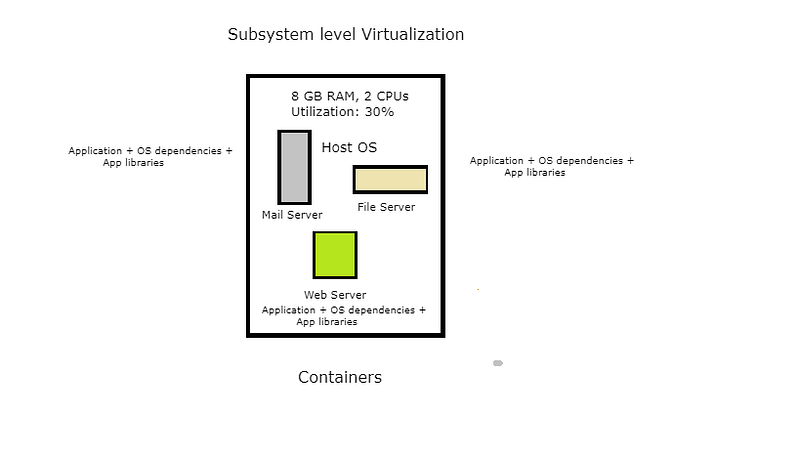
Containers enable virtualization in the sub-system level rather than hardware/OS level.
How is the virtualization achieved?
While hypervisors achieve virtualization by splitting hardware resources and running a separate set of OS on the virtualized hardware, containers utilize isolation at the subsystem level using namespaces and cgroups.
Before elaborating on namespaces and cgroups, let us first look at what are processes and how they relate to containers to better understand the inner works of a container.
Process is a program in running state. Say if you have an excel program open, you can see on your task manager that there is an excel process running in the background. A process has its own isolated memory. But it has to share other system resources such as the file system, network resources and user groups with other processes running on the system.
What if you can isolate a process or a set of processes completely? Say provide its own file system, it’s own network resources, user groups, its own hostname and everything else needed to function as a fully isolated entity? Tada… you have Containers. To say in Wes Higbee’s words, containers are system processes that run on steroids.
Now coming back to namespaces and cgroups.
Namespaces provide isolation for global system resources. If a process/processes belong to a namespace say ‘A’, it appears to the processes that they actually have access to all global resources, but in reality, they only have access to a small set of resources which are made available within namespace ‘A’. Thus effectively making the process run only on their own isolated subsystems.
Cgroups or Control groups allow a set of processes to be grouped together and provides the ability to control and track their resource(CPU/Memory/IO) usages.
Combining the ability of namespaces and cgroups that are available within Linux os kernel, you can create Containers.
There are various popular container runtimes such as Docker, rkt, LXC/LXD which make it easier for users to create containers rather than working with kernel namespaces and cgroups to create containers. These runtimes provide you with packaged container images for various applications which can then be simply run on your system to spin up a container, leveraging linux kernel namespaces, cgroups and security capabilities. Though containers have been available in Linux for many years now, Packaged container images which made it easy to distribute and create containers is what caused a major boom in the container industry in the last few years.
Containers are lightweight compared to VM and have very minimal resource utilization. Containers take up only as many resources as needed for a server or application that need to be hosted on them, unlike VMs which need their own OS along with server resources. Also when you have a container runtime, you can spin up a container in a fraction of seconds whereas VMs have a little overhead.
If you want to learn more about the containers, I recommend you to go through below resources
Containers and Images: The Big Picture by Wes Higbee — https://app.pluralsight.com/library/courses/containers-images-big-picture/table-of-contents
Beginners Guide to Containers Technology and How it Actually Works — https://www.youtube.com/watch?v=YsYzMPptB-k
Linux namespaces and cgroups manual pages:
http://man7.org/linux/man-pages/man7/namespaces.7.html
http://man7.org/linux/man-pages/man7/cgroups.7.html
Note: Concepts discussed here hold good for linux containers if you want to learn about windows containers please use the below article.

Follow us on Twitter 🐦 and Facebook 👥 and join our Facebook Group 💬.
To join our community Slack 🗣️ and read our weekly Faun topics 🗞️, click here⬇
