avatarJen-Hsuan Hsieh (Sean)

Free AI web copilot to create summaries, insights and extended knowledge, download it at here

7517

Abstract

1, and calculate the new checksum. Construct a new <code>IP datagram</code> (4) Craft the ARP request to find the MAC of the router B. Construct an <code>Ethernet datagram</code></li></ol><figure id="57c2"><img src="https://cdn-images-1.readmedium.com/v2/resize:fit:800/1*gUTltt8F1xam_LIFj2W_FA.jpeg"><figcaption></figcaption></figure><h2 id="5bf1">Troubleshooting — Traceroute</h2><p id="bffa">This tool can discover the path between two nodes, and give you information about hop along the way.</p><p id="11fd">It works through a manipulation technique of the TTL field at the IP level. The router will decrement TTL one. When the TTL reaches zero, the packet is discarded. The ICMP exceeds message will be sent back to the originating host</p><ul><li>Windows: <a href="https://support.microsoft.com/zh-tw/topic/%E5%A6%82%E4%BD%95%E4%BD%BF%E7%94%A8-tracert-%E7%96%91%E9%9B%A3%E6%8E%92%E8%A7%A3-windows-%E4%B8%AD%E7%9A%84-tcp-ip-%E5%95%8F%E9%A1%8C-e643d72b-2f4f-cdd6-09a0-fd2989c7ca8e">tracert</a></li></ul><figure id="f36e"><img src="https://cdn-images-1.readmedium.com/v2/resize:fit:800/1*_ezVfwzTWMkqfcZFBU-_Ww.png"><figcaption></figcaption></figure><ul><li>Mac OS/Linux: <a href="https://zh.m.wikipedia.org/zh-hant/Traceroute">traceroute</a></li></ul><figure id="a782"><img src="https://cdn-images-1.readmedium.com/v2/resize:fit:800/1*RBCNHQAlVvoq8waVR2bUig.png"><figcaption></figcaption></figure><h1 id="537e">Dynamic Host Configuration Protocol (DHCP)</h1><p id="da3c">DHCP is an application layer protocol that automates the configuration process of hosts on a network.</p><h2 id="e38f">IPv4 address type and DHCP</h2><p id="08bf">There are three types of IPv4 address</p><ul><li><code>Dynamic IP address</code>: reserved for clients</li><li><code>DHCP</code></li><li><code>Static IP address</code>: reserved for servers and network devices</li></ul><p id="3708">There are three types of DHCP</p><ul><li><code>Dynamic allocation</code>: the IP of the computer could be different almost every time it connects to the network</li><li><code>Automatic allocation</code>: the DHCP server is asked to keep track of which IP it’s assigned to certain devices in the past. The computer may be assigned to the same IP as possible</li><li><code>Fixed allocation</code>: require a manually specified list of MAC addresses and their corresponding IPs</li></ul><h2 id="61e9">Why do we need DHCP?</h2><p id="2123">For a bunch of devices like desktops or laptops or even mobile phones. It’s only important that they have an IP on the right network. It’s much less important which IP that is.</p><h2 id="0b90">DHCP Fingerprinting</h2><ul><li>DHCP Fingerprinting is a technique for identifying the requester of a DHCP lease</li><li>It’s a common way of passive fingerprinting technologies</li></ul><h2 id="1fa1">The allocating process of DHCP</h2><p id="21c0">Step 1. the DHCP client sends what’s known as a <code>DHCP discovery</code> message out onto the network (Broadcast)</p><figure id="7b55"><img src="https://cdn-images-1.readmedium.com/v2/resize:fit:800/1*49yIuNo95HjdMe5rbmvd4Q.jpeg"><figcaption></figcaption></figure><p id="3620">Step 2. the DHCP server would examine its own configuration and would make the decision on what kind of IP address to offer to the client (Broadcast)</p><figure id="a323"><img src="https://cdn-images-1.readmedium.com/v2/resize:fit:800/1*OyOr3_98t45yWUrn4HOOZQ.jpeg"><figcaption></figcaption></figure><p id="be7a">Step 3. The DHCP client responds the <code>DHCP request</code> (Broadcast)</p><figure id="8511"><img src="https://cdn-images-1.readmedium.com/v2/resize:fit:800/1*WNCd0nkvY5uOpIn3ioO1Dw.jpeg"><figcaption></figcaption></figure><p id="8af5">Step 4. The DHCP server sends the <code>DHCP ack</code> to the client. The networking stack on the client’s computer can use the configuration information (<a href="https://www.efficientip.com/glossary/dhcp-lease/">DHCP lease</a>) presented to it by the DHCP server</p><figure id="86f1"><img src="https://cdn-images-1.readmedium.com/v2/resize:fit:800/1*aPlc70xuQCdsfy07-Nb-Vw.jpeg"><figcaption></figcaption></figure><h1 id="0c3c">References</h1><ul><li><a href="https://notes.andywu.tw/2018/ip%E7%AD%89%E7%B4%9A%E8%88%87%E5%AD%90%E7%B6%B2%E8%B7%AF%E9%81%AE%E7%BD%A9%E4%BB%8B%E7%B4%B9/">IP等級與子網路遮罩介紹</a></li><li><a href="https://www.coursera.org/learn/computer-networking">The Bits and Bytes of Computer Networking</a></li><li><a href="https://app.gitbook.com/s/-M4M0G8PXRnA3yHgZCAL/chapter3-protocol-for-wireless-network/36zi-wang-lu-jian-de-tong-xun">3.6.子網路間的通訊</a></li><li><a href="https://www.fiber-optic-transceiver-module.com/vlan-vs-subnet.html">VLAN vs Subnet: What Are Their Differences?</a></li><li><a href="https://www.efficientip.com/glossary/dhcp-fingerprinting/">What is DHCP Fingerprinting?</a></li></ul><h1 id="5d5a">Summary</h1><p id="67b1"><i>Thanks for your patient. I am <a href="https://www.linkedin.com/in/jen-hsuan-hsieh-6a13347a/">Sean</a>. I work as a software engineer.</i></p><p id="95c5"><i>This article is my note. Please feel free to give me advice if any mistakes. I am looking forward to your feedback.</i></p><ul><li>Subscribe me</li></ul><div id="00b7" class="link-block"> <a href="https://medium.com/@seanhsieh_63050/membership"> <div> <div> <h2>Join Medium with my referral link — Jen-Hsuan Hsieh (Sean)</h2> <div><h3>As a Medium member, a portion of your membership fee goes to writers you read, and you get full access to every story…</h3></div> <div><p>medium.com</p></div> </div> <div> <div style="background-image: url(https://miro.readmedium.com/v2/resize:fit:320/0*HotGzJ9QwFkeUJCo)"></div> </div> </div> </a> </div><ul><li>The Facebook page for articles</li></ul><div id="633c" class="link-block"> <a href="https://www.facebook.com/imalayman"> <div> <div> <h2>A Layman</h2> <div><h3>A Layman. 81 likes. The page sharing the information about programming languages, algorithm, databases, devops and…</h3></div> <div><p>www.facebook.com</p></div> </div> <div> <div style="background-image: url(https://miro.readmedium.com/v2/resize:fit:320/0*7t8weBH0eq-il9Lq)"></div> </div> </div> </a> </div><ul><li>The latest side project: Daily Learning</li></ul><div id="af2a" class="link-block"> <a href="https://daily-learning.herokuapp.com/"> <div> <div> <h2>ALayman Daily Learning</h2> <div><h3>Daily learning provides articles, challenges, or videos to people who are also self-learner for programming.</h3></div> <div><p>daily-learning.herokuapp.com</p></div> </div> <div> <div style="background-image: url(https://miro.readmedium.com/v2/resize:fit:320/0*7820hJWu4Uq6b1eH)"></div> </div> </div> </a> </div><h1 id="e3cf">Related topics</h1><p id="0421">How to use the two-way binding in Knout.js and ReactJS?</p><div id="bb06" class="link-block"> <a href="https://readmedium.com/how-to-use-the-two-way-binding-in-knout-js-and-reactjs-afea126d0236"> <div> <div> <h2>How to use the two-way binding in Knout.js and ReactJS?</h2>

Options

     <div><h3>Components built by different frameworks must have the same action in one website. What we have to realize is how to…</h3></div>
            <div><p>medium.com</p></div>
          </div>
          <div>
            <div style="background-image: url(https://miro.readmedium.com/v2/resize:fit:320/1*SK9-uglh85Hl4wAh3OHQ_g.png)"></div>
          </div>
        </div>
      </a>
    </div><p id="7d15">Learn how to use SignalR to build a chatroom application</p><div id="ebac" class="link-block">
      <a href="https://readmedium.com/learn-how-to-use-signalr-to-build-a-chatroom-application-63e8bb8049ff">
        <div>
          <div>
            <h2>Learn how to use SignalR to build a chatroom application</h2>
            <div><h3>The Introduction of SignalR</h3></div>
            <div><p>medium.com</p></div>
          </div>
          <div>
            <div style="background-image: url(https://miro.readmedium.com/v2/resize:fit:320/1*j6m4jnkuRKkQ6rrkqLFeGA.png)"></div>
          </div>
        </div>
      </a>
    </div><p id="6252">My reflection of <effective sql="">:</effective></p><div id="a401" class="link-block">
      <a href="https://readmedium.com/how-to-design-the-data-model-my-reflection-of-effective-sql-adba6376588a">
        <div>
          <div>
            <h2>How To Design The Data Model? — My reflection of <effective sql=""></effective></h2>
            <div><h3><effective 61="" sql:="" specific="" ways="" to="" write="" better="" sql=""> gave me many tips for using the database.</effective></h3></div>
            <div><p>medium.com</p></div>
          </div>
          <div>
            <div style="background-image: url(https://miro.readmedium.com/v2/resize:fit:320/1*trYud-lAkP2-bXo82U9bQA.png)"></div>
          </div>
        </div>
      </a>
    </div><div id="249d" class="link-block">
      <a href="https://readmedium.com/how-to-design-the-index-my-reflection-of-effective-sql-b23d24212974">
        <div>
          <div>
            <h2>How To Design The Index? — My reflection of <effective sql=""></effective></h2>
            <div><h3><effective 61="" sql:="" specific="" ways="" to="" write="" better="" sql=""> gave me many tips for using the database.</effective></h3></div>
            <div><p>medium.com</p></div>
          </div>
          <div>
            <div style="background-image: url(https://miro.readmedium.com/v2/resize:fit:320/1*l4nVJqhrI1_sFMy2zQ8N0w.png)"></div>
          </div>
        </div>
      </a>
    </div><div id="6af9" class="link-block">
      <a href="https://readmedium.com/whats-if-we-can-t-change-the-design-my-reflection-of-effective-sql-3704b87c49b5">
        <div>
          <div>
            <h2>What if we can’t change the design? — My reflection of <effective sql=""> Part 3</effective></h2>
            <div><h3><effective 61="" sql:="" specific="" ways="" to="" write="" better="" sql=""> gave me many tips for using the database.</effective></h3></div>
            <div><p>medium.com</p></div>
          </div>
          <div>
            <div style="background-image: url(https://miro.readmedium.com/v2/resize:fit:320/1*jqUMxB_afM-552DjqBo3gA.png)"></div>
          </div>
        </div>
      </a>
    </div><p id="75de">IT &amp; Network:</p><div id="79e8" class="link-block">
      <a href="https://readmedium.com/back-to-the-basic-introduction-to-dns-f63aebe7bee7">
        <div>
          <div>
            <h2>Back to the basic: Introduction to DNS</h2>
            <div><h3>I decided to back to the basic and enhance these bits of knowledge. I also expect that this article can help someone…</h3></div>
            <div><p>medium.com</p></div>
          </div>
          <div>
            <div style="background-image: url(https://miro.readmedium.com/v2/resize:fit:320/1*m4nxtUjDkrX9lClzHnnboA.png)"></div>
          </div>
        </div>
      </a>
    </div><p id="e02d">Database:</p><div id="74a6" class="link-block">
      <a href="https://readmedium.com/learning-sql-server-part-1-locking-in-sql-server-807f79cbe9dd">
        <div>
          <div>
            <h2>Learning SQL server part.1 — lock and concurrency in SQL server</h2>
            <div><h3>Even though I used the SQL server for a long time, I didn’t know it very well. However, I received an alert with the…</h3></div>
            <div><p>medium.com</p></div>
          </div>
          <div>
            <div style="background-image: url(https://miro.readmedium.com/v2/resize:fit:320/1*f4tAhp00tEK51-KU73J5Yw.png)"></div>
          </div>
        </div>
      </a>
    </div><p id="fbfc">Software testing:</p><div id="c11a" class="link-block">
      <a href="https://readmedium.com/software-testing-automatic-test-with-newman-485c49d7dc1d">
        <div>
          <div>
            <h2>Software testing-Automatic test with Newman</h2>
            <div><h3>undefined</h3></div>
            <div><p>undefined</p></div>
          </div>
          <div>
            <div style="background-image: url(https://miro.readmedium.com/v2/resize:fit:320/1*cY7YmhMCMMiXr02fvrqH9A.png)"></div>
          </div>
        </div>
      </a>
    </div><p id="d27c">Debugging:</p><div id="0b33" class="link-block">
      <a href="https://readmedium.com/service-fabric-trouble-shooting-part-1-how-to-install-and-create-service-fabric-cluster-64aeaaf69657">
        <div>
          <div>
            <h2>Service Fabric trouble shooting part.1 — How to install and create Service Fabric cluster?</h2>
            <div><h3>Introduction</h3></div>
            <div><p>medium.com</p></div>
          </div>
          <div>
            <div style="background-image: url(https://miro.readmedium.com/v2/resize:fit:320/1*4P7GXp1lFjMzQUeC1sCweg.png)"></div>
          </div>
        </div>
      </a>
    </div><div id="4ce1" class="link-block">
      <a href="https://readmedium.com/how-to-attach-visual-studio-code-to-the-asp-net-core-process-in-the-service-fabric-cluster-831d83b7c0b0">
        <div>
          <div>
            <h2>Service Fabric trouble shooting part.2 — How to attach Visual studio code?</h2>
            <div><h3>ASP NET core, Service Fabric</h3></div>
            <div><p>medium.com</p></div>
          </div>
          <div>
            <div style="background-image: url(https://miro.readmedium.com/v2/resize:fit:320/1*jBgxd0uWizZ8I4pH57RfhQ.png)"></div>
          </div>
        </div>
      </a>
    </div><p id="c65c">DevOps:</p><div id="0acf" class="link-block">
      <a href="https://readmedium.com/devops-introduction-to-opserver-10427f8c5139">
        <div>
          <div>
            <h2>[DevOps] Introduction to Opserver</h2>
            <div><h3>Introduction</h3></div>
            <div><p> to Opserver

Introductionmedium.com</p></div> </div> <div> <div style="background-image: url(https://miro.readmedium.com/v2/resize:fit:320/1*yUfKnntVMJ7p_caQ4G2j3Q.png)"></div> </div> </div> </a> </div></article></body>

Back to the Basics: Introduction to DHCP, Subnetting, and Routing
Introduction

This article is the sequel to the Back to basics: Introduction to DNS. The network is a piece of essential knowledge for developers, especially for people who work in the network communication equipment industry.

Let’s back to the basics and enhance these bits of knowledge. As the original thought, I also expect that this article can help someone who also wants to learn from the basics.

The major source of this article I collect from is The Bits and Bytes of Computer Networking. This article will mention about:

IPv4 Address

IP is a 32-bit long number that is normally written out as four octets in decimal. It’s different from MAC address, IP address belongs to networks, not to the devices attached to host networks.

Classification

  • IPv4 can be split into two sections: network ID and host ID , the length of these IDs is changed with the classifications. The following example is an IP in class A
  • The following table shows network ID and host ID and the range of addresses in different classes

Non-routable address space

These ranges are free for anyone to use for their internal networks

  • 10.0.0.0/8
  • 172.16.0.0/12
  • 192.168.0.0/16

IPv4 Subnetting

Subnetting is a process of taking a large network and splitting it up into many individual and smaller subnetworks, or subnets.

These smaller subnets form based on the IP addresses and network mask of the devices on the network.

Subnet mask

  • A subnet mask is a 32-bit number that is normally written out as four octets in decimal
  • Core routers only care about the network ID
  • Host ID will be used by the last router to deliver the datagram to the intended recipient machine
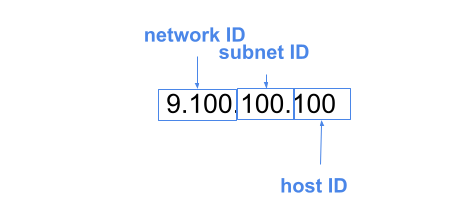
  • Subnet ID was calculated via what’s known as a subnet mask

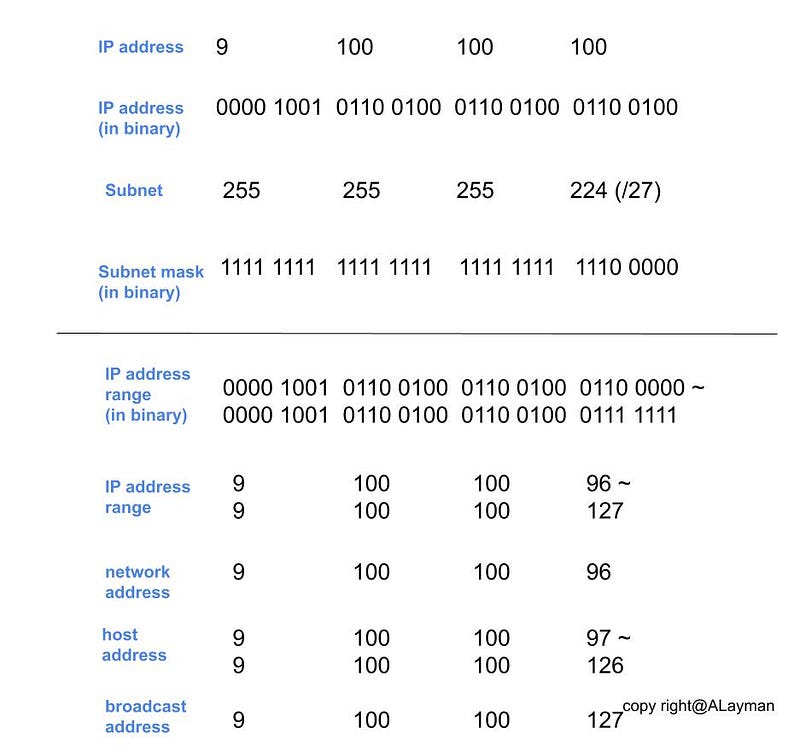
Classless Inter-Domain Routing (CIDR) IP Format: How to calculate subnetworks/subnets?

  1. We will always lose 2 host IDs per network. 0 is generally not used, and 255 is normally reserved as a broadcast address
  2. For example, the result of 9.100.100.100/27 is as the following diagram

3. The following table shows the range of IP addresses in different classes/subnet masks

Steps to split subnetworks/subnets?

  1. Decide the max hosts we need
  2. Calculate subnets to get the Starting IP addresses and the Ending IP addresses
  3. The list of available IP addresses = calculated IP addressesFirst IP addressesLast IP addressesDefault gateway

Routing

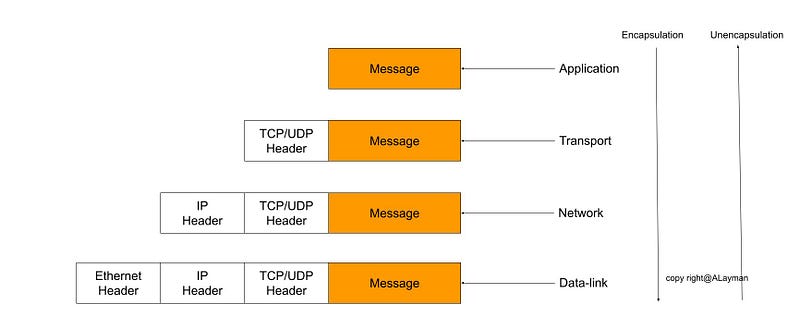
Packet encapsulation (TCP/IP Five-Layer Network Model)

The concept of routing matters to the 5-layer model. The topics we discussed above belong to Network layer

When a datagram is created, the message will be encapsulated. Vise versa.
Address Resolution Protocol (ARP)

  • A protocol used to discover the MAC address of the next router or device on the path with a certain IP address

ARP table

  • A list of IP addresses and the MAC addresses associated with them (source and destination device)
  • ARP table entries generally expire after a short amount of time to ensure changes in the network are accounted for

ARP broadcast

  • If there is no record in the table, an ARP request is sent by the source to all the devices in a network
  • All the devices compare their own IP address with the IP address of the destination device. When the IP address of the device matches with each other, the device sent to the response, which is then updated in an ARP table

Steps of routing

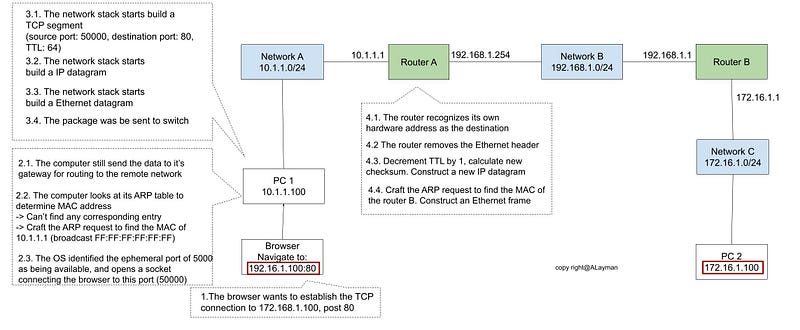
For example, there is a computer in the Network A (10.1.1.100) . It sends a request to another computer in the Network C (172.16.1.100).

  1. The browser wants to establish the TCP connection to 172.16.1.100:80
  2. (1) The computer still sends the data to its gateway for routing to the remote network (2) The computer looks at its ARP table to determine MAC address (3) The OS identified the ephemeral port of 50000 as being available and opens a socket connecting the browser to this port
  3. (1) The network stack starts to build a TCP segment (source port: 50000, destination port: 80, TTL: 64) (2) The network stack starts to build a IP datagram (3) The network stack starts to build a Ethernet datagram (4) The package was sent to switch
  4. (1) The router recognizes its own hardware address as the destination (2) The router removes the Ethernet datagram (3) Decrement TTL by 1, and calculate the new checksum. Construct a new IP datagram (4) Craft the ARP request to find the MAC of the router B. Construct an Ethernet datagram

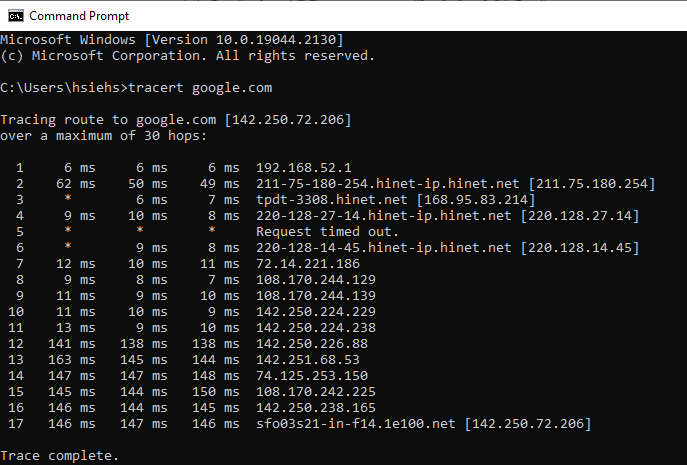
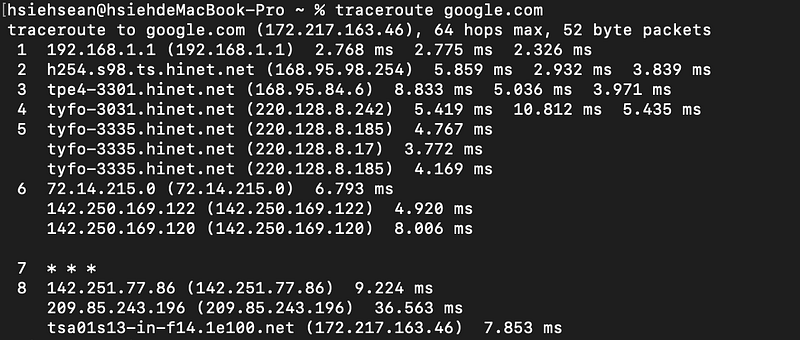
Troubleshooting — Traceroute

This tool can discover the path between two nodes, and give you information about hop along the way.

It works through a manipulation technique of the TTL field at the IP level. The router will decrement TTL one. When the TTL reaches zero, the packet is discarded. The ICMP exceeds message will be sent back to the originating host

Dynamic Host Configuration Protocol (DHCP)

DHCP is an application layer protocol that automates the configuration process of hosts on a network.

IPv4 address type and DHCP

There are three types of IPv4 address

  • Dynamic IP address: reserved for clients
  • DHCP
  • Static IP address: reserved for servers and network devices

There are three types of DHCP

  • Dynamic allocation: the IP of the computer could be different almost every time it connects to the network
  • Automatic allocation: the DHCP server is asked to keep track of which IP it’s assigned to certain devices in the past. The computer may be assigned to the same IP as possible
  • Fixed allocation: require a manually specified list of MAC addresses and their corresponding IPs

Why do we need DHCP?

For a bunch of devices like desktops or laptops or even mobile phones. It’s only important that they have an IP on the right network. It’s much less important which IP that is.

DHCP Fingerprinting

  • DHCP Fingerprinting is a technique for identifying the requester of a DHCP lease
  • It’s a common way of passive fingerprinting technologies

The allocating process of DHCP

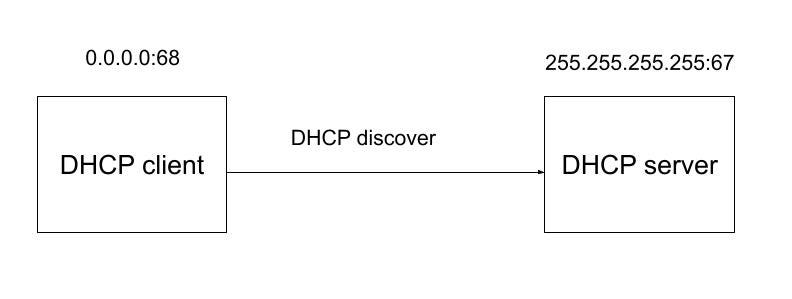
Step 1. the DHCP client sends what’s known as a DHCP discovery message out onto the network (Broadcast)
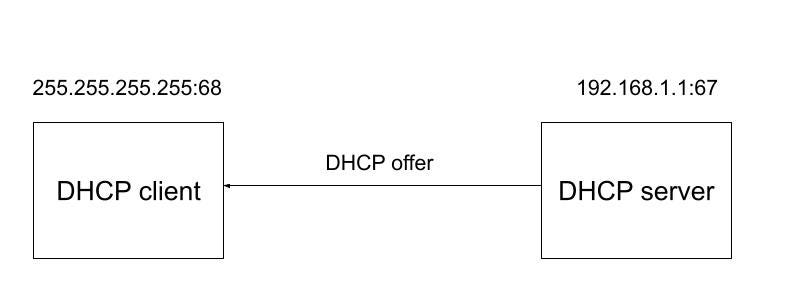
Step 2. the DHCP server would examine its own configuration and would make the decision on what kind of IP address to offer to the client (Broadcast)
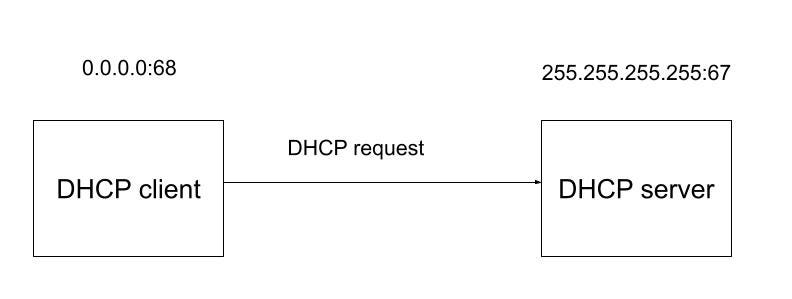
Step 3. The DHCP client responds the DHCP request (Broadcast)
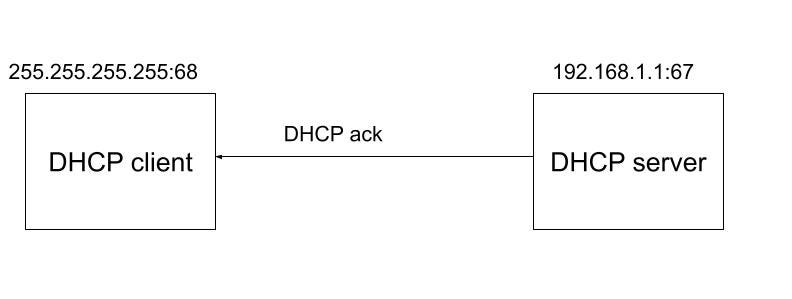
Step 4. The DHCP server sends the DHCP ack to the client. The networking stack on the client’s computer can use the configuration information (DHCP lease) presented to it by the DHCP server
References

Summary

Thanks for your patient. I am Sean. I work as a software engineer.

This article is my note. Please feel free to give me advice if any mistakes. I am looking forward to your feedback.

  • Subscribe me
  • The Facebook page for articles
  • The latest side project: Daily Learning

Related topics

How to use the two-way binding in Knout.js and ReactJS?

Learn how to use SignalR to build a chatroom application

My reflection of :

IT & Network:

Database:

Software testing:

Debugging:

DevOps:

Software Development
Networking
Dhcp
Subnet
Routing
Recommended from ReadMedium