Azure Key Vault — Update Expiry using Terraform
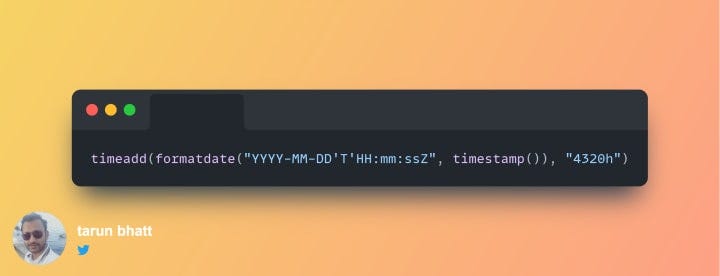
timeadd(formatdate(“YYYY-MM-DD’T’HH:mm:ssZ”, timestamp()), “4320h”)

Azure Key Vault is Microsoft’s cloud solution to store secrets and certificates. Enterprise applications can fetch them using Key Vault URLs. It enables easy and secure management of passwords and connection strings. Every secret has an expiry attached to it.
In my current company, it’s mandatory to keep the expiry for secrets. It serves as a mandatory reminder and helps in maintaining secure systems. The cyber policy mandates a most expiry of six months. We provision Azure resources via terraform IaC pipelines. Hence, I needed a way to keep an expiry of six months from the creation of secrets in my IaC pipeline.
To understand more about IaC (Infrastructure as Code), read my article below:
To follow through, please read my older stories on Azure Key Vault & Terraform. Below are the links:
azurerm_key_vault_secret
Terraform assists in the management of key vault secrets using the resource — azurerm_key_vault_secret
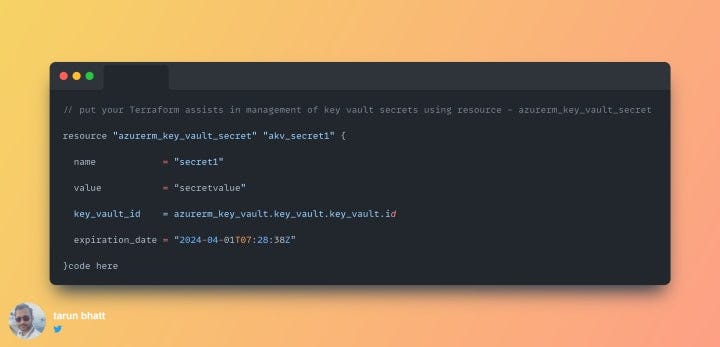
We are keeping the expiry of the secret to be 1st April 2024. The expiration date is in UTC
What’s the problem?
There is a problem with this approach. The same expiration date will be set every time the pipeline runs. I wanted something dynamic to compute the expiry date using the execution date.
A dynamic expression for the expiration_date eliminates the need for frequent code changes. Every time the pipeline runs, it will change the expiration_date.
I chose to use three in-built methods to form a date six months from the time of execution. Let’s look at these three methods and how can they help us:
1. timestamp()
In the Terraform, RFC 3339 “Date and Time format” syntax represents timestamps. The method returns the current timestamp as a string. To learn more about this in-built method, read the online documentation here.
2. formatdate(“YYYY-MM-DD’T’HH:mm:ssZ”))
Key vault expects an expiration date in a particular format. The formatdate() method helps in sticking to this format.
- YYYY — Defines year
- MM — Month
- DD — Date
- HH — Hour
- mm — Minutes
- ss — Seconds
- Z — UTC format
There are many variations of the formatdate() method. Read about all these variations on the official documentation site below:
3. Timeadd
We need an expiry of six months from today onwards. 4320 hours is 180 days which is approximately six months. According to the Terraform documentation, they don’t have a denomination for months. Read more about the timeadd method below:
Final code snippet
The final code snippet looks like below:
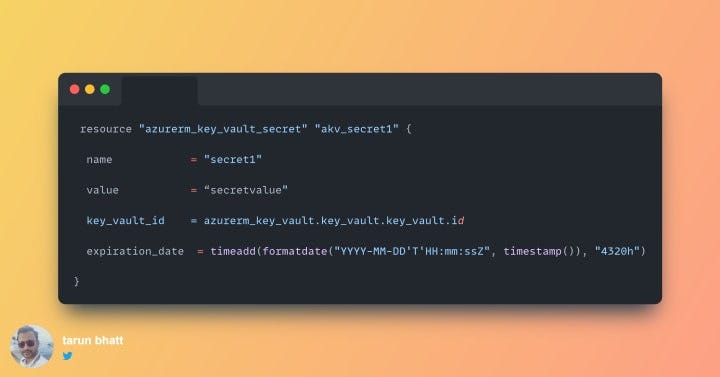
Terraform uses the concept of state files to deploy changes. The biggest advantage of terraform is that it always deploys the differential. Timestamp() will create a new string for the expiration_date every time. It means Terraform will detect a change from the existing state file. Hence, the code snippet will update the secret at each run. I have written about this concept in my older articles. See links below:
Let me know if you have any questions about this approach.
Regards
Tarun


