Azure Key Vault — Creation and Management using Terraform and Azure DevOps — 1 of 2
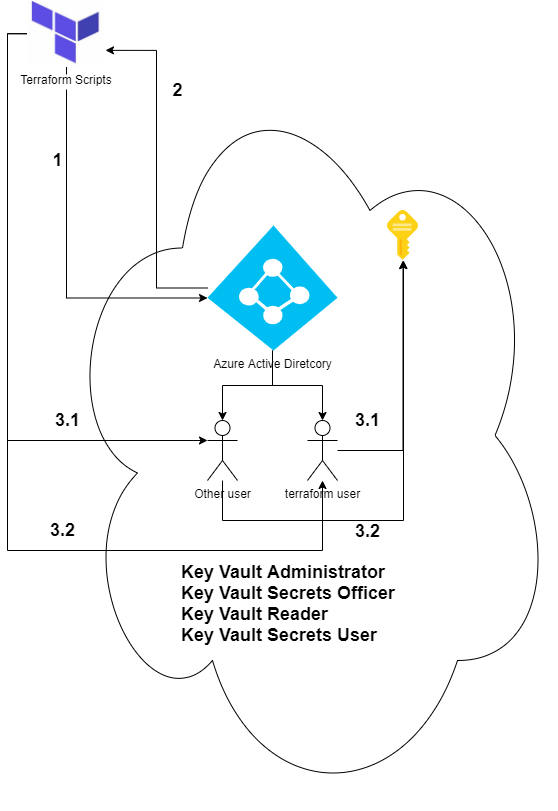
With the evolution of Cloud technologies, infrastructure as a code is one of the biggest priorities for most Tech companies.
IaC is all about provisioning infrastructure through software to achieve consistent and predictable environments.
Terraform is a widely used tooling for implementing IaC projects. It’s simple to use, but I see people overusing Terraform, which creates issues in supporting the enterprise applications.
The role of IaC tooling should be solely limited to the provisioning of infrastructure. We should not use it to deploy application-specific entities. To explain this point, I will use the example of Azure Key vault.
The role of IaC tooling for Azure key vault should be:
- Provisioning of Azure Key Vault
- Providing RBAC access to an Azure service principal.
One should not use IaC for managing secrets and certificates. Secrets and certificates are application-specific entities. A continuous deployment tool like Azure DevOps should instead administer them.
Let’s dive deep into the technicalities of Terraform and Azure DevOps to create and manage an Azure Key vault.
Terraform
azurerm_client_config
Define the data block to access the configuration of the Azure RM provider.
A provider is responsible for exposing and provisioning resources of a Cloud platform. A provider calls platform specific APIs (ARM : Azure Resource Manager APIs) to create, read, update and delete cloud resources.
data “azurerm_client_config” “current” {
}
You can use this data block to retrieve details of the execution context:
- client_id is set to the Azure Client ID (Application Object ID).
- tenant_id is set to the Azure Tenant ID.
- subscription_id is set to the Azure Subscription ID.
- object_id is set to the Azure Object ID.
In the context of this article, object_id is of importance. It’s the ID of the Azure service principal name (SPN). If you intend to use the same user for the deployment pipeline, we will provide appropriate access to this SPN later on.
azurerm_resource_group
Every resource in Azure needs a resource group. We will use azurerm_resource_group declaration to create a resource group in Australia East.
resource “azurerm_resource_group” “test-rg” {
 name = “test-rg”
 location = “Australia East”
}
azurerm_key_vault
It’s time to create the key vault using the resource declaration azurerm_key_vault. To explain the significance of each property, I have added comments in the code snippet below:
The next step is to provide appropriate permissions to the principal service name (SPN)
azurerm_role_assignment
The resource directive azurerm_role_assignment isn’t specific to the azure key vault but helps provide RBAC access to any SPN for any azure resource supporting managed identity. We need the SPN to have the following roles assigned to perform operations on the Key vault.
- Key Vault Administrator — Perform all data plane operations on a key vault and all objects, including certificates, keys, and secrets. Cannot manage key vault resources or management role assignments.
- Key Vault Secrets Officer — Perform any action on the secrets of a key vault, except manage permissions.
- Key Vault Reader — Read metadata of key vaults and their certificates, keys, and secrets. Cannot read sensitive values such as secret contents or critical material.
- Key Vault Secrets User — Read secret contents, including the confidential portion of a certificate with the private key.
Note — This approach will only work for key vaults using the Azure role-based access control permission model.
I will provide multiple SPNs access to these four roles using arrays and for loop. I have written another article detailing how to use for-loop and arrays to implement nested looping in terraform. Please read it here.
The list of objects under the local variable “keyvault_role_assignments” has two entries. These are the object ids of the SPN I need access to the Key vault.
What’s next
Now that we have provided relevant access to the SPNs, the next step is to manage secrets and certs. In the next article, I will talk on them using Azure DevOps & AzCli.
P.S — Medium is an excellent platform to read, write and learn from fellow authors. If you want to join me in this journey, Join medium today.