
Organizing a codebase by use cases
I’ll present my approach to avoiding code hotspots and explain what user-centered design and the screaming architecture have in common.

We can still hear the echoes of Steve Ballmer’s “developers” chant. This could be just a funny video, but even today, software development is too centered on developers. We should shout “users!” instead. What can we do about it? The user-centered design process advocates for close collaboration with the users; all we do as a team should align with it. For example, a board should avoid tech stories and focus on real user stories. What about codebases?
The threat of technology
When browsing a codebase folder structure and reading the code itself, I quickly scan what it can do without worrying about how it’s done (about frameworks and technologies). There should be a hard line splitting technical things (like I/O, web, databases) and the business domain — these should live in different levels of abstraction. Using a domain-centric architecture is a safe bet in that regard. I’ll refrain from going into details as I covered that before:
Code hotspots
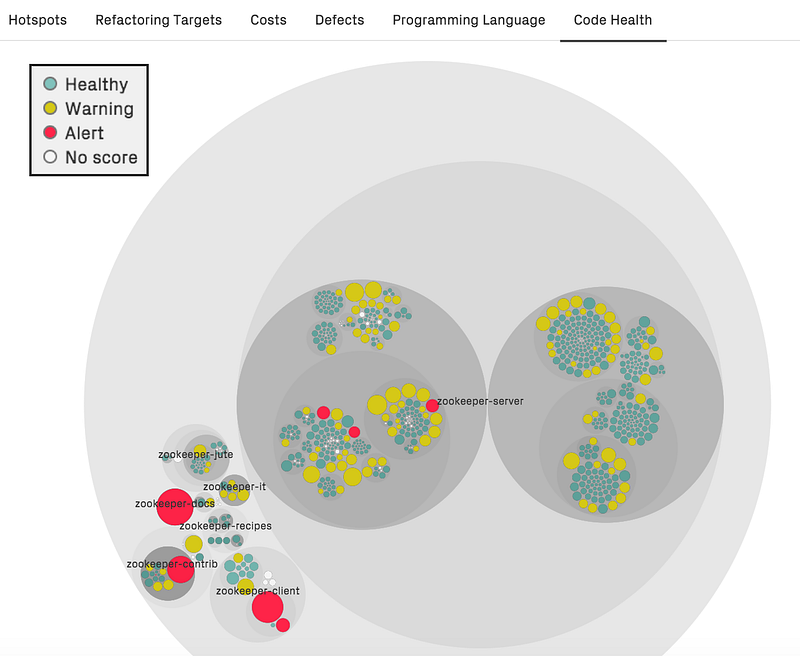
Even if technology is split apart from business rules, I struggle with some codebases. The most common reason is that they contain huge files with web handlers and others full of business logic. These are called code hotspots. Most of them are “god objects” (overbusy objects), as they are filled with unrelated functionality, show low cohesion, and violate the single responsibility principle.
There are several reasons why code grows into hotspots. The most common reason is low cohesion, which means that the hotspot contains several unrelated parts and lacks modularity. Such hotspots attract many commits because they have too many responsibilities and those responsibilities tend to be central to your domain, which is why they change. Software Design X-Rays
Why is this bad?
- Hindered developer experience. Can you quickly find the required feature in huge “hubs” and “services”? Code hotspots grow indefinitely. All you can do is use the editor’s find tool. This negatively contributes to self-documenting code. Also, code hotpots are a common source of merge conflicts as they have many reasons for change.
- Promiscuous sharing of code. There are two categories of decoupling: vertical, which represents the decoupling between layers (e.g., between domain and adapters), and horizontal, which aims to decouple distinct features. This type doesn’t get enough attention, and we end up with code hotspots where shared DTOs and other utilities create a strong coupling between many features.
- Messy dependency injection. Injecting many dependencies into a hotspot but only needing one or two in each method is a smell of low cohesion that characterizes code hotspots. This makes tests overly verbose since they end up crowded with dummy mocks.
Uses cases as the units of work
A use case is a simple behavior in which a system receives an external request (such as user input) and responds to it. In practice, it’s the code that handles a single business operation. Its name should start with a verb (e.g. “list debts”, “withdraw money”, “delete my data”, “pay shopping cart”).
Beware that use cases are not supposed to be CRUD; instead, they reflect business/user-centered interactions with your system! Software should aim to provide value beyond just storing and retrieving data, and its codebase should be designed accordingly.
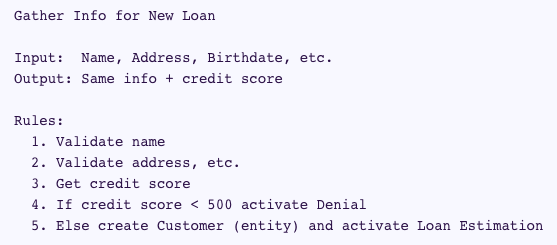
The use cases should be the highest level and most visible architectural entities. The use cases are at the center. Always! Databases and frameworks are details! NO DB
In a domain-centric architecture, use cases (also known as system use cases; in DDD known as services; in the clean architecture, interactors) belong to the app’s domain. Your app should revolve around use cases; they should be first-class citizens (i.e. the app’s building blocks and smallest architectural devices). Your file structure should respect that. You often see huge files with business logic — the solution is to split by use case. This way, the app’s goals become immediately evident when browsing its codebase.
Just as the plans for a house or a library scream about the use cases of those buildings, so should the architecture of a software application scream about the use cases of the application. Screaming Architecture
Let’s consider a backend app served through a web API as an example.
The web handlers
A web API is an entry point (i.e., primary adapter) comprised of web request handlers. An adapter should not contain any business logic.
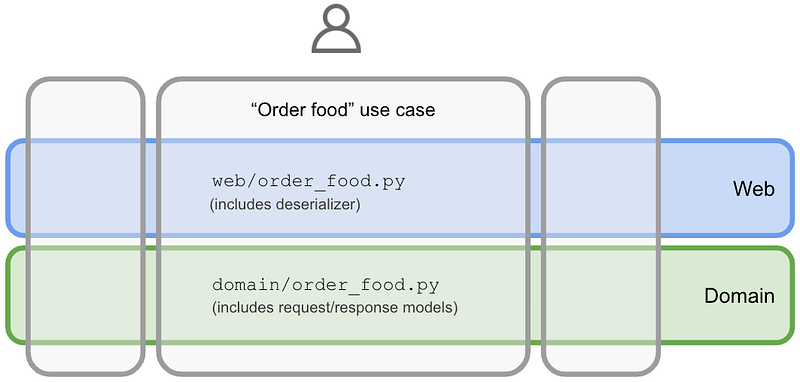
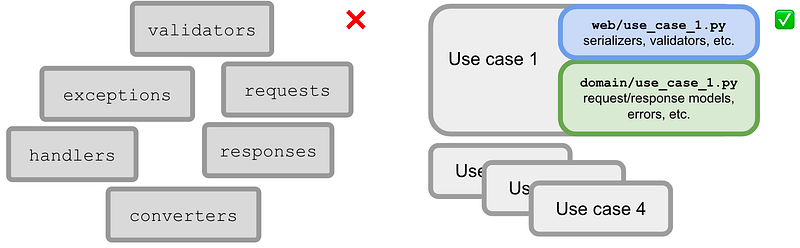
In a use-case-driven approach, each web handler is merely a use case entry point — they have a one-to-one relationship (unless there are other entry points to the use case). Therefore, each web handler should have its implementation file consisting of validation, parsing, (de)serialization, calling the domain, error handling, response preparation, API docs (e.g. OpenAPI), constants, etc. There’s no other place to look for. It’s all there, in one place.
class CreateUserHandler(
    private val createUser: CreateUser,
) : Handler {

    override fun handle(ctx: Context) {
        val createUserResult = createUser(
            ctx.bodyAsClass(CreateUser.CreateUserRequest::class.java)
        )
        ctx.status(
            when (createUserResult) {
                NewUser -> HttpStatus.CREATED_201
                UserAlreadyExists -> HttpStatus.CONFLICT_409
            }
        )
    }
}
📝 We could apply the same approach to any other entry point of your app (e.g., message broker handlers, web page controllers).
The domain
The domain is where the business know-how is encoded.
“Service”/“Hub” files full of domain operations are a bad idea. Instead, create a file per use case and name it accordingly. A file with a single public function supporting a use case is not a bad thing. It’s an excellent idea as it’s modular and cohesive. That function, a query or command, should be pure / (deterministic) and without side effects (these are delegated). It should be self-contained and only rely on secondary adapters to meet its needs (e.g., a repository). That said, besides the actual use case function (which includes semantic validation, orchestration, etc.), include its request/response models, errors/exceptions, and any private helpers in the same file.
📝 Following this orientation to intents, the entities should also be action-oriented rather than data-oriented:
The tests
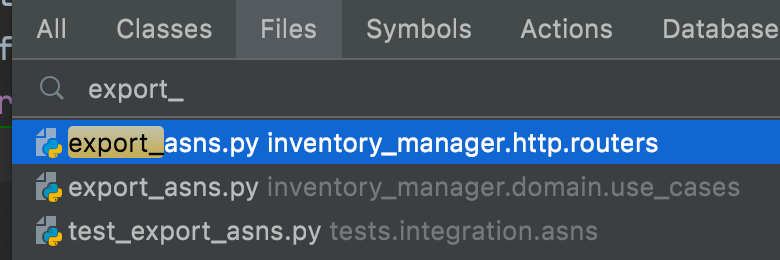
Create a test file per use case. Each test file exercises all scenarios of a use case. Each test only needs to inject the use case's actual dependencies rather than a bunch of them. These factors contribute to “tests as documentation” — one goal of automated testing — because they help to describe the use case as a user/client.
📝 You can test the use case directly or through the web handler. By default, I like to use the web entry point (more realistic) and hit the domain directly only for variations. However, that depends upon your testing strategy.
Use cases are your units to be tested. With this approach, you have a clear testing surface: the use case directly or indirectly (through the web handler). Don’t create other types of tests (e.g., serializer tests). This makes your tests decoupled from implementation details and supports smooth refactorings.
Advantages
Small files that share no code are the main enablers of a use-case-driven approach. There’s a cumulative price for huge files that are often changed. It’s much easier to reason about small, self-contained files. Eventual similarities are only an illusion since use cases will grow in different directions. There’s no need to share serializers, exceptions, DTOs, and other technical details; just put them in their use case (make them private if possible). Duplication is not a problem; code hotspots and oversharing are.
How do codebases cope with a growing number of features? The presented strategy is a great tool in that regard. I tried it in my last projects at multiple companies, which relied on different tech stacks. Here’s what I observed:
Developer experience
In all projects I applied the strategy, it contributed a lot to an improved developer experience:
- Since we knew no code sharing between features, we felt safer and more efficient changing code as the blast radius was always small. In physics, the principle of locality states that an object is influenced directly only by its immediate surroundings (Principle of locality).
- For compiled languages, the IDE was faster when analyzing a file and when executing automated refactorings;
- Having only one reason to change a file reduced merge conflicts;
- Files were smaller; we barely needed to use scroll because they contained only the use case code;
- We almost stopped using the editor’s find tool; we relied on file filtering.
Feature modularity
Vertical decoupling (feature-wise) is too underrated compared to horizontal decoupling (architectural layers). The use-case-driven approach promotes vertical decoupling between use cases. It helps spot shared code between them easily, so you’re less likely to make that mistake.
Organizing codebases by use case is acknowledging the goals of the app. Use cases are your app's units of work (i.e., building blocks). They’re a great way to manage software complexity.
If you are working on a simple, throwaway software system, then the quality of its design matters little. If you want to build something more complex, then you must divide the problem up so that you can think about parts of it without becoming overwhelmed by the complexity. Modern Software Engineering
You’ll start to recognize patterns like sub-domains and bounded contexts, which can help to split work into teams if it makes sense.
Another by-product is straightforward feature flagging: each use case is represented by a class or function that can easily be swapped by another. You can manage that using conditional dependency injection of use cases.
Self-documenting code
Recall that each use case only needs a few injected dependencies. This makes tests smaller (fewer mocks) and easier to read. Knowing what each use case depends upon is also implicit documentation. It's better when comparing this approach with a big hub/service with dozens of dependencies.
Each use case has all it needs to be understood: DTOs, errors, request/response models, serializers, and other artifacts. This helps to prevent technical hotspots as those things are not centralized. It also contributes to documentation as well because context provides meaning.
The resulting app screams about its intents through a set of use cases. It communicates what their clients can expect, such as a restaurant’s menu telling what the guests can order. Every newcomer can quickly learn what the project is about. Codebases become more about the user.
Fixing existing hotspots
Most projects you deal with are not greenfield and present many code hotspots. Big Bang refactorings are never a good idea; baby steps will keep the process safer. Where to start? Focus on complex files that are constantly changing:
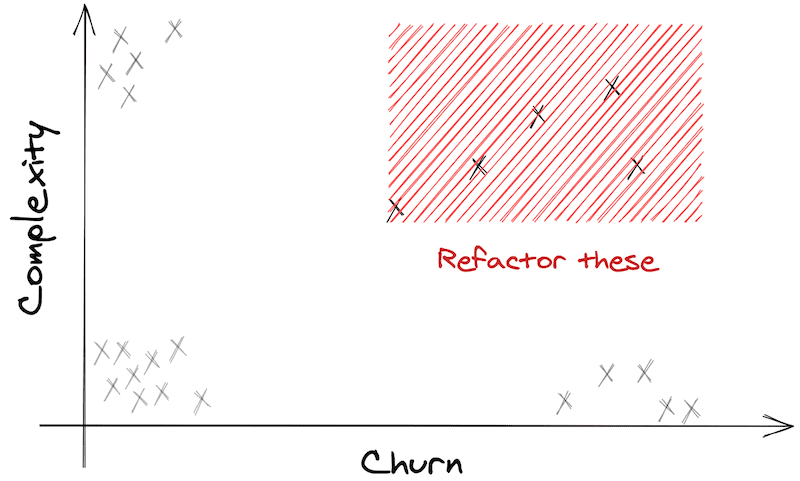
📝 A quick and language-agnostic way to identify code hotspots is running:
npx code-complexity . --since 6.month --limit 8 --sort score
You can run it regularly and observe its evolution.
A good trigger to refactoring is picking a use case that you keep bumping into. To do it, start by isolating its tests. You may need to make them high-level and less coupled with implementation details. Armed with the use case tests, it’s easier and safer to isolate the web handler and the domain use case. Don’t refrain from duplicating code to achieve use case modularity.


