
Visualizing Your Automated Testing Strategy
Do you feel safe regarding your testing strategy? Do you follow testing patterns consistently? Are you tired of debating what is a unit versus an integration test? I’ll propose a way to visualize your testing strategy so you can tackle those questions.

The testing strategy is how you approach the automated testing of your software. Given its importance, it should be taken seriously. I’ll propose a visual way to represent it, as visual representations promote discussion, a shared understanding, and support decision making.
In a world full of technicians and politicians all having different levels of understanding, a graphic representation was often the only way to make a point; a single plummeting graphic usually aroused ten times the reaction inspired by volumes of spreadsheets. Digital Fortress
Before starting…
… we need to define some terminology (inspired in xUnit Test Patterns). I avoided the typical division unit vs integration tests as it’s too narrow-minded, ambiguous, and irrelevant. The reality is more like a spectrum: in fact, what varies is the System Under Test (SUT) (also known as the test subject) and how you interact with it.
📝 An SUT can be anything with an interface, whether API or GUI: a function, a component, a page, a system… Interestingly, it doesn’t need to be one thing; it can be multiple classes, two layers, two apps… This has a noteworthy consequence: not everything needs to be tested directly.
The SUT can exist without any dependency but usually, it has one or more. For example, a React component depending on a service invoker, a web handler on a use case, a SPA on a server API, a microservice on a database, a system on an identity provider… These are called Depended-on Components (DoC).
DoCs can behave unpredictably in a test environment. Since we desire repeatable tests, we resort to “test doubles”, an umbrella term for dummies, stubs, spies, mocks, and fakes. I recommend learning about their differences.
Also, it’s important to mention the four-phase test structure (which maps to Arrange/Act/Assert, and Given/When/Then):
- Setup the SUT, test doubles; prepare the fixtures (which might need some direct or indirect interaction point);
- Exercise by interacting with the SUT through control points (e.g. invoking a method, calling an API, interacting with a GUI);
- Verify the results through observation points (for example, by verifying the SUT, the file system, a database, a spy, or a mock);
- Teardown (if needed): we might need to do some cleanup, which also needs an interaction point (direct or indirect).
Let’s look at a generic diagram that relates the concepts we’ve just covered:
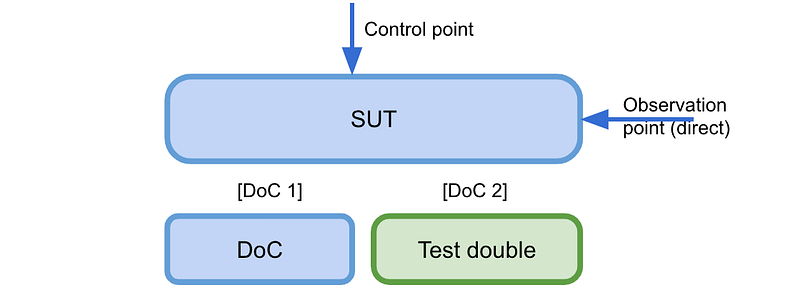
In the diagram, we can see that we’ll test the SUT by invoking it through some control point (a public interface). Also, notice that the SUT has two DoCs. DoC 1 was not replaced, so in a way, it’s part of the SUT, which might mean we want a more realistic test against the actual component. On the other hand, DoC2 was replaced by a test double so we can have better control over it. We’ll use the observation point for the assertions, in this case using the SUTs public interface (a front door).
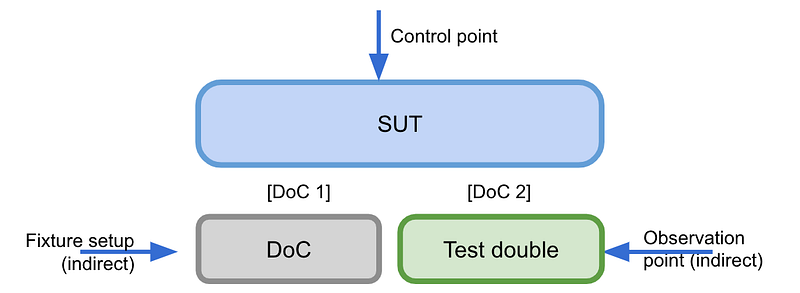
The example above shows that the fixture setup was done using a back-door mechanism (e.g. populating some database). The observation point relies on the DoC’s test double (e.g. a fake).
As we’ll see, all kinds of automated testing, from testing a shallow rendered component to a distributed system, can be generalized using the same language.
It’s irrelevant if it’s a unit or an end-to-end test; what varies and matters is the SUT size and your approach to its depended-on components.
Visualizing the test types
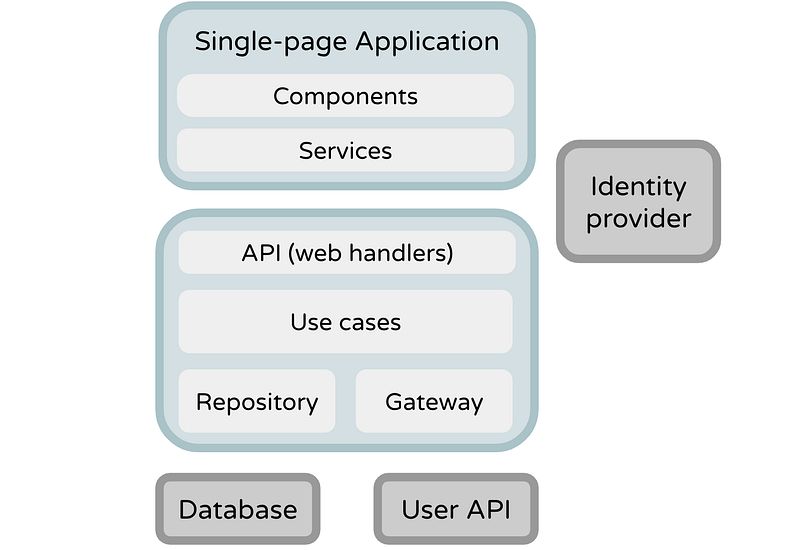
Enough with the theory; let’s see some practical examples. We’ll use as an example a typical client-server application: a SPA (React) that runs on the browser and communicates with a REST API (Kotlin). In its turn, the API has a few web handlers, use cases, and repositories; these depend on a database (PostgreSQL). The main goal is to analyze the expressive power of the diagrams, not the testing techniques, so don’t focus too much on their content. Also, the presented order has no special meaning.
Testing a use case
According to the clean architecture, a use case holds a bit of user-driven business logic. That’s our SUT; in our case, it depends on a repository (a DoC). We will prepare a mock that will act on its behalf and inject it into the SUT. Then, we can directly invoke the SUT methods (control point) and verify the results by asserting the method outcomes and side effects produced in the mock (observation points).
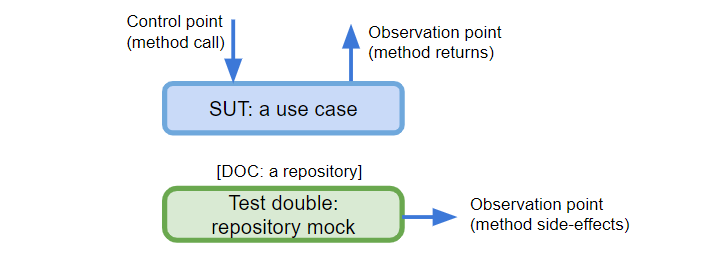
If the use case also depended on a gateway, we’d just add a new box and think about the best kind of test double to replace it.
Testing a gateway
Here, the SUT is a gateway — an adapter to some third-party service. The control points are the gateway methods (e.g. getUserProfile, resetPassword). The first observation point is the outcome of those method calls (useful for queries); the second is the calls that were made to the test double, in this case, the calls recorded by the testing server (useful for commands).
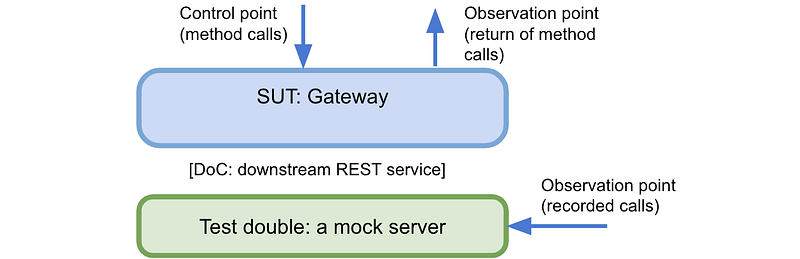
📝 Typical technologies for this kind of testing are WireMock and MockServer. However, you can also use Javalin.
Testing a repository
The goal is to isolate the data layer, in our case, an arbitrary repository so we focus on its abilities only (usually known as a unit test). A repository’s DoC is an actual database and the plan is to replace it with a test double; let’s use an in-memory/embedded database.
The tests will call methods of the repository under test (control point). Then, we can assert by analyzing the returns or by calling other SUT methods (observation point). For example, we could save a user, then get it just to assert if it was properly stored.
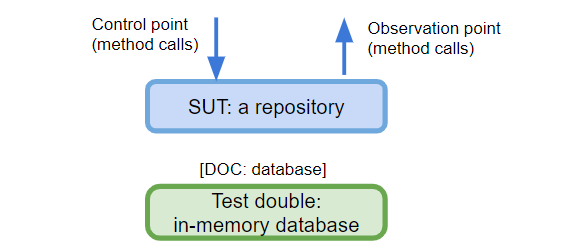
📝 You can find an example of this technique on my GitHub (using Wix Embedded MySql as the database double).
Testing the backend app
Here, we want to test the whole backend: from the web handlers to the database. This is typically known as an integration test. The SUT here is the backend app.
We’ll use the REST API as the control point so that our tests will hit those endpoints as any API client would (e.g. a browser). The REST API will also be an observation point (to make the test assertions) if we have methods for that. This means the test will assert HTTP body and status per call.
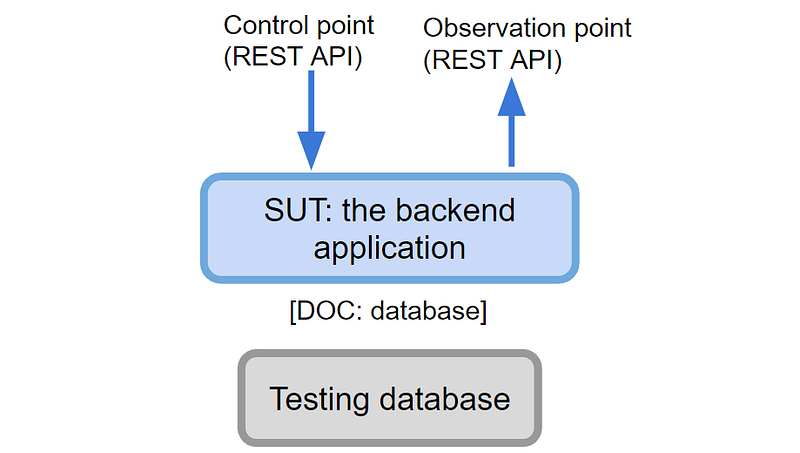
⚠️ Do not create REST APIs only for the sake of testing! If you don’t have them, consider other observation points.
The DoC is a database, so for this kind of test, we’ll choose a real database (of course, for testing purposes) so that we have a closer environment to the production one.
Testing the frontend app
We can test the frontend as a whole and isolate it from the server APIs. This means the frontend, our SUT, needs to be launched. Then, we’ll act as the user interacting with its GUI as the control point. We’ll also use the GUI as the observation point, to check how it’s behaving in response to those interactions. To be more precise, the interaction points are the DOM API, although the actions reproduce what a user would do in the GUI.
📝 Since we want to test as a user, I highly recommend using the Testing Library, which promotes finding web elements as a user, rather than technicalities like CSS selectors. If you use Jest, consider adding jest-dom custom matchers.
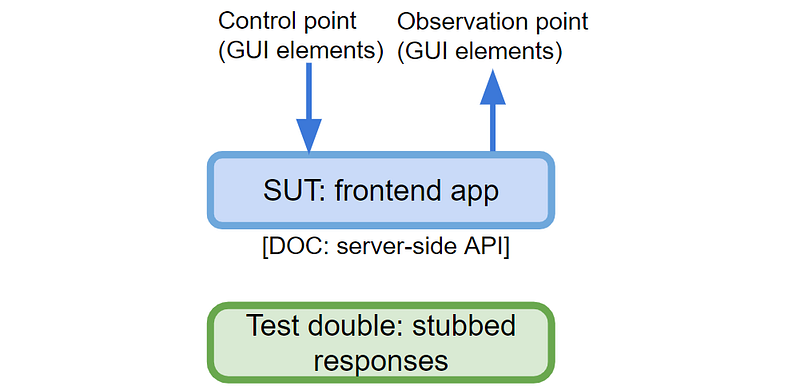
To isolate the SUT, the adapters that depend on the server have a set of stubbed responses so no network calls are involved.
As a test example, consider a test that confirms that a user listing was successful: it goes to the user list page, the SUT fetches the stubbed response, and it confirms that the users were properly displayed.
Additionally, we could have tested each React component individually. In that case, the SUT would be each component tree and the DoCs would be the services that connect to the server APIs. The interaction points would happen through the DOM API. Another alternative was to test rendered pages, in which case you wouldn't need to launch the SPA.
Testing the whole system
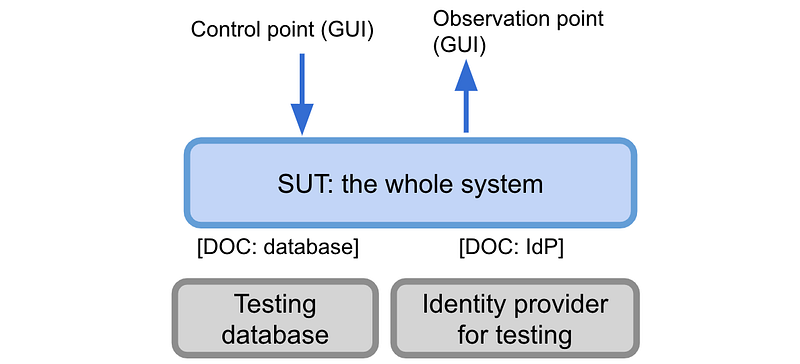
This is known as a system test or an end-to-end test. The plan is to have the backend, the frontend, and their DoCs running. Then, you’d act as a user in your tests, which means the GUI (through buttons, links, etc.) contains the interaction points to act and to assert:
📝 If we’re talking about interacting with web UIs, the typical contenders are Protractor, Nightwatch.js, Cypress, and Puppeteer. Bringing the Testing Library is also very relevant in this kind of testing.
Visualizing the strategy
The sum of all diagrams represents the testing strategy, so let’s zoom it out a bit. What if we overlay them on the architecture diagram? In this bird’s-eye view, we can reevaluate the strategy’s strengths and blind spots:
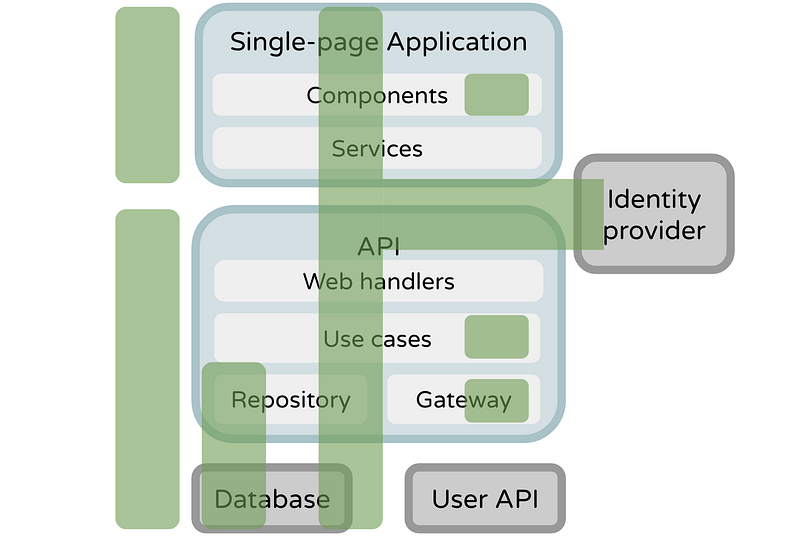
Now we can see that the frontend services and the backend web handlers are not tested (at least directly). The integration with the User API is not tested as well. This is not necessarily wrong (not everything needs to be tested), but now it’s a visible decision.
What makes a decision “strategic”? A decision is strategic if it is “hard to change.” That is, a strategic decision affects a large number of tests, especially such that many or all the tests would need to be converted to a different approach at the same time. Put another way, any decision that could cost a large amount of effort to change is strategic. xUnit Test Patterns, chapter 6
It’s now easier to discuss questions about the testing safety net: “Are we covering the most important scenarios?”, “What kind of test protects us from a service’s contract change?”, or strategic questions like “Are we doing test variations in the proper place?”, “Which types of test do we develop with TDD versus “after the fact”?”. Near 100% coverage doesn’t say much about the quality of a strategy; the overall view might show that you miss integrated coverage (testing things together).
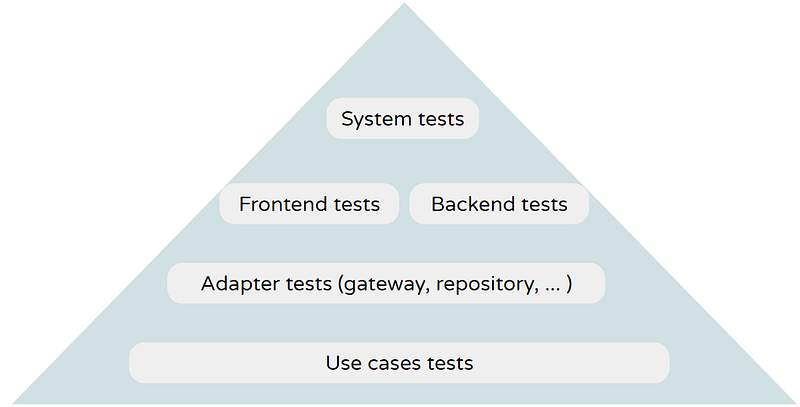
Another interesting view is to display the test types in the testing pyramid (the bigger the SUT, the closer to the top), which allows a better understanding of its shape:
My recommendation is to link the diagrams (you can use Miro, Mural, Google Drawings, or similar) in your project’s readme. This can help newcomers ramp up, the team to achieve more alignment, and serve as a point of reference and potential iteration.
Elaborating on the diagrams forces you to think and talk about the problem. Each diagram shows the SUT, its DoCs, and interaction points. Among other things, you can debate each diagram’s supporting technologies, patterns (e.g. “should we use mocks or fakes?”), cost/benefit ratio (e.g. “is it worth it?”), SUT size (e.g. “should it encompass one more layer?”). Finally, you can decorate each diagram with all those decisions along with other metadata.
This is not to suggest that we should follow a “big design upfront” (BDUF) approach to test automation. BDUF is almost always the wrong answer. Rather, it is helpful to be aware of the strategic decisions necessary and to make them “just in time” rather than “much too late.” xUnit Test Patterns, chapter 6


